GitHub520: fixing slow GitHub access by rewriting your hosts file
Make you fall in love with GitHub again - fixes broken images and slow loading when accessing it (no installation needed).
At a glance
- What is it?
- GitHub520 publishes hostname-to-IP mappings intended to help with slow GitHub access. Editing a hosts file can change which address a system uses, but results depend on the network and the mappings can become stale.
- Who is it for?
- GitHub520 may help diagnose or work around address-selection problems, but it does not guarantee faster or reliable access. Back up your hosts file, review downloaded entries and preserve unrelated mappings before changing it.
- Can I use it commercially?
- Not without permission. GitHub finds no licence file in the repository, and without a licence all rights are reserved by default: you may read the code but not reuse it. Check the README, or ask the authors, before using it.
- Is it still maintained?
- Yes. The repository received new commits within the last day.
- What is it written in?
- Mainly Python, according to GitHub's language statistics.
Answers come from the project's GitHub data, last synced on November 14, 2026, and from our analysis. They are not legal advice.
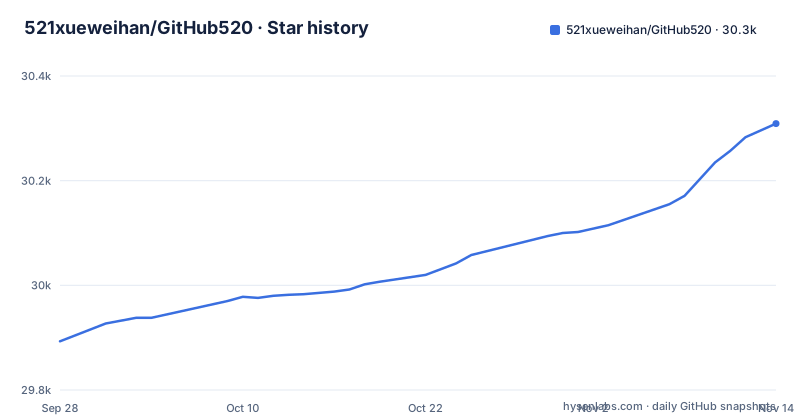
Star history
- 521xueweihan/GitHub52030,309 ★ · +416
| Repository | 2026-09-28 | 2026-11-14 |
|---|---|---|
| 521xueweihan/GitHub520 | 29.9k | 30.3k |
416 Stars in the last 47 days, measured from the daily GitHub snapshot. Compare with other projects
Editorial analysis
The specific problem GitHub520 attacks
GitHub access can be affected by DNS, address selection, routing, connectivity and service availability. The first category is name resolution: your resolver returns an IP for github.com or raw.githubusercontent.com that is geographically distant, congested, or simply wrong for your network. The symptoms are page loads that stall for seconds, broken avatars, and images that never render inside a README. The second category is transport-level interference, where packets to a correct IP are dropped or throttled. Choosing a different destination address may change the network path, but it cannot guarantee that a transport-level problem will be resolved.
What it does is supply a curated mapping of GitHub hostnames to IP addresses that the project's own tooling has probed. The README's stated goals are narrow and honest: fix slow GitHub access and fix images that fail to display. The audience is anyone who can edit a hosts file and who does not want to run a proxy, a VPN, or a browser extension to read a repository. The README's claim is that the whole process takes about five minutes and requires no program installation.
How the list is produced and where it comes from
The repository is not a daemon. It is a Python pipeline plus two published artifacts. The top-level files include fetch_ips.py, update_ips.py, and common.py, with dependencies pinned in requirements.txt: requests-html, pythonping, retry, lxml_html_clean, and aiodns. The presence of pythonping suggests the pipeline measures reachability or latency to candidate addresses, and aiodns suggests asynchronous DNS resolution. The README's TODO list claims three completed items: scheduled automatic updates, no update when content is unchanged, and finding the best IP resolution result.
The output lands in two files in the repository, hosts and hosts.json, and is served from https://raw.hellogithub.com/hosts and https://raw.hellogithub.com/hosts.json. That second URL matters: the README notes you can fetch the current list without visiting GitHub at all, which is the point when GitHub itself is the thing that is slow.
The published hosts content carries a header and footer marking the managed block: a line reading GitHub520 Host Start at the top, and the README's scripts match an end marker spelled Github520 Host End. The one-line commands depend on those marker lines. The sed commands delete or truncate at the start marker, then append fresh content. If you hand-edit inside that block, the next refresh wipes your edit.
Manual setup: paste, flush, verify
The README's manual path is three steps. First, fetch the current list. The README gives the raw file URL, and you can pull it straight from the terminal before you touch anything:
curl https://raw.hellogithub.com/hostsThat prints the current hosts block, which starts with the GitHub520 Host Start marker; the README notes the content is updated automatically on a schedule. Second, back up your hosts file and inspect the list and existing entries before editing; preserve unrelated mappings and remove conflicting entries only after understanding their purpose. The README lists the location per platform: C:\Windows\System32\drivers\etc\hosts on Windows, /etc/hosts on Linux and macOS, /system/etc/hosts on Android, /etc/hosts on iOS. On Linux and macOS you edit with root privileges; on iPhone and Android the README states the device must be jailbroken or rooted respectively.
Third, flush the resolver cache if the change does not take effect immediately. The README gives examples; cache services differ across systems, so use the command appropriate to the active resolver:
ipconfig /flushdnssudo nscd restartsudo killall -HUP mDNSResponderThe first is for Windows in a CMD window, the second only for Linux systems using nscd (do not install it merely to run this command), and the third for macOS. The README adds that rebooting the machine is a fallback when none of these work.
Automatic refresh with SwitchHosts
SwitchHosts is the tool the README explicitly recommends for keeping the list current. The configuration is four fields. Set the hosts type to Remote, give it any title, point the URL at https://raw.hellogithub.com/hosts, and set auto-refresh to one hour. That is the whole integration. The README includes a screenshot of the dialog but no further explanation, which is fine because there is nothing else to configure.
The README suggests an hourly refresh. Choose an interval appropriate to your environment and monitor the source: a recent timestamp alone does not prove that every address is reachable or suitable for your network.
AdGuard users get an equivalent path. Add https://raw.hellogithub.com/hosts as a custom list under Filters, DNS blocklist, add blocklist, and set the filter update interval to one hour under Settings, General. The README adds a warning worth repeating: the list must go in the DNS blocklist, not the DNS allowlist, or it will not work. The same instructions apply across AdGuard for Mac, Windows, Android, and iOS.
The one-line and Docker variants, and their sharp edges
The README includes automated shell examples, but their editing behavior deserves review before use. In particular, a command that truncates at a start marker can remove every line after it, including unrelated hosts entries; a failed download can also leave the file incomplete. Marker spelling and capitalization must match the actual file.
For a safer manual workflow, save a backup, download the list to a separate file with error checking, inspect its domains and addresses, and replace only the intended managed block. Verify unrelated entries remain intact and keep a rollback copy. Container-managed `/etc/hosts` files and platform-specific `sed` variants need separate handling; do not assume a host command is portable to a container or another OS.
Where GitHub520 is the wrong tool
The README describes the project as experimental. A published mapping is a snapshot: addresses, routing and service infrastructure can change, and a reachable address for one user may perform poorly for another. Hosts-file precedence also depends on the OS, resolver and application; some applications use their own DNS or proxy configuration.
The remote endpoint is an additional dependency for automatic refresh. If it becomes unavailable, updates may fail, so monitor the process and keep a rollback path. A different destination address can affect routing as well as name resolution, but it does not reliably fix blocking, server outages or other network problems.
Alternatives and the actual difference in approach
SwitchHosts is not really an alternative; it is the recommended client for GitHub520's list, and it can manage multiple host sources side by side. The distinction matters if you already use it for other host lists: GitHub520 becomes one entry among several, and its start and end markers keep it from colliding with your own entries as long as you do not edit inside the block.
Ghproxy takes a different route entirely. Instead of changing where your machine resolves GitHub hostnames, it rewrites the URL you request so the fetch goes through a mirror. That means no root access, no hosts file, and no resolver cache, but it also means you are not talking to GitHub directly, and any tool that hard-codes api.github.com or raw.githubusercontent.com will bypass the proxy unless it supports a configurable base URL. For git clone over HTTPS you can usually substitute the prefix; for a browser session, you cannot.
The honest summary is that tools in this space differ mainly in whether they intercept at the name layer, the URL layer, or the transport layer. Each approach has different security, performance and availability tradeoffs; neither layer is inherently the most reliable in every network. Pick based on whether your failure is resolution or reachability, not based on which one has more documentation.
Licence and maintenance cost
The README's declaration section places the work under Creative Commons Attribution-NonCommercial-NoDerivatives 4.0 International (CC BY-NC-ND 4.0). The repository itself does not carry a separate LICENSE file in its top-level entries, so the README declaration is the licence statement you have. Two of those clauses have practical consequences. NonCommercial means you should not build a paid product on redistributed copies of the list without checking with the author. NoDerivatives means you should not publish a modified version of the list as your own. Reading the list and applying it to your own machine is the intended use; republishing it is a different question, and this is not legal advice.
On maintenance, check the current update timestamp and endpoint availability rather than relying on a historical push date or a funding notice. Neither proves that a particular mapping works on your network.
Users still need to review updates, monitor connectivity and maintain a rollback path; automated refresh does not eliminate that operational work.
Editorial conclusion
GitHub520 may help diagnose or work around address-selection problems, but it does not guarantee faster or reliable access. Back up your hosts file, review downloaded entries and preserve unrelated mappings before changing it. Check the result on your network and remove the managed entries if they fail; follow your organization's policies and review the project's license before reuse.
Frequently asked questions
Does GitHub520 require installing anything?
No. The README states the project requires no program installation and takes about five minutes, because the entire mechanism is editing your local hosts file or pointing a hosts manager at the published list. The only optional software mentioned is SwitchHosts or AdGuard if you want automatic refresh.
Where is the hosts file on Windows, Linux, macOS, Android, and iOS?
The README lists C:\Windows\System32\drivers\etc\hosts for Windows, /etc/hosts for Linux and macOS, /system/etc/hosts for Android, and /etc/hosts for iOS. Editing on iPhone requires jailbreaking and on Android requires root, according to the README.
How do I refresh the DNS cache after editing the hosts file?
Windows provides `ipconfig /flushdns`, and macOS commonly uses `sudo killall -HUP mDNSResponder`. Linux cache handling depends on the resolver in use; many systems do not run nscd, so identify the active service before flushing it. Some applications maintain their own DNS cache.
Can I use GitHub520 automatically instead of pasting the list by hand?
Yes. The README recommends SwitchHosts with the hosts type set to Remote and the URL https://raw.hellogithub.com/hosts, with auto-refresh set to one hour. AdGuard users add the same URL as a custom list under the DNS blocklist, not the allowlist.
What licence does GitHub520 use?
The README's declaration section states the work is licensed under Creative Commons Attribution-NonCommercial-NoDerivatives 4.0 International. The repository's top-level entries do not include a separate LICENSE file, so the README declaration is the licence statement available.
Official sources
Add this badge to your README
If you maintain this project, the badge below links readers to this analysis and shows its maintenance status from the daily GitHub snapshot. Paste the markdown into your README; add ?metric=license or ?metric=stars to the image URL for a different field.

[](https://hysenlabs.com/projects/521xueweihan-github520)Star history chart for your README
[](https://hysenlabs.com/projects/521xueweihan-github520)Was this useful?