ReactiveProperty: MVVM in C# with no base class to inherit
ReactiveProperty provides MVVM and asynchronous support features under Reactive Extensions. Target frameworks are .NET 6+, .NET Framework 4.7.2 and .NET Standard 2.0.
At a glance
- What is it?
- ReactiveProperty is a C# library that gives a ViewModel properties which are simultaneously observable streams and bindable values, so LINQ operators and XAML binding work on the same property. Its own README points new projects at R3, a redesign by the same author, which is the most important fact about adopting it today.
- Who is it for?
- ReactiveProperty fits an existing WPF, WinUI, MAUI or Blazor codebase that wants observable values and command state derived from validation errors without adopting a ViewModel base class, and it fits a team that already depends on Prism or Microsoft.Toolkit.Mvvm and wants to add reactive composition alongside them.
- Can I use it commercially?
- Yes. MIT is a permissive licence: you can use, modify and sell software built on it, as long as you keep its copyright and licence notices.
- Is it still maintained?
- Yes. The repository last received commits 10 days ago.
- What is it written in?
- Mainly C#, according to GitHub's language statistics.
Answers come from the project's GitHub data, last synced on November 7, 2026, and from our analysis. They are not legal advice.
Star history
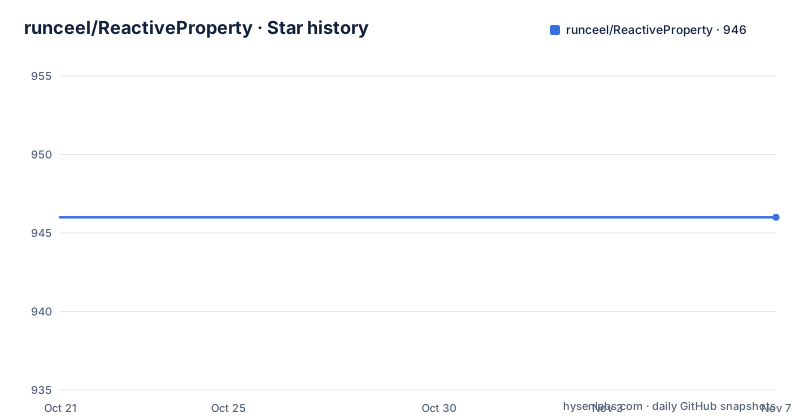
- runceel/ReactiveProperty946 ★ · +0
| Repository | 2026-10-21 | 2026-11-07 |
|---|---|---|
| runceel/ReactiveProperty | 946 | 946 |
0 Stars in the last 17 days, measured from the daily GitHub snapshot. Compare with other projects
Editorial analysis
No base class means no framework lock-in
The claim the README leads with is that there are not any base classes and interfaces, only declarative code between an input property and an output property. That is a smaller claim than it sounds, and it is the feature that decides whether the library fits your codebase.
A ViewModel written the conventional way implements INotifyPropertyChanged, declares a backing field per property, raises PropertyChanged from the setter, and calls RaiseCanExecuteChanged on a command whenever a dependency changes. The README shows exactly that pattern first, with a Name property and a Memo property, each with a backing field, a setter that fires the notification and a command status update, and a DelegateCommand that is described as a plain ICommand implementation.
The ReactiveProperty version of the same view model replaces all of that with property objects. The library states that this means ReactiveProperty can be used together with another MVVM library such as Prism or Microsoft.Toolkit.Mvvm.
That is the real difference in kind, not degree. Many MVVM frameworks want you to inherit from their base class, and mixing two of them means picking one. A library that is a set of property types rather than a hierarchy adds up to a ViewModel class that you could still write by hand, which is why it can sit next to a framework you already use.
One value, two consumers: Rx pipelines and XAML binding
The core class is ReactiveProperty, and the README describes it plainly as a wrapper class that has a value and implements IObservable<T> and INotifyPropertyChanged. The two interfaces are the whole point, because they serve two different consumers.
IObservable<T> is for connecting the change event of the property value to Rx LINQ method chains, so the value can be filtered, delayed and combined inside the ViewModel. INotifyPropertyChanged is for the data binding systems such as WPF, WinUI and MAUI, which is what lets the same property appear in a XAML binding.
The sample in the README makes the split concrete. An Input of type ReactivePropertySlim<string> is piped through Delay, Select and ObserveOnDispatcher, and the result becomes an Output of type ReadOnlyReactivePropertySlim<string>. The chain ends with ToReadOnlyReactivePropertySlim, which is what makes the output read only for consumers.
The Slim variants exist because of the same reasoning, and there is a separate NuGet package for them. ReactiveProperty.Core contains the minimum classes such as ReactivePropertySlim<T> and ReadOnlyReactivePropertySlim<T>, and the README states that this package does not have any dependency even on System.Reactive, so it fits when you do not need Rx features.
One detail changes how you write the binding. The XAML for the conventional view model binds Name and Memo directly, while the ReactiveProperty version binds Name.Value and Memo.Value, because the property is now an object holding the value rather than the value itself.
Command state is derived, not maintained by hand
The second sample in the README is about commands, and it is the more interesting one for application code.
In the conventional version, the command's CanExecute predicate is a lambda that checks two string properties for emptiness, and it is the setter of each property that has to remember to call RaiseCanExecuteChanged. Get one of those calls wrong and the button stays enabled or stays disabled, which is a class of bug that is tedious to track.
The ReactiveProperty version declares the properties as ValidatableReactiveProperty<string>, each constructed with a validation function that returns an error message or null. From there, the command is built from the observable error states of the two properties:
Name.ObserveHasErrors and Memo.ObserveHasErrors are combined with CombineLatestValuesAreAllFalse, the result is turned into a command with ToReactiveCommand, and the action is attached with WithSubscribe.
So the enabled state of the button is a value derived from the validation state of the inputs, and it updates because the validation state updates. There is no manual invalidation call anywhere in the view model, and the same mechanism covers a validation message in the UI because the error state is observable in the same way the value is.
The naming is worth learning as a pair. ReactiveCommandSlim is the command type used here, and the Slim family exists for the same reason the Slim property types do, a smaller dependency footprint for code that does not need the full feature set.
Four live packages and two that are retired
The NuGet table is the practical guide to what is still maintained, and it is split into two lists.
The first list has ReactiveProperty, which includes all core features, ReactiveProperty.Core with the minimum classes and no System.Reactive dependency, ReactiveProperty.WPF with EventToReactiveProperty and EventToReactiveCommand for WPF, which the table says is for .NET 6 or later and .NET Framework 4.7.2 or later, and ReactiveProperty.Blazor with validation support for the EditForm component of Blazor using the ReactiveProperty validation feature for the InteractiveServer render mode, which is for .NET 8.0 or later.
The second list is headed by the words no longer supported and contains ReactiveProperty.UWP, with the same event conversion helpers for UWP, and ReactiveProperty.XamarinAndroid, with many extension methods to create IObservable from events.
The target framework story is slightly inconsistent across the repository, and it is worth noticing. The project description on the repository says .NET 6+, .NET Framework 4.7.2 and .NET Standard 2.0, while the README itself says the target framework is .NET 8.0+, .NET Framework 4.7.2 and .NET Standard 2.0. The package table splits the difference in its own way, with the WPF package at .NET 6 and the Blazor package at .NET 8.0. If your build targets .NET 6, check which package version you are actually restoring rather than trusting a single line.
The repository layout also tells you the shape of the work. There are Samples/ folders for Blazor, Reactive.Todo, MultiUIThreadApp, WPF and shared code, and separate ReactivePropertySamples.R3 folders for the R3 line, plus a Benchmark/ directory, a Test/ directory, a Snippet/ directory and solution files in the new .slnx format.
Getting started means NuGet, then the Getting Started guide
The installation path for this library is the standard NuGet one, and the README points at four package identifiers rather than a command line, so there is nothing to paste here.
The choice is between the full ReactiveProperty package, the core package with no Rx dependency, ReactiveProperty.WPF, and ReactiveProperty.Blazor. Pick the one that matches the UI stack you are targeting, and take the core package if your ViewModel layer should not drag in System.Reactive.
After installation, the README says all steps are written in the Getting Started section of the ReactiveProperty documentation at docs/docs/README.md, and there is a Japanese version of the documentation under docs/docs-ja. The same path names the API documentation for the sketch equivalent, but here it is the entry point for learning the API rather than an optional extra.
A sensible first exercise is to reproduce the delay and select sample in a small view model of your own. The shape is a source property of type ReactivePropertySlim<string>, an operator chain that ends in ToReadOnlyReactivePropertySlim, and a binding that reads the .Value of the output. The README gives the whole view model, and it is short enough to type by hand:
public class MainPageViewModel
{
    public ReactivePropertySlim<string> Input { get; }
    public ReadOnlyReactivePropertySlim<string> Output { get; }
    public MainPageViewModel()
    {
        Input = new ReactivePropertySlim<string>("");
        Output = Input
            .Delay(TimeSpan.FromSeconds(1))
            .Select(x => x.ToUpper())
            .ObserveOnDispatcher()
            .ToReadOnlyReactivePropertySlim();
    }
}
The second sample, with ValidatableReactiveProperty and a command built from ObserveHasErrors, is the one to copy next, because it is the pattern you will repeat in every screen of an application.
The build and release workflow has a badge in the README, and the repository includes an AGENTS.md file, an .agents/ directory, a skills/ directory, a dev-docs/ directory and a .devcontainer/ directory, so there is contributor tooling beyond the library itself.
R3 is the alternative the author recommends for new work
The most consequential paragraph in the README is the Note near the top, and it is worth reading before anything else.
It says that if you are developing a new application, you should consider using R3 instead of ReactiveProperty, and that R3, redesigned by the original author, aligns with the current .NET ecosystem and offers most of the features found in ReactiveProperty. The link points to Cysharp/R3.
That is a difference in approach rather than a difference in features. ReactiveProperty is built around the ViewModel shape, with a value that is both an observable and a bindable property, aimed at WPF, WinUI, MAUI and Blazor codebases, and its target frameworks include .NET Framework 4.7.2 and .NET Standard 2.0 for older applications. R3 is the redesign aimed at the current ecosystem, and the repository carries separate sample folders for it, including ReactivePropertySamples.R3.Shared, ReactivePropertySamples.R3.WPF and ReactivePropertySamples.R3.Tests, which shows the two lines coexisting in the same solution.
So the choice for a new project is not between two libraries with overlapping features. It is between a mature library built for the classic MVVM stack and its redesign for the current one, and the author points new work at the redesign. ReactiveProperty remains the sensible choice for an existing application that is already on WPF or MAUI and wants observable values now, and the packages list shows the R3 era has not removed the older one from the table.
Where ReactiveProperty is the wrong tool
There are cases where this library is the wrong answer, and one of them comes from the project itself.
The first is a new .NET application. The README asks you to consider R3 for new work, and a team that starts on ReactiveProperty today is choosing the older line of a library whose own documentation points elsewhere.
The second is a UI stack outside the supported set. The UWP and Xamarin packages are marked no longer supported, and the remaining packages cover WPF and Blazor. A project on MAUI, WinUI or a plain .NET library can still use the core package, but the platform specific helpers such as EventToReactiveProperty and EventToReactiveCommand ship in the WPF package, so on another stack you write that conversion yourself.
The third is a codebase that wants the Rx pipeline but not the binding. That case has an answer, the ReactiveProperty.Core package with no System.Reactive dependency, but it also means the operator methods on the property types are not there, so the reactive composition you were hoping for has to be built on plain IObservable<T> instead.
The fourth is release management. The recent tags are v9.10.0-pre.1 from 2026-08-21, v9.4.0-pre.1 from 2026-08-19 and v9.9.0 from 2026-07-05, so pre-release builds are part of the published history, and a production application should pin a stable version rather than float to a pre-release. The last push was on 2026-08-31.
On licensing, the project is MIT, which is permissive and short, and the licence file is LICENSE.txt at the repository root. The Runtime and Compile time costs are on the reader's side: a ViewModel that holds property objects instead of plain fields costs a little more memory per property and adds a layer of indirection between the binding and the value, and the answer to whether that matters is a look at the Benchmark/ directory that ships with the repository.
Editorial conclusion
ReactiveProperty fits an existing WPF, WinUI, MAUI or Blazor codebase that wants observable values and command state derived from validation errors without adopting a ViewModel base class, and it fits a team that already depends on Prism or Microsoft.Toolkit.Mvvm and wants to add reactive composition alongside them. It does not fit a new .NET project, because the README asks you to consider R3 instead, and it does not fit a project that has moved past UWP or Xamarin, whose packages are marked no longer supported. Before adopting it, read the Note at the top of the README, pick the NuGet package that matches your target, the core package or the WPF or Blazor one, and follow the Getting Started section in docs/docs/README.md rather than the sample code alone.
Frequently asked questions
What is ReactiveProperty and which NuGet package should I use?
ReactiveProperty is a C# library that provides MVVM and asynchronous support features under Reactive Extensions, with no base classes and no interfaces to implement. The README lists four live packages: ReactiveProperty with all core features, ReactiveProperty.Core with the minimum classes and no System.Reactive dependency, ReactiveProperty.WPF for WPF, and ReactiveProperty.Blazor for Blazor EditForm validation.
Should I use ReactiveProperty or R3 for a new project?
The README's Note says that if you are developing a new application you should consider R3 instead, since R3 was redesigned by the original author, aligns with the current .NET ecosystem and offers most of the features of ReactiveProperty. The repository keeps separate sample projects for the R3 line alongside the WPF and Blazor ones.
How do I bind a ReactiveProperty value in XAML?
The binding uses the .Value suffix, so the XML in the README binds Name.Value and Memo.Value, where the conventional INotifyPropertyChanged version binds Name and Memo directly. The property is an object that holds the value, and it implements both IObservable<T> for Rx LINQ chains and INotifyPropertyChanged for data binding in systems such as WPF, WinUI and MAUI.
How do I make a command enable itself from validation errors in ReactiveProperty?
Declare the inputs as ValidatableReactiveProperty<string> with a validation function, observe their error state with ObserveHasErrors, combine the two with CombineLatestValuesAreAllFalse, and turn the result into a command with ToReactiveCommand, attaching the action with WithSubscribe. The command state is then derived from the validation state rather than invalidated by hand.
Official sources
Add this badge to your README
If you maintain this project, the badge below links readers to this analysis and shows its maintenance status from the daily GitHub snapshot. Paste the markdown into your README; add ?metric=license or ?metric=stars to the image URL for a different field.

[](https://hysenlabs.com/projects/runceel-reactiveproperty)Star history chart for your README
[](https://hysenlabs.com/projects/runceel-reactiveproperty)Was this useful?