Rundeck builds a war file and points installers elsewhere
Enable Self-Service Operations: Give specific users access to your existing tools, services, and scripts
At a glance
- What is it?
- Rundeck by PagerDuty is a runbook automation service with a web console, command line tools and a WebAPI, shipped as a Deb, RPM or War download. The repository documents the Gradle build in detail and hands installation, upgrades and first-run access to pages outside itself.
- Who is it for?
- Rundeck fits teams that already own the scripts and the nodes and want one procedure applied across them, and the repository is specific about how it builds: Gradle in, a war out, then that same war as the rundeck/rundeck:SNAPSHOT image. The costs are visible too, since the npm step needs either a Cloudsmith token or a deleted lockfile, and the documented build JVM and the image JRE are not the same number.
- Can I use it commercially?
- Yes. Apache-2.0 is a permissive licence: you can use, modify and sell software built on it, as long as you keep its copyright and licence notices.
- Is it still maintained?
- Yes. The repository received new commits within the last day.
- What is it written in?
- Mainly Groovy, according to GitHub's language statistics.
Answers come from the project's GitHub data, last synced on November 15, 2026, and from our analysis. They are not legal advice.
Star history
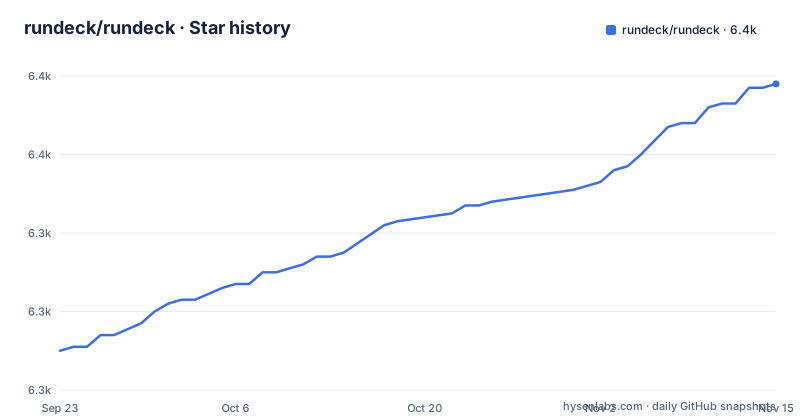
- rundeck/rundeck6,378 ★ · +68
| Repository | 2026-09-23 | 2026-11-15 |
|---|---|---|
| rundeck/rundeck | 6.3k | 6.4k |
68 Stars in the last 53 days, measured from the daily GitHub snapshot. Compare with other projects
Editorial analysis
Deb, RPM and War are three links to the same download page
The only distribution story in this repository is a three column table. Deb, RPM and War each carry a Download link, and all three point at the same https://www.rundeck.com/downloads page, so choosing a format does not choose a build. No version list, checksum, or apt and dnf repository line is spelled out anywhere here. What the repository does pin is narrow and current: the default branch is main, the last push landed on 2026-11-02, and the latest tagged release is v6.3.0 (v6.3.0-20261022) from 2026-10-22, after v6.2.1 (v6.2.1-20260909) on 2026-09-09 and v6.2.0 (v6.2.0-20260908) on 2026-09-08. For the install procedure the README hands off with a single link to an install page under docs.rundeck.com, and it says nothing about upgrades, rollback, or where a configuration file belongs.
The war file is the one build product everything else names
The build section names its output outright:
./gradlew buildThat produces `rundeckapp/build/libs/rundeck-X.Y.war`. At the root of the tree sit `version.properties` and `renovate.json`, alongside `build.gradle`, `settings.gradle`, `gradle.properties`, `build.yaml` and `testbuild.groovy`. The Docker path then reuses the artifact rather than rebuilding everything:
./gradlew :docker:officialBuildThe README states it uses the war artifact and creates the `rundeck/rundeck:SNAPSHOT` image. Two launchers at the root, `gradlew` and `gradlew.bat`, are the only stated doors to either path, and the Gradle wiki page is where the details past them live.
Java 11 and Node 18 for the build, a headless JRE 17 in the image
Build requirements are given in four words: Java 11, NodeJs 18. The tree helps on the Node side, because `.nvmrc` sits at the root and keeps the version from drifting between contributors. The container side then picks a different number. The image property is documented as `jreVersion=openjdk-17-jre-headless`, set with `-PjreVersion=openjdk-17-jre-headless`, so the published image runs a headless JRE 17 while the documented build target is Java 11. No line in the README says which JVM the war should run on in production, and that is the one number worth writing down before deploying. Tagging is a separate property with the same shape: `dockerTags` adds additional tags, with `-PdockerTags=local,local-RUN-123` given as the example, while the default image tag stays SNAPSHOT.
Without a Cloudsmith token the build asks for deleted lockfiles
This is the roughest edge in the build instructions. PagerDuty employees with Cloudsmith access export a token first:
export CLOUDSMITH_NPM_TOKEN=your-cloudsmith-token-hereContributors without that access are told to delete the `.npmrc` and `package-lock.json` files in the ui-trellis package, then the same two files in the `_package-manager` directory:
rm rundeckapp/grails-spa/packages/ui-trellis/.npmrc rundeckapp/grails-spa/packages/ui-trellis/package-lock.json
rm rundeckapp/grails-app/assets/javascripts/_package-manager/.npmrc rundeckapp/grails-app/assets/javascripts/_package-manager/package-lock.json
Deleting a lockfile is not a neutral workaround. It discards the pinned dependency tree the repository committed, so the next install resolves whatever the registry serves that day, and nothing says how to put the lockfiles back. The two paths differ as well, one under `grails-spa/packages` and one under `grails-app/assets`, so a half finished cleanup leaves one registry config behind.
Eighteen example folders name the replaceable parts
The `examples/` directory is the shortest map of what can be swapped inside a running Rundeck, because the folder names mix language with extension point. The Groovy set covers content converters, log filters, logs, and notifications. The Java set covers audit, execution lifecycle, job lifecycle, logging, node executor, notification, step, storage converter, and storage. Two entries are script-based plugins, `example-script-node-step-plugin` and `example-script-remote-node-step-plugin`, sitting next to `json-plugin` and `ssh-script-plugin`. Read as hooks rather than as samples, the list says a node executor decides how a command reaches a target, a notification plugin decides how a job reports itself. `examples/README.md` is the entry point, and the naming convention is the documentation.
Access control, storage and webhooks are each their own module
The root tree breaks the server into Grails plugins with descriptive names: `grails-execution-mode-timer`, `grails-job-kill-handler`, `grails-metricsweb`, `grails-persistlocale`, `grails-repository`, `grails-securityheaders`, and `grails-webhooks`. Beside them sit `core/`, `rundeck-authz/`, `rundeck-data-models/`, `rundeck-repository/`, `rundeck-storage/`, `rundeck-app-util/`, and `encryption-core/`, plus `plugins/`, `packaging/`, `docker/`, `config/`, `test/`, and `functional-test/`. That layout matches the project's one line description about giving specific users access to existing tools, services, and scripts: access control is a module of its own (`rundeck-authz`) rather than a preference inside the app, and encryption lives in a separate package (`encryption-core`) instead of being folded into storage. `SECURITY.md` and `cve-suppress.xml` are both at the root, yet no part of the README explains how to report a vulnerability or what the suppressions cover.
One variable ties npm to a nested package in four commands
Every UI task has the same shell shape with a different npm script at the end. A variable points at the package directory, `CORE_UI=rundeckapp/grails-spa/packages/ui-trellis`, and the command runs with `--prefix` against that variable:
CORE_UI=rundeckapp/grails-spa/packages/ui-trellis
npm run --prefix "$CORE_UI" dev:test:unit
Three sibling variants exist for jest unit tests of the Core UI, for the same tests watching for changes (`dev:test:watch`), for a dev mode build (`dev`), and for Storybook. The dev mode build is the one with a hidden coupling: it copies artifacts immediately to the assets dir of the running application, so the quick UI loop needs a server already up, and that server is the war from the Gradle build. A first visit therefore has an order to it. Build the war, run it, then loop on the frontend.
No install command, no config sample, no rollback, no API list
Read as a whole, this README is a build and navigation document, and the gaps line up. There is no install command to copy, no configuration file example, no default credentials for a first login, no list of environment variables, and no upgrade or rollback procedure. The first paragraph names a WebAPI and command line tools without a single endpoint or flag, so the automation surface has to be learned somewhere else. Testing is documented for the frontend only: `functional-test/` and `test/` exist in the tree, yet the sole test commands given are the jest runs against the Core UI, with nothing on running the Groovy suites. Links to docs.rundeck.com/docs, a FAQ wiki, a community forum, and the release notes history carry what is missing.
Editorial conclusion
Rundeck fits teams that already own the scripts and the nodes and want one procedure applied across them, and the repository is specific about how it builds: Gradle in, a war out, then that same war as the rundeck/rundeck:SNAPSHOT image. The costs are visible too, since the npm step needs either a Cloudsmith token or a deleted lockfile, and the documented build JVM and the image JRE are not the same number. For an evaluation, read version.properties and the two .npmrc paths in the tree before anything else, because the repository explains its own build and leaves installs, upgrades and first-run access to pages outside it.
Frequently asked questions
What is Rundeck used for?
The README calls it an open source runbook automation service with a web console, command line tools and a WebAPI. The header above the download table says it executes workflows across existing automations or automates procedures that were previously manual, standardizing tasks across a set of nodes.
What is PagerDuty Rundeck?
Rundeck by PagerDuty, published from the rundeck/rundeck repository, written in Groovy and licensed under the Apache License 2.0 with copyright 2024 PagerDuty, Inc. Its homepage is rundeck.org and its documentation is hosted at docs.rundeck.com/docs.
Is Rundeck free to use?
The repository is licensed under the Apache License 2.0 and the project describes itself as open source. Pricing for hosted or commercial offerings is not addressed anywhere in the repository.
How do I install Rundeck?
The README carries no install command. It points at an install page under docs.rundeck.com and offers Deb, RPM and War downloads at rundeck.com/downloads. Building from source is a separate path with Java 11 and NodeJs 18, then ./gradlew build, which produces rundeckapp/build/libs/rundeck-X.Y.war.
How does Rundeck work?
Three interfaces are named in the first paragraph: a web console, command line tools, and a WebAPI. The repository side shows a Grails server split into modules such as rundeck-authz, rundeck-storage, and grails-webhooks, packaged as a war and also built as the rundeck/rundeck:SNAPSHOT image.
What does a runbook in Rundeck do?
A runbook is the procedure Rundeck automates. The README frames the goal as standardizing tasks to improve operational quality across a set of nodes, and the examples directory shows the hooks available, including script node step, script remote node step, ssh-script, and json plugins.
Official sources
Add this badge to your README
If you maintain this project, the badge below links readers to this analysis and shows its maintenance status from the daily GitHub snapshot. Paste the markdown into your README; add ?metric=license or ?metric=stars to the image URL for a different field.

[](https://hysenlabs.com/projects/rundeck-rundeck)Star history chart for your README
[](https://hysenlabs.com/projects/rundeck-rundeck)Was this useful?