Inno Setup Source Tree (jrsoftware/issrc): What You Get When You Clone the Installer Builder
Inno Setup is an open-source installation builder for Windows applications by Jordan Russell and Martijn Laan. Since its introduction in 1997, Inno Setup has been trusted by developers and organizations of all sizes to reliably deploy software to millions of PCs worldwide.
At a glance
- What is it?
- The issrc repository is the Delphi source for Inno Setup, the Windows installer builder behind countless .exe setups. Here is what the tree contains, how to build it, and when you should stop and use the released compiler instead.
- Who is it for?
- Clone issrc if you are modifying the installer toolchain itself: patching the compiler, the setup loader, or the IDE, and you are prepared to install Delphi 12.3 Athens plus the GetIt dependencies and keep a Delphi licence current for every future release. Do not clone it if you only need to ship a setup.exe.
- Can I use it commercially?
- Check first. The repository uses a licence we do not classify automatically, so read its LICENSE file before any commercial use.
- Is it still maintained?
- Yes. The repository last received commits 2 days ago.
- What is it written in?
- Mainly Pascal, according to GitHub's language statistics.
Answers come from the project's GitHub data, last synced on November 15, 2026, and from our analysis. They are not legal advice.
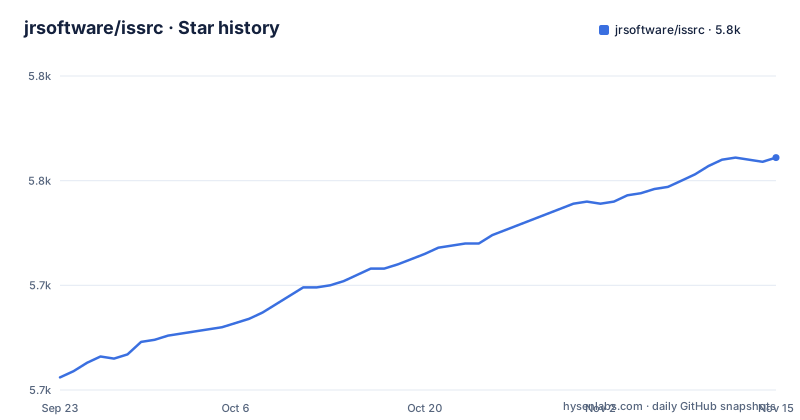
Star history
- jrsoftware/issrc5,761 ★ · +105
| Repository | 2026-09-23 | 2026-11-15 |
|---|---|---|
| jrsoftware/issrc | 5.7k | 5.8k |
105 Stars in the last 53 days, measured from the daily GitHub snapshot. Compare with other projects
Editorial analysis
Who the issrc tree is actually for
Inno Setup is an installation builder for Windows applications. The repository jrsoftware/issrc is not that builder in a form you can run. It is the source code for it, written in Pascal, and the README opens with the line "Source code README" before telling you to clone it, install Embarcadero Delphi, and compile. The audience is narrow and specific: people who want to change how Inno Setup behaves, not people who want to produce an installer for their own product. If your goal is a setup.exe for a Windows application, the work happens in an .iss script compiled by ISCC. The README's Getting Started section describes the workflow of the people who build the tool. That distinction is the single most important thing to settle before you clone anything. Contributors are pointed at CONTRIBUTING.md, which the README says to read before forking and opening pull requests. Everyone else is in the wrong repository.
Nine projects and the DLL boundary between them
The README lists nine projects, and the split is the most interesting design decision in the tree. ISIDE is the GUI front-end, described as a text editor that does not compile anything itself. ISCC is the command-line front-end. Both load ISCmplr.dll to do the real work, and the README states plainly that if the compiler project changes, ISIDE usually does not need recompiling. That is a deliberate separation: the editing surface and the compilation engine are decoupled behind a DLL interface, documented in Shared.CompilerInt.Struct.pas and Shared.CompilerInt.pas. ISPP is a separate DLL implementing the preprocessor interface. Setup is the wizard that runs on the user's machine, and SetupCustomStyle is the same program with VCL Styles support compiled in. SetupLdr is the loader that self-extracts a compressed Setup into the user's TEMP directory and runs it from there, and it is also what shows the "This will install..." and /HELP message boxes. Two utilities round out the set: ISSigTool, which signs and verifies DLL, E32, E64 and EXE files that ISIDE, ISCC and ISCmplr check before loading, and ISTestTool, an internal unit-test runner with no testing framework behind it. The README is explicit that ISSigTool is not Authenticode code signing and does not replace signtool.exe. If you are reading the tree to understand installer internals, that signature check before loading is a mechanism worth tracing.
Building issrc with Delphi 12.3 and the right batch file
The README gives the clone command first. Run it and you get the full tree, including Examples/, Components/, Projects/ and the batch files at the root.
git clone https://github.com/jrsoftware/issrc.git issrc
cd issrc
The README states that all of Inno Setup's projects are compiled under Delphi 12.3 Athens with the May Patch installed. A free Community Edition exists, but it changes the build path: Embarcadero removed command-line compilation from that edition, so the README says Community Edition users must run build-ce.bat, while everyone else runs build.bat. Both are described as building all files in Release mode and then prompting for instructions. After Delphi is installed, the README requires running getit.bat to install the GetIt dependencies.
getit.bat
build.bat
For a narrower build, the README documents compile.bat with an architecture argument and an optional project name, for example compile.bat x64 ISCC for the 64-bit command-line compiler alone, or compile.bat x86 for the 32-bit build. The README notes these batch files cannot be used with the Community Edition, where you instead open Projects\Projects.groupproj in the IDE. Two further steps matter if you touch the forms: the Setup project's forms need component units such as BitmapButton, FolderTreeView and NewCheckListBox, and the ISIDE forms additionally need DropListBox, NewGroupBox and NewTabSet. The Components directory holds a Components.dpk that installs them all. If you only edit code, the README says you can skip that and cancel when the IDE reports a missing class.
Where a build of issrc goes wrong
The most common failure mode is not a compiler error. It is the shared unit. Shared.Struct.pas is shared by ISIDE, ISCmplr, ISPP, Setup, SetupCustomStyle, SetupLdr and ISTestTool, and holds data structures and constants used by all of them, so a change to it reaches every one of those projects. A partial rebuild after editing that file produces binaries that disagree about data structures, and the symptom will appear at runtime rather than at compile time. The third constraint is the toolchain itself. There is no supported way to build this tree without Delphi, and the Community Edition cannot use the command-line batch files at all. If you are not on Windows with a Delphi installation, this repository is not a practical starting point.
Inno Setup against WiX and MSIX
The honest alternative depends on what you are packaging. WiX Toolset builds MSI packages from XML source that Windows Installer understands. Inno Setup produces a single self-contained setup.exe, and the README's description of SetupLdr shows exactly how: it self-extracts a compressed Setup program into the user's TEMP directory and runs it from there. That model needs no installer service and no MSI database, which is why it travels well for consumer software and small internal tools, and why it is the wrong shape for anything that must be advertised, patched or removed through Windows Installer APIs. The two are not interchangeable, and the issrc tree does not attempt to be. There is also a third option worth naming: if you want Inno Setup's output without touching its source, you use the released compiler. The repository is the alternative to the released compiler, not the other way round.
Maintenance, licensing and the cost of tracking upstream
The repository is not archived, and the last push was on 2026-11-02. Releases are frequent: 7.1.1 and 6.7.4 on 2026-10-28, and 7.1.0 on 2026-08-12. That cadence is the upgrade cost. If you maintain a fork, every upstream release is a rebase against a tree that includes a whatsnew.htm file and a Delphi project group, and a change to Shared.Struct.pas upstream can invalidate your local build until you rebuild every dependent project. The licence file is license.txt, and the repository metadata reports the licence as NOASSERTION, meaning GitHub could not classify it automatically. The README's header says conditions of distribution and use are in LICENSE.TXT, and the copyright lines name Jordan Russell and Martijn Laan. Read license.txt yourself before redistributing a modified build; the classification on the repository page will not tell you what the terms actually allow. Note also that the repository ships SBOM.spdx.json, which is worth reading if your organisation requires a software bill of materials for build tooling.
Editorial conclusion
Clone issrc if you are modifying the installer toolchain itself: patching the compiler, the setup loader, or the IDE, and you are prepared to install Delphi 12.3 Athens plus the GetIt dependencies and keep a Delphi licence current for every future release. Do not clone it if you only need to ship a setup.exe. The released Inno Setup compiler, ISCC, already compiles .iss scripts. Before committing, verify three things: that your Delphi edition can run the build script you intend to use (Community Edition must use build-ce.bat, not build.bat), that the license.txt terms in the tree cover the use you have in mind, and that you can rebuild all shared projects after any edit to Shared.Struct.pas, since that unit is shared by ISIDE, ISCmplr, ISPP, Setup, SetupCustomStyle, SetupLdr and ISTestTool.
Frequently asked questions
What is the jrsoftware/issrc repository?
It is the source code repository for Inno Setup, an open-source installation builder for Windows applications, written in Pascal. The README describes it as the source code README and walks through cloning, installing Delphi 12.3 Athens, and building the projects.
How do I build Inno Setup from the issrc sources?
Clone the repository, install Embarcadero Delphi 12.3 Athens with the May Patch, run getit.bat for the GetIt dependencies, then run build.bat for a full Release build. Community Edition users must run build-ce.bat instead, because command-line compilation was removed from that edition, and compile.bat x64 ISCC builds just the 64-bit command-line compiler.
Do I need Delphi to build jrsoftware/issrc?
Yes. The README states that all of Inno Setup's projects are compiled under Delphi 12.3 Athens with the May Patch, and a free Community Edition is offered as an alternative, though it cannot use the command-line batch files. There is no documented non-Delphi build path in the repository.
Which batch file should Community Edition users run?
The README says Community Edition users run build-ce.bat, while everyone else runs build.bat, because Embarcadero removed command-line compilation support from the Community Edition. For individual projects under Community Edition, the README directs you to open Projects\Projects.groupproj instead of using compile.bat.
What happens if I change Shared.Struct.pas?
The README warns that this unit is shared by ISIDE, ISCmplr, ISPP, Setup, SetupCustomStyle, SetupLdr and ISTestTool, and contains data structures and constants shared by those projects, so a change to it affects all of them.
Official sources
Add this badge to your README
If you maintain this project, the badge below links readers to this analysis and shows its maintenance status from the daily GitHub snapshot. Paste the markdown into your README; add ?metric=license or ?metric=stars to the image URL for a different field.

[](https://hysenlabs.com/projects/jrsoftware-issrc)Star history chart for your README
[](https://hysenlabs.com/projects/jrsoftware-issrc)Was this useful?