Rune runs end user scripts on a stack inside your Rust binary
An embeddable dynamic programming language for Rust.
At a glance
- What is it?
- Rune turns a Rust binary into a host for end user scripts by compiling them onto a stack based virtual machine. The README ships one CLI command and one nineteen line embedding example, and hands async, hot reloading and native module registration to a separate book.
- Who is it for?
- Rune fits teams that already ship a Rust binary and want end users to script behaviour without a rebuild of the host, and it gives you a Context that decides exactly which native functions a script can reach. It does not fit projects that need a general purpose language, a documented sandbox policy, or an upgrade story wider than one crate.
- Can I use it commercially?
- Yes. Apache-2.0 is a permissive licence: you can use, modify and sell software built on it, as long as you keep its copyright and licence notices.
- Is it still maintained?
- Yes. The repository last received commits 12 days ago.
- What is it written in?
- Mainly Rust, according to GitHub's language statistics.
Answers come from the project's GitHub data, last synced on October 23, 2026, and from our analysis. They are not legal advice.
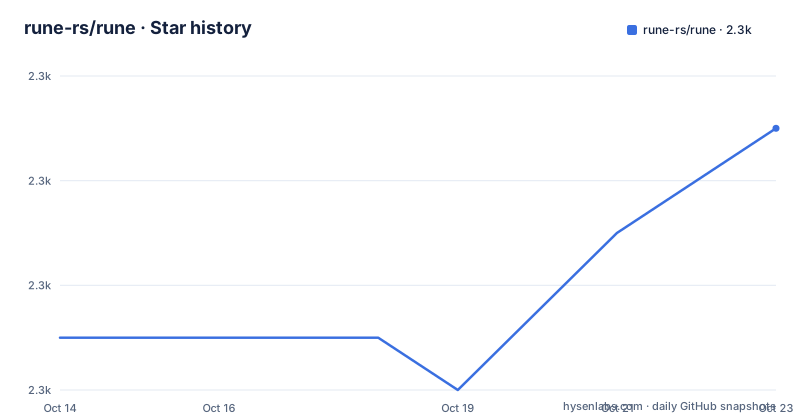
Star history
- rune-rs/rune2,343 ★ · +4
| Repository | 2026-10-14 | 2026-10-23 |
|---|---|---|
| rune-rs/rune | 2.3k | 2.3k |
4 Stars in the last 9 days, measured from the daily GitHub snapshot. Compare with other projects
Editorial analysis
Running hello_world.rn from a checkout with the bundled binary
A Rune program is a `.rn` script run by a binary built from the workspace, so the first real use needs a Rust toolchain and nothing installed from elsewhere. From the repository root, the documented command is:
cargo run --bin rune -- run scripts/hello_world.rnThe program comes from the top level `scripts/` directory, and the binary resolves because every crate under `crates/` is a default workspace member. That gives you a full compile and run cycle with no host application written. What you also need to know is what to expect when something is wrong. For a closer look at a running program, one flag pair is printed:
cargo run --bin rune -- run scripts/hello_world.rn --dump --traceThose two flags are the only ones spelled out anywhere in the README. `--help` gets a single line and its output is never reproduced, so the rest of that command line surface stays unknown until you run it on your own machine.
What default-members leaves out of a plain cargo run
The workspace is not one crate. Its `members` list globs two directories and names three paths directly:
members = [
    "crates/*",
    "examples",
    "benches",
    "tools/*",
    "no-std",
]
`default-members` then narrows that list to the crates, the examples, the benches and two named tool paths, `tools/site` and `tools/builder`. A detail worth planning around: `no-std` is a genuine member of the workspace, yet a default build never touches it, so anything targeting a build without the standard library has to be requested by name rather than picked up for free. The same narrowing applies to tools, where the glob covers every tool crate while only those two are compiled by default, so a third tool crate added later stays out of an ordinary build at the root until someone edits that list. Both lists resolve under `resolver = "2"`, which puts feature unification on the newer semantics.
Building the virtual machine inside your own Rust program
Embedding looks like this, and the README calls the listing a complete example:
use rune::{Context, Diagnostics, Source, Sources, Vm};
use rune::termcolor::{ColorChoice, StandardStream};
use rune::sync::Arc;

let context = Context::with_default_modules()?;

let mut sources = Sources::new();
sources.insert(Source::memory("pub fn add(a, b) { a + b }")?);

let mut diagnostics = Diagnostics::new();

let result = rune::prepare(&mut sources)
    .with_context(&context)
    .with_diagnostics(&mut diagnostics)
    .build_vm();

if !diagnostics.is_empty() {
    let mut writer = StandardStream::stderr(ColorChoice::Always);
    diagnostics.emit(&mut writer, &sources)?;
}

let mut vm = result?;

let output = vm.call(["add"], (10i64, 20i64))?;
let output: i64 = rune::from_value(output)?;

println!("{}", output);
Four steps carry the weight. `Context::with_default_modules()` decides which native modules scripts can reach, and in this example it is the single switch that defines the host API surface. The `rune::prepare` builder takes a `Sources` collection and borrows a diagnostics sink instead of printing anything itself. Failures surface after the build, since `build_vm` hands back a result and a script that fails to compile never reaches `vm.call`. Those last two lines convert the returned value into a typed i64, and the two arguments, 10 and 20, decide the number you see. Read it as a function body rather than a program: it applies the error operator at top level, has no main function, and imports `rune::sync::Arc` without using it anywhere in the listing.
Two ways to run a script and what each one costs you
The bundled binary and the library call are two different products with different failure modes. Through the command line you get a compiler and a VM as a subprocess, source read from `scripts/hello_world.rn`, and every edit to a script costs another cargo invocation because the binary is rebuilt from the workspace each time. Through the embed path you build the VM inside your own process with `rune::prepare` and reach it with `vm.call`, so the same script text can come from memory, from a file, or from a string your application assembles at run time, and the runtime travels inside the binary you already ship. The subprocess route suits a project that wants script experiments during development. The library route is the only one a UI button or a config reload in a deployed build can reach. Neither route shows what happens when a script panics or spins forever, because no timeout, cancellation or fuel example appears anywhere in the repository.
Reference counting and stack isolation decide what a script reaches
Everything a script touches passes through the host context, and the README sets out the shape of that boundary in one list of highlights. A stack based virtual machine runs a compact representation of the language. Values are reference counted, which is where the memory safety claim comes from, and stack isolation sits between function calls, with `rune-rs.github.io/book/call_frames.html` as the chapter that explains it. The language surface is wider than the name advertises: first class async with generators, multithreaded execution, hot reloading documented at `rune-rs.github.io/book/hot_reloading.html`, dynamic instance functions, structs and enums with associated data, try operators, pattern matching, macros, template literals, and vectors, objects and tuples that serialize through serde. One of those claims points at a file rather than a chapter, `crates/rune-modules/src/json.rs`, which is the most concrete thing in the list. Nothing in it says how heavy the runtime is, or how to stop a running script.
Apache-2.0 in the metadata against two files at the root
Before you embed anything, check the terms yourself: the repository root carries LICENSE-APACHE and LICENSE-MIT, while the project metadata records Apache-2.0 on its own. Version 0.14.2 was published on 2026-05-22, the last push to main was on 2026-09-13, and the nightly entry carries the date 2023-12-23, so a channel name tells you nothing about how current that build is. The consumption path itself is ordinary. The crate is published on `crates.io/crates/rune`, the API docs live on `docs.rs/rune`, and the dependency sits inside a workspace of many packages under `crates/*`, so a bump touches more than the single crate you call from your code. What neither the metadata nor the README settles is which of the two files at the root governs code you embed, and that question belongs to whoever handles your legal review.
The bench profile keeps LTO off and debug symbols on
Benchmarks count as part of the default build here, which says something about how the project treats its own overhead. The workspace sets `[profile.bench]` with `lto = false` and `debug = true`, and `benches/` is listed among the default members. Read plainly, a bench build skips link time optimization and keeps symbols in the binary. That configuration is the whole performance record in the repository: the README publishes no benchmark number, no startup figure and no comparison against another runtime. If your decision turns on script startup cost or on how a large script slows the host process, nothing published in the repository settles it, and that bench profile is the only place you could start measuring for yourself. The profile also says nothing about the crates that a default build skips, which is the `no-std` member and any tool crate beyond `tools/site` and `tools/builder`.
Gaps the README hands off to the book chapters
Every headline feature in the README is a link to a chapter, and this repository prints exactly one runnable program. That leaves open questions for anyone deciding today. How a host registers its own native module is never shown; `crates/rune-modules` appears only as the home of serde support. How a script error reaches the caller, and what the Rust side holds after a failed `rune::from_value`, is not demonstrated. Whether hot reloading notices a changed file, how threads are given work, and whether a single context can be shared across them, all stay in chapter territory with no code here to check against. There is no compatibility statement between the crate and the tooling under `tools/site`, and no rollback procedure of any kind. The examples directory is linked for more programs without showing a single one of them, so the fastest route to confidence runs through `examples/examples` and the book rather than the front page.
Editorial conclusion
Rune fits teams that already ship a Rust binary and want end users to script behaviour without a rebuild of the host, and it gives you a Context that decides exactly which native functions a script can reach. It does not fit projects that need a general purpose language, a documented sandbox policy, or an upgrade story wider than one crate. Before adopting it, run the script command once, read the chapter behind Context::with_default_modules, then confirm that the workspace member your target needs is one your own build compiles.
Frequently asked questions
How do I install rune for a Rust project?
The crate is published on `crates.io/crates/rune` with API docs on `docs.rs/rune`. To run a script straight from a checkout, the documented command is `cargo run --bin rune -- run scripts/hello_world.rn`.
What does the Context control in an embedded rune script?
`Context::with_default_modules()` loads the default native modules that scripts can call, and the README example shows it as the only switch defining that surface. The context is then handed to `rune::prepare` when the VM is built.
Does rune work on targets without the standard library?
The workspace lists a `no-std` member, but it is absent from the default member list, so an ordinary build at the root does not compile it. The README does not document that member at all.
Which flags does the rune CLI accept for diagnostics?
Only `--dump --trace` is printed, appended to `cargo run --bin rune -- run scripts/hello_world.rn`. `--help` is mentioned in one line without any output being shown.
Which licence governs code that embeds rune?
The repository root carries both LICENSE-APACHE and LICENSE-MIT, while the project metadata records Apache-2.0 alone. The README does not say which of them applies to downstream use.
Official sources
Add this badge to your README
If you maintain this project, the badge below links readers to this analysis and shows its maintenance status from the daily GitHub snapshot. Paste the markdown into your README; add ?metric=license or ?metric=stars to the image URL for a different field.

[](https://hysenlabs.com/projects/rune-rs-rune)Star history chart for your README
[](https://hysenlabs.com/projects/rune-rs-rune)Was this useful?