QuietHarness ships one 1,604-byte rule file, and its uninstall rule is a printed line
QuietHarness: a lightweight AI workflow system shared by Claude Code, Codex and Cursor
At a glance
- What is it?
- QuietHarness is the v3 form of the claude-code-workflow repository: a shell installer that writes a single shared rule file into Claude Code, Codex or Cursor, previews before writing, and records backups only for the targets it overwrote. The naming, the byte comparison and the success criteria all need reading closely.
- Who is it for?
- QuietHarness is a small, reversible thing to try, and the trial path it offers is the right way to judge it: an isolated temporary directory, a fixture, and an install that does nothing until you pass an apply flag. Two limits deserve attention first.
- Can I use it commercially?
- Yes. MIT is a permissive licence: you can use, modify and sell software built on it, as long as you keep its copyright and licence notices.
- Is it still maintained?
- Yes. The repository last received commits 2 days ago.
- What is it written in?
- Mainly Shell, according to GitHub's language statistics.
Answers come from the project's GitHub data, last synced on November 14, 2026, and from our analysis. They are not legal advice.
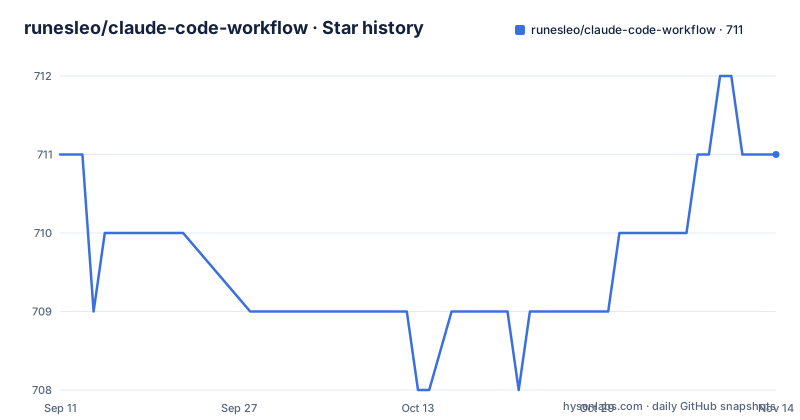
Star history
- runesleo/claude-code-workflow711 ★ · +0
| Repository | 2026-09-11 | 2026-11-14 |
|---|---|---|
| runesleo/claude-code-workflow | 711 | 711 |
0 Stars in the last 64 days, measured from the daily GitHub snapshot. Compare with other projects
Editorial analysis
The repository is claude-code-workflow and the product is QuietHarness
The repository name and the product name disagree, and the project says so rather than hiding it. The homepage is leolabs.me, the primary language is Shell, the license is MIT, and the default branch is main. Inside it, the harness is called QuietHarness, described as a lightweight working system shared by Claude Code, Codex and Cursor. The Chinese README states that the repository address and the git history keep the name claude-code-workflow, and that QuietHarness is version 3 of the same system rather than a separate project started from nothing.
The version numbering in the release list matches that story: v3.0.0 tagged QuietHarness v3.0.0, then v3.1.0 tagged with the phrase single-agent first success. Two releases, both in 2026, with the last push landing on 2026-09-18.
The project leads with a Chinese README. The tree at the repository root also lists README.en.md and MIGRATION-v3.en.md next to README.md and MIGRATION-v3.md, along with a Doxyfile-free set of ordinary files: AGENTS.md and CLAUDE.md committed at the root, CHANGELOG.md, RELEASE_NOTES.md, SECURITY.md, CODE_OF_CONDUCT.md, a REVIEW-codex-pass.md review note, and directories for docs, examples, labs, media, scripts, templates and tests. Every fact below comes from the Chinese README, which is the version the repository presents first.
1,604 bytes of shared core, and no client loads all three files
The central claim is a size claim, and the project is careful about what it does not claim from it. Three templates sit in the tree. The shared core is templates/shared/AGENTS.md at 1,604 bytes. The Claude Code adapter is templates/claude/CLAUDE.md at 168 bytes. The Cursor project rule is templates/cursor/quiet-harness.mdc at 546 bytes. Together that is 2,318 bytes, but the README states plainly that no single client loads all three at once, and that adding a second client reuses the same behavioural boundaries rather than unlocking a hidden complete edition.
The README also draws its own line on measurement: comparing these files is comparing file bytes, and it does not pretend to know exact token counts, speed, or model quality. That disclaimer sits directly under the byte table, which is unusual and worth keeping in mind when reading any performance framing elsewhere.
Inside the 1,604 bytes, the project says only four kinds of rule survive. Advance the current request directly. Do not pretend to have read files, web pages, or history that were never opened. Verify in proportion to risk after any file or code change. Ask for confirmation first before money, accounts, public publishing, production environments, and destructive actions. Four rules, one kilobyte and a half, and no rule about task management or scheduling.
The installer previews by default, and the BACKUP line is the uninstall record
Every install runs through scripts/install.sh, which previews unless you pass an explicit apply flag. The trial sequence starts by cloning and taking an inventory, then creates a throwaway directory and runs a fixture setup into it:
git clone https://github.com/runesleo/claude-code-workflow.git
cd claude-code-workflow
./scripts/inventory.sh

demo_dir="$(mktemp -d "${TMPDIR:-/tmp}/quiet-harness-first-success.XXXXXX")"
./examples/first-success/setup.sh "$demo_dir"
The installer states its own limits in one line: it does not use the network, it does not log into any account, and it does not modify any scheduler. That is a narrow surface for a tool that edits the files your agent reads on every request.
Reversal is where the design gets interesting. Each target gets its own INSTALLED line, and only the targets that overwrote an existing file print a neighbouring BACKUP line, pointing at a timestamped copy created in place with a .bak-ai-workflow- suffix. The uninstall rule then splits on whether that line existed: a target with a matching BACKUP is restored from it, and a target with no matching BACKUP is one the harness created itself. For created targets the README asks you to confirm the file still matches the template, then remove that one exact path, and to move it elsewhere instead of deleting it if you have edited it.
The practical consequence is that the only durable record of what changed is the output of the install command. The rollback instructions live in MIGRATION-v3.md, under a Chinese heading, and the English variant MIGRATION-v3.en.md sits beside it in the tree.
Project installs write different file counts for each client
The three client flags do not write the same thing. The Claude Code project install writes two files into the target directory, AGENTS.md and CLAUDE.md. The Codex project install writes one, AGENTS.md only. The Cursor project install writes one file of a different kind entirely, .cursor/rules/quiet-harness.mdc, which is the format Cursor reads.
Each has a dry run and an apply run against the temporary directory:
./scripts/install.sh --dry-run --claude-project "$demo_dir"
./scripts/install.sh --apply --claude-project "$demo_dir"
The reason for the asymmetry is visible in the byte table. Codex reads the shared AGENTS.md directly, so there is nothing to adapt. Claude Code needs an entry point that references the shared file, and that adapter is the 168 byte template. Cursor cannot read a shared file, so the 546 byte rule mirrors the same boundaries in a form that fits .mdc.
User level installs widen the reach. The Claude user level flags affect ~/AGENTS.md and ~/.claude/CLAUDE.md. The Codex user level flag affects the AGENTS.md inside CODEX_HOME, which defaults to ~/.codex/AGENTS.md. Both write outside any single project, and both take the same backup treatment before overwriting.
Nine business lines, and no shortcut seven
A large part of the README describes the author's own working topology rather than the harness. Nine long-running lines are listed with their entry points: Personal Ops, Strategy Lab, Data Platform, Portfolio, Content Studio, Products and Growth, Health Ops, Daily Rhythm, and Research Desk. The first owns systems, agents and risk boundaries. Strategy handles validation and expansion. Data Platform covers pipelines, indexing and profiles. Portfolio covers allocation and execution decisions. Content Studio covers posts, articles and search. Products and Growth covers building, monetisation and distribution. Health Ops covers records, rhythm and health research. Daily Rhythm covers intake, routing and daily audits. Research Desk covers investigation and knowledge capture.
The shortcut column runs from 0 through 6 and then jumps to 8 and 9, so seven is absent from a table that otherwise uses consecutive numbers. Whether that slot was retired or never existed is not stated.
The framing matters for anyone expecting to install this. The README is explicit that these names are not a requirement to copy them, and that each line corresponds to a stable workspace and owner so that switching model, conversation or client does not change where facts get written back. At startup only the current line's limited state is read, and a named task brings in exactly that one task.
A worker saying done is not a state change
The task model is the part of the system with actual field names, and it is built around refusing to accept chat as storage. Status is the single lifecycle fact. owner_thread records stable ownership of the line. primary_worker and claimed_by record only who is executing right now. next_action, artifacts and updated_at are required to be explicit. When a new fact conflicts with an older narrative, state_revision marks the override.
The sentence that follows matters most: a worker's claim of completion does not count as persistent state, and needs an artifact, validation, and an owner writeback behind it.
Write access follows the same logic. Claude, Codex and Cursor may research and review in parallel, but a single repository or task fact surface has one writer by default. Acquiring the lock records this line:
repo / worktree / writer / allowed paths / validation / next gateReleasing it requires this one:
artifact / validation / writeback / rollback / outcome / next gateThe README attributes that rule to a real cross-model double-write incident rather than to process for its own sake, and points at a desensitised example file under examples/leo-system alongside a task example. Session closeout uses the same test: at the end of a long conversation, five percent of it carries forward, and the only usable criterion is whether a step produced a file, not whether it was explained clearly in the conversation.
The first success check is a behaviour probe, not a measurement
After installing into the temporary directory, the trial sends the agent exactly one instruction:
Read TASK.md and complete the task.Success is defined as four behaviours, none of them prompted item by item: find and preserve one unrelated user change, fix only the discount calculation, run the existing tests, and give real verification evidence in the final reply.
What the project claims from that exercise is narrower than the framing suggests, and the framing is worth reading twice. The README states the exercise is an onboarding behaviour check and not a causal experiment showing the harness improves a model. The design goal is ten minutes. Automation currently verifies only that the fixture repeats, and real timing measured by someone other than the author is named as the next product gate. In other words, the ten minute figure is a target, not a reported result.
The follow up is a two minute public usage receipt filed as an issue, used to measure install outcome, time to first success, support friction, and reuse at seven days, with the instruction to edit the same issue later if seven days have not passed. The same paragraph lists what must never go in it: private code, repository names, absolute paths, credentials, or account information.
Background reports keep running, and the governance layer is marked experimental
Two more pieces round out the picture, and both are opt-in rather than installed. Background reporting keeps going: daily reports, sync and monitoring run independently, write to disk quietly on success, and only raise a reminder when something is missing, stale, or failed. The point being made is that an interactive agent should not rerun a morning routine or regenerate a dashboard to answer an unrelated question.
The scope boundary is stated as plainly as the byte counts. QuietHarness does not provide a full task database, background automation, or a team orchestration platform. A later section refers to the author's Leo System as an optional reference only.
There is also a governance layer that is not part of installation. The repository carries a labs/opc-company directory with its own README, described as an experimental layer for sharing canonical state across multiple long-lived owners and workers, doing semantic handoff, refusing false completion, and continuing the same task after a worker swap. It is labelled a governance experiment inside the same repository and explicitly not a prerequisite for installing the harness. Everything under it stays optional.
Editorial conclusion
QuietHarness is a small, reversible thing to try, and the trial path it offers is the right way to judge it: an isolated temporary directory, a fixture, and an install that does nothing until you pass an apply flag. Two limits deserve attention first. The proof that it works is a behaviour checklist on a prepared fixture, and the project says so itself, since automation only confirms the fixture repeats and real timing by someone other than the author is still an open gate. Second, the record of what the installer changed lives in the BACKUP lines of the install output, so capture that output if you intend to uninstall later. For anything needing a task database, background automation or team orchestration, this repository states plainly that it does not supply those.
Frequently asked questions
What exactly does QuietHarness write into my project?
It depends on the client flag. The Claude Code project install writes AGENTS.md and CLAUDE.md, the Codex project install writes only AGENTS.md, and the Cursor project install writes .cursor/rules/quiet-harness.mdc. User level flags reach further: ~/AGENTS.md and ~/.claude/CLAUDE.md for Claude Code, and the AGENTS.md inside CODEX_HOME, defaulting to ~/.codex/AGENTS.md, for Codex.
Does the QuietHarness installer change anything before I pass an apply flag?
No. The installer previews by default and writes only when an explicit apply flag is given, and each run prints an INSTALLED line per target. The project also states that the installer does not use the network, does not log into any account, and does not modify any scheduler.
How do I undo a QuietHarness install?
Before overwriting an existing file the installer creates a timestamped copy in place with a .bak-ai-workflow- suffix and prints a BACKUP line next to the target. A target that has a matching BACKUP is restored from it. A target with no matching BACKUP was created by the harness, so confirm it still matches the template before removing that exact path, or move it aside if you have edited it.
How large is the QuietHarness rule set and does it need all three files?
The shared core is 1,604 bytes, the Claude Code adapter is 168 bytes and the Cursor project rule is 546 bytes, 2,318 bytes in total. No single client loads all three. The project notes that this compares file bytes only and does not claim exact token counts, speed, or model quality.
Does QuietHarness include a task database or team orchestration?
It states that it does not provide a full task database, background automation, or a team orchestration platform. Task structure is described through fields such as status, owner_thread, primary_worker, next_action, artifacts and state_revision, with a desensitised example under examples/leo-system. The multi-owner governance experiment lives in labs/opc-company and is not a prerequisite for installing the harness.
Which clients does QuietHarness support, and does it require more than one?
Claude Code, Codex and Cursor each receive the same core reliability boundaries, and you install only the client you already use. Multi-client support exists so the boundaries can travel when you switch tools, not as an installation requirement. The Claude Code adapter is a thin 168 byte entry point that references the shared AGENTS.md, while Codex reads that shared file directly.
Official sources
Add this badge to your README
If you maintain this project, the badge below links readers to this analysis and shows its maintenance status from the daily GitHub snapshot. Paste the markdown into your README; add ?metric=license or ?metric=stars to the image URL for a different field.

[](https://hysenlabs.com/projects/runesleo-claude-code-workflow)Star history chart for your README
[](https://hysenlabs.com/projects/runesleo-claude-code-workflow)Was this useful?