x-reader: an MCP source reader for AI agents that reports what it did not read
Universal content reader MCP Server for 10+ platforms
At a glance
- What is it?
- x-reader is an MIT-licensed Python tool that fetches X/Twitter posts, articles, YouTube, Bilibili, podcasts, WeChat, Xiaohongshu, Telegram, RSS and ordinary web pages for AI agents. This article covers its PASS, PARTIAL, FAIL and UNKNOWN evidence states, its install routes, and the sources it cannot read.
- Who is it for?
- Use x-reader if your agent keeps summarising a link from a search snippet or a tweet caption and you want it to say what it actually read. Skip it if you need to read X Article bodies, since they are never read, or if you expect logged-in pages and transcription to work without extra setup.
- Can I use it commercially?
- Yes. MIT is a permissive licence: you can use, modify and sell software built on it, as long as you keep its copyright and licence notices.
- Is it still maintained?
- Yes. The repository last received commits 3 days ago.
- What is it written in?
- Mainly Python, according to GitHub's language statistics.
Answers come from the project's GitHub data, last synced on November 14, 2026, and from our analysis. They are not legal advice.
Star history
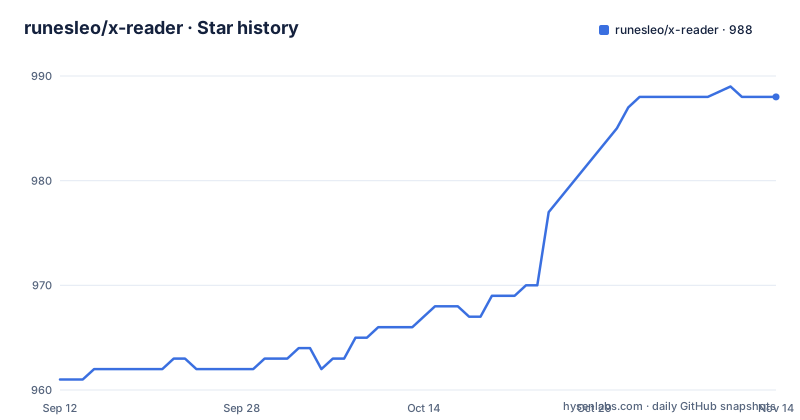
- runesleo/x-reader988 ★ · +27
| Repository | 2026-09-12 | 2026-11-14 |
|---|---|---|
| runesleo/x-reader | 961 | 988 |
27 Stars in the last 63 days, measured from the daily GitHub snapshot. Compare with other projects
Editorial analysis
Four evidence states replace a silent best guess
The distinguishing idea in x-reader is that a read can be incomplete and the tool says so. A search snippet is not the source, a tweet caption is not the attached video, and a video description is not a transcript. When a material layer of the source is still missing, x-reader keeps the gap explicit instead of reporting a finished read.
The canonical skill uses a four-state contract:
PASS     original source + all material media needed for the answer were read
PARTIAL  some material layer is still missing
FAIL     the original source could not be fetched reliably
UNKNOWN  retrieved material is too ambiguous to verify
The consequence for an agent workflow is that a downstream step can branch on the state. A summary built from a PARTIAL read can be labelled as such, and a FAIL gives a machine-readable error with a non-zero exit code instead of invented content. The project's suggested prompt asks the agent to tell you what it actually read and what is still missing.
A text post can pass while its attached video stays PARTIAL
The project spells out what an agent may claim at each level of access. A search result or preview card is discovery only, not source evidence. X post text supports claims about the post text only. Post text plus an unconsumed attached video means the post may pass but the video stays PARTIAL. A video page title or description is metadata, not spoken content.
Threads add layers. If the first post of a thread, a quoted post or an X Article has not been read, the result is PARTIAL until that layer is shown to be absent. A quoted post can also be read, but an X Article body never is. That last point is a hard limit: if the thing you care about is the body of an X Article, x-reader will not deliver it, and it will not pretend to.
This strictness is why mixed-media posts look less complete than they would in a tool that returns text and moves on. The tool trades a neat answer for an honest one.
Setup is an agent prompt, a plugin, or a skill, and uv is required for the plugin
The fastest route is to paste one sentence into your agent, asking it to set up x-reader by following the official instructions in `install.md`. The agent then installs the skill and the CLI, runs the read-only `x-reader doctor` self-check, and reads a first link with you.
The plugin route differs by client. Claude Code needs version 2.1.275 or later and uses `/plugin install x-reader --marketplace runesleo/x-reader`. Codex uses `codex plugin marketplace add runesleo/x-reader` followed by `codex plugin add x-reader@runesleo`. Cursor has a `.cursor-plugin/plugin.json` at the repository root, but the Cursor Marketplace listing is not live yet, so Cursor users cannot install this way today. The plugin starts the MCP server with `uvx`, so uv must be installed first.
The skill alone installs with:
npx skills add runesleo/x-reader --skill x-readerOptional sources such as logged-in pages, Telegram and transcription still need the extra setup in `install.md`, whichever route you pick.
The hosted Evidence Receipt app refuses private sessions on purpose
There is a public beta web utility for public X, YouTube and generic web URLs. You paste a URL and it returns the same four states, which you can copy as a human-readable receipt or as JSON. To run it locally:
pip install -e .
x-reader-web --host 127.0.0.1 --port 8787
The hosted policy is narrow by design. It uses a fresh temporary HOME and inbox for each request and does not inherit saved browser sessions, Telegram credentials, Groq keys, Obsidian or output paths, or external X cookies. The web layer does not add a second reader or a second state machine. It calls the existing `x-reader URL --json` path in the isolated environment and projects the result onto the four states.
The cost of that isolation is capability. A page behind a login, a private Telegram channel, or a video that needs transcription will not be fully read through the hosted app, because the credentials those need are exactly what it refuses to carry. For those, use the CLI or the agent route with your own setup.
v0.3.1 fixed a Jina 401 on example.com by falling back to pinned HTML
The source-fetch hardening in v0.3.1 comes with a before and after against v0.3.0. For `https://example.com`, v0.3.0 hit a Jina HTTP 401 and failed. v0.3.1 safely falls back to `direct_html_pinned` and returns `READ`. For mixed-media X posts, v0.3.0 returned the post text without structured media coverage, while v0.3.1 returns `media_status=present`, so the text can be `READ` while unconsumed attached media stays PARTIAL.
Two things follow. First, fetching depends on third-party reader services as a first attempt, and a failure there is handled by a direct fetch rather than ending the read. Second, the project's own proof is a 12-second MP4 attached to the v0.3.1 release, which is a demonstration of two cases, not a coverage report.
The pyproject adds `idna` for IDN and homograph attack protection in URL validation and `html5lib` so generic pages are built the way browsers build them before being judged. The examples folder includes a script showing that the URL validator blocks localhost.
Optional extras decide which sources actually work
The base install needs Python 3.10 or newer and pulls in `requests`, `feedparser`, `python-dotenv`, `loguru`, `idna` and `html5lib`. Everything else is an extra. The `telegram` extra adds `telethon`, `mcp` adds `mcp[cli]` pinned below version 2, `browser` adds `playwright`, `media` adds `faster-whisper`, and `all` installs the four together.
Three console commands are installed: `x-reader`, `x-reader-mcp` for the MCP server, and `x-reader-web` for the local receipt app.
The `.env.example` shows which credentials unlock which feature. `TG_API_ID` and `TG_API_HASH` are for fetching Telegram channels. `GROQ_API_KEY` is for video and audio transcription through Groq Whisper, and the file notes that a free key is available. `GEMINI_API_KEY` is for AI-powered analysis. `OUTPUT_DIR` and `INBOX_FILE` control where results are written.
If you skip these, expect PARTIAL results on video and audio and no Telegram reads. That is the intended behaviour, not a bug.
One public benchmark and a fast release cadence
The first-success evidence is a single public X post. The post text passed, fetched through oEmbed. The attached video passed after the public MP4 was resolved and downloaded, at about 178.3 seconds long. The spoken content passed because a native Chinese subtitle track was retrieved and read, and a deliberately broken URL failed with a non-zero exit and a JSON error. The npx install was also checked from a fresh directory and reported three skills found, one selected.
That is one post and one language, so treat it as a smoke test, not a guarantee across X, YouTube or Bilibili. A linked receipt in `docs/FIRST_SUCCESS.md` carries the dated details.
The release cadence is quick and the version is still 0.x. v0.3.1 shipped on 29 September 2026, v0.4.0 on 13 October with the one-sentence agent install and doctor self-check, and v0.5.0 on 14 October with Evidence Receipts. The most recent push was on 28 October 2026. Pin the version you depend on.
Editorial conclusion
Use x-reader if your agent keeps summarising a link from a search snippet or a tweet caption and you want it to say what it actually read. Skip it if you need to read X Article bodies, since they are never read, or if you expect logged-in pages and transcription to work without extra setup. Run the x-reader doctor self-check before the first real task.
Frequently asked questions
What is x-reader?
x-reader is a universal content reader for AI agents. It reads X/Twitter, articles, YouTube, Bilibili, podcasts, WeChat, Xiaohongshu, Telegram, RSS and the open web, then returns structured source content.
How to use x-reader with an AI agent?
Install the skill with npx skills add runesleo/x-reader --skill x-reader, then give your agent a URL and ask it to read the original source. It should report what it read and what is still missing.
What is an X reader in this project?
Here it means a source reader that returns one of four evidence states: PASS, PARTIAL, FAIL or UNKNOWN. It keeps missing layers explicit instead of treating a snippet or caption as the full source.
Official sources
Add this badge to your README
If you maintain this project, the badge below links readers to this analysis and shows its maintenance status from the daily GitHub snapshot. Paste the markdown into your README; add ?metric=license or ?metric=stars to the image URL for a different field.

[](https://hysenlabs.com/projects/runesleo-x-reader)Star history chart for your README
[](https://hysenlabs.com/projects/runesleo-x-reader)Was this useful?