Violin dubs a video into 33 languages with Whisper, an LLM and ffmpeg
Open-source Video Translation Skill
At a glance
- What is it?
- Violin is an open-source video translation skill that dubs a video file into 33 languages through Whisper, one LLM and Cartesia Sonic 3, then remuxes the result with ffmpeg. It ships as a CLI, a FastAPI app and a Claude Code skill, and its own documentation disagrees with its own config about the OpenAI speech model.
- Who is it for?
- Violin suits a small team that already pays for hosted speech and translation APIs and wants a finished MP4 plus SRT from one command. It is the wrong tool for lip sync, voice cloning or offline runs, and the project calls its own style profiles experimental.
- Can I use it commercially?
- Yes. MIT is a permissive licence: you can use, modify and sell software built on it, as long as you keep its copyright and licence notices.
- Is it still maintained?
- Yes. The repository last received commits 49 days ago.
- What is it written in?
- Mainly Python, according to GitHub's language statistics.
Answers come from the project's GitHub data, last synced on October 23, 2026, and from our analysis. They are not legal advice.
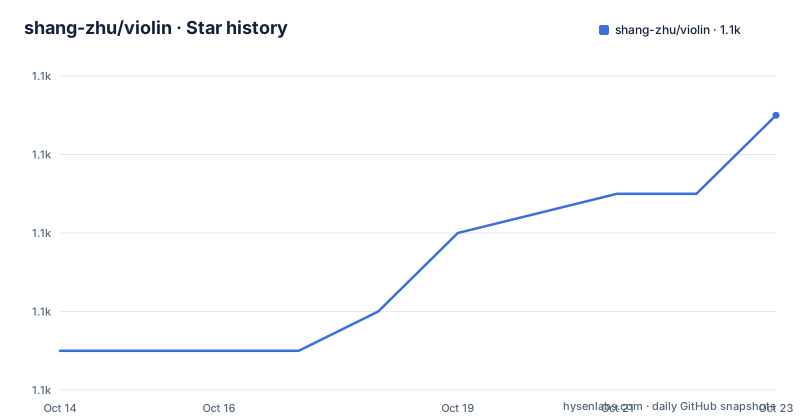
Star history
- shang-zhu/violin1,083 ★ · +6
| Repository | 2026-10-14 | 2026-10-23 |
|---|---|---|
| shang-zhu/violin | 1.1k | 1.1k |
6 Stars in the last 9 days, measured from the daily GitHub snapshot. Compare with other projects
Editorial analysis
One pipeline behind a CLI, a REST app and a skill
Violin exists for one narrow job: a lecture, a course clip or a news segment exists in one language and the audience speaks another. Point it at a file and the pipeline transcribes the speech, translates it, synthesizes a voice-over in the target language and remuxes that audio back into the original picture, with an SRT file as an option.
One core, three ways in. `violin` handles a single file from a shell, `violin-api` serves a FastAPI REST interface and a browser UI, and `violin --install-skill` copies a skill into `~/.claude/skills/` so a Claude Code session can ask for the job by name. Every stage is a remote call: transcription, translation, speech and the answering chat model each name a provider and a model id in `config/default.yaml`, and no local model appears there.
Coverage is uneven in a way the headline number hides. The project advertises 33 target languages, but handpicked native-speaker voices exist for the 16 most-used ones, on Cartesia Sonic 3 and ElevenLabs. In-video Q&A is part of the same package: a question about any moment in the finished video is answered from nearby subtitles plus sampled frames, and a natural-language voice picker lets you describe a voice instead of naming one.
Four model stages and two ffmpeg passes
Stage order carries the design here. `ffmpeg` first lifts the audio out of the picture as a 16 kHz WAV, which is what the speech model expects. Whisper Large v3 returns word-level timestamps, and Violin groups those words into sentence segments rather than treating the transcript as one block. An LLM, DeepSeek V4 Pro by default, translates each segment separately under the active style profile, so a long recording is handled in pieces instead of one shot. Cartesia Sonic 3 then synthesizes one dubbed clip per segment.
Those word timings are what make the timing work possible downstream. The pipeline knows when each word started and stopped in the source language, which gives it something concrete to compare the synthesized audio against.
No model name here is a requirement. Every stage is a provider plus a model string, and a YAML file passed with `--config` replaces whichever ones you want to change.
Speed alignment and the freeze-frame fallback
The second `ffmpeg` pass decides how the result looks, not only how it sounds. It speed-aligns the video track to the synthesized audio, so a translation that runs long is absorbed by slowing the picture rather than letting sound and image drift apart.
When the dubbed audio comes up short, the pipeline concatenates with a freeze-frame fallback that holds the last frame for the leftover time. On a talking-head recording that hold is easy to spot. The project is open about the half it has not built: voice cloning and lip sync generation both sit unchecked on the to-do list at the top of the repository.
Audio goes out in a single-pass AAC encode, and the same pass writes the MP4 plus the optional SRT. Nothing in that chain re-times a speaker's mouth, which makes the result a dubbed soundtrack laid over untouched video rather than a reanimated performance.
uv, ffmpeg and one provider key to get running
Two prerequisites come first: Python 3.10+ and an `ffmpeg` binary on PATH. The package is published as `violin`, and the route the README recommends is uv, which keeps the tool in its own environment instead of your active one.
curl -LsSf https://astral.sh/uv/install.sh | sh
uv tool install violin
Export a key for the provider you actually picked. Under the default Together stack one key covers transcription, the translating LLM and speech together.
export TOGETHER_API_KEY=...Then name the input, the output and the target language on a single line.
violin lecture.mp4 lecture_zh.mp4 --language ChineseThe web surface takes no arguments and binds to localhost instead.
violin-api`violin-api` answers on `http://127.0.0.1:8000` with the browser UI and on `http://127.0.0.1:8000/docs` with interactive API docs. Two more CLI flags matter: `--style` picks a profile and `--config` loads your own YAML. Working on the pipeline itself means running from a checkout, and an editable install makes later edits take effect on the next invocation with no rebuild.
git clone https://github.com/shang-zhu/violin.git
cd violin
uv sync
cp .env.example .envuv tool uninstall violin
uv tool install --editable .Swapping Together, OpenAI and ElevenLabs through YAML
Configuration is a single YAML file with deep merge. Write `my.yaml`, pass it with `--config my.yaml`, and only the keys you want to change need to appear; everything else falls back to `config/default.yaml`. Each of the four stages carries a `provider` and a `model`, and the inline comments name the alternative model for each provider.
models:
  transcription:
    provider: together                  # together | openai
    model: openai/whisper-large-v3      # together → openai/whisper-large-v3 | openai → whisper-1
  translation:
    provider: together                       # together | openai
    model: deepseek-ai/DeepSeek-V4-Pro-0813  # together → deepseek-ai/DeepSeek-V4-Pro-0813 | openai → gpt-5.5
  tts:
    provider: together                       # together | elevenlabs | openai
    model: cartesia/sonic-3                  # together → cartesia/sonic-3 | elevenlabs → eleven_v3 | openai → tts-1-hd
  chat:
    provider: together                       # together | openai — must be vision-capable
    model: zai-org/GLM-5.3-Flash             # together → zai-org/GLM-5.3-Flash | openai → gpt-5.5
Two constraints live in that block. The `chat` stage must be vision-capable, because in-video Q&A reads sampled frames next to nearby subtitles; a text-only chat model breaks that feature while translation keeps working. The same stage spends part of `chat.max_tokens` on thinking before it answers, and the shipped default is 4096. Point it at a model with a tighter budget and the API hands back an empty answer carrying `finish_reason: length`.
Keys follow your choices. `OPENAI_API_KEY` covers the OpenAI stages, `ELEVENLABS_API_KEY` covers ElevenLabs speech, and `TOGETHER_API_KEY` alone covers everything under the default config; an all-OpenAI stack works with `OPENAI_API_KEY` by itself. `CORS_ORIGINS` takes a comma-separated allow-list and defaults to `*`, which is convenient on localhost and wrong for a public deployment.
Six style profiles change prompt and speech speed
One flag, `--style`, does two jobs, because each profile feeds both the translation prompt and the speech synthesizer. `standard` is a faithful translation at 1.0x speed. `kids` rewrites the text for a 7-year-old in plain language and asks for an excited delivery. `academic` holds a formal register, preserves jargon and honorifics, slows to 0.95x and reads calm. `casual` moves the other way with slang and contractions, 1.1x and a content tone. `storyteller` is vivid, dramatic narration at 0.9x with an enthusiastic voice.
`news` is named in the feature list, but its tone, speed and emotion values are not shown in the style table. All six profiles are marked experimental, which is a fair warning for a setting that changes both what gets said and how fast it is spoken.
The docs say tts-1 while the config maps tts-1-hd
A few details reward a close read. The environment variable table says `OPENAI_API_KEY` covers `whisper-1`, GPT models and `tts-1`, and `.env.example` repeats `tts-1` in its own comment. The config comments for the same stage map the openai branch to `tts-1-hd`. Two project files disagree about which speech model an OpenAI deployment calls, and nothing in the repository settles it.
Then there is `yt-dlp>=2025.1.0` sitting in the dependency list while every documented input is a local file path and no URL input is described. `imageio-ffmpeg>=0.6.0` is a dependency too, while the README asks for `ffmpeg` on PATH and the Dockerfile installs the system ffmpeg through apt, so two sources of the same binary ship together. And `elevenlabs>=1.0.0` with `openai>=1.0.0` are unconditional, which means a pure Together install still downloads both SDKs even though a single key is all it needs.
Hosted demo, PyPI wheel or an editable checkout
Four routes reach the same output, and they differ in more than convenience. The hosted demo at `https://www.violin-ai.com` takes a short clip and returns a dubbed video in a few minutes, which costs nothing to try and hands your media to someone else's server while giving you no access to the config. The PyPI wheel installs two console scripts, `violin` and `violin-api`, and `pyproject.toml` declares version 0.1.2 with a `Development Status :: 4 - Beta` classifier. An editable install from a local checkout suits work on the pipeline, and `uv tool uninstall violin && uv tool install violin` moves you back to the published build.
Docker is the fourth. `docker compose up -d --build` after filling `.env` builds an image whose base is Python 3.13, mounts a named volume at `/app/jobs`, and starts the API under the production config.
CMD ["uv", "run", "run_api.py", "--host", "0.0.0.0", "--port", "8000", "--config", "config/prod.yaml"]`config/prod.yaml` adds upload limits, serializes jobs and caps ffmpeg concurrency, so a public deployment works through one video at a time. The compose file holds the API on port 8000 inside the network and lets Caddy publish 80 and 443 from the Caddyfile, which is how automatic HTTPS is added. The wheel itself packages only the pipeline, api and prompts directories, leaving `main.py` and `run_api.py` as scripts. The last push was on 2026-09-04, and the package is MIT licensed in `pyproject.toml`, so forking carries no copyleft obligation.
Editorial conclusion
Violin suits a small team that already pays for hosted speech and translation APIs and wants a finished MP4 plus SRT from one command. It is the wrong tool for lip sync, voice cloning or offline runs, and the project calls its own style profiles experimental. Before adopting, check which speech model an OpenAI deployment really receives, since the environment table and the config name different ones, and confirm the `chat` stage is vision-capable before promising in-video Q&A. Licence terms are MIT in pyproject.toml, so forking carries no copyleft obligation.
Frequently asked questions
What does violin need before it can dub a video?
Python 3.10+ and an ffmpeg binary on PATH, plus an API key for whichever provider you configure. The default Together stack of Whisper Large v3, DeepSeek V4 Pro and Cartesia Sonic 3 needs only `TOGETHER_API_KEY`.
Can I try violin without installing anything?
Yes, the live demo at https://www.violin-ai.com takes a short clip and returns a dubbed video. Locally, `violin --install-skill` copies a skill into `~/.claude/skills/` so a Claude Code session can request a translation by name.
Do all 33 violin target languages have handpicked voices?
No. Native-speaker voices were handpicked for the 16 most-used languages on Cartesia Sonic 3 and ElevenLabs, and the remaining languages fall back to whatever the configured speech provider offers.
How does violin keep the dubbed speech the same length as the original?
The pipeline speed-aligns the video to the synthesized audio and falls back to a freeze frame when the dubbed audio runs short. Lip sync generation and voice cloning are both still unchecked items on the project's to-do list.
How do I track which build of violin I have installed?
pyproject.toml records version 0.1.2 with a `Development Status :: 4 - Beta` classifier, and the repository root carries a CHANGELOG.md. The GitHub releases page is empty, so the package version is the only build marker.
Official sources
Add this badge to your README
If you maintain this project, the badge below links readers to this analysis and shows its maintenance status from the daily GitHub snapshot. Paste the markdown into your README; add ?metric=license or ?metric=stars to the image URL for a different field.

[](https://hysenlabs.com/projects/shang-zhu-violin)Star history chart for your README
[](https://hysenlabs.com/projects/shang-zhu-violin)Was this useful?