skillshare syncs one skills directory into every AI CLI, and on Windows your files may only get copied
📚 Sync skills across all AI CLI tools with one command and simplify team sharing. Supporting Codex, Claude Code, OpenClaw & more
At a glance
- What is it?
- skillshare is a Go tool that keeps skills, agents, rules, MCP connections and hooks in one source directory and fans them out to Claude Code, Codex, Pi and other tools. The interesting parts are the Windows link behaviour, the version numbers in the README against the release tags, and a dependency list that explains what the tool actually does.
- Who is it for?
- Use skillshare if you move between AI coding tools and want one copy of your skills instead of a folder per tool, and set your expectations for Windows before you start, because file symlinks there need Developer Mode and everything else degrades to a copy that will not travel back. Read the install script before you pipe it into a shell, since the documented path is a curl straight to sh.
- Can I use it commercially?
- Yes. MIT is a permissive licence: you can use, modify and sell software built on it, as long as you keep its copyright and licence notices.
- Is it still maintained?
- Yes. The repository received new commits within the last day.
- What is it written in?
- Mainly Go, according to GitHub's language statistics.
Answers come from the project's GitHub data, last synced on November 22, 2026, and from our analysis. They are not legal advice.
Star history
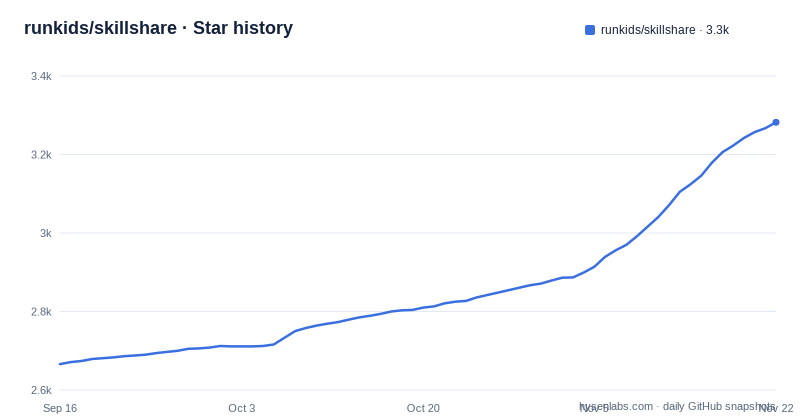
- runkids/skillshare3,282 ★ · +616
| Repository | 2026-09-16 | 2026-11-22 |
|---|---|---|
| runkids/skillshare | 2.7k | 3.3k |
616 Stars in the last 67 days, measured from the daily GitHub snapshot. Compare with other projects
Editorial analysis
The README names v0.24.0 as the latest while three releases shipped on one day
The release list holds v0.24.4, v0.24.3 and v0.24.2, all tagged on 2026-10-04, at 10:44, 08:11 and 06:27 UTC. The README's own callout, in a note box near the top, says latest is v0.24.0 and describes what that version changed: a redesigned init that asks first and writes only after you confirm, one output style and keymap shared by the command line tool and every TUI, a push --pull that syncs both ways in a single command, Markdown memory shared across agents, and per-target Pi extension switches with npm packages from pi.dev. None of that text mentions the three patch releases above it. If you are pinning a version for a team, take the number from the release list rather than from the README, since the two disagree by four releases.
Windows copies your files unless Developer Mode is turned on
The platform table is the most useful thing on the page. On macOS and Linux, skills, agents and extras are linked into each target with symlinks. On Windows the link type column reads: NTFS Junctions for folders, no admin required, and file symlinks need Developer Mode, otherwise copied. That conditional is the whole difference between editing in one place and editing in many. With Developer Mode on, a file change propagates. With it off, the file is copied into the target, so a later edit in the source directory never reaches the tool, and the divergence is silent. Folders still work without it. Nobody reading a skills marketplace listing will discover this, and the Windows PowerShell installer is given with the same brevity as the macOS one.
One source directory with three subdirectories, fanned out by sync
The configuration lives at ~/.config/skillshare/ on macOS and Linux and at %AppData%\skillshare\ on Windows. Inside it the source side is split three ways: skills/ holds SKILL.md files, agents/ holds agents, and extras/ holds rules, commands and similar material. A diagram shows that box on top, a single arrow labelled sync, and three target boxes below it, the first labelled Claude before the drawing stops. The quick start is the whole mechanism in two lines, creating the config, the source and the detected targets, then syncing:
skillshare init            # Create config, source, and detected targets
skillshare sync            # Sync skills to all targets
The point of the split is that each target can receive a filtered subset, which the documentation links to as choosing what each tool receives.
Four install paths, one of them a curl piped straight into a shell
macOS and Linux get a script:
curl -fsSL https://raw.githubusercontent.com/runkids/skillshare/main/install.sh | shIt installs to ~/.local/bin by default, so ordinary installs and updates avoid sudo, it prints PATH instructions if it needs them, and INSTALL_DIR moves the location. Windows has the PowerShell equivalent, and Homebrew is a one-liner:
brew install skillshareA separate desktop app lives in its own repository and installs through a cask. For CI there is a GitHub Action that runs setup-skillshare against a source directory and then runs sync, with audit, project mode and version pinning among its options. Upgrades are handled by a skillshare upgrade subcommand that detects how you installed. Note that the shell script is served from the main branch rather than from a tag, so the bytes you run are whatever that branch holds at the moment you run it.
The go.mod file explains the interface, the locking and the diffing
The module is built on Go 1.25.5, and the direct dependencies describe what the program does. The terminal side is a Charm stack: bubbletea, bubbles, huh for forms, lipgloss for styling, glamour for rendering, and alecthomas/chroma for syntax highlighting, which is what one output style across the CLI and every TUI would be built from. Two entries matter more than the rest. github.com/gofrs/flock is advisory file locking, which is how two concurrent syncs avoid corrupting each other. github.com/sergi/go-diff is diffing, which is the machinery behind showing what would change before writing. And github.com/tailscale/hujson is a JSON parser that tolerates comments, a deliberate choice for reading configuration files that people hand-edit.
The Makefile validates its own security tests by breaking things on purpose
The phony target list is long and includes test-unit, test-int, test-docker, a docker online install and update suite, lint, fmt, docs-check, and verify, described as a host environment with real AI CLIs and a throwaway config. Three targets are unusual. test-redteam runs red team supply-chain security tests. test-redteam-signal verifies that the red team test fails on an intentional mutation. test-redteam-rules-signal verifies that it fails when critical builtin rules are disabled. That is a detector checking itself: the project is confirming its security tests still catch things by breaking the code on purpose and expecting the failure. There is a .pre-commit-hooks.yaml at the root as well, so some of this runs before a commit lands.
The repository keeps its own skills, five translated READMEs and a video directory
The top level of a Go command line tool is unusually crowded. Alongside the expected cmd/, internal/, ui/, tests/, scripts/, docker/ and the .goreleaser.yaml and Makefile, there are skills/ and .skillshare/ plus a .skillignore, ai_docs/, proposals/, schemas/, wiki/, extensions/ and a video/ directory. There are also two agent instruction files, AGENTS.md and CLAUDE.md, and the README exists in five languages: English, Japanese, Korean, Simplified Chinese and Traditional Chinese. A .devcontainer and a docker-compose.sandbox.yml give you a containerised sandbox, while mise.toml and .air.toml handle tool versions and Go reloads. The repo is large enough to run its own tool on itself, which is at least consistent with what it sells.
The preview section is four table headers with nothing in the cells
The CLI and UI preview is a two by two table with the headings Skill Detail, Security Audit, UI Dashboard and UI Skills, and in the published page every one of those cells is empty, so the promised screenshots are not part of the README you actually get. The comparison table further down fares better but still ends abruptly: it sets imperative, install per command, against declarative, skillshare, and gives two complete rows, skills copied independently versus a single source with symlinks or copies, and re-running every install manually versus cloning the config in git and syncing, with the final row stopping partway through the phrase git clone config. What the page does not state anywhere is how conflicts are resolved when both sides changed.
Editorial conclusion
Use skillshare if you move between AI coding tools and want one copy of your skills instead of a folder per tool, and set your expectations for Windows before you start, because file symlinks there need Developer Mode and everything else degrades to a copy that will not travel back. Read the install script before you pipe it into a shell, since the documented path is a curl straight to sh. Two things to verify for yourself: that the version you install matches the release tag you meant, since the README's own latest callout trails the tags, and what the red team and audit commands actually check, because the Makefile shows those tests being validated by deliberately breaking the code they are supposed to catch.
Frequently asked questions
How do I install the skillshare command line tool?
Four documented paths. On macOS and Linux a script, `curl -fsSL https://raw.githubusercontent.com/runkids/skillshare/main/install.sh | sh`, which installs to ~/.local/bin by default and honours INSTALL_DIR; on Windows, `irm https://raw.githubusercontent.com/runkids/skillshare/main/install.ps1 | iex`; through Homebrew, `brew install skillshare`; or in CI with the runkids/setup-skillshare action followed by skillshare sync. The command skillshare upgrade auto-detects the method used.
Where does skillshare store its files and how does it reach other AI tools?
Config and source live in ~/.config/skillshare/ on macOS and Linux and %AppData%\skillshare\ on Windows, split into skills/, agents/ and extras/. Sync links that source into each detected target, using symlinks on macOS and Linux, and the README points to a documentation page on filtering what each tool receives.
Does skillshare work properly on Windows?
With one caveat the README spells out. Windows uses NTFS Junctions for folders, which need no admin rights, but file symlinks require Developer Mode; without it, files are copied into the target instead of linked, so later edits in the source directory do not propagate. Configuration lives at %AppData%\skillshare\.
What is the latest version of skillshare?
The release list shows v0.24.4, v0.24.3 and v0.24.2, all tagged on 2026-10-04. The README's own note box still describes v0.24.0 as the latest and summarises what it added, so the page trails the tags by four releases. Pin from the release list rather than from the README text.
Can skillshare check skills before they are used?
The documentation links an audit page for reviewing skills before use, and the setup-skillshare GitHub Action lists audit among its options, alongside project mode and version pinning. The Makefile also carries test-redteam for supply-chain security tests, plus two targets that verify those tests fail on an intentional mutation and when critical builtin rules are disabled.
Does skillshare sync in both directions?
The README's note about v0.24.0 mentions a push --pull that syncs both ways in one command. The design it describes is declarative rather than per-command: a single source linked into each tool, so on macOS and Linux a change on either side is the same file, and on Windows it depends on whether Developer Mode is enabled for files.
Official sources
Add this badge to your README
If you maintain this project, the badge below links readers to this analysis and shows its maintenance status from the daily GitHub snapshot. Paste the markdown into your README; add ?metric=license or ?metric=stars to the image URL for a different field.

[](https://hysenlabs.com/projects/runkids-skillshare)Star history chart for your README
[](https://hysenlabs.com/projects/runkids-skillshare)Was this useful?