Maestro shipped three releases in one day, two of them labelled security releases, and its manifest matches none of them
Agent Orchestration Command Center. Note: Maestro supports Claude Code, OpenAI Codex, OpenCode, Factory Droid, and Copilot-CLI (beta).
At a glance
- What is it?
- Maestro is an AGPL-licensed TypeScript desktop app for running several AI coding agents in parallel across git worktrees, supporting five agent providers and shipping as an Electron application with two command line binaries. Its repository root carries eleven files named after one assistant's product, a second assistant-branded feature with a registry checked into the root, and a build that rewrites its own version number before packaging.
- Who is it for?
- Use Maestro if you are already running two or more coding agents at once and the friction is orchestration rather than the coding: parallel branches, unattended batches that resume, a queue for messages that arrive while an agent is busy, and one window instead of five terminals. It is explicitly a pass-through, so your existing authentication and tool configuration carries over unchanged, which is the feature that makes it a wrapper rather than a competitor.
- Can I use it commercially?
- Yes, with strict conditions. AGPL-3.0 is a network copyleft licence: if people use a modified version over a network, for example as a hosted service, you must offer them its source code under the same licence.
- Is it still maintained?
- Yes. The repository received new commits within the last day.
- What is it written in?
- Mainly TypeScript, according to GitHub's language statistics.
Answers come from the project's GitHub data, last synced on November 14, 2026, and from our analysis. They are not legal advice.
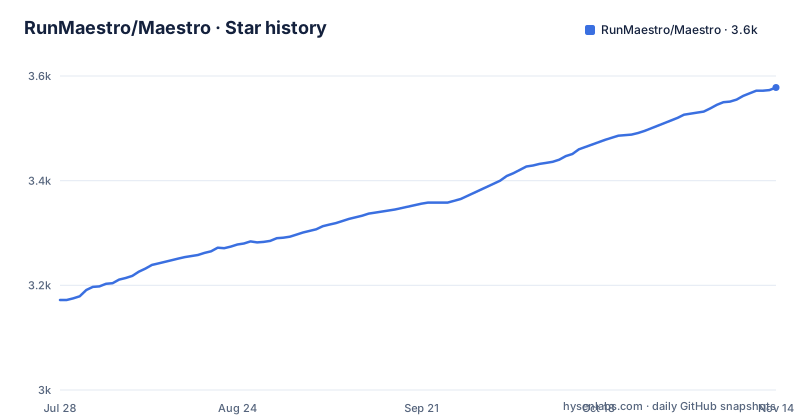
Star history
- RunMaestro/Maestro3,578 ★ · +406
| Repository | 2026-07-28 | 2026-11-14 |
|---|---|---|
| RunMaestro/Maestro | 3.2k | 3.6k |
406 Stars in the last 109 days, measured from the daily GitHub snapshot. Compare with other projects
Editorial analysis
Three releases in one day, two of them labelled as security releases
The three newest tags share a date, and the middle one is a week behind the newest.
The oldest of the three is a feature release titled with a product name, published in the evening. Under two hours later comes a tag one minor version lower, titled as a security release. Then, in the small hours of the next day, another tag jumps forward to a higher minor version, is marked as a release candidate rather than a final, and is also titled as a security release.
So within about four hours the project published two security releases, one of them ahead of the other in version number and one behind it, and the later one is a candidate.
That pattern is consistent with a security issue being fixed, patched across two branches that were both in flight, and tagged independently on each. It is also the pattern that makes a version number useless as a description of what you are running.
Which brings us to the manifest.
"version": "0.17.9",That matches neither tag. It sits between the lower security tag and the higher release candidate, which is consistent with the branch being ahead of every published tag and with the packaging step rewriting this number before a release is cut.
Eleven files named after one assistant, a constitution, and an agents file
The repository root is where this project's conventions are visible, and the naming is the convention.
There are eleven documentation files whose names begin with a specific AI assistant's product name, each covering a different subsystem: agents, features, inter-process communication, patterns, performance, platform, plugins, sessions, settings, a wizard, and one general file with that same prefix. Beside them sit an agents file, a constitution, and a directory named after the same assistant.
So one assistant's product name is the prefix of a dozen files and a directory in a project that supports five different agent providers.
The constitution file is the one worth opening first. A constitution in an open source repository is usually a short statement of what the project will not do, and its presence next to a dozen assistant-specific documents suggests the project is trying to hold a line as its own documentation grows.
A second brand appears alongside it. Two documentation files and one JSON registry at the root are named after a different concept, a feature called Symphony, with a registry checked into the repository and a separate issues document. The newest feature release in the list is titled with a third name that matches one of the assistant-prefixed files.
Three naming systems for one codebase, which is what happens when features are named after whatever the author was using that week.
Two command line binaries are published and one is described
The manifest publishes two executables, and the README mentions one of them.
The documented one is a command line interface for headless operation: it lists agents and groups, runs playbooks from scheduled jobs or pipelines, and emits either human-readable output or line-delimited JSON for scripting. That is a real feature with a documented page behind it.
The second binary has its own build step in the scripts and its own entry point in the output directory, and it is not named anywhere in the README.
So there are two command line tools in this project, and a reader of the documentation will find one. Whether the second is a deprecated alias, an internal helper, or a second tool the author forgot to document is not answerable from the files.
The same asymmetry runs through the scripts. There is a script that generates command line reference documentation, so the undocumented binary could be documented in generated output somewhere.
For anyone automating against this project, the practical consequence is small but real: install the package and you get two commands, and only one of them is described anywhere you would look.
The build rewrites its own version, and the verification step is not in the build
The packaging script runs a version-setting tool twice, wrapping two different commands.
The first invocation sets the version and then runs the ordinary build. The second sets the version again and then invokes the desktop application packager for macOS.
So the number in the manifest is not the number that ships. It is a value that gets written at packaging time, which explains why the committed version sits between two release tags: the file on the branch is whatever the last local build left there.
Next to that, the build chain writes a build provenance file, and there is a second script that verifies the same file. The verify script has a name and a flag, and it is not part of the build.
That is the finding. A provenance record exists, and a check for it exists, and the default build path never runs the check. It is available for a release pipeline to call, and nothing calls it.
So the build produces evidence about itself and does not test the evidence. Worth wiring in before trusting it, and worth asking about, because a verification step that is never run is indistinguishable from no verification step.
Remote control is a built-in web server with QR codes and a tunnel
One of the eight power features is reaching the app from a phone.
The mechanism is a web server inside the desktop application, reachable over the local network by scanning a QR code, with an option to tunnel outward through a third-party tunnel service so it works from anywhere.
That is the most security-relevant thing in the project, and the README describes it in one line with no authentication detail, no mention of bind address, and no mention of what an authenticated session is allowed to do beyond monitor and control the agents.
The stakes come from what the agents themselves can do. The project's own premise is that it is a pass-through, so whatever tools, skills, permissions and authentication the underlying provider has configured work identically inside Maestro. An unauthenticated path into that surface is a path into the developer's shell.
The repository does ship a security policy, and there is a document describing agent resilience that reads as though someone has thought about failure modes carefully. Whether anyone has thought about the remote channel is not visible from these files.
If you enable it, bind it to a network you trust, and treat the tunnel option as an exposure rather than a convenience.
Two of the three demo videos point at the same address
The video block near the top of the README lists three links with runtimes attached.
A one-minute introduction. A twenty-seven-minute walkthrough and demo. And a six-minute onboarding demo.
The one-minute and six-minute links carry the same address, and they are the same link in the source, down to the tracking parameters. Only the walkthrough has its own.
So two of the three are the same video, described as two different things, one of them labelled by its length as an introduction and the other as an onboarding walkthrough of six minutes.
This matters more than a stray link because of who it excludes. A walkthrough of twenty-seven minutes assumes you already know what the application is. A six-minute onboarding video is for someone who does not. And the one-minute clip is presumably the same twenty-seven-minute video mislabelled, or a longer one described as a minute.
Anybody evaluating this project is being offered one long video twice and nothing that resembles a short introduction.
Five compiler configs, four test configs, and a second linter config about dashes
Count the configuration files and the project's shape emerges.
There are several TypeScript configurations at the root, separate ones for the main process, for the command line tools, for the lint pass and for the renderer. There are four test configurations, split across unit, end-to-end, integration and performance runs. There are two bundler configurations, one for the application window and one for the web build, and separate styling configurations.
The split is the architecture showing through: an Electron main process, a renderer, a web target, a command line tool, and a separate entry point for the undocumented binary.
Two files in that list are worth singling out. There is a linter configuration, a directory of custom linter rules, and a second linter configuration whose filename is about dashes.
A whole separate configuration file for a punctuation rule is either a rule so contentious it needs its own pass, or a scar from a large mechanical change. Both are common in repositories with automated formatting, and both are the kind of detail that only shows up in the file listing.
Also at the root: a review-bot configuration file, a hooks directory for git, and a directory for the desktop application's own build output.
Parquet preview claims to skip row groups it can prove cannot match
One core feature makes a specific performance claim, and it is the most interesting sentence in the README.
Parquet files open as a live, filterable table with a schema rail beside them, and a typed query language runs against the whole file: an example filter is a timestamp comparison combined with a numeric threshold.
The claim is what makes it more than a viewer. While filtering, the application skips the row groups it can prove cannot match, so a file of several gigabytes filters instantly and never loads into memory.
That is a real engineering claim and a specific one. It says the pruning is based on proofs rather than heuristics, from row-group statistics rather than from sampling, and that the consequence is a filter which does not touch the bytes it can rule out.
It is also the only performance claim in the README with a mechanism attached. The Parquet section says what it does and why it is fast. The agent resilience section describes backing off and failover without a number. And the opening paragraphs record a personal best of nearly twenty-four hours of continuous unattended runtime, which is a claim about one machine and one configuration.
Everything else in this project describes itself in terms of what it does. This one describes itself in terms of what it skips.
Editorial conclusion
Use Maestro if you are already running two or more coding agents at once and the friction is orchestration rather than the coding: parallel branches, unattended batches that resume, a queue for messages that arrive while an agent is busy, and one window instead of five terminals. It is explicitly a pass-through, so your existing authentication and tool configuration carries over unchanged, which is the feature that makes it a wrapper rather than a competitor. Three things to check first. The remote access surface, because the mobile control feature runs a web server with QR-code entry and can tunnel outward, and that is a control channel into whatever your agents can reach. What you are getting version-wise, since the manifest's version number does not match any release tag and the packaging step rewrites it. And how many binaries you will actually use, because two are published and only one is described anywhere in the README.
Frequently asked questions
What is Maestro?
It is a cross-platform desktop application for orchestrating several AI coding agents and projects at once, written in TypeScript, packaged as an Electron application, and licensed AGPL 3.0. It currently supports Claude Code, OpenAI Codex, OpenCode, Factory Droid and Copilot-CLI in beta, with another tool named as planned based on user demand. The repository is not archived and the last push to the default branch main is dated 2026-10-04.
Does Maestro need its own AI account or API key?
No. The README describes it as a pass-through to your AI provider: whatever tools, skills, permissions and authentication you have configured in the underlying agent work identically inside Maestro. The only stated difference is that it is not running interactively, since each task receives a prompt and returns a response, whether that is a new session or a resumed one.
How does Maestro run several agents in parallel?
With git worktrees. You create sub-agents from a branch menu and each one operates in its own directory, so you can work in the main repository while sub-agents process tasks independently and then open pull requests. Each agent also gets its own workspace, conversation history and isolated context, and a group chat feature adds a moderator agent that routes questions to other agents and synthesises their answers.
What is the Maestro command line interface?
A headless binary documented in the README for listing agents and groups and for running playbooks from scheduled jobs or pipelines, with output that is either human-readable or line-delimited JSON for scripting. The package manifest publishes a second binary alongside it, with its own build step, which the README does not describe.
What happens when an AI provider fails in Maestro?
There is a resilience feature that resends the exact prompt when a turn dies on an overload status or a spent plan quota, backing off in seconds for a brief failure or waiting for the reset time read out of the error. Auto Run batches resume themselves, a single status card replaces a wall of error dialogs, and an agent can optionally fail over to a backup endpoint instead of waiting out the window.
Can I control Maestro from my phone?
Yes, through a mobile remote control feature built on a web server inside the application, reachable over the local network by scanning a QR code, with an option to tunnel outward through a third-party tunnel service for access from anywhere. The repository ships a security policy, and the README does not describe how that remote channel is authenticated, which is worth establishing before enabling it.
Official sources
Add this badge to your README
If you maintain this project, the badge below links readers to this analysis and shows its maintenance status from the daily GitHub snapshot. Paste the markdown into your README; add ?metric=license or ?metric=stars to the image URL for a different field.

[](https://hysenlabs.com/projects/runmaestro-maestro)Star history chart for your README
[](https://hysenlabs.com/projects/runmaestro-maestro)Was this useful?