OpenCodex: A Local Proxy That Lets Codex and Claude Code Run Any LLM
Universal provider proxy for OpenAI Codex & Claude Code, use any LLM (Claude, Gemini, Grok, DeepSeek, Ollama…) with Codex CLI, App, SDK, and Claude Code.
At a glance
- What is it?
- OpenCodex is a TypeScript-based local proxy that translates Responses, Chat Completions and Anthropic Messages requests into whatever 40+ built-in providers speak, letting Codex, Claude Code, Claude Desktop, and Grok Build use models like Gemini, DeepSeek, or Ollama. It also manages ChatGPT account pools for Codex auth, but its approach comes with real trade-offs.
- Who is it for?
- Adopt OpenCodex if you want to break the model lock-in of Codex or Claude Code without leaving their native UIs, and if you are comfortable running a local proxy with bundled Bun and managing provider credentials yourself. Skip it if you cannot accept the risk of account pooling for ChatGPT/Codex auth, or if your organization forbids third-party proxies for security or compliance reasons.
- Can I use it commercially?
- Yes. MIT is a permissive licence: you can use, modify and sell software built on it, as long as you keep its copyright and licence notices.
- Is it still maintained?
- Yes. The repository last received commits 1 day ago.
- What is it written in?
- Mainly TypeScript, according to GitHub's language statistics.
Answers come from the project's GitHub data, last synced on November 12, 2026, and from our analysis. They are not legal advice.
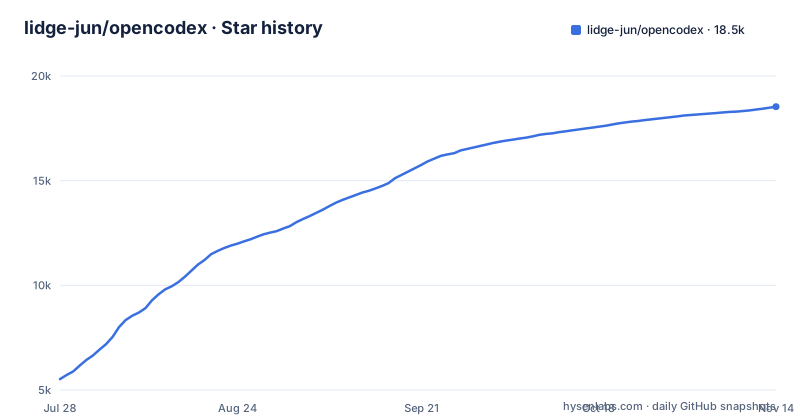
Star history
- lidge-jun/opencodex18,438 ★ · +12,918
| Repository | 2026-07-28 | 2026-11-12 |
|---|---|---|
| lidge-jun/opencodex | 5.5k | 18.4k |
12,918 Stars in the last 107 days, measured from the daily GitHub snapshot. Compare with other projects
Editorial analysis
What OpenCodex Actually Fixes
The proxy listens on localhost:10100 and exposes a web dashboard for configuration. You add providers either from 40+ built-ins or any OpenAI-compatible endpoint, pick models, and manage accounts. The dashboard is also where you configure the ChatGPT account pool for Codex auth. The install needs Node 18+, but the proxy's scripts run on Bun, which is bundled automatically on npm install, so you do not need to install Bun separately.
The Two-Command Setup and Its Hidden Details
The quick start is genuinely short: `npm install -g @bitkyc08/opencodex` and then `ocx start`. That starts the proxy and dashboard on localhost:10100. For background operation, `ocx service` runs it as a service, and `ocx gui` reopens the dashboard. From the terminal, `ocx init` is run before adding providers in the dashboard, and accepting its Codex prompt connects Codex. For Claude Code, `ocx claude` starts the proxy if needed and launches Claude Code through it. `AGENTS_INSTALL.md` lists everything the install writes to disk.
Account Pooling: The Feature That Carries Real Risk
One of the most distinctive features is the ChatGPT account pool for Codex auth. You add accounts, refresh their quotas in the dashboard, and let new sessions auto-route to the lowest-usage healthy account, while existing threads stay pinned to the account that started them. Pooling several accounts against one provider is something to check against that provider's terms before relying on it. If you are an enterprise user, account pooling might be a non-starter due to terms of service concerns.
Combos and Sub-Agent Routing: Where the Proxy Gets Smart
Beyond simple translation, the README's examples show models handing work to each other: in Claude Desktop, Opus answers and then hands the task to a GPT-5.6 Sol subagent, and in Grok Build, Sol drives the session and calls a Kimi K3 subagent. This is a different level of control than a simple proxy; it is orchestrating which model handles which part of a conversation. The trade-off is a layer of abstraction that can be hard to debug, so if a routed request fails, you need to understand the routing to see why.
Platform Support and Service Management
The CLI requires Node 18+, and the Bun runtime is bundled on npm install, so no separate Bun install is needed; package.json lists bun under trustedDependencies so its install scripts may run. `ocx service` runs the proxy in the background, which matters for long-running use with Codex or Claude Code. There is also a beta desktop app with a tray and bundled `ocx`: a universal macOS 13+ build signed with a Developer ID and notarized, a Windows x64 .msi whose code signing via SignPath Foundation is still rolling out, and a Linux x86_64 AppImage or .deb whose tray needs an AppIndicator-capable desktop. Every file has a `.sha256` next to it on the release page. For containers, the repository ships a Dockerfile and a `compose.yaml` that binds port 10100 to 127.0.0.1 by default.
Limitations and the Wrong Tool Cases
OpenCodex is not a magic bullet. It is a local proxy, so it must be running whenever you use Codex or Claude Code with a non-native model. If the proxy crashes or is stopped, your tools will fail to connect. Also, the proxy adds a hop between the client and the provider, which could introduce latency, though the README does not quantify it. For users who only use OpenAI models with Codex, the proxy is unnecessary overhead. For users who need strict compliance with provider terms, the account pooling feature is a red flag; the very existence of the feature could be a problem in regulated environments. If you rely on provider-specific features, you need to test them. The README says it handles streaming, tool calls, reasoning tokens, and images, but it does not guarantee feature parity across all providers. The version numbers show a rapid release cycle, with v2.94.0, v2.95.0 and v2.96.0 all within three days, which suggests active development but also a moving target. Upgrading frequently might be necessary to get fixes, but it also means you need to watch for breaking changes.
Alternatives and How They Differ
The main alternative to OpenCodex is using a provider's own native client or a direct API integration. For example, you could use the official Claude Code with an Anthropic API key, or use Codex with an OpenAI key, and skip the proxy entirely. That is the simplest approach, but it locks you into one provider. Another alternative is to use a generic API gateway like LiteLLM, which also provides a proxy to route requests to multiple providers. The difference is that LiteLLM is a more general-purpose gateway, while OpenCodex ships client-specific setup such as `ocx claude`, `ocx claude desktop` and the dashboard's Codex switch. OpenCodex's edge is that it is purpose-built for these specific clients, so the dashboard and the account pool are tailored to Codex and Claude Code. If you only need to switch providers occasionally and do not need account pooling, a simpler proxy or direct API calls might be less complex.
Maintenance, Upgrade Cost, and License
The project is MIT-licensed, which means you can use, modify, and distribute it freely, but you get no warranty. The maintenance cost is tied to the rapid release cadence: with three releases in three days, you will likely need to update often to get bug fixes and new features. You would need to check the releases page for each version. The license implications are straightforward: MIT allows commercial use, but you are responsible for how you use the proxy, especially the account pooling feature, which may violate provider terms if misused.
Editorial conclusion
Adopt OpenCodex if you want to break the model lock-in of Codex or Claude Code without leaving their native UIs, and if you are comfortable running a local proxy with bundled Bun and managing provider credentials yourself. Skip it if you cannot accept the risk of account pooling for ChatGPT/Codex auth, or if your organization forbids third-party proxies for security or compliance reasons. Before adopting, verify the current version's handling of streaming, tool calls, and reasoning tokens against your primary provider, test the combo failover behavior with your actual workloads, and check your provider's terms before pooling accounts. The project's rapid release cadence (v2.94.0 to v2.96.0 within three days) means you should pin a specific version and review changes before upgrading.
Frequently asked questions
What is opencodex?
It is a lightweight local gateway that accepts the Responses, Chat Completions and Anthropic Messages APIs and translates each request into whatever your provider speaks, carrying streaming, tool calls, reasoning and images where the client, model and provider support them. That lets Claude, Gemini, Grok, GLM, DeepSeek, Kimi, Qwen, Ollama or any OpenAI-compatible endpoint run inside Codex, Claude Code, Claude Desktop and Grok Build.
Does opencodex need Node installed before the npm install?
Node 18 or newer is the stated requirement, and the Bun runtime is bundled automatically by the package rather than installed separately. package.json also lists bun under trustedDependencies so its install scripts may run.
Where does the opencodex dashboard run?
On localhost:10100 by default, served by the same process as the proxy. `ocx start` brings up both, `ocx gui` re-opens the dashboard later, and `ocx service` runs it in the background. The compose file makes the host-side port overridable through OPENCODEX_PORT while the bind address defaults to 127.0.0.1.
Will an existing opencodex session stay on the same ChatGPT account?
Yes, existing threads stay pinned to the account that started them, while new sessions auto-route to the lowest-usage healthy account.
Can I install the opencodex desktop app on Windows without problems?
Code signing for the Windows x64 .msi via SignPath Foundation is rolling out; until a release is signed, SmartScreen asks once and you choose More info and then Run anyway. macOS builds are signed with a Developer ID and notarized, and the Linux tray requires an AppIndicator-capable desktop.
Official sources
Add this badge to your README
If you maintain this project, the badge below links readers to this analysis and shows its maintenance status from the daily GitHub snapshot. Paste the markdown into your README; add ?metric=license or ?metric=stars to the image URL for a different field.

[](https://hysenlabs.com/projects/lidge-jun-opencodex)Star history chart for your README
[](https://hysenlabs.com/projects/lidge-jun-opencodex)Was this useful?