Folo, the RSS reader still calling its packages @follow
Folo is the AI RSS Reader. Dynamic Content Support Because we know content is more than just text.
At a glance
- What is it?
- Folo is an AGPL-3.0 RSS reader published as a web app, four store builds and a set of community Linux packages, from a private pnpm monorepo whose package scope and repository URL still say follow. The install table covers the client on six platforms and says nothing about running your own instance.
- Who is it for?
- Adopt Folo if you want an RSS client on every platform your devices run and you are content to take the store or release build, because the table covers nothing else. Do not adopt it as a self-hosted service on the strength of the AGPL licence and the presence of api/, since the install table documents no deployment path for your own instance.
- Can I use it commercially?
- Yes, with strict conditions. AGPL-3.0 is a network copyleft licence: if people use a modified version over a network, for example as a hosted service, you must offer them its source code under the same licence.
- Is it still maintained?
- Yes. The repository last received commits 3 days ago.
- What is it written in?
- Mainly TypeScript, according to GitHub's language statistics.
Answers come from the project's GitHub data, last synced on November 13, 2026, and from our analysis. They are not legal advice.
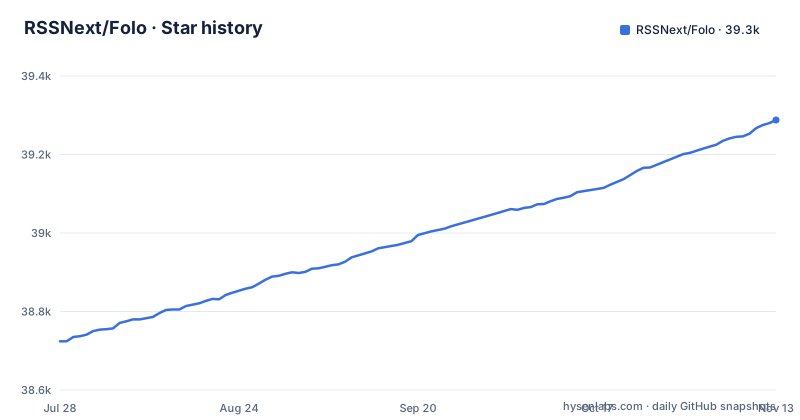
Star history
- RSSNext/Folo39,288 ★ · +564
| Repository | 2026-07-28 | 2026-11-13 |
|---|---|---|
| RSSNext/Folo | 38.7k | 39.3k |
564 Stars in the last 108 days, measured from the daily GitHub snapshot. Compare with other projects
Editorial analysis
Six destinations in the install table, and no server among them
The getting-started table is a routing table, not a set of instructions. Every cell is a link. Any platform gets the hosted web app at app.folo.is, iOS and macOS both point at the App Store listing id6739802604, Android points at the Play Store listing is.follow, and Windows points at the Microsoft Store listing 9nvfzpv0v0ht. Linux has exactly one destination, the GitHub releases page. Android, macOS and Windows each list the releases page as a second option, so Linux is the platform with no store fallback.
Below that sits a second list of community packages, each with the maintainer named: folo-appimage from the Arch User Repository, Folo from FlatPark for Flatpak users, a package from nixpkgs, a Homebrew cask named folo, and a Scoop manifest named folo.
Read together, the two lists cover the reader application and nothing else. Every destination is a binary or a store listing for a person to run, and the repository does contain api/, apps/, packages/ and a vercel.json, so a server exists somewhere in the tree. The install table does not document how to stand one up. If your requirement is an instance you control, this table cannot answer it, and the AGPL licence is a promise about source availability rather than a deployment guide.
The package scope is @follow while the app in apps/ is Folo
The rename is visible in the build scripts, where two naming systems sit side by side:
"build:web": "turbo run Folo#build:web""dev:web": "turbo run @follow/web#dev @follow/ssr#dev"One target is addressed by its app name, the others by a scope that predates the product name. The same split runs through the metadata: the package is called @follow/monorepo, its description is still Follow everything in one place, the homepage field points at https://github.com/RSSNext, and the repository URL is https://github.com/RSSNext/follow. The community packages use the new name: the Homebrew cask, the Nix package and the Scoop manifest are named folo, and the AUR package is folo-appimage.
For a reader this is cosmetic. For anyone working in the tree it is a naming mismatch to keep in mind. The default branch is dev, not main, so a fresh clone lands on dev.
AGPL-3.0-only plus a private flag means you cannot npm install it
The root package.json sets private to true and the package name to @follow/monorepo. Private is the field that matters for adoption: it marks the root as unpublishable, and the top-level entries include pnpm-workspace.yaml, pnpm-lock.yaml, packages/ and apps/ rather than a single distributable. There is no published artifact to install from a registry, so if your plan was to add Folo as a dependency, that plan ends at the package.json.
Licensing is the more consequential line. The licence field reads AGPL-3.0-only, and a LICENSE file sits at the root next to SECURITY.md, CODE_OF_CONDUCT.md, CONTRIBUTING.md and AGENTS.md. The copyleft reach of the Affero variant is the part to think about before you build on it: the obligations attach to modified versions offered to users over a network, which is exactly the shape of a service, and not to a private script that never leaves your machine. The README says the project is under active development and welcomes issues, and the last push was on 2026-11-02.
Do not take the word AGPL as a decision. Open LICENSE, and if you intend to run a modified instance for other people, get that read right before you build the deployment around it.
Running from source fires a turbo build from postinstall
There is no install command anywhere in the table, so a from-source route has to be assembled from the root scripts. The package manager is pinned to [email protected] through the packageManager field, and the toolchain itself is handled by corepack:
"prepare": "simple-git-hooks && corepack prepare"Two scripts run before you ever see a page. The postinstall hook runs scripts/link-cf-build-tools.mjs and then pnpm run build:packages, and build:packages is a turbo run build filtered to the workspace packages directory. So pnpm install is not a download step. It finishes by building every package under packages/ through turbo, which is why a slow first install is normal here and why a broken workspace shows up as a postinstall failure rather than a type error later. The dev server itself is one command:
pnpm run dev:webwhich expands to the @follow/web and @follow/ssr dev targets shown earlier. If a version of pnpm other than 12.5.1 is active, corepack and the packageManager field are what stop the install from drifting into an unresolvable lockfile.
patches/ and plugins/ are what you inherit when a dependency moves
The top-level listing includes patches/, plugins/, scripts/ and a turbo.json, alongside the usual configuration. patches/ at the root of a pnpm monorepo is a directory of local modifications applied on top of registry dependencies, and its presence tells you the project has needed to change the behaviour of something upstream. The root scripts reinforce that: a reinstall recipe exists that removes node_modules three times over, once at the root and once under apps/ and packages/, before reinstalling.
A clean break in a patched dependency shows up as a failure inside pnpm install or inside the turbo build that postinstall triggers, not as a message you can read and act on. typecheck runs through turbo and test runs cross-env CI=1 pnpm --recursive run test, with vitest.workspace.ts and vitest.workspace.js both committed, so there is a test surface to point a failing change at.
For a fork, the practical cost is that dependency upgrades are not a routine chore. Each bump is a candidate for a new patch, and the check is whether postinstall still completes.
One icon pipeline converts SVG into React Native components
icons/ sits at the top level and the sync script names the file it runs. The icons:sync command chains three steps: a TypeScript script at scripts/svg-to-rn.ts converts SVG sources into React Native components, prettier formats the generated tsx files under apps/mobile/src/icons, and eslint fixes them again. There is a sibling update script, icons:update, pointing at scripts/update-icon.ts.
The script converts SVG sources into the mobile app React Native icon components. The two-pass format and fix at the end of the command exists because generated code does not come out compliant. If you add an icon, you run the sync script and commit whatever lands in apps/mobile/src/icons, you do not hand-write the component.
locales/ is an eslint target, so a new string is a two-file change
Translations are a first-class part of the tree rather than a per-app afterthought. locales/ is a top-level directory, and the root script named dedupe:locales runs eslint --fix across that directory.
For a contributor the practical consequence is that touching a user-facing string is never a one-line change. You add the key in the interface code, the locale files need the matching entry. For a translator working outside the monorepo, the same directory is the whole surface, since there is no separate translation repository in the top-level listing. The repository also carries .agents/, .codex/, .cursorignore and AGENTS.md next to .vscode/.
Two release trains, and the AI claim has no feature list behind it
Releases are versioned per platform with the platform in the tag name: desktop/v1.17.0 and mobile/v0.6.2 both shipped on 2026-11-02, and mobile/v0.6.1 on 2026-10-19. The desktop is on a 1.x line and the mobile app is still at 0.6.x, so the two clients are at different levels of stability on the same day. Anything scripted against releases has to filter on the tag prefix, because there is no single version to ask for.
The other thing to weigh is what the README promises about AI. The repository description calls Folo the AI RSS Reader and adds a line about dynamic content support. The feature section opens with Folo AI: ask about an article, a feed, a folder or everything you follow, pick your AI model or bring your own API key, and connect MCP services. Timeline Summary and AI Translation and Summaries (English, Chinese, Japanese or French) follow.
So the AI capability is described in the README as a set of named features, including an option to bring your own API key.
Editorial conclusion
Adopt Folo if you want an RSS client on every platform your devices run and you are content to take the store or release build, because the table covers nothing else. Do not adopt it as a self-hosted service on the strength of the AGPL licence and the presence of api/, since the install table documents no deployment path for your own instance. Before you fork, check two things: that `pnpm run dev:web` still resolves, given that the scope is @follow while the app target is named Folo, and that LICENSE really is AGPL-3.0-only, since the package description still reads Follow everything in one place.
Frequently asked questions
Can I self-host Folo?
The install table covers the client application only, on six platforms, and gives no deployment steps for your own instance. The repository does contain api/, apps/, packages/ and a vercel.json, so a server exists in the tree, but the path from a clone to a running service you own is not written down anywhere in the table.
What licence is Folo under?
The root package.json declares license as AGPL-3.0-only and a LICENSE file sits at the repository root. The package itself is marked private, so there is no registry artifact to install, and anyone running a modified copy as a service for other people needs to read that file first.
How do I install Folo on Linux?
The table gives Linux one destination, the GitHub releases page. Community packages exist for three other Linux routes: the folo-appimage package in the Arch User Repository, Folo from FlatPark for Flatpak users, and a package named folo in nixpkgs.
Does Folo have an Android or Windows app?
Both, plus a release build as a second option for each. Android points at the Play Store listing is.follow and Windows at the Microsoft Store listing 9nvfzpv0v0ht, and the community list adds a Scoop manifest named folo for Windows users. macOS and iOS both resolve to the same App Store listing id6739802604.
Do Folo's AI features need an API key or a subscription?
The README says you can pick your AI model or bring your own API key, and connect MCP services to bring your other tools into Folo AI. The install table lists no paid tier.
Official sources
Add this badge to your README
If you maintain this project, the badge below links readers to this analysis and shows its maintenance status from the daily GitHub snapshot. Paste the markdown into your README; add ?metric=license or ?metric=stars to the image URL for a different field.

[](https://hysenlabs.com/projects/rssnext-folo)Star history chart for your README
[](https://hysenlabs.com/projects/rssnext-folo)Was this useful?