The one file behind sersavan's shadcn multi-select, and the five blocks it expects
A multi-select component designed with shadcn/ui
At a glance
- What is it?
- This shadcn/ui multi-select is not distributed as a package but as one TypeScript file you copy into your own components folder. Everything it needs around that file, path aliases, a cn helper, five shadcn/ui blocks and the Radix primitives behind the overlay, is your project's job first and the install step second.
- Who is it for?
- Adopt this file if your project already runs shadcn/ui on Next.js with a working path alias, and you want badges, grouping and keyboard filtering without writing them yourself. Pass on it if you need something npm can upgrade, or if you are on Create React App and have to eject to set up aliases first.
- Can I use it commercially?
- Yes. MIT is a permissive licence: you can use, modify and sell software built on it, as long as you keep its copyright and licence notices.
- Is it still maintained?
- Yes. The repository last received commits 57 days ago.
- What is it written in?
- Mainly TypeScript, according to GitHub's language statistics.
Answers come from the project's GitHub data, last synced on October 23, 2026, and from our analysis. They are not legal advice.
Star history
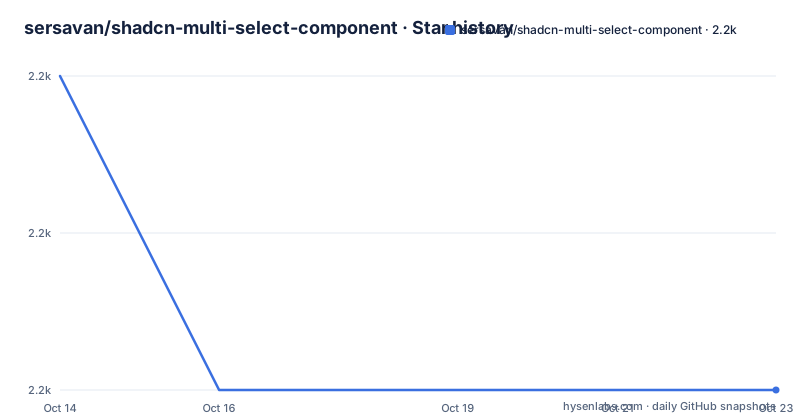
- sersavan/shadcn-multi-select-component2,212 ★ · -2
| Repository | 2026-10-14 | 2026-10-23 |
|---|---|---|
| sersavan/shadcn-multi-select-component | 2.2k | 2.2k |
-2 Stars in the last 9 days, measured from the daily GitHub snapshot. Compare with other projects
Editorial analysis
Copying one file instead of installing a package
The delivery model matters more than the feature list here, because nothing is installed as a package. You copy `src/components/multi-select.tsx` into your own components folder and edit it from that point on. The manifest describes the demo site rather than a distributable library: the package is marked `"private": true` at version 0.2.0, and its four scripts, `next dev --turbopack`, `next build`, `next start` and `next lint`, exist to run that demo. The repository is MIT licensed and the last push was on 2026-08-27, with no GitHub releases, so there is no changelog to consult before you copy anything.
Upgrading later means diffing your edited file against a newer copy by hand. Nothing in the manifest would catch that difference, and the four scripts have nothing to say about component behaviour. Two consequences follow. Whoever inherits your codebase inherits source you maintain yourself, and any fix that lands upstream reaches you only if you go looking for it. That is a normal trade for copy-and-own interface code, and it is cheaper here than it would be for something with server behaviour, but it is not free.
How selection state moves through onValueChange and defaultValue
Selection state is deliberately plain. You hold an array of strings in your own component, push it back through `onValueChange`, and let `defaultValue` seed the first render; the basic example does exactly that with three options carrying nothing but `value` and `label`. Everything visual is optional and hangs off the option object. An `icon` entry takes a component, and a `style` object accepts `badgeColor`, `iconColor` or `gradient`, as the Vue.js row shows by handing a linear gradient string straight to CSS.
A single row can be blocked with `disabled: true`, which matters when one option is unavailable and the rest of the list is fine. Two further behaviours sit outside the render path: duplicate option values are detected and removed automatically, and a ref exposes imperative methods for reset, clear, focus, and reading or writing values. Because the state array lives in your own `useState`, clearing the component is just your own setter call. The quick start never builds the ref object, so read those signatures out of the source file before you depend on them.
Grouped options replace the flat options array with headings
Grouped mode is the one real change to the data contract. Instead of a flat list, `options` accepts objects that each carry a `heading` and a nested `options` array: the example files React, Vue.js and a disabled Angular under Frontend Frameworks, then Node.js and Python under Backend Technologies. No prop switches grouping on, so the shape of the array is the switch itself. That matters in a TypeScript project, where `options` means two different things depending on which example you copied and where a type error will point at your data rather than at the component.
The quick start keeps the two shapes apart and never states whether a single array may mix flat entries with grouped ones, so check the prop type in the source file before you design a dataset that relies on mixing. A disabled row is expressed inside its group instead of through a component-level list of blocked values, which keeps availability rules attached to the data you already hold. Both shapes use the same `value` and `label` keys, so search and filtering behave the same either way.
Installing takes Radix primitives and five shadcn blocks
Copy the file first, then let npm add the runtime pieces its import statements expect:
cp src/components/multi-select.tsx your-project/components/npm install react react-dom
npm install @radix-ui/react-popover @radix-ui/react-separator
npm install lucide-react class-variance-authority clsx tailwind-merge cmdkThe overlay and its divider come from Radix, the icons from `lucide-react`, and the searchable command list from `cmdk`. The shadcn/ui blocks the file imports are added separately, and five of them are named:
npx shadcn@latest add button badge popover command separatorNext comes the path alias, since every example imports through it. In a Next.js project that alias goes in `tsconfig.json`:
{
	"compilerOptions": {
		"baseUrl": ".",
		"paths": {
			"@/*": ["./src/*"]
		}
	}
}
Vite users put the same alias in `vite.config.ts`. The component also needs the cn helper the README expects in `src/lib/utils.ts`:
import { type ClassValue, clsx } from "clsx";
import { twMerge } from "tailwind-merge";

export function cn(...inputs: ClassValue[]) {
	return twMerge(clsx(inputs));
}
After that, one import from `@/components/multi-select` and a `useState` array are enough to see the dropdown render. In Next.js, put the `"use client"` directive at the top of the page, because the control keeps React state.
Badge counts stop at six on a desktop screen
Responsive behaviour is opt-in through the `responsive` prop, and once enabled it caps how many selected badges stay on screen. Below 640 pixels the component shows two badges in compact mode, between 640 and 1024 pixels it shows four in normal mode, and above 1024 pixels it shows six with the full feature set. That ceiling is the design decision worth knowing: a dashboard filter holding twenty selections still renders six badges on a wide monitor, and the README does not document what happens to the remainder.
<MultiSelect
	options={options}
	onValueChange={setSelected}
	responsive={true} // Enable automatic responsive behavior
	placeholder="Responsive component"
/>
Width is a separate lever from badge count. `minWidth="200px"` and `maxWidth="400px"` bound the trigger, which is how a narrow sidebar and a full-width filter bar can share one component. Neither prop appears in the quick start, so both arrive as additions rather than defaults. Compact mode is also where the touch-friendly behaviour lives, which is worth knowing before you disable the flag for a phone-first product.
The self-contained claim contradicts the install steps
One bullet in the feature list calls the component self-contained, with all accessibility features built in and no external dependencies required. The install steps contradict that sentence: `cmdk` powers the search, `lucide-react` supplies icons, `class-variance-authority` and `tailwind-merge` handle styling, and two Radix primitives render the popover and its separator. `package.json` widens the gap, listing six `@radix-ui` packages where the install commands name two. `@radix-ui/react-dialog`, `@radix-ui/react-label`, `@radix-ui/react-slot` and `@radix-ui/react-toast` show up in the manifest alone, pulled in by the demo site's own pages rather than by the select control.
The same gap runs through the feature list. Form integration with React Hook Form is advertised, yet `react-hook-form` and `@hookform/resolvers` never appear in the install commands, so turning that feature on means adding both packages and writing validation yourself. Chart filtering is listed the same way, with `recharts` pinned at 3.1.2 in the manifest and no working example in the quick start.
Four scripts and no test runner in package.json
Verification stops at linting. The manifest defines four scripts, `next dev --turbopack`, `next build`, `next start` and `next lint`, while devDependencies hold TypeScript at 5.9.2, ESLint at 9.32.0, PostCSS, Tailwind CSS at 3.4.17, Autoprefixer and type packages for React and Node, with nothing for running tests. So the bullet promising full keyboard support, screen reader compatibility and ARIA live regions has no automated check behind it, and neither do the badge and popover animations listed as bounce, pulse, wiggle, fade and slide. Verify those by hand in your own app rather than assuming them.
The root files confirm what this repository is built around: `components.json` for the shadcn registry, `next.config.mjs`, `postcss.config.js`, `tailwind.config.ts` and a `knowledge-base.md` document, all wrapped around a Next.js app pinned at 15.4.10 on React 19. Nothing in that list configures Vite or Webpack, so the compatibility claim for Vite and Create React App is not exercised here. Under Create React App the README itself says you may need to eject or use CRACO to configure path aliases, which is a restructuring decision rather than an install step.
Building the same control from cmdk and the Radix popover
The realistic alternative is not another library but the same two primitives without the wrapper. `@radix-ui/react-popover` gives you the anchored overlay with dismissal and focus handling, and `cmdk` gives you a filtered list with keyboard navigation; both already sit in the install commands. Assembling them yourself means owning the badge row, the grouping headers, the disabled check, the responsive badge cap and the ref methods, which is most of what the copied file already does for you.
The difference shows at the edges. Written by hand, the 640 and 1024 breakpoints and the two, four and six badge limits become your constants rather than defaults, and grouping becomes a render branch you maintain instead of a property of the options array. Taken from this repository, you accept source that no package manager will upgrade and a `cn` helper your project has to have already. For a filter driving a dashboard of recharts charts, that grouped, animated, responsive control is already written. For a one-off select inside a form, the machinery is mostly dead weight.
Editorial conclusion
Adopt this file if your project already runs shadcn/ui on Next.js with a working path alias, and you want badges, grouping and keyboard filtering without writing them yourself. Pass on it if you need something npm can upgrade, or if you are on Create React App and have to eject to set up aliases first. Before copying, confirm the cn helper already exists in src/lib/utils.ts, add react-hook-form yourself if you want form validation, and check the 640 and 1024 pixel badge caps against your own layout.
Frequently asked questions
How do I install the multi-select component from shadcn-multi-select-component?
There is no package to add. You copy `src/components/multi-select.tsx` into your components folder, install `react`, `react-dom`, `@radix-ui/react-popover`, `@radix-ui/react-separator`, `lucide-react`, `class-variance-authority`, `clsx`, `tailwind-merge` and `cmdk`, then run `npx shadcn@latest add button badge popover command separator` and configure your path alias.
Does the shadcn multi-select component work with Vite or Create React App?
The quick start gives a `vite.config.ts` snippet that maps the alias to your source folder, and for Create React App it says you may need to eject or use CRACO to configure path aliases. The repository itself only builds a Next.js app at `15.4.10` with `next build`, so the other two environments are not exercised here.
How many selected values does the multi-select show at once?
With `responsive={true}`, two badges below 640 pixels, four between 640 and 1024 pixels, and six above 1024 pixels. The README gives no badge count for the non responsive case, so treat the capped row as something you opt into and verify in your own layout.
Is the multi-select component available as an npm package?
No. The manifest is marked `"private": true` at version `0.2.0` and exposes four scripts for running its own demo, so what people adopt is a copied source file that they own and edit.
Do I need react-hook-form to use the multi-select with a form?
Form integration is a listed feature, and `react-hook-form` plus `@hookform/resolvers` are in the manifest, but neither package appears in the README install commands. Adding them, and writing the validation rules, is left to you.
Official sources
Add this badge to your README
If you maintain this project, the badge below links readers to this analysis and shows its maintenance status from the daily GitHub snapshot. Paste the markdown into your README; add ?metric=license or ?metric=stars to the image URL for a different field.

[](https://hysenlabs.com/projects/sersavan-shadcn-multi-select-component)Star history chart for your README
[](https://hysenlabs.com/projects/sersavan-shadcn-multi-select-component)Was this useful?