OpenPuck: eleven modes, four on hardware buttons, two numbers skipped
Opensource firmware for NRF52840 Pro Micro that copycats the Steam Controller 2 Puck and adds an Xbox and Switch mode
At a glance
- What is it?
- AGPL firmware for an eight dollar Pro Micro that emulates the Steam Controller 2's wireless puck over USB, so a cheap board can stand in for an accessory Valve does not sell on its own. The mode table is the interesting part: four modes live on hardware buttons, the rest arrive through a WebUSB panel, two mode numbers are missing from the list, and the modes built for simulators are the ones that report everything instead of pretending to be something else.
- Who is it for?
- OpenPuck solves a narrow, real problem: the wireless puck that makes the Steam Controller 2 low latency is only sold with the controller, and the controller is close to useless without Steam running. If that is your situation, an eight dollar microcontroller and an uploaded sketch is a cheap answer, and the latency claim is measured against the official puck rather than asserted.
- Can I use it commercially?
- Yes, with strict conditions. AGPL-3.0 is a network copyleft licence: if people use a modified version over a network, for example as a hosted service, you must offer them its source code under the same licence.
- Is it still maintained?
- Yes. The repository last received commits 33 days ago.
- What is it written in?
- Mainly C++, according to GitHub's language statistics.
Answers come from the project's GitHub data, last synced on November 15, 2026, and from our analysis. They are not legal advice.
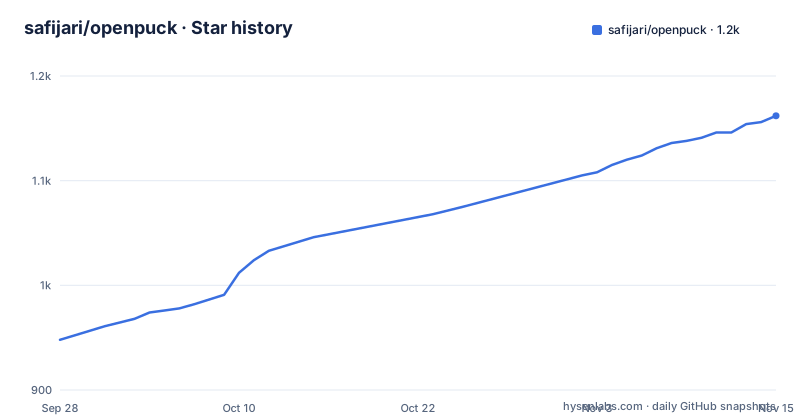
Star history
- safijari/openpuck1,162 ★ · +214
| Repository | 2026-09-28 | 2026-11-15 |
|---|---|---|
| safijari/openpuck | 948 | 1.2k |
214 Stars in the last 48 days, measured from the daily GitHub snapshot. Compare with other projects
Editorial analysis
The puck is the part that is not sold on its own
The project's motivation is stated as two problems, and both are about the accessory rather than the firmware.
The first is availability. The puck is what the controller uses to talk to the host device wirelessly, and as of writing it is not available for purchase separately from the controller. So a replacement, or a second one, since a single controller can pair to two, is not an option. The author goes further and predicts it will never be sold as a standalone accessory, which is a forecast rather than a fact but explains the shape of the project.
The second is Steam Input. The page argues it is a requirement rather than a convenience, meaning the controller is effectively unusable without Steam running outside a few niches the author considers marginal, with a game subscription and a racing game given as the case where you will need separate software on your computer to make it work.
The hardware facts behind the workaround matter. The puck handles four controllers at once at low latency, and the controller's own Bluetooth mode has over twice the latency of the puck, so the puck is the low-latency path and the thing worth reproducing. The board used is a Pro Micro with an NRF52840 radio similar to the originals, listed at eight dollars.
Eleven modes, four of them on hardware buttons
The mode table is the project's real specification, and it has a shape worth reading carefully.
Four modes are bound to physical input, by holding all four back buttons and pressing a face button. A gives Steam controller mode, B gives what the project calls lizard mode, which is described as an independent mode that can work against UAC prompts and the task manager and still works when Steam is open, X gives Xbox 360 mode, and Y gives a Switch Pro controller with gyro and haptics.
The rest arrive through a WebUSB panel, which is where the numbering gets interesting. The list goes from mode 4 to mode 6, then jumps to mode 9. Modes 7 and 8 are absent, with no explanation on the page.
What survives that jump is a spread of support levels. The Hori Pad entry is Switch mode with no gyro or haptics. The DualSense and DS4 entries are both marked PC only. The PS3 entry says it enumerates on a real PS3 with gyro and haptics, and the Original Xbox entry says it enumerates on a real Original Xbox, which are the two modes with hardware confirmation behind them alongside Switch.
The remaining two, DirectInput and SInput, exist for simulators and are described in the next two sections.
DirectInput splits one controller into two because of an 8-axis cap
The reasoning chain here is the clearest explanation of a mode in the project.
Steam Input funnels everything through XInput, which means only a handful of the controller's analog inputs can be live at once. That is a problem for flight and space simulators, which bind axes through DirectInput instead. DirectInput itself caps a device at eight axes, so this mode presents the controller as two joysticks, two HID collections on one USB interface.
The split is described precisely. The first device carries the left and right sticks on X and Y and the X and Y rotation axes, both triggers on the Z axes, and the D-pad as a hat, with buttons one through twenty-six covering the face buttons, shoulder buttons, triggers, start, select, stick clicks, D-pad, the two extra back buttons, pad clicks and touches, the Steam button and the quick access menu. The second device carries the left and right trackpads on its X and Y axes, and the gyro on three axes including a slider, with four buttons for the two pad clicks and two pad touches.
Two behaviors are worth flagging. Trackpad axes latch, holding the last touched position so a pad works as a throttle or trim slider, and they re-centre when you click that pad. And no remapping is applied, since every physical control including the paddles is its own bindable button and the simulator does the binding.
Two modes have no rumble, and the page says why
Rumble support is not uniform across the eleven modes, and the two gaps have different causes.
The DirectInput gap is structural. Force feedback in DirectInput is a separate HID class from input, and this mode is input only, so rumble is not wired up there. The page is explicit that rumble is not available in this mode and points at another mode if you want it.
The second gap is Steam mode itself, for a different reason. In the translated modes, which it names as Xbox, Switch and PlayStation, the puck decodes the host's rumble packet itself, which is what makes reshaping possible. Steam mode relays Steam's own haptics untouched, so none of those settings apply there.
The reshaping surface is a Rumble card in the WebUSB panel. Strength scales the amplitude the game asked for, with 200 percent as the default and a note that this matches previous firmware. Style picks how the two motors are driven across four named options: mono runs both motors at the stronger value, heavy and light mute one motor each, punchy softens weak effects while leaving strong ones alone, and soft lifts weak effects so subtle rumble is felt. A test button buzzes the controller with the current settings so you can compare without launching a game.
SInput is the one mode that does not impersonate anything
Of the eleven modes, one is described as not impersonating anybody, and it is the mode the author would use on a non-Windows machine.
SInput is an open gamepad protocol, and the page says SDL3 and Steam Input both bind to it with a dedicated driver. In this mode the controller reports sticks, both analog triggers, the gyro and the accelerometer, both trackpads as two touchpads, and the battery level, all natively and at the same time, with rumble coming back from the host. The point is that nothing has to be translated into another controller's vocabulary, so nothing is lost in translation and nothing is limited to a subset of inputs.
The requirement is an SDL build that ships the driver, given as SDL 3.4 or newer or a current Steam client. On older hosts it falls back to appearing as a plain HID gamepad, which is the graceful degradation worth knowing about: you lose the gyro, the accelerometer, the second trackpad and the battery reading, not the controller.
The page also names the operating system split plainly, since DirectInput is a Windows API and on Linux or SteamOS the SInput mode is the one that exposes everything.
Three USB constants and two documented ways the device resets
The build file carries the most technical comment in the repository, and it documents failure modes rather than intentions.
The firmware needs TinyUSB configuration values that differ from the defaults in the Adafruit nRF52 core. The interface count is set to six, because Steam mode exposes four puck slots plus one for the mouse and one for the WebUSB panel, where the core default is two. The task queue size is raised to sixty-four for a deeper USB device event queue. The vendor transmit buffer is raised to two hundred and fifty-six bytes.
Each of those carries the reason it is not the default. The queue default of sixteen is documented as deadlocking the loop task under communications load, which leads to a watchdog reset, and it points at the sketch and the build and deploy document. The vendor buffer default of sixty-four is documented as too small for the WebUSB status blob, which is around one hundred and eighteen bytes, so the panel send drops rather than completing.
A small inconsistency sits in the same comment. It announces two configuration values and then lists three, and the third is the one with its own failure mode. Worth knowing if you are grepping for the values.
The formatter is pinned to one version and skips one directory
The build file is mostly about a code formatter, and the reasoning is specific enough to be reusable.
Clang-format is pinned to version 18 to match continuous integration, because output differs between versions and a mismatch would make the pipeline reject code that was formatted locally. The binary is resolved in a documented order: the versioned name used by CI on Linux, then the Homebrew keg path on macOS in both the Apple silicon and Intel locations, then a bare clang-format as a fallback, with an override variable if yours lives somewhere else.
The file list is built by finding C, C++, header and Arduino sources across four directories. Generated headers are excluded explicitly, with a comment saying they are gitignored and should not be formatted.
And the list covers four of the five source directories in the tree. The firmware directory, the reverse-engineering firmware directory, the sniffer tool and the pairing tool are included; a separate reverse-engineering directory is not. The rest of the tree explains what the project is made of: the main firmware, two reverse-engineering efforts, host-side tools for sniffing USB traffic and for pairing, documentation including a code map and an architecture document, a version generation script and a script that produces the firmware artifact.
Release numbering runs in the same spirit. The recent tags are 0.9.51, then 0.9.31 and 0.9.28, so the middle component does not increment by one between releases. The page also opens with a warning that every part of the project heavily used language models.
Editorial conclusion
OpenPuck solves a narrow, real problem: the wireless puck that makes the Steam Controller 2 low latency is only sold with the controller, and the controller is close to useless without Steam running. If that is your situation, an eight dollar microcontroller and an uploaded sketch is a cheap answer, and the latency claim is measured against the official puck rather than asserted. Three things to know. Mode coverage is uneven by design, with some modes verified against real consoles, some marked PC only, and one with no gyro or haptics. Rumble is re-encoded on the device in the translated modes and absent in two others, for reasons that are stated rather than worked around. And the page opens by saying every part of the project heavily used language models, which is worth knowing before you rely on it for anything you would rather read closely, particularly given the documented watchdog resets in its USB configuration.
Frequently asked questions
What hardware does OpenPuck need?
A Pro Micro with an NRF52840, listed at $8 on Amazon, whose radio is similar to the one in the Steam Controller 2 and its puck. Once the Arduino sketch is uploaded it emulates the puck over USB to Steam by default, which lets a controller pair normally, and the project states latency has been measured within 1ms of the official puck.
Which OpenPuck modes work on real consoles?
Switch, PS3 and Original Xbox modes are described as verified on real hardware, and the PS3 and Original Xbox entries say they enumerate on a real console. The PS4 and PS5 modes have gyro and, where available, touchpad wired in. The DualSense and DS4 modes are marked PC only, and the Hori Pad mode is Switch mode with no gyro or haptics.
What is lizard mode in OpenPuck?
An independent mode bound to holding the four back buttons and pressing B, described as working even if Steam is open and as usable against UAC prompts and the task manager. The page notes that pairing in that mode might not be 1:1 with the official puck, and that mode is input only in the sense that nothing about the pairing is guaranteed to match.
How do I use the trackpads as flight controls with OpenPuck?
Through DirectInput mode on Windows, which presents the controller as two DirectInput joysticks with two HID collections on one USB interface because DirectInput caps a device at eight axes. The first device carries both sticks, both triggers and the D-pad, the second carries both trackpads and the three gyro axes. Trackpad axes latch at the last touched position and re-centre when you click that pad, and no remapping is applied in this mode.
Does OpenPuck support rumble in every mode?
No. In the translated modes for Xbox, Switch and PlayStation the puck decodes the host's rumble packet itself, and a WebUSB panel card scales strength, with 200% as the default, and picks one of four motor styles, plus a test button. Steam mode relays Steam's own haptics untouched, and DirectInput mode has no rumble because force feedback is a separate HID class.
Official sources
Add this badge to your README
If you maintain this project, the badge below links readers to this analysis and shows its maintenance status from the daily GitHub snapshot. Paste the markdown into your README; add ?metric=license or ?metric=stars to the image URL for a different field.

[](https://hysenlabs.com/projects/safijari-openpuck)Star history chart for your README
[](https://hysenlabs.com/projects/safijari-openpuck)Was this useful?