CheetahClaws shipped autonomous by default, and its header still links to another lab
CheetahClaws: A Fast and Easy-to-Use Agent Harness Infrastructure for Long-Horizon, Multi-Model, and Tool-Using AI Systems
At a glance
- What is it?
- A Python agent harness for long-running tool-using sessions, where permission prompts were rebuilt into a parser, a provider router learned a per-call upstream suffix, and the configuration keys carry three different product prefixes.
- Who is it for?
- CheetahClaws fits a specific shape of work: long sessions where the agent runs many commands against a workspace you have already decided to hand over, across more than one model provider. If that is your shape, the default posture of v3.5.88 saves a great deal of keystrokes, and the release notes are unusually honest about which permissions still interrupt.
- Can I use it commercially?
- Yes. Apache-2.0 is a permissive licence: you can use, modify and sell software built on it, as long as you keep its copyright and licence notices.
- Is it still maintained?
- Yes. The repository last received commits 1 day ago.
- What is it written in?
- Mainly Python, according to GitHub's language statistics.
Answers come from the project's GitHub data, last synced on November 23, 2026, and from our analysis. They are not legal advice.
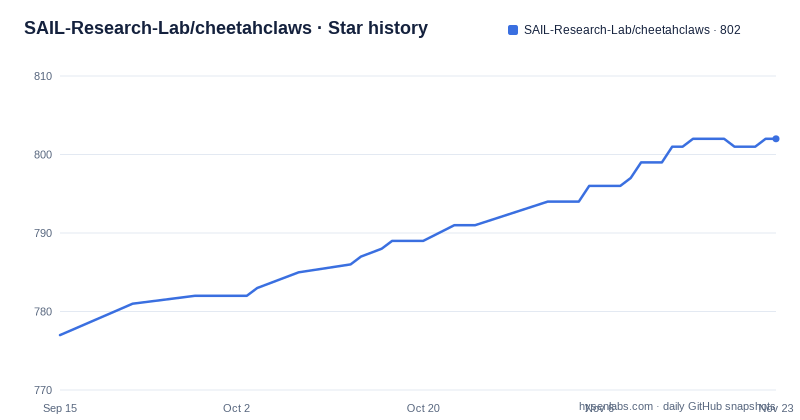
Star history
- SAIL-Research-Lab/cheetahclaws802 ★ · +25
| Repository | 2026-09-15 | 2026-11-23 |
|---|---|---|
| SAIL-Research-Lab/cheetahclaws | 777 | 802 |
25 Stars in the last 69 days, measured from the daily GitHub snapshot. Compare with other projects
Editorial analysis
The header links resolve to SafeRL-Lab, and the logo points at another repository
The package lives at `SAIL-Research-Lab/cheetahclaws`, and the authors and maintainers fields both name SAIL Lab, Safe AI and Robot Learning Lab, with the address [email protected]. The links in the README header do not agree.
The banner image is wrapped in a link whose visible target is `https://github.com/SafeRL-Lab/Robust-Gymnasium`, a different project in a different namespace. The issue link goes to `https://github.com/SafeRL-Lab/cheetahclaws/issues`, so the same repository name is presented under an owner that is not the one serving it. The badge markup itself is malformed in the same way: the href attribute contains a second markdown link rather than a URL.
The published container adds a third name. The docker badge and the compose file both point at Docker Hub namespace `chauncygu`, which matches neither the repository owner nor the lab.
So a reader following the project from the README ends up in two other places before reaching anything: another lab's repository for the logo, and a personal Docker Hub namespace for the image. The install path itself is two lines, a package from PyPI:
pip install cheetahclawsand then the command with no arguments:
cheetahclaws # start chatting!The name `cheetahclaws` is the one identifier that stays consistent across the manifest, the install command and the repository it is served from.
auto_approve ships as True, and config.json no longer freezes the defaults
The v3.5.88 notes, dated September 20, 2026, change the default posture of the harness. `auto_approve` now ships as `True`, so a turn that needs six commands runs all six instead of stopping six times at an approval menu. `/auto off` puts the prompts back and the choice is saved; `--ask` does it for one run. Four things still override autonomy: the Bash hard denylist, the filesystem sandbox, and the `manual` and `plan` modes. The startup banner calls out the state whenever it is not the default.
At the prompt, `!` saves a grant for one command or file permanently, and `auto` switches the session to autonomous mode. So the escape hatches are both a startup flag and two prompt keys.
The same release carries a quieter fix with a long tail. `save_config` used to persist every key it knew about, including the defaults, which froze them into `config.json`. A default changed in a later release could therefore never reach an existing installation, because the old value was already sitting on disk looking deliberate. It now writes only what differs from the default, with a one-time migration that cleans up what is already there.
Two smaller changes belong to the same release: `/resume` now lists sessions by name, showing the opening request with date, turn count, model and id, newest first with the live session pinned, and resuming repaints the conversation rather than printing a path; and sessions are stored as UTF-8 rather than escaped `\uXXXX` sequences, so a Chinese message is greppable.
The shell permission check became a parser, closing a prefix-match hole
v3.5.87, tagged a day before v3.5.86 on August 17, 2026, narrows when the harness stops to ask. Auto-approved now includes every registry-marked read-only tool, eighteen more than before, covering diagnostics, task and memory queries and document readers; read-only shell pipelines such as `git log | head -20` and `ls -la | grep test`, where the old check rejected every command containing a pipe; session-state tools for tasks, memories and skills; and creating a new file inside the workspace.
Still asked: overwrites, writes outside the workspace, anything under `.git/hooks` or `.github/workflows`, interpreters and test or build runners, anything that deletes or uploads, and sub-agent spawns.
The mechanism is the more interesting half. The check is now a real parser instead of a prefix match, and the notes say that rewriting it closed a hole where anything beginning with `python `, `node ` or `find ` auto-ran. Under the old rule, a prefix match that treated those interpreters as safe could be satisfied by a command that started the same way and then did something else.
The prompt also gained `s`, which approves one command or file for the rest of the session rather than for one prompt, as a scoped alternative to `accept-all`. `/permissions clear` drops those grants.
OpenRouter routing and the four bugs a gateway model id exposed
OpenRouter became a first-class provider with one key and 400-plus models, and the model picker picks it up without configuration. The route is written as `/model openrouter/<vendor>/<model>`, for example `openrouter/deepseek/deepseek-v4-flash`. The key comes from `OPENROUTER_API_KEY` or from `/config openrouter_api_key=sk-or-...`.
The interesting part is the per-call upstream pin. Appending `@<provider>`, optionally followed by a quantization, as in `openrouter/deepseek/deepseek-v4-flash@gmicloud/fp8`, selects which upstream serves the request. It is sent as OpenRouter's `provider` object in the request body rather than being folded into the model string, so the model field stays a real catalog id and a tool or a log can still tell which model you meant.
Four fixes shipped with it, and their names describe the failure modes. The provider was being re-derived from an already-stripped model string, so `openrouter/deepseek/...` was read as the DeepSeek API and DeepSeek-only request fields leaked out to a gateway that does not want them. Cost estimates and context windows were resolving per gateway rather than per model, which showed up as $0.00 and a flat 128k. And the `@` routing suffix was stripping a model of its prompt-family overlay.
Each of those is the kind of bug that only appears once a second provider's id format meets routing code written for one.
requirements.txt documents extras the manifest does not show, and an env var from another name
The manifest declares six runtime dependencies: anthropic at 0.40 or newer, openai at 1.30 or newer, httpx, rich, pyte at 0.8 or newer, and prompt_toolkit at 3.0.43 or newer, with Python 3.10 as the floor. The optional extras it names are voice with sounddevice, vision with Pillow, autosuggest with prompt_toolkit, browser with playwright, and files with pymupdf and openpyxl.
requirements.txt repeats the six core entries with a comment saying they must match the manifest, then documents capabilities that the visible extras do not list: a `litellm` extra for multi-provider routing, and two local speech-to-text backends, faster-whisper marked fastest and recommended and openai-whisper marked original, with the alternative of setting `OPENAI_API_KEY` to use the cloud API. It also notes that numpy is needed by the local backends and by the arecord level detector, and that the model size can be overridden.
That override is the clue. The variable is `NANO_CLAUDE_WHISPER_MODEL`, not anything prefixed for this project. The same file comments pyte as the terminal emulator for the `!claude` and `!python` bridge rendering. Two leftovers of an earlier name sit in the configuration of a package called cheetahclaws, which is worth knowing before you grep a deployment for the wrong prefix.
Elsewhere the prefix is inconsistent by design: `CHEETAH_SUGGEST=0` disables next-prompt suggestions, and `CHEETAH_IMAGE` selects the published image in the compose file.
The container runs as UID 1000 with your host workspace mounted into it
The server image is built `FROM python:3.13-slim` and installs two packages with `--no-install-recommends`: git, because the agent invokes it for status and log inside the workspace, and tini, for signal handling as PID 1 so a stop is a clean interrupt. A non-root user named cheetah is created with UID 1000, and the package is installed editable with the `web` extra so the chat interface dependencies are present and the version metadata matches the source tree.
One Dockerfile comment explains a failure mode it works around. The data and workspace directories are created and chowned before the image drops to the non-root user, because otherwise the anonymous volume for `.cheetahclaws` and the workdir-created `/workspace` default to root ownership and the first run dies with a PermissionError while creating the sessions directory. That is a specific enough failure that it is worth recognising when it shows up in a different deployment.
The compose file mounts the project workspace and the data directory, `./workspace` and `./data`, maps `${WEB_PORT:-8080}` to 8080, and runs as `${UID:-1000}:${GID:-1000}` so files in the workspace stay owned by the host user and reachable from a file share. `host.docker.internal` is mapped to the host gateway so the agent can reach an Ollama instance running on the Docker host, and `ANTHROPIC_API_KEY` and `OPENAI_API_KEY` are passed through as environment variables. Setting `CHEETAH_IMAGE` swaps the locally built image for the published one.
Ghost text, tool profiles, and a tab title that wrote to a file nobody reads
v3.5.86, dated July 30, 2026, added next-prompt suggestions. After each reply the auxiliary model, the cheap and fast one, drafts the message you are most likely to type next and shows it dimmed at the prompt. Tab or the right arrow accepts the whole thing, typing over it replaces it, and Enter alone never submits it. Drafting runs on a background thread so the prompt never waits, fails silently when there is no key or no model, and is one-shot so a stale prediction is never left on screen. `/config input_suggest=false` or `CHEETAH_SUGGEST=0` turns it off.
The same release fixed the terminal tab title over Remote-SSH, WSL and devcontainers. It used to write a settings file on the server that the editor never reads, and never retried; it now targets the remote Machine settings the window actually reads. A tab title is a trivial feature to have gotten wrong in exactly this way, since the failure is invisible unless you look at the remote side.
The July 20 changes are about the tool surface and bounded I/O. `tool_profile` selects how many tool schemas are sent per turn, `full` by default, then `standard` for compact coding, `research` and `orchestration`, switchable with `/config tool_profile=standard` to cut prompt tokens on small-context models. Two bounded-I/O fixes went with it: `SummarizeLargeFile` no longer summarises its own chunk-failure markers, returning a clean `Error` when the map or reduce step fails, and the DuckDuckGo parser stopped doing something the visible notes cut off mid-sentence.
Editorial conclusion
CheetahClaws fits a specific shape of work: long sessions where the agent runs many commands against a workspace you have already decided to hand over, across more than one model provider. If that is your shape, the default posture of v3.5.88 saves a great deal of keystrokes, and the release notes are unusually honest about which permissions still interrupt. Three things to check first. The permission gate decides what runs without asking, and the list of what still asks includes writes outside the workspace, `.git/hooks` and `.github/workflows`, interpreters and test runners, deletions and uploads, and sub-agent spawns, so put the workspace somewhere you would be willing to lose. Second, the environment variables do not share one prefix: `CHEETAH_SUGGEST` and `CHEETAH_IMAGE` for this project, but `NANO_CLAUDE_WHISPER_MODEL` for the speech model size, a name left over from something else. Third, the server image runs as UID 1000 and mounts your host workspace and data directories into it, and the compose file passes cloud keys as environment variables, so read that compose file before pointing it at a machine with anything else on it. The project is Apache-2.0 and declares Python 3.10 to 3.13 on Linux and macOS.
Frequently asked questions
What is CheetahClaws and how do I install it?
An agent harness for long-horizon, tool-using sessions that speaks to Anthropic, OpenAI and OpenRouter models. pip install cheetahclaws, then run cheetahclaws to start the chat. Alternatives listed are a one-line install script, installing from source, uv, running from source without installing, and a Docker image on Docker Hub under the chauncygu namespace.
What changed in CheetahClaws v3.5.88?
auto_approve now ships as True, so a turn needing six commands runs them instead of stopping at six approval menus, with /auto off and --ask to restore prompting. save_config now writes only keys that differ from the defaults, with a one-time migration, /resume lists sessions by name, and sessions are stored as UTF-8 instead of escaped sequences.
What still asks for permission in CheetahClaws?
Overwrites, writes outside the workspace, paths under .git/hooks and .github/workflows, interpreters and test or build runners, anything that deletes or uploads, and sub-agent spawns. Read-only tools, read-only shell pipelines, session-state tools and creating a new file inside the workspace are auto-approved, and the prompt key s grants one command or file for the session.
How does the CheetahClaws Docker setup expose the web interface?
The compose file maps ${WEB_PORT:-8080} to port 8080 and the quick start opens http://<host-ip>:8080/chat. It mounts ./workspace as the agent's working directory and ./data as the persisted home, runs as your host UID and GID, and adds host.docker.internal so the agent can reach an Ollama instance on the Docker host.
What are CheetahClaws' Python and dependency requirements?
Python 3.10 or newer, with anthropic, openai, httpx, rich, pyte and prompt_toolkit as runtime dependencies. The manifest names extras for voice, vision, autosuggest, browser and files, while requirements.txt additionally documents a litellm extra and the faster-whisper or openai-whisper speech backends.
Official sources
Add this badge to your README
If you maintain this project, the badge below links readers to this analysis and shows its maintenance status from the daily GitHub snapshot. Paste the markdown into your README; add ?metric=license or ?metric=stars to the image URL for a different field.

[](https://hysenlabs.com/projects/sail-research-lab-cheetahclaws)Star history chart for your README
[](https://hysenlabs.com/projects/sail-research-lab-cheetahclaws)Was this useful?