passport-local-mongoose turns a Mongoose schema into a working Passport login
Passport-Local Mongoose is a Mongoose plugin that simplifies building username and password login with Passport
At a glance
- What is it?
- The passport-local-mongoose plugin adds the username, hash and salt fields to your user schema and the methods to go with them, so a username and password login becomes a plugin call rather than a week of plumbing. The options it exposes are effectively a configurable security policy, from the pbkdf2 iteration count to the account lockout interval.
- Who is it for?
- Adopt passport-local-mongoose when you are building a Node application with Mongoose and Passport and want a working local login without writing the hashing, the lockout and the serialisation by hand. Do not adopt it if you need social login, since the plugin is specifically the local strategy.
- Can I use it commercially?
- Yes. MIT is a permissive licence: you can use, modify and sell software built on it, as long as you keep its copyright and licence notices.
- Is it still maintained?
- Yes. The repository last received commits 7 days ago.
- What is it written in?
- Mainly TypeScript, according to GitHub's language statistics.
Answers come from the project's GitHub data, last synced on November 6, 2026, and from our analysis. They are not legal advice.
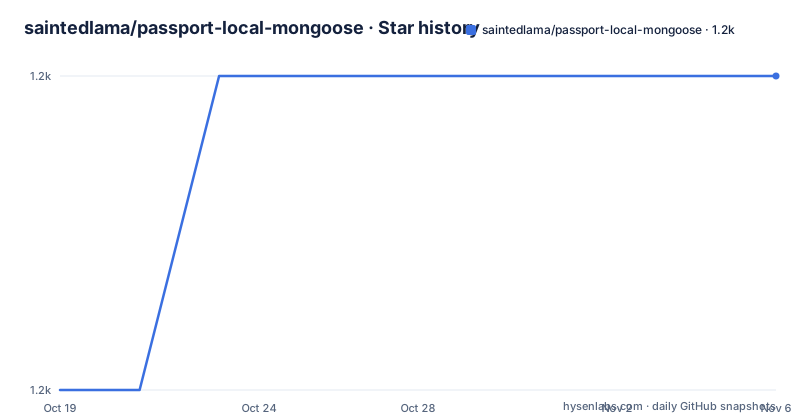
Star history
- saintedlama/passport-local-mongoose1,164 ★ · +1
| Repository | 2026-10-19 | 2026-11-06 |
|---|---|---|
| saintedlama/passport-local-mongoose | 1.2k | 1.2k |
1 Stars in the last 18 days, measured from the daily GitHub snapshot. Compare with other projects
Editorial analysis
One plugin call replaces the whole local login
Passport-Local Mongoose is a Mongoose plugin that simplifies building username and password login with Passport, and the plugin is the whole idea.
The installation is one command.
> npm install passport-local-mongooseThere is an important detail in the next paragraph. Passport-Local Mongoose does not require the passport or mongoose dependencies directly but expects you to have these dependencies installed.
That is unusual for a plugin, and it is a deliberate choice. The plugin is a Mongoose plugin, so it needs the Mongoose plugin system to be present, and it is a Passport strategy helper, so it needs Passport to be present. Declaring them as peer dependencies would force versions on the host application, and the project has decided to trust the application to install what it needs. The readme gives the full set for the case where you have not.
> npm install passport mongoose passport-local-mongooseThe implementation is TypeScript, the licence is MIT, the author is Christoph Walcher, and the releases are regular. v9.2.1 came on 2026-10-03, v9.2.0 on 2026-09-28 and v9.1.0 on 2026-05-04, and the last push was on 2026-10-12.
There is also a tutorial link at the top of the readme, from Michael Herman, which walks through setting up Mongoose, Passport, passport-local and passport-local-mongoose for user authentication. That link is from 2013, so treat the API details with suspicion, but the shape of the setup is the same.
Plugging it into the schema
The usage section starts with a schema that is deliberately empty, because the plugin fills it in.
const mongoose = require('mongoose');
const Schema = mongoose.Schema;
const passportLocalMongoose = require('passport-local-mongoose');

const User = new Schema({});

User.plugin(passportLocalMongoose);

module.exports = mongoose.model('User', User);
The readme explains what you get for free. You are free to define your User how you like, and Passport-Local Mongoose will add a username, hash and salt field to store the username, the hashed password and the salt value. Additionally, it adds some methods to your Schema.
So the plugin is doing three things: adding the storage fields, adding the methods that hash and compare, and wiring those methods into Passport.
The ESM case has a wrinkle worth knowing. When using ESM modules you need to import the default export and then pass the default property to the plugin call.
import passportLocalMongoose from 'passport-local-mongoose';

User.plugin(passportLocalMongoose.default);
That .default is a consequence of the package being compiled to CommonJS and consumed from an ES module, and the readme is explicit about it rather than leaving you to work it out from a type error.
The strategy, the serialisation and the shortcut
Configuring Passport and Passport-Local is described as the responsibility of the Passport Guide, and the readme does not repeat it. What the plugin provides is the glue.
Passport-Local Mongoose supports that setup by implementing a LocalStrategy and serializeUser/deserializeUser functions, and the code that wires it up is short.
const User = require('./models/user');

passport.use(new LocalStrategy(User.authenticate()));

passport.serializeUser(User.serializeUser());
passport.deserializeUser(User.deserializeUser());
Then there is the simplified form, which arrived in version 0.2.1 as a static helper method called createStrategy on your schema, responsible for setting up the passport-local LocalStrategy with the correct options.
passport.use(User.createStrategy());The reason for the helper is the interesting part, and it is a real footgun in Passport. When you use the usernameField option to specify an alternative username field name, for example email, passport-local would still expect your frontend login form to contain an input field named username instead of email. The readme says this can be configured for passport-local, but that it is double the work, and so the shortcut was implemented.
The fix is worth understanding as a general lesson. A library that lets you rename a field on the server side has to make sure the client side follows, and the library that owns both halves is the right place to solve that.
Everything is a promise except the two session functions
Since version 5.0.0, passport-local-mongoose is async and await enabled by returning promises for all instance and static methods except serializeUser and deserializeUser.
const user = new DefaultUser({username: 'user'});
await user.setPassword('password');
await user.save();
const { user } = await DefaultUser.authenticate()('user', 'password');
The two exceptions are the obvious ones. Passport's serializeUser and deserializeUser are callbacks, not promises, because Passport calls them itself, so making them asynchronous would change the contract with Passport rather than with your database.
The authenticate call is the one that changes shape in a way that catches people. The static authenticate returns a function, and that function returns a promise, and the promise resolves to an object containing the user. So it is destructured, and the same identifier appears twice, once for the outer binding and once for the property.
That is the price of the change, and it is a real one. Code written for the callback style has to be rewritten, and the fact that a major version was spent on it rather than folded into a minor release is the right call for a change that alters the shape of a return value.
The readme also has a section for the API documentation, which is a section of the same file rather than a separate site, so the details of every method the plugin adds are in one place.
The options are where the security policy lives
The options list is long, and reading it is the fastest way to understand what the plugin does for you.
The hashing parameters are four. saltlen is the salt length in bytes and defaults to 32. iterations is the number of iterations used in the pbkdf2 hashing algorithm and defaults to 25000. keylen is the length in bytes of the generated key and defaults to 512. And digestAlgorithm specifies the pbkdf2 digest algorithm, defaulting to sha256, with the list of supported ones available from crypto.getHashes().
The lockout behaviour is another four. The interval is the interval in milliseconds between login attempts, which increases exponentially based on the number of failed attempts, up to maxInterval, and defaults to 100 milliseconds. The maxInterval is the maximum amount of time an account can be locked and defaults to 300000, which is five minutes. limitAttempts specifies whether login attempts should be limited and login failures penalized, and it defaults to false. maxAttempts is the maximum number of failed attempts allowed before preventing login, and it defaults to Infinity. unlockInterval is the interval after which a user is unlocked automatically.
The field names are configurable too, which is what makes the plugin fit an existing schema: usernameField defaults to username, saltField to salt, hashField to hash, attemptsField to attempts and lastLoginField to last.
The rest are behaviour switches. usernameUnique says whether the username field should be enforced to be unique by a MongoDB index, and it defaults to true. usernameCaseInsensitive and usernameLowerCase both default to false. selectFields decides which fields are stored in the session, and defaults to undefined so that all fields of the model are selected. populateFields decides what is populated in findByUsername. And encoding specifies how the generated salt and hash are stored, defaulting to hex.
The defaults are a usable baseline, and the lockout being off is the one to check first, because a 100 millisecond interval and a five minute maximum are configured but do nothing until limitAttempts is set.
A TypeScript rewrite with a modern test setup
The repository shows a project that has been modernised in place, and the package manifest is the evidence.
The source is TypeScript, the build is tsc, and the output is a dist directory with the type declarations next to the JavaScript, published as the only file in the tarball. The tests run on Vitest, with a coverage mode and a CI mode that adds a verbose reporter, and there is a separate tsd script for the type tests. The linting is ESLint with the flat configuration, in an eslint.config.mjs file, with prettier integrated through eslint-config-prettier and eslint-plugin-prettier.
The dependency set is minimal at runtime. There is exactly one runtime dependency, passport-local at ^1.0.0, and everything else is a development dependency: mongoose at 9.10.4 for the tests, the debug library, drop-mongodb-collections for cleaning up between test runs, tsx for running TypeScript directly, and the type packages for node, passport and passport-local.
The example directory holds a small working application, with server.js, routes.js, register.js and users.js, which is the same set of files you would expect in a real project using the plugin, and the readme in that directory is the place to start if you want to see the wiring in one file each.
The rest of the tree is governance and automation. There is a .release-please-manifest.json for the release versioning, a CHANGELOG.md, a CODE_OF_CONDUCT.md, a CONTRIBUTING.md, a SECURITY.md, a .devcontainer/ directory for a development container, and a .prettierrc and .editorconfig.
One oddity worth flagging is the engines field, which says node >= 8.0.0, while the development dependencies are on TypeScript 6 and Mongoose 9. The floor is stated conservatively and has not been raised, which is harmless for a library that declares a permissive floor, but it does mean the published metadata understates what the code is actually tested against.
Editorial conclusion
Adopt passport-local-mongoose when you are building a Node application with Mongoose and Passport and want a working local login without writing the hashing, the lockout and the serialisation by hand. Do not adopt it if you need social login, since the plugin is specifically the local strategy. Verify first that you are happy with the default hashing parameters, in particular the pbkdf2 iteration count of 25000, that you understand the lockout is off by default and that enabling it needs both limitAttempts and maxAttempts, and that your user model uses a unique index on the username if you rely on username uniqueness.
Frequently asked questions
What does passport-local-mongoose do?
It is a Mongoose plugin that simplifies building username and password login with Passport. Plugging it into a user schema adds a username, hash and salt field, the methods that hash and compare passwords, and the LocalStrategy and serializeUser/deserializeUser functions that Passport needs.
Do I need to install passport and mongoose separately?
Yes. The readme states that passport-local-mongoose does not require the passport or mongoose dependencies directly but expects you to have them installed, and gives the command that installs the whole set.
What does createStrategy do?
It is a static helper on the schema, added in version 0.2.1, that sets up the passport-local LocalStrategy with the correct options. It exists because when you rename the username field with usernameField, passport-local would still expect a form field named username, and configuring that by hand is double the work.
Is passport-local-mongoose promise based?
Since version 5.0.0 all instance and static methods return promises, except serializeUser and deserializeUser, which stay callbacks because Passport calls them itself. The static authenticate returns a function whose promise resolves to an object containing the user.
What are the default hashing parameters?
A salt length of 32 bytes, 25000 iterations in the pbkdf2 algorithm, a key length of 512 bytes and the sha256 digest algorithm. All four are configurable through the plugin options.
Is account lockout enabled by default?
No. The interval and maxInterval options are configured, at 100 milliseconds and 300000 milliseconds with an exponential backoff, but limitAttempts defaults to false, so the lockout does nothing until you enable it. maxAttempts also defaults to Infinity.
Official sources
Add this badge to your README
If you maintain this project, the badge below links readers to this analysis and shows its maintenance status from the daily GitHub snapshot. Paste the markdown into your README; add ?metric=license or ?metric=stars to the image URL for a different field.

[](https://hysenlabs.com/projects/saintedlama-passport-local-mongoose)Star history chart for your README
[](https://hysenlabs.com/projects/saintedlama-passport-local-mongoose)Was this useful?