Sakai: a Java LMS where each tool is its own module in the repository
Sakai is a freely available, feature-rich technology solution for learning, teaching, research and collaboration. Sakai is an open source software suite developed by a diverse and global adopter community.
At a glance
- What is it?
- Sakai is an Educational Community License open source learning management system built on Java and Apache Tomcat 9, whose repository holds dozens of independent tool modules alongside the shared kernel, with its own release branches per version and an Apereo Foundation governance. It suits a university that wants a self-hosted LMS with a real community behind it, and it is the wrong choice for a school that needs a hosted product with a support contract.
- Who is it for?
- Sakai fits a higher education institution that wants to run its own learning management system and can commit to the operational weight of Tomcat plus a Java application, because the project ships long-lived release branches with fix lists per tool and an Apereo Foundation behind the governance.
- Can I use it commercially?
- Check first. The repository uses a licence we do not classify automatically, so read its LICENSE file before any commercial use.
- Is it still maintained?
- Yes. The repository last received commits 1 day ago.
- What is it written in?
- Mainly Java, according to GitHub's language statistics.
Answers come from the project's GitHub data, last synced on November 7, 2026, and from our analysis. They are not legal advice.
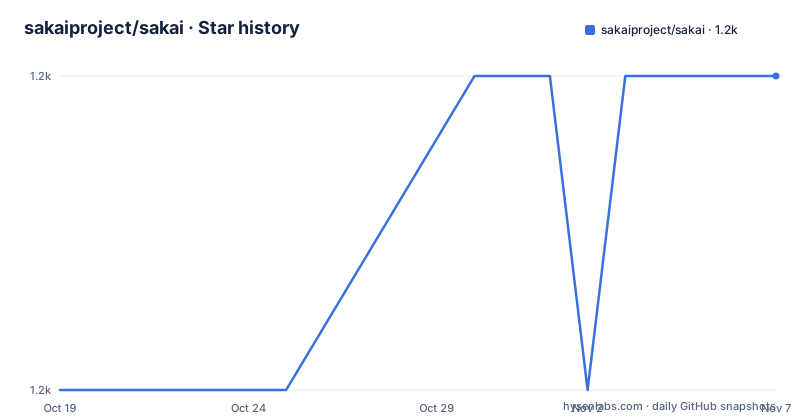
Star history
- sakaiproject/sakai1,240 ★ · +1
| Repository | 2026-10-19 | 2026-11-07 |
|---|---|---|
| sakaiproject/sakai | 1.2k | 1.2k |
1 Stars in the last 19 days, measured from the daily GitHub snapshot. Compare with other projects
Editorial analysis
The repository is a catalogue of tools, not an application
Sakai is described as a freely available, feature-rich technology solution for learning, teaching, research and collaboration, an open source software suite developed by a diverse and global adopter community. The repository layout shows what that means in practice. The root holds a long list of tool directories, including assignment, calendar, chat, cloud-content, content, conversations, dashboard, feedback, gradebookng, lessonbuilder, library, login, lti, mailarchive, meetings and many more, alongside shared infrastructure in kernel/, common/, libs/, master/, jsf2/ and entitybroker/, plus deploy/ and docker/ directories, an e2e-tests/ directory and a config/ directory. The primary language is Java and the topics name the stack directly with lms, vle, java and tomcat. Each tool is developed and versioned with some independence, which is why the release notes are published as fixes by tool.
Building needs Java and Maven, and the wrapper removes the Maven dependency
The README calls the build instructions a Mini Quick Start and points to a wiki guide for the complete procedure. To build Sakai you need Java 1.8, and once you have it you clone the repository and run the build.
mvn installThe wrapper is the practical part, since the README notes you can run ./mvnw install if you do not have Maven installed. That single dependency, a JDK and a wrapper script, is what it takes to get a full LMS built from source. The master branch is the most current development release, described as Sakai 24, and the other branches are currently or previously supported releases, so the branch you check out is a product decision rather than a technical one.
Tomcat must be downloaded by hand, and configured before you deploy
Sakai runs on Apache Tomcat 9, and the README is specific about how to get it. You download the latest version from the Apache site and extract the archive, and there is a warning that Sakai does not work with Tomcat installed via a package from apt-get, yum or other package managers, which rules out the obvious shortcut on a Debian host. You must also configure Tomcat according to the project's own install guide, and the phrasing is that you must do this, not that you may. The deploy step passes the Tomcat location to Maven.
mvn clean install sakai:deploy -Dmaven.tomcat.home=/path/to/your/tomcatThen the server is started with the startup script and the log followed.
cd /path/to/your/tomcat/bin
./startup.sh && tail -f ../logs/catalina.out
Once started, which the README says usually takes around 30 seconds, the portal is at http://localhost:8080/portal.
Only two versions are supported, and the rest get security fixes only
The community supported versions section is short and that is the point. Sakai 25.2 and Sakai 23.5 are actively supported by the community, and each entry links a release, a fixes list broken down by tool, and release notes. Everything below that is in the previous versions section, which says plainly that these versions are no longer supported by the community and will only receive security changes. The list runs back through 22.5, 21.5, 20.6, 19.6, 12.7 and 11.4, and each has the same three links. In parallel, Sakai 25.3 and Sakai 23.6 are the current development releases and both are expected to release in Q4 2026. The pattern is a two-track maintenance stream per major line, and knowing which track you are on is the first question to ask.
Bug reports go to Jira, not to GitHub
The README routes issues to the project's own Jira instance at jira.sakaiproject.org, which is a deliberate departure from the GitHub issue tracker most projects use. For testing the latest builds there is a nightly server page, and for questions the developer mailing list is the primary channel, with subscription by email to [email protected]. A wiki page lists all the Sakai email lists, and there are Slack channels for people who want a faster answer during weekday business hours. The README even explains the onboarding friction, that if you cannot find your institution domain on the Apereo signup page you should email [email protected] or [email protected] to request access. A project this size runs on many channels because the contribution surface is that wide.
Accessibility and the editor are treated as a first-class concern
The accessibility section says the Sakai Accessibility Working Group is responsible for ensuring that the Sakai framework and its tools are accessible to persons with disabilities, and the Voluntary Product Accessibility Template reports on the sakailms.org site document the conformance. The editor gets specific attention, because CKEditor is the open source rich text editor used throughout Sakai and CKSource has produced a GPL licensed open source Accessibility Checker that inspects the accessibility level of content and surfaces issues. The Checker cannot be bundled with Sakai because of the GPL licence, but it can be used with Sakai, and the working group has written instructions for doing so. That is a more useful answer than a general statement about accessibility, and it tells you the tooling exists but lives outside the distribution.
Skinning and translation are community functions, not core features
Two capabilities that look like product features are pointed at the community. Skinning, altering the look and feel of Sakai, is documented in the repository's own library/ directory, and the skin is therefore something you change in code rather than configure in an admin screen. Translation, internationalization and localization are coordinated by the Sakai Internationalization and localization community, and the README says that community maintains the relevant files. For an institution outside the anglophone world, that means the language pack is a community contribution rather than a vendor deliverable, which is worth confirming against your own language before you commit to the platform.
ECL-2.0, not LGPL, and an Apereo project with CLA requirements
Sakai is licensed under the Educational Community License version 2.0, and the repository carries both the LICENSE file and an ECLv2-header-template.txt for new files. The ECL is OSI approved and is broadly similar in effect to LGPL, with the educational purpose written into it, which matters if your institution's legal team has to approve the licence. The project is an Apereo Foundation project and follows the Foundation's guidelines and requirements for Contributor License Agreements, and the repository also has a CODE_OF_CONDUCT.md, a CONTRIBUTING.md, an AGENTS.md and a CLAUDE.md, plus a .codacy.yaml for static analysis. The last push to the repository was on 2026-10-15 and the repository is not archived, so the codebase is still moving.
Editorial conclusion
Sakai fits a higher education institution that wants to run its own learning management system and can commit to the operational weight of Tomcat plus a Java application, because the project ships long-lived release branches with fix lists per tool and an Apereo Foundation behind the governance. It is a poor fit for a small school with no sysadmin capacity, since a self-hosted Java LMS on Tomcat is a platform to operate, not a site to open, and a poor fit if you need a vendor with a support SLA. Verify first which version branch you will run against the supported list, since only two versions are actively supported and everything older receives security fixes only, and check the Tomcat configuration instructions the README insists on before your first deploy.
Frequently asked questions
What do I need to build Sakai from source?
Java 1.8 and the repository, then mvn install, or ./mvnw install if you do not have Maven installed. The README links a fuller Quick Start from Source guide on the project wiki for anything beyond the short version.
Which Sakai versions are currently supported?
Two are actively supported by the community, Sakai 25.2 and Sakai 23.5, each with release, fixes by tool and release notes pages. Older versions including 22.5, 21.5, 20.6, 19.6, 12.7 and 11.4 are no longer supported and will only receive security changes.
Can I run Sakai on Tomcat installed from apt?
No. The README states that Sakai does not work with Tomcat installed via a package from apt-get, yum or other package managers, and that you must download Tomcat 9 from the Apache site, extract it and configure it according to the project's own install guide before deploying.
Under what licence is Sakai released?
The Educational Community License version 2.0, which is OSI approved, and the project is an Apereo Foundation project that follows the Foundation's requirements for Contributor License Agreements. The repository includes an ECLv2 header template for new files.
Official sources
Add this badge to your README
If you maintain this project, the badge below links readers to this analysis and shows its maintenance status from the daily GitHub snapshot. Paste the markdown into your README; add ?metric=license or ?metric=stars to the image URL for a different field.

[](https://hysenlabs.com/projects/sakaiproject-sakai)Star history chart for your README
[](https://hysenlabs.com/projects/sakaiproject-sakai)Was this useful?