pi-from-scratch has an empty dependency list, and the trace on its website is a recording
A super-mini version of pi written in 600 lines of TypeScript, so you can easily build your own pi-agent from scratch.
At a glance
- What is it?
- This is a teaching project: roughly 600 lines of TypeScript that read files, edit code and run commands, built by decomposing another agent's data flow and keeping only the ideas. What makes it worth reading is the manifest, which lists no runtime dependencies at all. What makes it worth trusting carefully is that the interactive trace on the published site is pre-generated static data, and the two API credits at the bottom are resellers with referral codes in their links.
- Who is it for?
- pi-from-scratch is a good read if you already know how a tool-calling agent works and want to see the whole loop in one sitting, and a poor substitute for a production agent: there is no dependency list to audit, no error handling story, and a line count that is a claim rather than a constraint. Two practical notes.
- Can I use it commercially?
- Yes. MIT is a permissive licence: you can use, modify and sell software built on it, as long as you keep its copyright and licence notices.
- Is it still maintained?
- Yes. The repository last received commits 22 days ago.
- What is it written in?
- Mainly TypeScript, according to GitHub's language statistics.
Answers come from the project's GitHub data, last synced on November 15, 2026, and from our analysis. They are not legal advice.
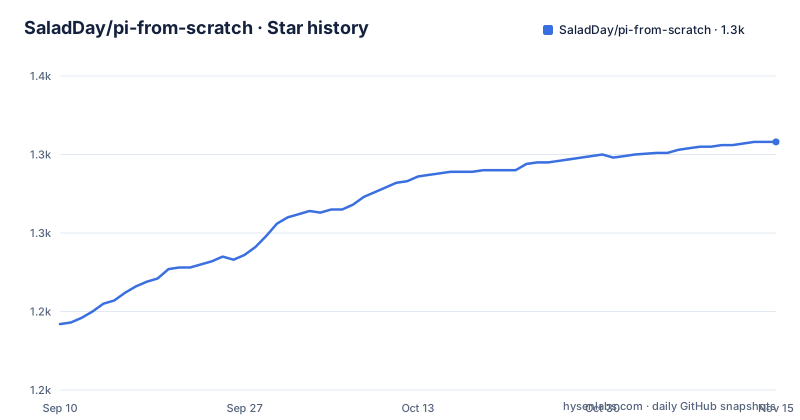
Star history
- SaladDay/pi-from-scratch1,308 ★ · +116
| Repository | 2026-09-10 | 2026-11-15 |
|---|---|---|
| SaladDay/pi-from-scratch | 1.2k | 1.3k |
116 Stars in the last 66 days, measured from the daily GitHub snapshot. Compare with other projects
Editorial analysis
The runtime dependency list is empty, and that is the argument
The manifest has an empty object where dependencies normally go, and four dev dependencies instead: a TypeScript compiler, a test runner, a TypeScript execution wrapper and the Node type definitions. So everything the agent does, the model call, the tool dispatch, the loop that keeps feeding results back, the file reading, the code editing and the command execution, is written against the platform rather than assembled from packages. At roughly 600 lines that is a strong claim and the page makes it twice, once in the repository description and once in the package description. It is also the only claim that matters here. A coding agent's real surface area is its model client, its JSON parsing and its shell invocation, and a project that declines to take any of those from a dependency is at least legible about where the sharp edges are.
The trace on the published site is generated data, not a live run
The site puts the article and the source side by side, and as you scroll, the editor on the right fills itself in, so that by the end of the read the whole agent is sitting in the editor. There is also a trace view you can break in and step through line by line, which is the part of the design that is genuinely unusual. What matters is where that trace comes from. The page states that the online trace is pre-generated static data and that browsing the site does not issue any model requests. The manifest confirms the shape: a script whose name is generate-traces runs a TypeScript file under the scripts directory. So somebody ran the agent once, recorded the sequence, and shipped the recording. That is the right choice for a tutorial, since a reader should not need a key to read it, but it does mean the demo cannot show you a failure.
Four names for the same agent: the package, the command, the prefix and the page
The project you would install is named after the thing it deconstructs, and the manifest module and repository fields both use that name. The executable it declares points at the compiled CLI. The agent you actually build while reading is called something else entirely, and the environment variables that configure it are prefixed with that shorter name. The published site uses the long name as its title. So the same agent is referred to four ways across four surfaces: the package name, the binary name, the runtime prefix and the page title. None of this is wrong on its own, since tutorial projects are allowed to name things after their subject, but it does mean grepping for the name the docs use will not find the binary, and grepping for the binary will not find the environment variables.
The page advertises its own lack of AI flavour, which is a claim about the writing
One line near the end of the introduction is worth translating carefully, because it is unusual on a repository about building an AI agent. It says the article is hand-typed in the old-fashioned way and tries as far as possible to have no AI taste in it, and hopes readers enjoy it. The rest of the introduction frames the project the same way: it says this is an article rather than a book, that you will find it easy to read, and that the approach is to strip the engineering detail out of the upstream project while keeping its core ideas. That framing matters for what you get. This is not a library with an API you adopt and a README you skim. It is a document with code in it, aimed at someone who wants to end up able to write their own version, and the page tells you the goal is to keep writing rather than to ship something.
Both API credits are resellers, reached through referral links
The acknowledgements section thanks an API provider for test support and a second one for sponsorship, and both links carry a referral or invitation code in the query string. The first is described as a service exposing more than fifty mainstream models through one interface and compatible with the two big coding agents. The second is described as a relay service compatible with two protocols and usable from the same coding agents, and it names this project and two others as things you can point it at. That is worth knowing before you follow either link: both are intermediaries rather than first-party endpoints, and the default base URL in the configuration points somewhere else entirely, at the first-party API. The page also credits a third-party book as the source of several ideas for the implementation, and suggests it as the next step once you have finished.
A root package and a nested site package, with a build step the page never mentions
The tree has two projects in it. The root holds the agent, the manifest, the TypeScript configuration, a test directory and a test configuration, and the scripts directory that generates the traces. A nested directory holds the website, and it has its own install and dev commands, run separately after changing into it. There is a deploy-ignore file at the root, which is how the nested one ends up being the deployed thing. Running the agent needs three steps.
npm install
export NANOPI_API_KEY=your-api-key
npm run dev
Building the executable is a fourth step the page does not list, even though the manifest declares a bin pointing at the compiled output and a build script that runs the compiler. Two environment variables are optional beyond the key: one for the model name and one for the base URL, which defaults to the first-party API.
Editorial conclusion
pi-from-scratch is a good read if you already know how a tool-calling agent works and want to see the whole loop in one sitting, and a poor substitute for a production agent: there is no dependency list to audit, no error handling story, and a line count that is a claim rather than a constraint. Two practical notes. Browsing the site makes no model requests, because the trace you step through is static generated data, so what you are reading is a recorded run rather than a live one. And pick your endpoint deliberately: the default base URL points at a first-party API, while the two providers thanked at the bottom are resellers reached through referral links.
Frequently asked questions
Does pi-from-scratch depend on any packages?
No. The runtime dependency list is empty. Four dev dependencies cover the compiler, the test runner, the TypeScript execution wrapper and the Node type definitions, and everything the agent does is written against the platform.
Does browsing the pi-from-scratch website make model requests?
No. The page states the online trace is pre-generated static data. A script in the manifest regenerates those traces, so the trace you step through in the browser is a recorded run rather than a live one.
What does pi-from-scratch need to run?
Node.js 22 or newer and an OpenAI-compatible API. One environment variable holds the API key, and two optional ones set the model name and the base URL, where the default points at the first-party OpenAI-compatible endpoint.
Which project does pi-from-scratch deconstruct?
It follows the data flow of another agent implementation and builds up whatever it needs, stripping the engineering detail and keeping the core ideas. The agent you build while following along is called nano-pi, under its own environment variable prefix.
Is the pi-from-scratch README available in English?
No. The repository provides a Chinese-language README only, and the tree has no English translation file. The written guide itself lives on the published site rather than in the repository.
Official sources
Add this badge to your README
If you maintain this project, the badge below links readers to this analysis and shows its maintenance status from the daily GitHub snapshot. Paste the markdown into your README; add ?metric=license or ?metric=stars to the image URL for a different field.

[](https://hysenlabs.com/projects/saladday-pi-from-scratch)Star history chart for your README
[](https://hysenlabs.com/projects/saladday-pi-from-scratch)Was this useful?