Oh My Hermes loads 36 skills into an agent that asks at most three questions
An opinionated workflow layer for building, shipping, and operating apps with Hermes Agent
At a glance
- What is it?
- A shell installer that drops a curated set of skills and workflows into Hermes Agent, arranged around a CTO role that coordinates six more roles through a kanban. Irreversible actions need your approval, three skills reach paid or public APIs, and the repository itself ships no secrets and no licence file.
- Who is it for?
- Oh My Hermes fits someone who already runs Hermes Agent on a machine they control and wants a structured delivery loop, from a product brief through a review gate to a rollback, without hand-writing that process as prompts.
- Can I use it commercially?
- Not without permission. GitHub finds no licence file in the repository, and without a licence all rights are reserved by default: you may read the code but not reuse it. Check the README, or ask the authors, before using it.
- Is it still maintained?
- Yes. The repository last received commits 54 days ago.
- What is it written in?
- Mainly Shell, according to GitHub's language statistics.
Answers come from the project's GitHub data, last synced on November 15, 2026, and from our analysis. They are not legal advice.
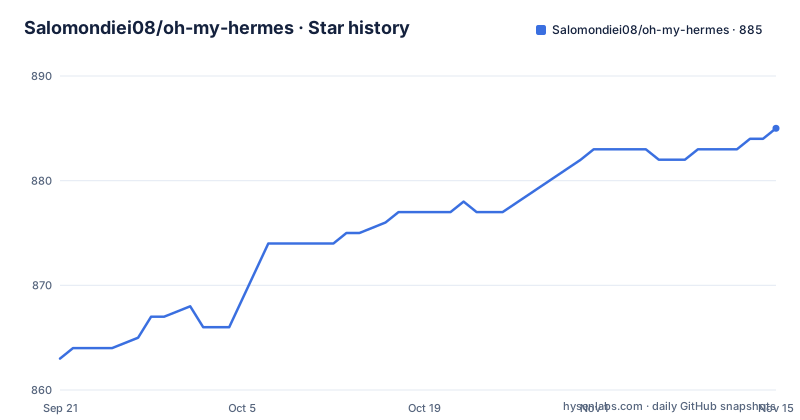
Star history
- Salomondiei08/oh-my-hermes885 ★ · +22
| Repository | 2026-09-21 | 2026-11-15 |
|---|---|---|
| Salomondiei08/oh-my-hermes | 863 | 885 |
22 Stars in the last 55 days, measured from the daily GitHub snapshot. Compare with other projects
Editorial analysis
The claim of 36 skills survives counting the table
The setup table says running install.sh loads 36 skills and 6 workflows. The skills table that follows has exactly 36 rows, ending at rollback, so the headline number and the inventory agree. The list is not a bag of prompts: it covers the whole path, with onboarding and clarify-requirements at the front, product-brief and design-handoff for shaping, deploy-to-vercel and connect-supabase for shipping, setup-monitoring and health-check for watching, manage-github-issues and create-github-pr for delivery evidence, security-review as a release gate, and failure-recovery, backup-hermes-data and reset-runtime for when things go wrong. Two of them are meta-skills in the literal sense: create-skill creates a new skill in the required format, and choose-engine routes work to Hermes, Claude Code or Codex.
Seven agents is the CTO plus six roles
The architecture is drawn as a tree with the Founder at the top and a CTO underneath, holding lifecycle, roadmap, delegation and decisions. From the CTO hang six roles. Product owns the brief, priorities, positioning, SEO and content. Designer owns UX, visual verification and launch assets and video. Builder owns working product increments. Reviewer owns journeys, visual and accessibility checks, and PR review. Security owns release risk plus a daily and weekly assessment. Ops owns deploy, health, deduplicated logs and incidents. Counting the CTO with those six gives the seven that the prose claims, which is worth stating because the diagram does not label the CTO as one of the seven. Everything lands in Hermes Kanban, plus memory, plus cron, plus completion evidence. The page is explicit that GitHub issues and PRs are delivery evidence rather than the roadmap.
At most three questions, and six kinds of action that stop for you
The interaction contract is narrow on both sides. Hermes reads the project before asking anything, asks at most three useful questions, supplies recommended defaults, and continues when you skip them. Work can start from an idea, customer feedback, production logs, analytics, or an issue. On the other side, the approval list is closed and short: production release, rollback, public posting, licensed media, payment, and destructive account changes. Everything else proceeds without asking, which is the design and also the thing to think about before you point it at anything real. The lifecycle it drives is Understand, Design, Build, Check, Ship, Learn, and the flagship skill ship-this-idea runs the idea to brief to design to build to verify to ship sequence end to end.
Three skills reach a paid or public API, and all three are gated
Most of the 36 skills act on your repository or your own servers. Three cross into outside services and each one names the official client or API it uses. generate-with-seedance runs approved paid video shots through the official Volcengine Ark API, which means money. publish-with-buffer dry-runs and then schedules approved posts with the official Buffer CLI, which means something public happens under your name. creative-production produces product assets and HyperFrames launch video with licensed music evidence, which means both a paid asset and a licensing question. The gating is the point: the page says HyperFrames launch videos and licensed music activate only when requested, and the pattern across all three is approve first, then spend or publish. Two more skills also reach hosted platforms, deploy-to-vercel and connect-supabase, and those are framed as deployment steps rather than as anything irreversible.
The repository-level env file declares no secrets and defines none
The .env.example at the root is three comment lines and nothing else. It says the repository has no server and requires no secrets, and it points at templates/.env.example for the variables a project actually needs. That split is the design: this repository is a set of files you install, not a service you run, so there is nothing here for a secret to protect, and the project-level variables live one directory deeper in the templates. The rest of the tree matches that shape. install.sh is the installer, INSTALL_FOR_AGENTS.md is the document written for a coding agent to read, AGENTS.md and CHANGELOG.md sit at the root, VERSION.md holds the version, and skills/, agents/, workflows/, templates/, scripts/ and docs/ carry the content.
The licence badge points at a file the tree does not contain
The header carries a licence badge linking to a LICENSE file, and the recorded licence field for the repository is empty rather than an identifier. The top-level entries are .env.example, .github/, .gitignore, AGENTS.md, CHANGELOG.md, INSTALL_FOR_AGENTS.md, README.md, VERSION.md, agents/, banner.png, docs/, install.sh, scripts/, skills/, templates/ and workflows/. There is no LICENSE among them. So three sources have to be reconciled before you copy this into your own environment: a badge that expects a file, a metadata field that names nothing, and a tree without the file. There is also only one release, v0.0.1 from 2026-06-19, against commits continuing to 2026-09-22, so the tag tells you very little about which state of the installer you would actually get.
The installer either clones itself or is piped in from a URL
There are two documented ways in, and they resolve to the same script. The clone route is two lines:
git clone https://github.com/salomondiei08/oh-my-hermes /tmp/oh-my-hermes
bash /tmp/oh-my-hermes/install.sh
A pipe route is supported as well, and the page explains the fallback: when repo files are not present, the installer self-clones a temporary copy. That detail is what makes the piped form work rather than fail, and it is the reason the clone into a temporary directory is what the agent-facing instructions tell a coding assistant to run. Step one is separate and lives elsewhere: install Hermes Agent itself from its own quickstart, ending with a bot you can message on Telegram, Slack, Discord or WhatsApp. Only after that does step three come, which is messaging the bot the single phrase set up the CTO loop and letting it walk the configuration in chat.
Editorial conclusion
Oh My Hermes fits someone who already runs Hermes Agent on a machine they control and wants a structured delivery loop, from a product brief through a review gate to a rollback, without hand-writing that process as prompts. It is a poor fit if you are looking for a chatbot front end or a prompt pack, both of which the page explicitly rules out, and a poor fit if you want an offline tool, since several skills call hosted services such as Vercel, Supabase, Sentry, Buffer and the Volcengine Ark API. Before installing, read the skills table rather than the summary, decide which of the approval-gated skills you will never enable, and settle the licence question with the author, because the metadata records none and the tree holds no LICENSE file.
Frequently asked questions
What does the Oh My Hermes installer load?
The setup table says 36 skills and 6 workflows, and the skills table that follows has exactly 36 rows. The list spans onboarding, product brief, design handoff, deployment, monitoring, GitHub issue and PR handling, security review, and backup and rollback.
How many agents does the Oh My Hermes CTO loop coordinate?
Seven, counting the CTO itself. A CTO holding lifecycle, roadmap, delegation and decisions sits over six roles: Product, Designer, Builder, Reviewer, Security and Ops, with everything landing in Hermes Kanban, memory, cron and completion evidence.
What does Oh My Hermes need approval for?
Six categories: production release, rollback, public posting, licensed media, payment, and destructive account changes. Everything else proceeds without a prompt, and the agent asks at most three questions at the start, supplying defaults you can skip.
Does Oh My Hermes require any API keys or secrets?
Not the repository itself. Its root .env.example says the repo has no server and requires no secrets, and points at templates/.env.example for the variables a project needs. Individual skills do reach hosted services such as Vercel, Supabase, Sentry and Buffer.
What is oh my hermes and how is it installed?
It is a workflow layer of skills and workflows for Hermes Agent, compared on the page to Oh My Zsh for Zsh. Install it by cloning the repo to a temporary path and running install.sh, or by piping it, in which case the installer self-clones when repo files are absent.
Official sources
Add this badge to your README
If you maintain this project, the badge below links readers to this analysis and shows its maintenance status from the daily GitHub snapshot. Paste the markdown into your README; add ?metric=license or ?metric=stars to the image URL for a different field.

[](https://hysenlabs.com/projects/salomondiei08-oh-my-hermes)Star history chart for your README
[](https://hysenlabs.com/projects/salomondiei08-oh-my-hermes)Was this useful?