Essentials: the install requires turning off Pixel protection first
Essential tools and mods for Android nerds
At a glance
- What is it?
- A Kotlin collection of mods and workarounds for Pixels and other Android devices, installed by sideloading and driven by Shizuku or root. The documentation is thin in the repository and the real setup notes live in a wiki, which is worth knowing before you start.
- Who is it for?
- Essentials is aimed at people who already sideload APKs and are willing to grant accessibility or shell access, and it pays off if you want system-level controls that a normal app cannot reach. Two things to check before installing.
- Can I use it commercially?
- Yes. MIT is a permissive licence: you can use, modify and sell software built on it, as long as you keep its copyright and licence notices.
- Is it still maintained?
- Yes. The repository received new commits within the last day.
- What is it written in?
- Mainly Kotlin, according to GitHub's language statistics.
Answers come from the project's GitHub data, last synced on November 24, 2026, and from our analysis. They are not legal advice.
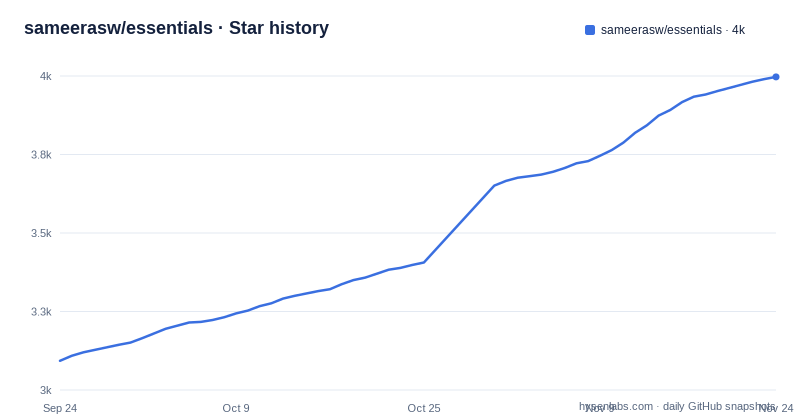
Star history
- sameerasw/essentials3,997 ★ · +904
| Repository | 2026-09-24 | 2026-11-24 |
|---|---|---|
| sameerasw/essentials | 3.1k | 4k |
904 Stars in the last 61 days, measured from the daily GitHub snapshot. Compare with other projects
Editorial analysis
A warning with no way past it, and two switches to flip
The installation section opens with a problem rather than a command. During installation you will probably see a warning claiming the app is blocked with no way to continue, and the explanation is a new Android restriction on sideloaded apps that can request sensitive permissions such as Accessibility or Notification Listener. Essentials may use both, which puts it inside the scope of that restriction by design. There is a way through, and it takes two steps. First, Google Play Protect has to be disabled temporarily for the install. Second, and this is the part that catches people out, the Play Protect toggle in the Play Store can appear enabled and greyed out, refusing to be switched off, because the Advanced protection feature on Pixels blocks sideloading outright. That feature has to be disabled as well. The author's own note acknowledges the annoyance and the reason the restriction exists, and asks readers to verify the trusted source of any APK they install.
Two shell providers, and root makes one of them optional
The app needs elevated access to do most of its work, and it accepts two routes. Shizuku and root are both supported as shell providers for running advanced system-level commands, and the choice is not cosmetic. With Shizuku, the guidance is specific about where to get it: use the latest version, preferably from a fork such as thedjchi/Shizuku or a similar one, and not from Google Play, because the Play version is described as no longer well supported. With root, the app bypasses Shizuku entirely and uses root privileges directly, which the documentation names as the path for features such as Button Remap and App Freezing. That is the practical difference: a rooted device needs no separate service to be running, while an unrooted one depends on Shizuku being alive at the moment the app needs it. Shizuku also has to be reconnected after a reboot, which is the usual source of a feature that worked yesterday and does nothing today, and it is the reason the fork recommendation matters.
Two betas of 18.5 within four days
The release cadence is fast and the version names carry more than version numbers. The most recent stable release is 18.4, published on 2026-09-30, and its description lists what changed: Weather, Island Improvements, and Improved Haptics, described as and more in that release. Two betas followed within days, beta.1 on 2026-10-01 and beta.2 on 2026-10-04, and the last push to the main branch is dated 2026-10-03, so the second beta shipped after the most recent commit in the repository. For anyone installing, that ordering matters: a beta is the only place a recent fix exists, and the release asset for it is the one tagged with the beta suffix. The project is not archived, is licensed under MIT, and its main language is Kotlin.
Translations go through a validation script before review
Localisation is the most formally documented contribution path in the repository, and it starts with in-app strings. The instructions ask anyone fluent in another language to translate the strings inside the app, and a video walkthrough is linked for the mechanics. Before a translation pull request goes up, there is a script to run.
# Validate all translation files for syntax, escaping & placeholder errors
python3 scripts/validate_strings.py

# Auto-fix quote and percent escaping issues automatically
python3 scripts/validate_strings.py --fix
The validation covers three classes of problem, which is the useful part: syntax of the translation files, escaping, and placeholders. The fix mode is narrower and handles quote and percent escaping automatically. A translation platform is also configured at the repository root through a Crowdin configuration file, so there are two routes into the same strings, one for translators using the platform and one for contributors editing them directly. Contributors are asked to read the contribution guide for the code of conduct and the pull request process.
The footer date is two months behind the releases
One line in the repository will mislead you if you take it at face value. The footer reads Last updated: 2026-08-08, while the releases at the top of the page are dated late September and October 2026 and the most recent commit is 2026-10-03. The README is therefore not a reliable freshness signal for this project, which is consistent with the rest of it: several sections in the file are headings with no text under them, including the screenshots section and the accessibility permissions section, and the actual feature list and system requirements are links into the project wiki rather than content in the page. If you are deciding whether a fix has landed, read the release tags and the commit dates instead of the footer. The same pattern shows in the credits, which name the upstream sources behind individual features: an emoji data file and a kaomoji generator for the keyboard, a quick settings tile for Pixel charging, and a link shortener.
A permissions script, a stub, and a Shizuku store entry
The root of the repository explains some of the operational requirements. A shell script named grant_perms.sh sits at the top level, which is the tool for the permission side of setup given how many sensitive permissions the app may request. There is also a Shizuku store configuration file, which is how an app registers itself so it can appear in the Shizuku manager and be granted a shell, which is the alternative path to the root route described earlier. Without that registration the app has no shell to talk to on an unrooted device, so the two files together cover the part of setup that the wiki cannot do for you. A stub directory at the root is separate from the application source in app/, and the release side is handled by a fastlane directory, so build channels are configured there rather than in the Gradle files. The Gradle wrapper is checked in with both the Unix and Windows launcher scripts, alongside the Kotlin DSL settings and build files and a gradle.properties. Documentation and issue handling sit in a docs directory and the GitHub templates, with separate bug report and feature request forms. A security policy file sits at the root too, which is the file to read before reporting something that affects other users' devices.
A wiki holds the requirements, and Wear OS lives elsewhere
The README is a signpost, and the destinations are worth noting. The feature list is a link to the project wiki, as are the system requirements, which sit behind an installation anchor in that wiki rather than in the page. The documentation for granting accessibility permissions has a heading and nothing else, so the wiki and the community channels are where that detail lives. Those channels are a subreddit and a Telegram group, both linked from the top of the file. There is also a second project: Essentials WearOS is developed in its own repository rather than as a module here, which is the usual arrangement when a companion app has its own release cadence. The credits list names the sources behind two features that would otherwise look like original work, an emoji dataset and a kaomoji generator for the keyboard, and a quick settings tile for Pixel charging, plus a link shortener.
Editorial conclusion
Essentials is aimed at people who already sideload APKs and are willing to grant accessibility or shell access, and it pays off if you want system-level controls that a normal app cannot reach. Two things to check before installing. Know which shell provider you will use, since root lets the app bypass Shizuku entirely, and that decides how much setup you are signing up for. And read the installation section carefully, because on Pixels the Play Protect toggle alone will not let you disable it until the Advanced Protection feature is also turned off.
Frequently asked questions
What is the sameerasw/essentials app?
A Kotlin set of tools, mods, and workarounds for Pixels and other Android devices, covering features such as Button Remap and App Freezing. It is MIT licensed and runs either through Shizuku or through root privileges, and a separate Essentials WearOS project lives in its own repository.
How do I install Essentials on a Pixel?
Expect an installation warning that appears to have no way past it, which comes from a new Android restriction on sideloaded apps requesting permissions such as Accessibility or Notification Listener. Temporarily disable Google Play Protect, and if its toggle is greyed out, disable the Advanced Protection feature as well, since that blocks sideloading outright.
Does Essentials need Shizuku or root?
It supports both as shell providers. If your device is rooted, the app can bypass Shizuku and use root privileges directly, which is the path used for features like Button Remap and App Freezing. Otherwise use Shizuku, preferably a recent build from a maintained fork rather than the Google Play version, which is described as no longer well supported.
How do I contribute translations to Essentials?
Translate the in-app strings, then validate before opening a pull request: python3 scripts/validate_strings.py checks syntax, escaping, and placeholder errors, and the --fix flag auto-fixes quote and percent escaping. A Crowdin configuration is also present for translators who prefer the platform.
Official sources
Add this badge to your README
If you maintain this project, the badge below links readers to this analysis and shows its maintenance status from the daily GitHub snapshot. Paste the markdown into your README; add ?metric=license or ?metric=stars to the image URL for a different field.

[](https://hysenlabs.com/projects/sameerasw-essentials)Star history chart for your README
[](https://hysenlabs.com/projects/sameerasw-essentials)Was this useful?