LidAngleSensor reads one sensor and asks you not to press Start Audio
tfw when you when your lid when uhh angle your lid sensor
At a glance
- What is it?
- LidAngleSensor is a Swift utility that shows the lid angle reported by a MacBook sensor, and optionally creaks like a wooden door when you move the lid very slowly. It also has a very funny small readme: the FAQ answers why the laptop needs to know the lid angle with 'Oh. I don't know.', hard-codes the app to a single sensor tested on one machine, and has replaced its own request for help with a confirmation that it works.
- Who is it for?
- LidAngleSensor fits someone with a recent MacBook who wants to watch the angle readout move, or who wants a joke on their desk, and who does not mind a tool that only knows about one sensor part. It does not fit anyone scripting the sensor, because a Python library that taps the same sensor is linked from the page and is the better route for that, and it does not fit an M1 or M2 machine, where the author reports it does not work and has no fix.
- Can I use it commercially?
- Yes. Apache-2.0 is a permissive licence: you can use, modify and sell software built on it, as long as you keep its copyright and licence notices.
- Is it still maintained?
- Yes. The repository last received commits 4 days ago.
- What is it written in?
- Mainly Swift, according to GitHub's language statistics.
Answers come from the project's GitHub data, last synced on November 14, 2026, and from our analysis. They are not legal advice.
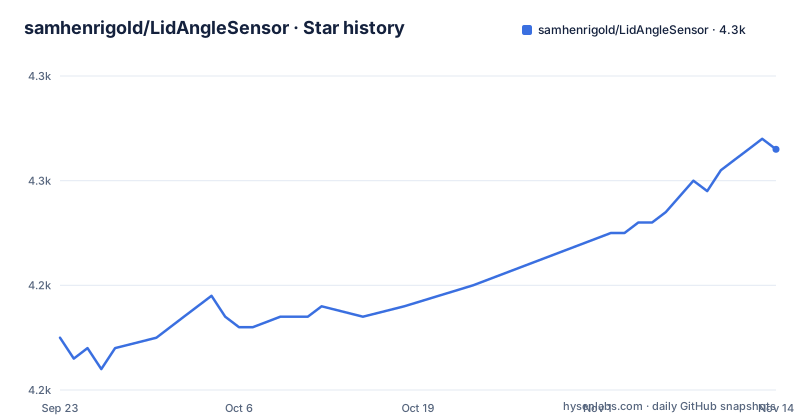
Star history
- samhenrigold/LidAngleSensor4,253 ★ · +18
| Repository | 2026-09-23 | 2026-11-14 |
|---|---|---|
| samhenrigold/LidAngleSensor | 4.2k | 4.3k |
18 Stars in the last 52 days, measured from the daily GitHub snapshot. Compare with other projects
Editorial analysis
Hard-coded to one sensor, tested on one machine
The honest limits are in the FAQ rather than in a compatibility table. The author says the app has only been tested on an M4 MacBook Pro and that it is hard-coded to look for a specific sensor.
That hard-coding is the whole compatibility story. If the sensor on your machine is not the one being looked for, nothing appears, and the documented remedy is to run a linked script and paste its output into a new issue.
Two models are named as known problematic: the wedge-shaped M1 MacBook Air, and the M1 and M2 MacBook Pro with Touch Bar. A separate answer adds that people have reported it does not work on M1 and M2 devices at all, with no fix found yet.
So the tool's reach is one sensor part on recent silicon, and the project's answer to anything outside that is to collect hardware reports rather than to detect models at runtime.
Introduced with the 2019 16-inch MacBook Pro, and iMacs work
The hardware question is answered in three sentences. It is a sensor that detects the angle of the lid, despite what the name suggests. It was introduced with the 2019 16-inch MacBook Pro. And if your laptop is newer, you probably have it.
The iMac answer is the one that changed. It used to read that the case was not yet tested, and invited you to slam your computer into your desk and open a pull request with your results. That line is struck through now and replaced by a link to an issue reporting that it totally works, followed by the suggestion that if it does not work for you, you should try slamming your computer harder.
That edit is the most informative thing in the readme. A request for hardware reports became a confirmation, and the joke stayed, which tells you how the project handles the difference between a bug and a shrug.
The door sound comes from a LEGO game and is disabled by never clicking
The second half of the utility is an audio effect. It plays a wooden door creaking sound, if you adjust the lid very slowly, once you have clicked Start Audio.
The page is candid about the sound itself. Asked why the audio feels strange, the answer is that the author is bad at audio. Asked where the effect came from, the answer is LEGO Batman 3: Beyond Gotham.
Turning it off has its own instruction: never click the button that starts the audio, with a note that this energy is not encouraged. So there is no mute flag, only a button you are asked not to press.
The release history says the same thing in version numbers. The 1.0.3 release, published in September 2025, is named THEREMIN MODE, and the newest release, 1.1, published on 2026-03-22, is named Big ol refactor.
Three releases, two of them hours apart, and nothing since March
The published history is short. Version 1.0.2 and version 1.0.3 were both released on 2025-09-06, the second named THEREMIN MODE. Then version 1.1 arrived on 2026-03-22 with the name Big ol refactor.
The last push to the default branch is dated 2026-03-22 as well, which means the release and the tip of the branch are the same day. Nothing has been pushed to this repository since then.
So the latest release is a refactor that has not been touched in the months since it shipped, and the readme's building note is the place to look for why that matters: the author has only tested building on Xcode 26 and closes with the abbreviation for your mileage may vary.
For a utility this size that is a reasonable place to stop. It is also the reason the page points you at a script and an issue rather than at a compatibility matrix.
One project directory, one source directory, and Homebrew
The repository has five top-level entries. There is a gitignore, a licence, the readme, an Xcode project directory, and a source directory named after the project.
There is no package manifest, no test directory, no continuous integration configuration and no changelog file. The releases page is the changelog.
Installation does not come from that tree. The only install route on the page is Homebrew:
brew install lidanglesensorBuilding is the other route, and the page's advice is one sentence: according to a linked issue, building requires Xcode installed, tested only on Xcode 26.
So there are two ways in, one binary from a package manager and one compile from the project directory, and neither is described in the repository itself beyond those notes. A related project is linked as well, a Python library that taps into the same sensor, which is the more useful pointer if you want the number in a script rather than on screen.
The readme jokes about the hardware and answers one bug report straight
The tone is the documentation. The page opens by pointing at a video about what it calls the Constitution human interface device utility, and asks whether you knew you had a lid angle sensor, striking through the word rights.
Asked why the project exists, an earlier line about free time and looking for work is struck through and replaced with a link to the author's site plus a line saying he is employed now and still doing this for the love of the game. Asked why the laptop needs to know the exact angle of its lid, the answer is: oh, I don't know. Asked whether contributions are welcome, the answer is I guess.
Underneath that, the technical content is precise and short: which laptop introduced the sensor, which two models fail, which Xcode version was used, where the audio came from, and what to do when nothing appears. The joke and the bug report sit in the same file without either one being padded.
Editorial conclusion
LidAngleSensor fits someone with a recent MacBook who wants to watch the angle readout move, or who wants a joke on their desk, and who does not mind a tool that only knows about one sensor part. It does not fit anyone scripting the sensor, because a Python library that taps the same sensor is linked from the page and is the better route for that, and it does not fit an M1 or M2 machine, where the author reports it does not work and has no fix. Before installing, check four things. Whether your machine is newer than the 2019 16-inch MacBook Pro that introduced the sensor. Whether your model is one of the two known problematic ones, the wedge-shaped M1 Air or the Touch Bar M1 and M2 Pro. Whether you have Xcode and, if you are building rather than installing through Homebrew, whether you have a version close to the 26 the author used. And whether you want the sound, because turning it off means never clicking the button that starts it, which the page says is not encouraged.
Frequently asked questions
What does LidAngleSensor do on a MacBook?
It is a small Swift utility that shows the angle reported by the lid sensor and, optionally, plays a wooden door creaking sound when you adjust the lid very slowly. The page names LEGO Batman 3: Beyond Gotham as the source of the effect.
Does my MacBook have a lid angle sensor?
The sensor was introduced with the 2019 16-inch MacBook Pro, so a newer laptop probably has one. The page names the wedge-shaped M1 MacBook Air and the M1 or M2 MacBook Pro with Touch Bar as known problematic models, and reports that it does not work on M1 and M2 devices.
Why does LidAngleSensor not find my sensor?
The app is hard-coded to look for one specific sensor and has only been tested on an M4 MacBook Pro. If nothing appears, the page suggests running a linked script and reporting its output in a new issue.
What does building LidAngleSensor require?
Xcode, according to a linked issue, and the author has only tested it on Xcode 26. The repository holds an Xcode project directory and a source directory, with no package manifest, and installation goes through Homebrew instead.
Official sources
Add this badge to your README
If you maintain this project, the badge below links readers to this analysis and shows its maintenance status from the daily GitHub snapshot. Paste the markdown into your README; add ?metric=license or ?metric=stars to the image URL for a different field.

[](https://hysenlabs.com/projects/samhenrigold-lidanglesensor)Star history chart for your README
[](https://hysenlabs.com/projects/samhenrigold-lidanglesensor)Was this useful?