FitTrackee is a self-hosted workout tracker that pulls in devices by file, and its stable patch shipped after the next version's beta
Self-hosted outdoor activity tracker :bicyclist: [mirror of codeberg repository: https://codeberg.org/FitTrackee/FitTrackee]
At a glance
- What is it?
- A Flask and Vue application on PostgreSQL with PostGIS, importing activity files from several Android apps and from smartwatch bridges, with a command line interface and a Python API. The GitHub copy is a build mirror, the coverage badge excludes the frontend, and the packaging declares production stable while the readme says otherwise.
- Who is it for?
- Use it if you want your activity history on your own server rather than in someone else's account, and if your devices already export files. The import path is the design: it does not talk to any vendor service, it reads what your phone wrote.
- Can I use it commercially?
- Yes, with strict conditions. AGPL-3.0 is a network copyleft licence: if people use a modified version over a network, for example as a hosted service, you must offer them its source code under the same licence.
- Is it still maintained?
- Yes. The repository last received commits 3 days ago.
- What is it written in?
- Mainly Python, according to GitHub's language statistics.
Answers come from the project's GitHub data, last synced on November 25, 2026, and from our analysis. They are not legal advice.
Star history
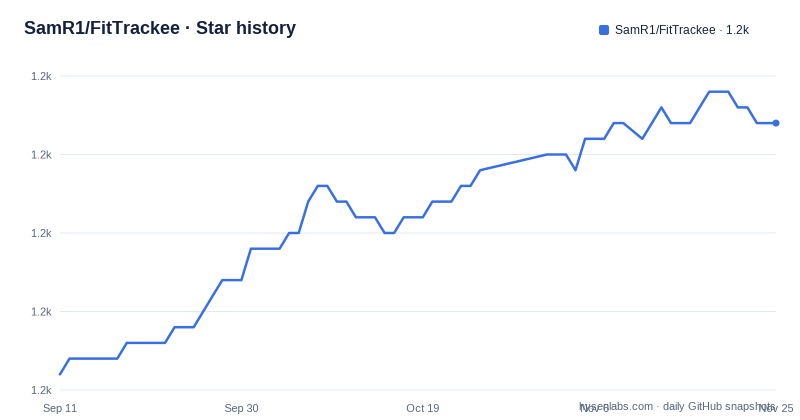
- SamR1/FitTrackee1,177 ★ · +16
| Repository | 2026-09-11 | 2026-11-25 |
|---|---|---|
| SamR1/FitTrackee | 1.2k | 1.2k |
16 Stars in the last 75 days, measured from the daily GitHub snapshot. Compare with other projects
Editorial analysis
The maintenance patch came out after the next version's beta
Three releases are visible and they are not in numeric order. The 1.3.4 patch lands in late July. A 1.4.0 beta, with the pre-release suffix on the tag, lands in late August. The 1.3.5 patch then lands in September, after the beta for the version above it.
So the maintenance line kept shipping while the next minor was already in beta, which is a normal thing to do and a confusing thing to read from a tag list. Anyone waiting for a feature will look at the newest tag, see a patch on the older line, and conclude that the beta was abandoned. It was not.
The packaging file declares 1.3.5, which matches the newest stable tag rather than the beta, so a source build and a release download agree on the version. The repository's last push is late September, weeks after that tag, so the default branch is ahead of every release.
The project also describes itself as under heavy development with some features possibly unstable, and points at a provisional roadmap issue and the issue tracker rather than a published plan.
The GitHub copy is a build mirror and the issues live somewhere else
This repository is not where the work happens. The main repository is hosted on another forge, and the GitHub one is described as a mirror with an explicit exception: issues and pull requests. Those live on the other host, and this copy is used to run the tests and to build and publish the Python packages and the container images.
That split is visible in the files. There is a directory for the other forge's automation sitting beside the GitHub one, and the badge row points at both. The workflows are not the same: this side runs a test workflow, the other side runs a Python checks workflow and a separate JavaScript checks and tests workflow, and all three workflow filenames begin with a dot.
So code checks run on one host and tests run on the other. The packaging metadata agrees with the arrangement rather than with the repository it lives in: the homepage, the issue tracker and the release notes links all point at the other forge, while the source distribution badge points at the package index.
For a contributor this matters more than for a user. Opening an issue here is the wrong move, and the readme says so in a parenthetical most people will skim past.
The classifier says production stable and the readme says heavy development
Two statements in the same repository disagree about the maturity of the software.
The packaging metadata classifies the project at production and stable. The readme says it is under heavy development and that some features may be unstable, and points at a provisional roadmap issue, the issue list and the documentation for more information.
The classifier is what tooling reads. It appears in the package index, in dependency resolvers and in any automated check that asks whether a dependency is safe to depend on. The prose is what a human reads.
Neither is necessarily wrong on its own terms, and there is a reading where both hold: the application is stable enough to run in production while individual features are still moving. But that reading is doing work that neither sentence does, and the repository gives no way to tell which features are the unstable ones.
The same metadata block is otherwise careful. It declares a Linux-only operating system class, lists four Python versions from 3.11 to 3.14, names the web framework it is built on, and includes a JavaScript language classifier because the frontend lives in the same repository.
Every dependency is pinned exactly, and one is held below its own Python floor
The dependency list has no ranges in it at all. Every entry is an exact version: the web framework, the template and localisation libraries, the task queue, the feed generator, the activity file parser, the database layer and its migration tool, the geospatial libraries, the production server, the schema validator, the XML parser, the HTML sanitiser, the array library, the dataframe library and the imaging library.
One entry carries a comment explaining a floor. The array library is pinned to a version below the next major, with the comment saying the newer one requires a newer Python than this project supports. The project declares support from 3.11 upward, and that pin is what keeps 3.11 working.
So the constraint is real and the resolution is exact: if you want to run on the oldest supported Python you are held at a specific old version of one library, and if you want current versions of everything you must move off the oldest Python. There is no way to have both.
Exact pins everywhere make a release reproducible and make an upgrade a diff of the lock file rather than a decision. The cost is that a security fix in any of these libraries requires a deliberate release rather than arriving with a resolver.
There is no official database image for ARM, so that part is yours to build
The compose file opens with two warnings about the database image, and both matter before your first deploy.
The first is a version note: a specific major release of the database changed where its data directory lives, so an upgrade across that boundary needs the upstream documentation rather than a pull. The second is an architecture note: there is no official PostGIS image for ARM platforms, and the stated workaround is to build the image locally.
That second one decides the deployment for anyone on Apple Silicon. The compose file will not bring up the database on an ARM machine without an image you built yourself, which is a different first-run experience from the one the file is written for.
The rest of the file is careful in a way the warning is not. The application image is pinned to a specific release tag, matching the newest stable version. The database image uses a major, minor and alpine tag that will drift as upstream publishes. Volumes are host directories with defaults under the project. The database has a readiness check on a five second interval with a fifteen second timeout and three retries, sits on an internal network, and restarts unless stopped.
One user needs two containers and a second user needs four
The compose file describes its own tiers in the header comments, which is more than most deployment files do.
A single user application needs only the application container and the database container. A multi-user application needs two more: a worker container for user data export, archive uploads and email sending, and a cache container, which serves API rate limits and the same three features. Both are commented out by default.
So the feature list is not uniform across deployments. Rate limiting, exports, archive uploads and email all require the cache, and the worker also requires it. The environment file says the same thing independently, marking the cache as required for rate limits, export and email, and marking the worker as required for export, email and archive uploads.
One consequence is worth planning for. Email is enabled by setting a URL variable, and that variable is what switches the feature on, so a multi-user install that wants notifications has to have both extra containers up before the setting does anything.
The example environment ships a placeholder secret and one unparseable line
The environment template is mostly commented out, which is the right default for a file that is read rather than sourced. A handful of variables are actually exported and most of the rest are examples.
One of the exported lines is a placeholder secret whose value says it should be changed. That is the conventional way to flag a required secret, and it is also the line a careless deployer ships unchanged.
Two details in the commented lines are worth noting. One variable that controls API rate limiting is written as a number followed by words in the same value, which is not something a shell would accept if you uncommented it as written. And the file is described as able to overwrite variables that are also defined in a makefile configuration file, so configuration for this project arrives from two places and the environment file wins.
The commented block is also the best inventory of what talks to the internet. There are separate variables for the tile server, a static map service with a subdomain list and an attribution string, an elevation API, a routing API, and a geocoding service, plus a weather provider where exactly one provider is listed as available. A self-hosted install is only offline if you either host those or accept the calls.
The version lives in two files and the coverage badge carries a footnote
Two things in the tree are easy to trip over.
The first is the version. There is a file at the root whose entire purpose is the version string, and the packaging file declares a version as well. A release therefore has to update both, and a mismatch is silent until something reads the wrong one.
The second is the coverage badge. It has a footnote marker attached to it, and the footnote at the bottom of the readme says the coverage figure covers only the Python API and the command line interface. So the percentage on the badge is accurate and the impression it gives is not: none of the Vue frontend is in that number.
The rest of the layout supports both. There is an end to end test directory and a coveragerc, so the excluded work is tested by something other than the coverage tool. Documentation has its own source directory, the translation template is generated from a message catalogue, and there are two compose files, two Dockerfiles, two entrypoint scripts and three environment templates, one set for development and one for production.
Two editor setups sit at the root as well, a dev container definition and an editor directory, which is what a project with a frontend, a backend and a database tends to accumulate.
Editorial conclusion
Use it if you want your activity history on your own server rather than in someone else's account, and if your devices already export files. The import path is the design: it does not talk to any vendor service, it reads what your phone wrote. Two things to know before you deploy it. On an ARM machine there is no official database image, so the compose file assumes you can build one. And a single user needs two containers while email, exports and rate limiting each pull in a broker and a cache, so the multi-user configuration is a different deployment rather than a larger one. Read the backup note before any upgrade that carries database migrations.
Frequently asked questions
How does FitTrackee get workout data from a phone or watch?
Devices store workouts locally and export them as files, which the application imports. Four Android apps are named as sources, and two smartwatch bridges are named, one of which has an integration and one of which is described as having none.
Where should I open an issue for FitTrackee?
On the Codeberg repository, not on GitHub. The GitHub copy is a mirror and excludes issues and pull requests, and it is used to run tests and to build and publish packages and container images.
What containers does a single user FitTrackee install need?
Only the application and the database. The worker and cache containers are commented out in the compose file and are needed for multi-user setups, where they serve exports, archive uploads, email sending and API rate limits.
Can I run FitTrackee on an ARM machine with Docker?
The database cannot, out of the box. The compose file warns that there is no official PostGIS image for ARM platforms and that the workaround is to build the image locally.
What does the FitTrackee test coverage badge actually measure?
Only the Python API and the command line interface, according to the footnote attached to the badge. The frontend is excluded from that figure and is covered by a separate end to end test directory instead.
Official sources
Add this badge to your README
If you maintain this project, the badge below links readers to this analysis and shows its maintenance status from the daily GitHub snapshot. Paste the markdown into your README; add ?metric=license or ?metric=stars to the image URL for a different field.

[](https://hysenlabs.com/projects/samr1-fittrackee)Star history chart for your README
[](https://hysenlabs.com/projects/samr1-fittrackee)Was this useful?