AI-Influencer-Generator documents a requirements file it does not ship
Create and customize your AI influencer open-source
At a glance
- What is it?
- AI-Influencer-Generator is a single Jupyter notebook that chains Stable Diffusion, gTTS, and SadTalker into a talking virtual persona, and it recommends running it in Google Colab rather than locally. The interesting part is what the repository does and does not contain: three files, no requirements file, and a quickstart link to a differently named repository.
- Who is it for?
- AI-Influencer-Generator suits someone who wants to see the whole pipeline end to end in one readable notebook and is willing to assemble the dependencies, because the four stages are chained explicitly and each tool does exactly one job. It does not suit anyone expecting a turnkey install, since the documented local setup fails on a missing requirements file and the Colab route is what the project actually recommends.
- Can I use it commercially?
- Yes. MIT is a permissive licence: you can use, modify and sell software built on it, as long as you keep its copyright and licence notices.
- Is it still maintained?
- Yes. The repository last received commits 105 days ago.
- What is it written in?
- Mainly Jupyter Notebook, according to GitHub's language statistics.
Answers come from the project's GitHub data, last synced on November 14, 2026, and from our analysis. They are not legal advice.
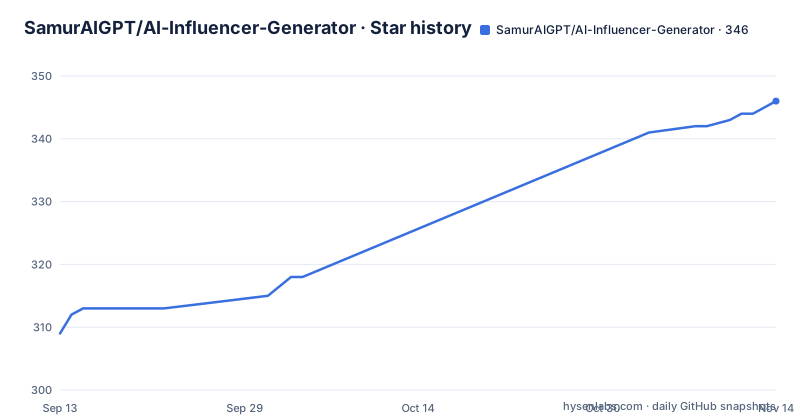
Star history
- SamurAIGPT/AI-Influencer-Generator346 ★ · +37
| Repository | 2026-09-13 | 2026-11-14 |
|---|---|---|
| SamurAIGPT/AI-Influencer-Generator | 309 | 346 |
37 Stars in the last 62 days, measured from the daily GitHub snapshot. Compare with other projects
Editorial analysis
The local setup installs a file the repository does not contain
The documented local path is four commands.
# Clone the repository
git clone https://github.com/SamurAIGPT/AI-Influencer-Generator.git
cd AI-Influencer-Generator

# Install dependencies
pip install -r requirements.txt

# Run the notebook
jupyter notebook AI_Influencer.ipynb
The repository contains three things: the notebook, a license file, and the README. There is no requirements file at the root.
So the third command cannot succeed on a fresh clone. Someone following the instructions gets as far as the directory listing and has to work out the dependencies themselves.
This is recoverable rather than fatal, since the dependencies are named elsewhere. The tech stack table lists four components, and the feature list names the same four. But the versions are not pinned anywhere visible, and three of those four bring their own installation weight.
It also explains why the other option is marked as the recommendation. Running in a hosted notebook environment sidesteps the missing file, at the cost of the notebook being the only supported environment.
The Colab link points at a differently named repository
Two references in the documentation resolve outside this repository, and they resolve to a sibling project.
The notebook badge near the top of the README links to a path under a repository named for an AI influencer rather than a generator. The Google Colab option in the quick start links to the same place.
So the artifact this documentation is about, the notebook named in the local setup, is presented through a link to a different repository. Whether that is a rename that was only half applied or two related projects sharing a notebook, the effect on a reader is the same: the file you are sent to fetch may not be the file in the directory you cloned.
That is worth resolving before anything else, because every other instruction in the document assumes one notebook.
It is a small thing, and it is the kind of small thing that only shows up when you actually try the documented path. Nothing in the text hints that the two names differ.
The pipeline is four tools chained by hand
The whole system is described as one line: a prompt becomes a generated image, the image is paired with generated audio, and the pair becomes video.
Each stage has exactly one tool behind it. Image generation is Stable Diffusion, speech is gTTS, and lip sync is SadTalker.
The workflow around those three is five steps, and only three of them are the pipeline. Designing the persona comes first, generating the script comes second, voice generation is the third, animation is the fourth, and publishing is the fifth.
Publishing is the only step with no tool attached to it, which is the honest shape of this project. Everything up to a video file is automated; getting that file in front of an audience is manual.
The four stated use cases follow from that shape rather than from the model. Social platforms are listed first, along with brand ambassadors, educational presenters, and entertainment characters. All four are cases where the output is a short talking clip rather than anything interactive.
OpenAI GPT is in a stack that claims no paid APIs are needed
One line in the feature list says the core functionality requires no paid APIs. One row in the tech stack table lists a commercial model provider for prompt generation.
Those two statements are compatible, but only if you know which stage the paid part belongs to. The image, speech, and animation stages are all local tools that run on your own machine or in a free notebook environment. Prompt generation is the one stage that needs a hosted model.
So the free claim covers the media pipeline and not the scripting step. Whether that matters depends on what you use it for: if you write your own scripts, the paid dependency disappears entirely, since the prompt generator is a convenience for people who want the model to draft copy.
The dependency asymmetry also explains the tool choices. Text to speech through gTTS is a much older and smaller approach than a neural voice clone, and lip sync through SadTalker is a research project rather than a hosted product. Both are chosen because they run locally, and both carry the quality ceiling that implies.
The four tips at the end of the README are consistent with that: they are all advice about input quality rather than about tuning a model.
Character consistency is a prompting habit rather than a model setting
Consistent characters are listed as a feature, and it is the one claim in the list with no tool behind it.
There is no identity embedding, no reference-image conditioning, and no seed management described anywhere. What there is, in the tips section, is a set of four input-quality rules.
Use similar prompts to maintain character appearance. Keep scripts clear because clean text produces better lip sync. Generate images with good lighting because better-lit images animate better. Use higher resolution because higher resolution produces better video.
Every one of those is a property of what you hand the pipeline, not of the pipeline. Consistency is therefore achieved by discipline in prompting, which works acceptably and degrades the moment a prompt drifts.
The third and fourth tips are worth reading as a unit. They are really advice about the input to the animation stage, and they reflect a known weakness of lip-sync systems: they inherit the geometry and texture quality of the source image.
So the same image-quality advice that keeps a character recognizable is the advice that makes the animation look right, which is convenient, since neither is a parameter you can turn.
Three files, and eight linked projects that are mostly not this one
The related projects section is longer than the project's own documentation and mostly points elsewhere.
Eight repositories are listed. Four belong to a different account and cover adjacent jobs: scheduling content across social platforms, generating user-generated-style video ads with AI actors, a free studio fronting more than two hundred image and video models, and a free curriculum on monetising AI influencer content.
Three belong to this account and are separate tools: a shorts generator, a faceless video generator, and a text-to-video project.
The eighth is not open source at all. It is a hosted unified generation service with its own playground and paid access keys, listed first among the related projects.
That ordering is the interesting part. The commercial API appears at the top of a list in a project whose pitch is that it is completely free and needs no paid APIs.
The tutorial link reinforces the framing. It points at a long-form article whose title promises a specific monthly income figure, which is a marketing claim rather than something this repository can support.
For an evaluator, the practical conclusion is that this notebook is one link in a commercial ecosystem rather than a self-contained tool, and the repository is the piece you can read.
The repository homepage points at a hosted product page
A few metadata details set expectations before you read a line.
The repository homepage is not the project page but a hosted tool page on a commercial domain, the same one named by the product. So the link from the repository goes somewhere a visitor can sign up rather than somewhere they can read the code.
The repository lists no tagged releases. Pin a Git commit to retain a reproducible source snapshot and use commit history to inspect changes. The last recorded push is 2026-08-02.
The primary language is recorded as a notebook rather than as Python, which is accurate: the deliverable is a single file meant to be executed cell by cell, not a package to import.
The licence is MIT, which is worth stating plainly because the components it drives are separately licensed. A notebook that imports three independent tools inherits their terms regardless of what the surrounding file says.
The contributing section asks for pull requests and then asks for a star, and two personal accounts are listed for updates. That combination reads like a portfolio project maintained in public rather than a dependency anyone should build on.
Editorial conclusion
AI-Influencer-Generator suits someone who wants to see the whole pipeline end to end in one readable notebook and is willing to assemble the dependencies, because the four stages are chained explicitly and each tool does exactly one job. It does not suit anyone expecting a turnkey install, since the documented local setup fails on a missing requirements file and the Colab route is what the project actually recommends. Before you start, expect to write the dependency list yourself, and check which of its related projects you actually need, since several are separate products rather than parts of this one.
Frequently asked questions
Can I create an AI influencer?
With this project, yes. It is a notebook that chains Stable Diffusion for the persona image, gTTS for the voiceover, and SadTalker for lip sync, with no paid APIs required for that core path. The recommended route is Google Colab, opening the notebook and running each cell sequentially.
What does AI-Influencer-Generator need to run locally?
A clone, an install step, and Jupyter. The documented commands are `pip install -r requirements.txt` followed by `jupyter notebook AI_Influencer.ipynb`, but the repository root contains only the notebook, a license file, and the README, so the requirements file that step references is not present.
Which tools does AI-Influencer-Generator use?
Stable Diffusion for AI image generation, gTTS for text-to-speech, SadTalker for lip-sync animation, and OpenAI GPT for prompt generation. The first three run locally, which is why the project states no paid APIs are needed for core functionality.
How do I keep the same character across videos?
Consistency is presented as a prompting habit rather than a model setting. The documented advice is to use similar prompts to maintain appearance, keep scripts clear for better lip sync, generate images with good lighting, and use higher resolution, since all four factors are properties of the input.
What use cases does AI-Influencer-Generator list?
Social media content for Instagram, TikTok, and YouTube; brand ambassadors as virtual product representatives; educational content as AI tutors and presenters; and entertainment characters and personas. Publishing is a manual step, so the output is a short talking clip rather than anything interactive.
Official sources
Add this badge to your README
If you maintain this project, the badge below links readers to this analysis and shows its maintenance status from the daily GitHub snapshot. Paste the markdown into your README; add ?metric=license or ?metric=stars to the image URL for a different field.

[](https://hysenlabs.com/projects/samuraigpt-ai-influencer-generator)Star history chart for your README
[](https://hysenlabs.com/projects/samuraigpt-ai-influencer-generator)Was this useful?