Sandstorm: a package manager for web apps, where the sandbox is the product
Sandstorm is a self-hostable web productivity suite. It's implemented as a security-hardened web app package manager. | Actively sponsored by our friends at TestMu AI
At a glance
- What is it?
- Sandstorm is a self-hostable web productivity suite implemented as a security-hardened web app package manager. It installs on any x86-64 Linux system, and the repository layout shows the build depends on a bundled clang, a Meteor bundle and the ekam build tool.
- Who is it for?
- Adopt Sandstorm if you want to run your own documents, spreadsheets, blogs, git repos and task lists on a server you control, and evaluate it first on the demo instance rather than on a fresh install, because the documentation splits installation, usage, security practices and app packaging across four separate pages and none of them is summarized in the README.
- Can I use it commercially?
- Check first. The repository uses a licence we do not classify automatically, so read its LICENSE file before any commercial use.
- Is it still maintained?
- Yes. The repository last received commits 14 days ago.
- What is it written in?
- Mainly JavaScript, according to GitHub's language statistics.
Answers come from the project's GitHub data, last synced on November 15, 2026, and from our analysis. They are not legal advice.
Star history
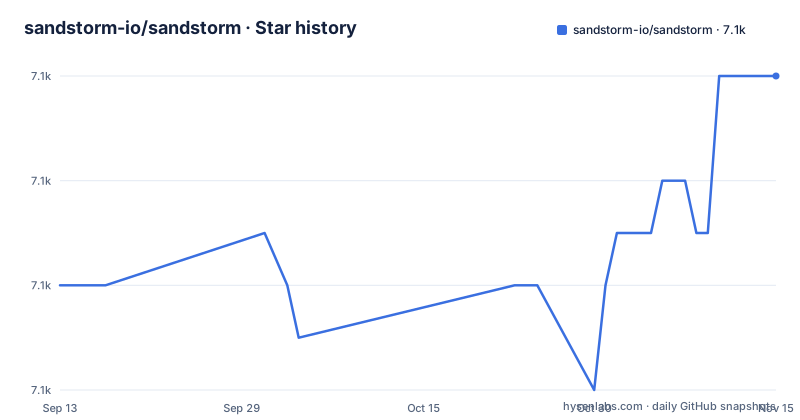
- sandstorm-io/sandstorm7,082 ★ · +4
| Repository | 2026-09-13 | 2026-11-15 |
|---|---|---|
| sandstorm-io/sandstorm | 7.1k | 7.1k |
4 Stars in the last 63 days, measured from the daily GitHub snapshot. Compare with other projects
Editorial analysis
The package manager is the product, and the app catalogue is the payload
The README describes Sandstorm in two clauses that are worth separating because they describe different layers. It is a self-hostable web productivity suite, and it is implemented as a security-hardened web app package manager.
The second clause is the architecture. Sandstorm's own self-description, in the header comment of its Makefile, is Personal Cloud Sandbox. So the unit of installation is a web application package, and the thing that installs packages is itself the server you run. That is why the README frames the experience as running your own server and installing apps to create documents, spreadsheets, blogs, git repos and task lists, and more, as easily as you would install apps on your phone.
That framing is doing real work. Most self-hosted software asks you to assemble a stack: a web server, a runtime, a database, a reverse proxy, TLS. A package manager for web apps asks you to install one thing and then choose from a catalogue. The catalogue is browsable at apps.sandstorm.io, and each entry in the README's list is a link into it.
The security claim attaches to the mechanism rather than to the apps. Because each app is a package run inside a hardened sandbox rather than a process with access to the host, the blast radius of a compromised app is a question the architecture is designed to answer. The README links both how it works and a separate security-practices page in the documentation, which is where to go before you rely on that claim.
x86-64 Linux is the entire stated platform requirement
The README states that Sandstorm is open source and can be installed on any x86-64 Linux system. That is the whole platform requirement as written, and it is narrower than it sounds in one direction and wider in the other.
Narrower, because x86-64 is an architecture statement rather than a distribution statement. Nothing in the README names a Linux distribution, an init system or a minimum kernel version, so you are left to discover those from the installation documentation. That is a real gap for anyone deploying unattended, and it is the reason to read the install page rather than to plan from the README.
Wider, because there is no managed edition to rule out and no hosted tier in the repository. The README links a demo at demo.sandstorm.io.
Installation itself is delegated entirely. The README's Installing section is a single link to the installation instructions in the documentation, with no command, flag or configuration shown in the repository's own front page. Given that the repository ships install.sh, a Vagrantfile and an installer-tests directory, the actual install path is script-driven, but the README does not reproduce any of it, so treat the documentation page as the authoritative source rather than inferring from the file names.
Three of the top-level entries hint at what the install involves without documenting it: recover-sandcats.sh, acme-dns-01-sandcats/, and keys/. Those names point at certificate issuance and hostname provisioning, which is the part of a self-hosted suite that most often determines whether the deployment works on your network.
The build runs a bundled clang and takes its own parallelism from nproc
The Makefile is the most concrete thing in the repository, and it describes a build that does not use the system compiler. The override block is short enough to read as a unit:
CC=$(shell pwd)/deps/llvm-build/Release+Asserts/bin/clang
CXX=$(shell pwd)/deps/llvm-build/Release+Asserts/bin/clang++
CFLAGS=-O2 -Wall -g
CXXFLAGS=$(CFLAGS)
BUILD=0
PARALLEL=$(shell nproc)
LIBS=
EKAM=ekam
Four things follow. The compiler is a bundled LLVM build under deps/llvm-build, resolved relative to the working directory, which means the build does not depend on what the host has installed and gives the same toolchain regardless of distribution. Optimisation is on with warnings and debug info retained. PARALLEL is taken from nproc, so the build sizes itself to the machine rather than asking you to configure it. And the build tool is named as ekam, with the comment that you may override these variables on the command line to suit your config.
The same comment block contains the most interesting admission in the file, and it is about a shared library rather than the compiler. It notes that most of the code is static binaries, that they also need to build a .node module which is a shared library, and that it needs to include all the Cap'n Proto code, then asks whether to double-compile or just accept it. It raises the possibility that position-independent executables would be better for security reasons, and leaves the question open.
That is a real design tension stated plainly rather than hidden: static binaries and a shared Node module pull in opposite directions, and the resolution is a TODO marked for cleanup. If you are auditing this codebase, that comment is where the interesting decision is, along with the Cap'n Proto dependency it implies for the wire format.
The build also expects a Meteor toolchain. METEOR_DEV_BUNDLE is resolved by running find-meteor-dev-bundle.sh, and METEOR_SPK_VERSION is pinned at 0.6.0 with the binary expected at meteor-spk-$(METEOR_SPK_VERSION)/meteor-spk. There is a meteor-testapp/ directory and a meteor-bundle-main.js entry point, so Meteor is a runtime dependency of the server, not an optional extra.
The -DKJ_STD_COMPAT flag exists because nobody is sure what broke
One comment in the Makefile is worth reading on its own, because it is an honest record of an unresolved problem. It reads that empirically -DKJ_STD_COMPAT appears to be necessary on recent distributions, as of Jan 2020, notably Debian Sid, Fedora 30 and Archlinux, that the maintainers are not entirely sure what changed, and that this seems to be a backwards incompatibility in libstdc++, with a reference to issue #3171.
That is three separate distributions, one library, no identified root cause and an observation dated January 2020, nearly seven years old. The flag is still in the build. It is a good example of why reading a Makefile tells you things a README never will: the failure mode is a build break on a newer toolchain, the workaround is a define whose rationale nobody can reconstruct, and the tracking issue is the only place the answer would live.
The date matters for reading it. Jan 2020 is old enough that the distributions named have moved several releases since, and libstdc++ has changed more than once. So the comment should be treated as a historical record rather than a current description of what your build will hit, and if you do hit a toolchain failure, do not assume this flag is the answer just because it is mentioned here.
The rest of the repository layout points at a build with several distinct halves rather than one compilation. There is src/ and shell/ for the server's own code, hack/ for tooling, tests/ and installer-tests/ as two separate suites, docs/ with an mkdocs.yml at the root meaning the documentation is built from this repository, and make-bundle.sh alongside release.sh and release-process.md. The presence of release-process.md as a distinct document from CONTRIBUTING.md suggests the release path is documented deliberately rather than improvised.
Packaging an app is a documented path with its own hub, not a side door
Four documentation destinations are named in the README, and one of them is about contributing apps rather than using the server. How to Package Apps points at the developer hub in the documentation, which is a separate concern from installation, usage and security.
That separation is the thing to notice. Consuming the catalogue and producing an entry in it are different activities with different failure modes, and the project documents them separately rather than folding packaging into a contributing guide.
SECURITY.md sits at the top level next to CHANGELOG.md and CONTRIBUTING.md, and for a project whose central claim is a security-hardened package manager, a maintained security document is a meaningful part of that claim. If you are evaluating whether to trust the boundary, that file and the security-practices page are the two places to read, and reading them is a reasonable precondition rather than an optional step.
Community and contribution routes are also named: CONTRIBUTING.md, a community page on sandstorm.io, and a discussion group hosted on groups.io at g/sandstorm-dev-group. The groups.io hosting is worth noting because it is a mailing-list archive rather than a chat platform, which usually means slower but more searchable discussion.
One thing the repository does not have is GitHub releases. The README lists no version, no tag scheme and no download link. Any version tracking therefore has to come from CHANGELOG.md or the commit history, which is a weaker guarantee than a tagged artifact and is worth accounting for if you are pinning versions in a deployment.
Three things the README leaves out, and each one affects a decision
The README is short, and the omissions are structured rather than random. Three gaps are worth naming because each one maps to a decision you would otherwise make on incomplete information.
First, the architecture mismatch between the license metadata and the source headers. The repository's license field is recorded as NOASSERTION, which is the GitHub convention for a license it could not classify automatically, while the Makefile header carries a full Apache License 2.0 notice with a copyright line naming the Sandstorm Development Group, Inc. and contributors. Those are consistent in practice, but NOASSERTION in the metadata means automated license tooling will not tell you anything, and LICENSE at the root is the file to read rather than the badge.
Second, no version and no releases. Combined with the absence of a version string in the README, there is nothing in the front page to pin. The default branch is master and the last push was 2026-11-01, so the repository is active, but active is not the same as versioned, and a deployment that needs a rollback point has to create one.
Third, the sponsorship line in the project description, which reads that it is actively sponsored by TestMu AI. A named commercial sponsor behind an open-source project is ordinary and not a red flag, but it belongs in your read of the governance picture alongside the Apache header and the groups.io discussion group, particularly for a project whose value proposition is a security boundary.
None of these are reasons to skip the project. They are reasons to read LICENSE, SECURITY.md and the installation documentation before deploying, because the README is an index to those documents rather than a summary of them.
Editorial conclusion
Adopt Sandstorm if you want to run your own documents, spreadsheets, blogs, git repos and task lists on a server you control, and evaluate it first on the demo instance rather than on a fresh install, because the documentation splits installation, usage, security practices and app packaging across four separate pages and none of them is summarized in the README. Confirm your host is x86-64 Linux before anything else, since that is the only stated platform requirement and there is no other. If you intend to package an app, read the developer hub and SECURITY.md first, because the repository treats both as first-class documents and a package that does not respect the sandbox boundary is the failure mode that matters. And do not plan around tagged releases: the repository has no GitHub releases at all, so version tracking has to come from the changelog and the commit history.
Frequently asked questions
What is Sandstorm?
Sandstorm is a self-hostable web productivity suite implemented as a security-hardened web app package manager. You run your own server and then install apps from the catalogue to create documents, spreadsheets, blogs, git repos and task lists. The Makefile header describes it as a Personal Cloud Sandbox, which is the same idea from the server's side.
What are Sandstorm's system requirements?
The README states only that Sandstorm is open source and can be installed on any x86-64 Linux system. No distribution, init system or kernel version is named in the README, and installation instructions are delegated to the documentation at docs.sandstorm.io. The repository does ship install.sh and a Vagrantfile, but the README does not show the install commands themselves.
How do I package an app for Sandstorm?
The README points at the developer hub in the Sandstorm documentation for app packaging, which is a separate path from installation and from usage. Packaging and consuming the catalogue are documented as different activities.
Does Sandstorm publish tagged releases?
No. The repository has no GitHub releases, and the README lists no version, tag scheme or download link. Version tracking has to come from CHANGELOG.md or the commit history. The repository is active, with the default branch master and a push on 2026-11-01, but active is not the same as versioned.
What compiler does building Sandstorm require?
The Makefile uses a bundled LLVM build rather than the system compiler, with CC and CXX both resolving to deps/llvm-build/Release+Asserts/bin, and CFLAGS set to -O2 -Wall -g. PARALLEL is taken from nproc so the build sizes itself to the machine, and the build tool is ekam. A Meteor toolchain is also expected, with METEOR_SPK_VERSION pinned at 0.6.0.
Official sources
Add this badge to your README
If you maintain this project, the badge below links readers to this analysis and shows its maintenance status from the daily GitHub snapshot. Paste the markdown into your README; add ?metric=license or ?metric=stars to the image URL for a different field.

[](https://hysenlabs.com/projects/sandstorm-io-sandstorm)Star history chart for your README
[](https://hysenlabs.com/projects/sandstorm-io-sandstorm)Was this useful?