MacPacker browses nested archives like folders and reads formats by magic number, but still cannot create one
Archive manager and 7zip replacement for macOS. Preview (nested) archives without extracting them. Extract single files.
At a glance
- What is it?
- A GPL-3.0 archive manager for macOS that opens more than forty container formats, drills into archives inside archives and previews files without extracting. Editing is ZIP only, creation is not on the list yet, and the release that calls itself 1.0.0 is paired with a beta from the same afternoon.
- Who is it for?
- MacPacker is a good fit if your archive habit is reading rather than writing: peeking inside a large container for one file, working through a nested tree, or previewing something from Finder without launching an app. Pick the install channel by how fresh you need the build to be, since the App Store copy trails the GitHub release by days of review.
- Can I use it commercially?
- Yes, with conditions. GPL-3.0 is a copyleft licence: if you distribute software that includes it, you must release that software's source code under the same licence. Running it internally without distributing it does not trigger that obligation.
- Is it still maintained?
- Yes. The repository received new commits within the last day.
- What is it written in?
- Mainly Swift, according to GitHub's language statistics.
Answers come from the project's GitHub data, last synced on November 15, 2026, and from our analysis. They are not legal advice.
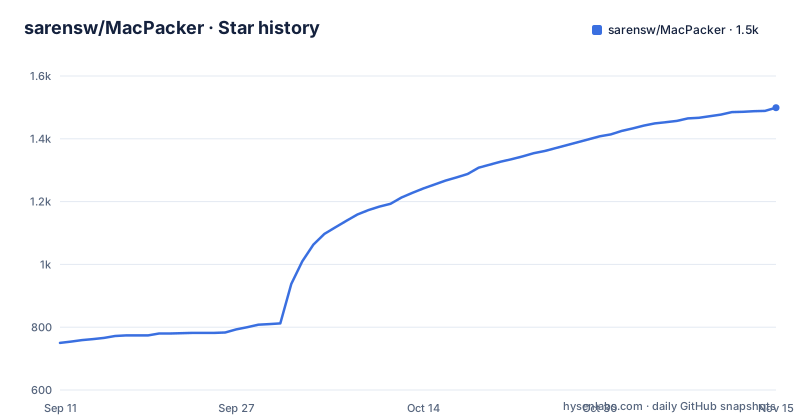
Star history
- sarensw/MacPacker1,499 ★ · +749
| Repository | 2026-09-11 | 2026-11-15 |
|---|---|---|
| sarensw/MacPacker | 750 | 1.5k |
749 Stars in the last 65 days, measured from the daily GitHub snapshot. Compare with other projects
Editorial analysis
Forty formats open, but nothing gets created yet
The roadmap is the honest summary of the tool's shape, and it is mostly ticked. Nested browsing, breadcrumb navigation, drag and drop extraction of selected files, extraction of the whole archive, preview without extraction, the Quick Look and Finder extensions, encrypted archive support, wide format coverage and ZIP editing are all marked done. Two boxes are empty.
The first empty box is deleting files and folders from inside an archive, which is labelled as coming next. The second is creating archives and editing formats other than ZIP. Read together, those two lines describe the current boundary: MacPacker opens things and pulls things out, and the mutation story starts with a single writable format. The feature list phrases the same limit more gently, saying editing for more formats is on the way.
That makes the edit and re-save entry in the features a ZIP feature, not a general one. An archive workflow that ends in writing a new archive is not yet covered by this app.
Format detection reads the magic number, not the extension
The detection rule is stated as a feature of its own: formats are recognised by their magic number, not just by the file extension. That is the difference between a tool that opens what you renamed something and one that opens what it actually is, and it matters most for the formats at the edges of the table.
Coverage is grouped into four rows rather than one long list. The archives row is the widest, covering 7z, ar, arj, cab, chm, cpio, deb, exe, lha, lzh, lzx, msi, pkg, rar, rpm, sea, sit, sitx, tar, xar, zip and zipx. Disk images add dmg, fat, iso, ntfs, qcow2, squashfs, vdi, vhd, vhdx, vmdk and wim. Compression covers bz2, gz, lz4, xz and z. Tarballs cover the compound extensions, including tar.gz and its tgz form, tar.bz2, tar.xz, tar.lz4 and tar.z.
The Windows and Linux installers appearing in the archives row is the tell that the list was built around a general purpose extraction library rather than around Mac workflows. Reading an MSI or an RPM is useful when you are handed one; it is not the same as having a Mac archiver.
Three install channels with different freshness
Installation requires macOS 14.6 or later, and the parenthetical matters if you are on an older machine: macOS 13 was supported through version 0.14.1, so support was dropped at a specific release rather than gradually. Three channels are offered, all described as sandboxed, signed and notarized by Apple.
brew install --cask macpackerDirect download takes a disk image or a zip from the website or from the GitHub releases and moves the app into Applications. The third channel is the Mac App Store, and it carries an explicit lag: App Store releases land a few days after the GitHub and direct downloads, because every build goes through Apple's review. For the newest version the recommendation is Homebrew or the direct download.
That lag has a practical consequence. Anyone tracking a format that was just added, or a fix that just landed, will find the Store copy behind. The Homebrew cask tracks the newest build, so it and the direct download are the two channels to compare when a release note matters.
Building from source needs submodules and your own signing team
The source prerequisites are macOS 14.6 and Xcode 16. The clone is the first step and it is not optional in its flags, because the repository uses submodules for vendored dependencies and for test archives:
git clone --recurse-submodules https://github.com/sarensw/MacPacker.git
cd MacPacker
If you already cloned without the flag, the repair is a submodule update with init and recursive. After that the project is opened as an Xcode project and run with the usual command, and signing is the optional step that surprises people on a machine without the original team. A template is copied into place:
cp Config/SigningOverride.xcconfig.template Config/SigningOverride.xcconfigYou then set your own Team ID in that file, found under Accounts in Xcode settings. The file is gitignored and never committed, which is the correct arrangement for a per-machine signing override and also means a fresh clone has nothing but the template.
Two Finder extensions, a test plan, and a sandbox pilot file
The top level layout tells you what the app is made of. There are two extension targets: a Finder extension, which is what supplies the right-click extract here and extract to a folder behaviour, and a Quick Look extension, which is what makes the spacebar preview work from Finder. The main target sits beside them, with a UI test directory and an explicit test plan file, so there is a defined set of test configurations rather than an implicit scheme.
Two configuration files at the root are unusual enough to be worth naming. One is a periphery configuration, which is the unused code detector for Swift, so dead code is being checked for on purpose. The other is a sandbox pilot file, sitting beside the claim that all builds are sandboxed. Having both is not contradictory, since a pilot file and a shipping sandbox entitlement describe different things, but it is a signal that the sandboxing story is actively enforced rather than assumed.
There is also a modules directory, which is where vendored Swift packages would live, matching the submodule story in the clone instructions.
The 1.0.0 release shipped the same afternoon as beta 16
The release list is three entries and they tell a small story. Beta 15 on 2026-09-30, beta 16 on the morning of 2026-10-01, and version 1.0.0 on the afternoon of the same day. So the project moved from a long beta sequence to a stable tag in the space of a few hours, after which the repository was pushed to again on 2026-10-02.
Against that, the contributing section describes the project as still in early development, warns that a few breaking changes are ahead, and says pull requests may need rework or some wait time before they can be merged. Those two statements sit awkwardly together. A 1.0.0 tag reads as a stability promise, while the contribution guidance says the opposite, and the format list is still gaining entries.
The practical reading is that 1.0.0 marks a feature complete archive reader rather than a finished application. The advice to open an issue before a larger change, and to expect rework, is the part to take literally.
GPL-3.0 alongside App Store distribution and a terms file
The licence is the GNU General Public License version 3.0, and it ships alongside a terms file, a privacy document, a contributing guide and a separate guide written specifically for AI-assisted contributions. The application is also distributed through the Mac App Store, which means the same binary reaches users through a curated channel and through Homebrew and a direct download.
For a desktop utility this combination is unusual enough to check rather than assume. A copyleft licence on an application distributed through a store raises questions about what a store agreement changes about distribution, and the presence of a separate terms document suggests the author has thought about it. Nothing in the document set explains the arrangement, so if the licensing terms matter to your organisation, the terms file and the licence are where to read them rather than assuming the store listing settles it.
The format is not in question. The licence text, the terms, the privacy document and the code of conduct are all present at the repository root.
AI-authored pull requests carry a disclosure and evidence rule
One document in the repository is unusual and specific. The AI contribution guidelines set out what happens when a pull request is written primarily by a model: disclose the AI involvement, open the pull request from a human account, and include verification evidence, which means before and after screenshots for a user interface change and terminal or test output otherwise. Minor AI-assisted edits where a person is clearly the author need none of that.
That is a stronger position than most projects take, and it is enforced through process rather than tooling, since nothing in the repository can detect authorship. Two related files sit beside it: an agents file and a similar instructions file naming another assistant tool, both of which tell a coding agent how to work in this tree. Given the app is a native Mac interface, the screenshot requirement is the one that does real work, because a passing test run says nothing about whether a window is laid out correctly.
Localisation runs through a hosted translation service rather than through pull requests, with a join link for the project, and the interface ships in thirteen languages.
Editorial conclusion
MacPacker is a good fit if your archive habit is reading rather than writing: peeking inside a large container for one file, working through a nested tree, or previewing something from Finder without launching an app. Pick the install channel by how fresh you need the build to be, since the App Store copy trails the GitHub release by days of review. Three things to weigh before committing. It cannot create archives yet, so it does not replace a general purpose archiver. The format list is broad but the editing path is ZIP only, so the phrase edit and save is narrower than the format table suggests. And the GPL-3.0 licence plus a TERMS file and a privacy document at the root are worth reading before you install it on a work machine.
Frequently asked questions
Can MacPacker create new archives?
Not yet. Creating archives and editing formats beyond ZIP sit in the unticked roadmap boxes, and the next item listed is deleting files and folders from inside an archive.
How do I install MacPacker on macOS?
You need macOS 14.6 or later, and you can use brew install --cask macpacker, download the disk image or zip from macpacker.app or GitHub Releases, or take the App Store copy, which lands a few days after the other two because of Apple's review.
How does MacPacker decide what format an archive is?
By its magic number rather than the file extension, and coverage spans archives, disk images, single compression formats and compound tarballs, including Windows and Linux packages such as exe, msi, deb and rpm.
Why did my git clone of MacPacker build fail?
The repository uses submodules for vendored dependencies and test archives, so it has to be cloned with the recurse-submodules flag, or run through a submodule update with init and recursive afterwards.
What does MacPacker require for pull requests written by an AI?
Disclosure of the AI involvement, opening the pull request from a human account, and verification evidence, with before and after screenshots for interface changes and terminal or test output otherwise.
Official sources
Add this badge to your README
If you maintain this project, the badge below links readers to this analysis and shows its maintenance status from the daily GitHub snapshot. Paste the markdown into your README; add ?metric=license or ?metric=stars to the image URL for a different field.

[](https://hysenlabs.com/projects/sarensw-macpacker)Star history chart for your README
[](https://hysenlabs.com/projects/sarensw-macpacker)Was this useful?