Warracker's checked-in compose file targets a database named warranty_test
🛡️ Warracker is an open source, self-hostable warranty tracker to monitor expirations, store receipts, files. You own the data, your rules!
At a glance
- What is it?
- Warracker is a self-hostable warranty tracker: a Flask and PostgreSQL app behind Nginx, packaged two different ways, with a compose file that names its database warranty_test and ships four credentials that only work if the operator changes them.
- Who is it for?
- Warracker is a well shaped self-hosted warranty tracker whose packaging tells you more than its documentation does. The compose file you are pointed at is not the compose file in the repository, it names a test database, and it ships four values that only work if you overwrite them.
- Can I use it commercially?
- Yes, with strict conditions. AGPL-3.0 is a network copyleft licence: if people use a modified version over a network, for example as a hosted service, you must offer them its source code under the same licence.
- Is it still maintained?
- Yes. The repository received new commits within the last day.
- What is it written in?
- Mainly JavaScript, according to GitHub's language statistics.
Answers come from the project's GitHub data, last synced on November 25, 2026, and from our analysis. They are not legal advice.
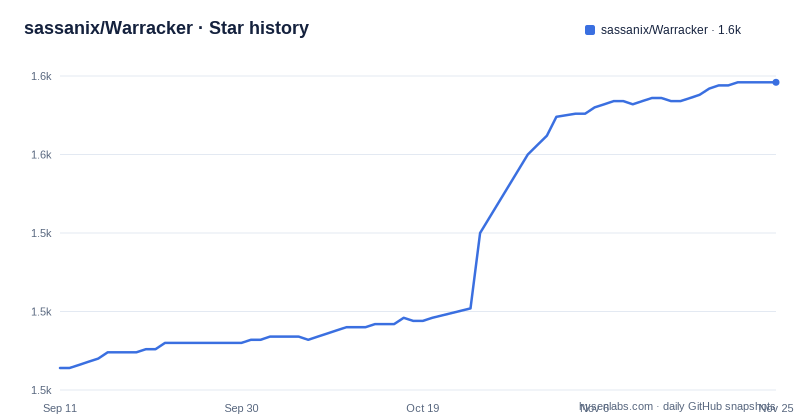
Star history
- sassanix/Warracker1,573 ★ · +91
| Repository | 2026-09-11 | 2026-11-25 |
|---|---|---|
| sassanix/Warracker | 1.5k | 1.6k |
91 Stars in the last 75 days, measured from the daily GitHub snapshot. Compare with other projects
Editorial analysis
Two compose definitions exist and they disagree on almost everything
The one printed in the README pulls a published image:
services:
  warracker:
    image: ghcr.io/sassanix/warracker/main:latest
    ports:
      - "8005:80"
    volumes:
      - warracker_uploads:/data/uploads
    env_file:
      - .env
    depends_on:
      warrackerdb:
        condition: service_healthy
    restart: unless-stopped

  warrackerdb:
    image: postgres:15-alpine
    volumes:
      - postgres_data:/var/lib/postgresql/data
    env_file:
      - .env
    restart: unless-stopped
    healthcheck:
      test: ["CMD-SHELL", "pg_isready -U $$POSTGRES_USER -d $$POSTGRES_DB"]
      interval: 5s
      timeout: 5s
      retries: 5

volumes
Its top-level `volumes` key has nothing under it, so `warracker_uploads` and `postgres_data` are referenced but never declared. Compose creates undeclared named volumes on first use rather than up front, which means an interrupted first run can leave a half populated volume that nothing in the file reuses, inspects, or warns about.
The root `docker-compose.yml` is a different animal. It uses `build: .`, bind mounts `./uploads:/data/uploads` and `./backend/migrations:/app/migrations`, an inline `environment:` block instead of `env_file`, and no `depends_on` and no healthcheck anywhere. Copying the README snippet gets a prebuilt container behind a database readiness gate. Running the repository file starts Postgres and the app together with no ordering guarantee and no probe.
The shipped compose file hardcodes a database named warranty_test
Three of the database values are fixed and two fall back to literals:
      - DB_HOST=warrackerdb
      - DB_PORT=${DB_PORT:-5432}
      - DB_NAME=warranty_test
      - DB_USER=warranty_user
      - DB_PASSWORD=${DB_PASSWORD:-warranty_password}
      - DB_ADMIN_USER=warracker_admin
      - DB_ADMIN_PASSWORD=${DB_ADMIN_PASSWORD:-change_this_password_in_production}
`warranty_test` is the name a project's own test database would carry, and it is what a default deployment actually creates inside `postgres:15-alpine`. `warranty_user` and `warracker_admin` are fixed the same way rather than derived from `env.example`, so two operators who set only `DB_PASSWORD` still end up with the same two account names in every deployment.
The admin default, `change_this_password_in_production`, at least announces itself as a placeholder. The application password default, `warranty_password`, does not, and it is the one that applies whenever the file is copied and nothing is changed.
SECRET_KEY arrives readable and signs both the session and the JWT
The same file repeats the pattern for the application key:
- SECRET_KEY=${SECRET_KEY:-your_very_secret_flask_key_change_me} # For Flask session and JWTOne value covers both the Flask session cookie and token signing, so leaving it at the shipped string gives every default deployment the same key. The OIDC settings beside it follow the same empty-by-default pattern: `OIDC_CLIENT_ID`, `OIDC_CLIENT_SECRET`, and `OIDC_ISSUER_URL` all resolve to an empty string, `OIDC_PROVIDER_NAME` resolves to the literal `oidc`, and `OIDC_SCOPE` defaults to `openid email profile`.
Two URL settings sit next to them and they are not interchangeable. `FRONTEND_URL` is documented as the public frontend URL matching the port mapping, while `APP_BASE_URL` is the base URL the application builds links from. Both default to `http://localhost:8005`, which lines up with the `"8005:80"` mapping. Put the app behind a real hostname and whichever one you forget will keep generating localhost links in outbound mail and redirects.
The first account to register becomes the admin, with no invitation step
Account creation takes one line: the first account created in the system automatically becomes the Admin account. That admin can create other users, assign roles, toggle global access, and holds full system permissions, while regular users see only their own warranties unless granted more.
Read next to the compose defaults, that ordering is the whole risk. A freshly started instance, running on the default database password and the default secret key, hands admin rights to whoever registers first. Nothing in either file forces an operator to change a value before the first signup, and no invitation code, email domain restriction, or waiting period appears anywhere.
The multi-user model is worth separating from that. The feature table advertises a global warranty view where authenticated users can see all warranty data under role-based permissions. That is deliberate sharing, and it is the reason OIDC SSO with Google, GitHub, and Keycloak sits in the same list as token-based password recovery.
Development ran eleven months past the last tagged release
The project status block states that Warracker is in active development, that the essential features are reliable and ready for everyday use, and that advanced enhancements are still being worked on. The commit record supports the first half of that: the last push is dated 2026-09-28 and the repository is not archived.
The release record is a different shape. Tag 1.0.0 landed 2025-10-25, 1.0.1 on 2025-10-27, and 1.0.2 on 2025-10-30. Those are the three most recent releases, all three inside a single week in October 2025, with nothing tagged in the eleven months since. An operator pinning a version tag is therefore pinning something from last October while the tree itself has kept moving, and the distance between the published image and the current code is not described in the status block, the changelog, or the compose file.
The roadmap shows the opposite pattern. Twelve of its thirteen entries are checked, covering authentication, settings, the status page, custom reminders, email notifications, warranty categories via tags, CSV import and export, OIDC SSO, admin controls, the Paperless-ngx integration, localization, warranty claim tracking, and an audit trail. The one open box is calendar integration.
The recorded primary language is JavaScript and the backend is Flask
The repository's primary language is recorded as JavaScript, and the stack section lists HTML, CSS, and JavaScript for the frontend with Python and Flask behind it, PostgreSQL for storage, Docker and Docker Compose for packaging, and Nginx for serving. The tree matches the second half of that list: `backend/`, `frontend/`, `Docker/`, `Dockerfile`, `docker-compose.yml`, `env.example`, `nginx.conf`, `locales/`, `babel.cfg`, and `renovate.json`.
The Dockerfile is a two stage build on `python:3.13-slim-trixie`, pinned by digest, carrying build-essential plus the libpq, libcurl, and OpenSSL headers in the builder stage. Dependencies are installed system-wide with pip and no virtual environment, and the runtime stage then copies the whole of `/usr/local` across, which the comment in the file describes as version-agnostic. The runtime image also carries nginx, supervisor, logrotate, cron, postgresql-client, gettext-base, and curl before dropping to a non-root user with uid 999 named warracker.
Gettext plus a locales directory is what backs twenty languages with right to left support and instant switching. Cron in the same image is what backs reminders at all.
Alerts are advertised across 100+ services and ship switched off
The feature table promises proactive alerts by email or by more than a hundred push services including Discord and Slack, delivered through Apprise. In the compose file that path starts disabled:
- APPRISE_ENABLED=${APPRISE_ENABLED:-false} # Enable/disable Apprise notificationsMail is closer to on. `SMTP_HOST` defaults to `localhost` and `SMTP_PORT` to `1025`, the port a local mail catcher listens on rather than a real relay, with `SMTP_USERNAME` defaulting to `[email protected]` and `SMTP_PASSWORD` empty. The file also notes that when `SMTP_FROM_ADDRESS` is undefined, `SMTP_USERNAME` is used instead, which it concedes may not always work.
The rest is ordinary application surface: CSV import and export, custom tags, archiving that keeps expired records reachable, multiple serial numbers per product, search across product name, serial number, vendor, and tags, and a status dashboard with both global and per-user views. The one integration with real reach outside the app is Paperless-ngx, where documents are stored and managed directly with file-level control rather than staying in the app's own upload volume.
Editorial conclusion
Warracker is a well shaped self-hosted warranty tracker whose packaging tells you more than its documentation does. The compose file you are pointed at is not the compose file in the repository, it names a test database, and it ships four values that only work if you overwrite them. Before the first signup, set DB_PASSWORD, DB_ADMIN_PASSWORD, and SECRET_KEY, pin a tag rather than a moving branch, and decide whether the global warranty view belongs in your deployment. Twenty languages and a hundred notification targets are not where the risk sits.
Frequently asked questions
What does Warracker actually track?
Warranty records with purchase dates, durations, notes, product photos with thumbnail previews, multiple serial numbers per product, custom tags, uploaded receipts, invoices and manuals, and full claim lifecycles with statuses, dates, and resolutions.
How is Warracker installed?
Docker and Docker Compose are the only stated prerequisites. The README snippet pulls `ghcr.io/sassanix/warracker/main:latest` and maps host port 8005 to container port 80, while the repository root `docker-compose.yml` builds locally and bind mounts `./uploads` and `./backend/migrations`. A further copy with environments and a .env example lives in the `Docker/` directory.
What database and backend does Warracker use?
PostgreSQL, shown as `postgres:15-alpine` in the README compose and as `postgres_data:/var/lib/postgresql/data` in the repository one. The backend is Python with Flask on `python:3.13-slim-trixie`, served by Nginx, with cron and supervisor in the same image.
How do Warracker users and roles work?
The first account created in the system automatically becomes the Admin account. The admin can manage other users, assign roles, and toggle global access, and authenticated users can view global warranty data under role-based permissions. Regular users manage only their own warranties unless granted more.
What license is Warracker under and how recent are its releases?
AGPL-3.0. Three releases are visible: 1.0.0 on 2025-10-25, 1.0.1 on 2025-10-27, and 1.0.2 on 2025-10-30. The last push is dated 2026-09-28 and the repository is not archived.
Official sources
Add this badge to your README
If you maintain this project, the badge below links readers to this analysis and shows its maintenance status from the daily GitHub snapshot. Paste the markdown into your README; add ?metric=license or ?metric=stars to the image URL for a different field.

[](https://hysenlabs.com/projects/sassanix-warracker)Star history chart for your README
[](https://hysenlabs.com/projects/sassanix-warracker)Was this useful?