ClipCascade: Self-Hosted Clipboard Sync Across Devices
ClipCascade is a lightweight utility that automatically syncs the clipboard across devices, no key press required.
At a glance
- What is it?
- ClipCascade synchronizes text, images, and files across Windows, macOS, Linux, and Android through either a central server or peer-to-peer connections. Its main attraction is self-hosting with Docker or a Java 21 server JAR, although the available documentation does not explain the full client setup or the encryption implementation.
- Who is it for?
- ClipCascade fits users who want automatic clipboard sharing across mixed devices and are willing to operate or trust a synchronization service. It is less suitable for users who need documented offline behavior, transparent encryption details, or a complete command-driven setup.
- Can I use it commercially?
- Yes, with conditions. GPL-3.0 is a copyleft licence: if you distribute software that includes it, you must release that software's source code under the same licence. Running it internally without distributing it does not trigger that obligation.
- Is it still maintained?
- Yes. The repository last received commits 7 days ago.
- What is it written in?
- Mainly Python, according to GitHub's language statistics.
Answers come from the project's GitHub data, last synced on November 7, 2026, and from our analysis. They are not legal advice.
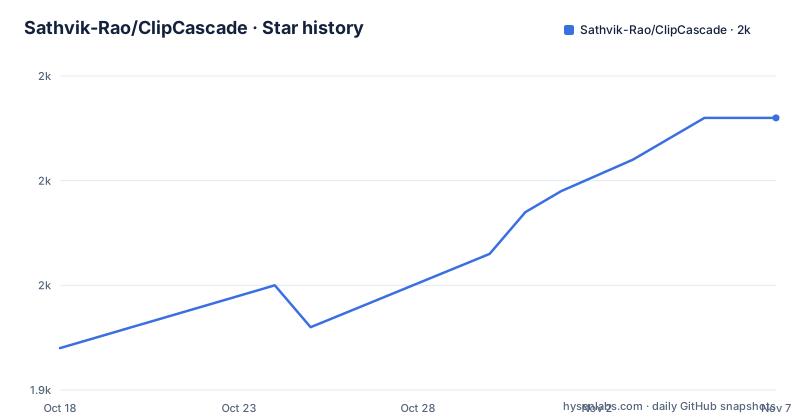
Star history
- Sathvik-Rao/ClipCascade1,966 ★ · +22
| Repository | 2026-10-18 | 2026-11-07 |
|---|---|---|
| Sathvik-Rao/ClipCascade | 1.9k | 2k |
22 Stars in the last 20 days, measured from the daily GitHub snapshot. Compare with other projects
Editorial analysis
What ClipCascade Synchronizes Between Devices
ClipCascade addresses a specific gap between ordinary copy-and-paste tools and continuously synchronized clipboards. A user copies text, an image, or one or more files on one device, and connected devices receive that clipboard content without requiring a paste action. The intended audience is people moving among Windows workstations, macOS machines, Linux systems, and Android phones who want one clipboard rather than platform-specific clipboard histories.
The compatibility table marks support for text, images, and files on every listed client: Windows, macOS, Linux GUI, Linux CLI, and Android. That broad media coverage is more significant than basic text forwarding, because many clipboard utilities restrict themselves to strings. ClipCascade also separates clipboard activity by user, which makes its synchronization model suitable for more than one account on a server. The documentation does not state clipboard size limits, retained history length, conflict behavior, or whether transfers resume after a connection drops.
The project offers two deployment choices. A hosted Live Community Server removes the need to operate infrastructure, while the Docker image and standalone Java server JAR allow self-hosting. This distinction matters because self-hosting moves responsibility for availability, account administration, storage, network exposure, and upgrades to the operator. It does not eliminate those concerns merely by placing ClipCascade on a private machine.
Server-Based and Peer-to-Peer ClipCascade Paths
The architecture diagrams identify two synchronization paths: server-based synchronization and peer-to-peer synchronization. In the server-based path, clients communicate through a centralized ClipCascade server. The README describes this as cloud-based synchronization, and the repository has separate desktop, mobile, and server entry points. That layout suggests a client-server system, but the documentation does not expose the transport protocol, server API, message format, or event ordering rules.
The peer-to-peer path connects devices directly and is intended to reduce dependence on the central server. ClipCascade does not document how peers discover one another, whether the same account must reach both peers, what network traversal mechanism is used, or whether a relay remains necessary when direct connectivity fails. NAT traversal is a practical concern for self-hosted deployments because two devices can be behind different routers. The feature list establishes direct device-to-device operation, but it does not provide enough detail to determine which network conditions support it.
Authentication controls which users may synchronize clipboard data, while the README states that content receives end-to-end encryption and hashing. It does not identify the algorithms, key derivation method, certificate model, server-side storage policy, or client recovery process. End-to-end encryption is therefore a documented product claim, not a claim this description can independently verify. Operators considering sensitive clipboard use would need to inspect the client and server source before trusting that label with credentials, private keys, confidential text, or business files.
Installing the ClipCascade Server JAR
The documented bare-metal installation starts by obtaining `ClipCascade-Server-JRE_21.jar` from the GitHub releases page. The server requires Java 21 or later. The README then describes environment variables as optional, but the available text ends before naming those variables or showing their values. Omitting them from this tutorial avoids inventing configuration keys that may not exist.
For a first installation, download the release asset and confirm that the destination machine can launch Java 21 or later. The documentation does not provide an exact `java -jar` command, so it would be misleading to present one as an official step. After opening the complete installation section, use the release command and configuration shown there. The repository's Docker image is another documented server option, but the available text does not include an exact `docker run` or Compose example, including required ports, volumes, environment variables, and persistence paths.
The fastest documented first use is instead the Live Community Server at `clipcascade.sathvik.dev`: create an account, install the appropriate ClipCascade client, sign in, and copy content between connected devices. The README does not give the menu path or command for adding a device, so those steps must come from the downloaded client or fuller documentation. Confirm that copied text arrives on the second device before transferring images or files.
Docker and Java Deployment Costs for Operators
Self-hosting gives an operator control over the server, but it also creates ongoing work that the feature list does not quantify. ClipCascade documents both a Docker image and a standalone JAR, allowing the deployment boundary to be selected according to the host's Java management practices. The repository separates `ClipCascade_Server/` from `ClipCascade_Desktop/` and `ClipCascade_Mobile/`, which is consistent with independently distributed server and client components.
A useful Docker evaluation must include persistence and exposure, yet the available documentation gives no volume declaration, port mapping, database requirement, or health check. Those details should not be guessed. For the JAR route, Java 21 is the only documented prerequisite. The server's memory footprint, expected concurrent-user load, storage retention, and backup procedure are not stated, so capacity planning cannot be based on the README.
Upgrade cost is visible from the release record. Versions 3.0.0, 3.1.0, and 3.2.0 were released on 2025-02-02, 2025-08-07, and 2026-05-04 respectively. Those major and minor changes mean operators may need to check configuration and data migration requirements when crossing versions. The repository was not archived, and the last push was on 2026-05-04. No compatibility or migration policy is documented, so upgrading without a tested backup would be the wrong first action.
ClipCascade Privacy Claims and Missing Security Detail
The README states that ClipCascade provides end-to-end encryption, secure authentication, hashing, and per-user clipboard isolation. These are meaningful requirements for a utility that can copy passwords, messages, images, and files between devices. However, security adoption depends on implementation details that the available documentation leaves silent.
There is no protocol description, threat model, key exchange explanation, ciphertext format, or explanation of whether the server can decrypt clipboard payloads. The documentation also does not say whether clipboard history is stored centrally, how long it remains available, whether administrators can inspect activity, or what happens if an account password is lost. The web dashboard is described as a place to track clipboard activity and manage settings, but its exact visibility for users and server operators is not specified.
Clipboard synchronization also expands the consequences of a compromised client. A copied password can follow the user to every connected device, and file transfer extends exposure beyond short text strings. ClipCascade's multi-user isolation may reduce accidental cross-account mixing, but the README does not describe authorization granularity between linked devices. Security-sensitive users should verify the source implementation and deployment settings before enabling file synchronization on a server they do not control.
Why ClipCascade Differs from Keyboard Clipboard Tools
A real alternative is a keyboard-shortcut clipboard manager that stores recent items locally and pastes a selected entry on the same device. Its synchronization model is pull-based: the user invokes a shortcut, searches or selects a saved item, and presses paste. ClipCascade is event-driven, with the README stating that a copy update is synchronized to connected devices without manual input.
The alternative approach generally requires less cross-device infrastructure and gives the user an explicit selection step before content leaves the source device. ClipCascade can remove that step, but it depends on accounts, client sessions, connectivity, and either a reachable server or a functioning peer connection. It also synchronizes images and files, whereas many text-oriented clipboard managers stop at copied strings. The practical distinction is automation and cross-device scope, not simply a larger clipboard history.
A manually synchronized file-transfer tool is another option when security controls, offline behavior, or explicit destination selection matter more than immediate availability. ClipCascade is the wrong tool for an air-gapped workflow because the documentation does not describe offline queueing or local-network operation without a server. It is also a poor match when every transfer must require confirmation, because no clipboard-confirmation workflow is documented.
ClipCascade Platform Fit and Release Currency
Platform coverage is broad, but Linux has two distinct clients: a desktop GUI and a terminal-based CLI. That is useful for environments where a full graphical application is unavailable or where clipboard handling is scripted. Windows, macOS, and Android each have their own release artifact, and the README links all desktop and mobile applications to the GitHub releases page. It does not state whether every client is updated in lockstep or whether platform-specific features differ.
The latest documented release is ClipCascade v3.2.0 from 2026-05-04. The repository's last push was also on 2026-05-04, and the repository is not archived. That is current release activity, but it does not prove that every platform receives equal fixes. The README does not publish a support policy, security response process, minimum supported client version, or protocol compatibility matrix.
Users should choose a client only after checking that its release notes cover their operating system and that the server accepts that client. Self-hosters must also decide whether to use the hosted service or accept responsibility for Java updates, Docker image updates, backups, and network access. ClipCascade offers several credible choices for clipboard synchronization, but its undocumented server configuration and protocol details should decide whether it is appropriate for a particular deployment.
Editorial conclusion
ClipCascade fits users who want automatic clipboard sharing across mixed devices and are willing to operate or trust a synchronization service. It is less suitable for users who need documented offline behavior, transparent encryption details, or a complete command-driven setup. Before adoption, verify the release client for the target platform, inspect the server environment configuration, and confirm that files can be transferred through the server or peer-to-peer modes used by your network.
Frequently asked questions
Which platforms support ClipCascade?
The README lists Windows, macOS, Linux GUI, Linux CLI, and Android clients. Each is marked as supporting text, images, and files.
Can ClipCascade be self-hosted?
Yes. The documentation offers a Docker image and a standalone `ClipCascade-Server-JRE_21.jar` for deployment on systems with Java 21 or later.
What is the difference between ClipCascade's two sync modes?
Server-based mode synchronizes through a centralized server, while peer-to-peer mode establishes a direct device-to-device connection. The README does not document peer discovery or network fallback behavior.
Does ClipCascade require installation to use the community server?
The Live Community Server removes the need to host a ClipCascade server, but users still need an account and compatible clients on their devices. The README directs users to the GitHub releases page for client downloads.
Official sources
Add this badge to your README
If you maintain this project, the badge below links readers to this analysis and shows its maintenance status from the daily GitHub snapshot. Paste the markdown into your README; add ?metric=license or ?metric=stars to the image URL for a different field.

[](https://hysenlabs.com/projects/sathvik-rao-clipcascade)Star history chart for your README
[](https://hysenlabs.com/projects/sathvik-rao-clipcascade)Was this useful?