clipse: a clipboard history TUI for a tiled window manager
Configurable TUI clipboard manager for Unix
At a glance
- What is it?
- clipse is a Go clipboard manager designed for a Linux desktop running a dedicated window manager, with fuzzy filtering, pinning, image support, auto-paste and excluded applications, and it is distributed through Nix, the AUR, COPR and go install. It suits someone who lives in keyboard shortcuts, and the auto-paste feature is where the platform differences bite.
- Who is it for?
- Adopt clipse if you run a tiled window manager on Linux and want clipboard history you can reach with one keybinding, since the design assumes that workflow. Skip it if you want a clipboard manager that works across a full desktop with a system tray, since this one expects you to bind it yourself.
- Can I use it commercially?
- Yes. MIT is a permissive licence: you can use, modify and sell software built on it, as long as you keep its copyright and licence notices.
- Is it still maintained?
- Yes. The repository last received commits 6 days ago.
- What is it written in?
- Mainly Go, according to GitHub's language statistics.
Answers come from the project's GitHub data, last synced on November 7, 2026, and from our analysis. They are not legal advice.
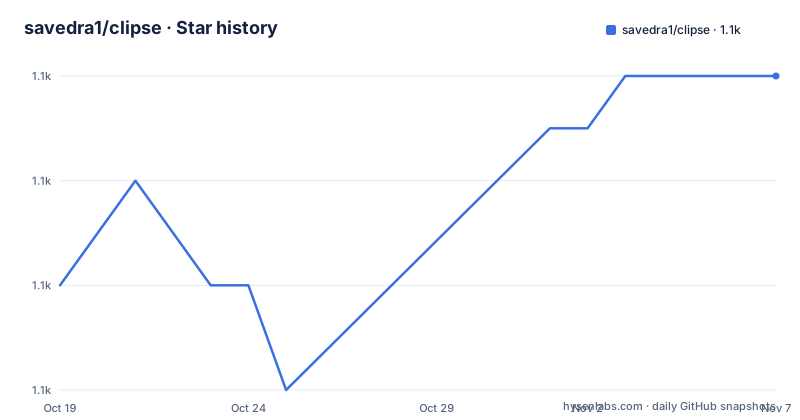
Star history
- savedra1/clipse1,056 ★ · +4
| Repository | 2026-10-19 | 2026-11-07 |
|---|---|---|
| savedra1/clipse | 1.1k | 1.1k |
4 Stars in the last 19 days, measured from the daily GitHub snapshot. Compare with other projects
Editorial analysis
What it is, and the assumption it makes
clipse is a configurable clipboard manager application written in Go with minimal dependency. The design target is stated directly, that the application is optimized for a Linux OS using a dedicated window manager, though it can also be used on any Unix-based system, and the model is that you install the package and bind the open command to get your desired clipboard behaviour. That assumption is the whole design. A dedicated window manager means a keyboard-driven workflow with floating windows spawned on demand, and a clipboard manager that fits into that workflow is a small terminal interface bound to one key rather than a background service with a system tray icon. The feature list follows from it, with text and image support, highly customizable behaviour, image and text previews, item pinning, fuzzy filtering, multi-select, auto-paste, excluded apps and windows, bulk copy or output, realtime UI updates, portability across Wayland, X11 and macOS, and CLI operations. The primary language is Go, the licence is MIT, the last push was on 2026-06-09, and the releases are v1.2.1 on 2026-01-27, v1.2.0 on 2025-12-26 and v1.1.0 on 2024-10-04.
Auto-paste, and where the platforms differ
The dependencies section is the part that tells you what the tool actually does under the hood. On a Wayland-based display server you must have wl-clipboard installed, to handle both text and image data, and to enable the auto-paste feature you may also need to allow persistent permission to the `/dev/uinput` device. On X11 builds the robotgo library is used to implement the auto-paste feature, and the README points at that project's documentation for the runtime dependencies. There are no known dependencies for Darwin. The reason for the difference is that auto-paste means synthesising keyboard input, and the three platforms offer different mechanisms for it. The uinput route on Wayland writes to a virtual input device, which is why the permission matters, while on X11 the robotgo library can send events directly. The X11 path is the heaviest of the three, and the dependency list in go.mod shows what it drags in, with robotgo pulling in a chain of image, screenshot and platform-specific packages.
Building it, and the build tags that matter
Building from source requires different build tags depending on the display server, and the README is explicit that you should use the Makefile to get the tags right rather than invoking go build yourself:
git clone https://github.com/savedra1/clipse
cd clipse
go mod tidy
make wayland # || make x11 || make darwin
The Makefile shows what each tag means. The `wayland` target builds with `CGO_ENABLED=0` and the `wayland` tag, which is the interesting one since it means the Wayland build is statically linked with no cgo, while the `x11` target uses the `linux` tag with cgo enabled because robotgo needs it, and the `darwin` target uses the `darwin` tag. There is also an `install` target that copies the binary to `INSTALL_DIR`, which defaults to `/usr/local/bin/`, and a `test` target that runs `go test -v ./...`. The go.mod pins Go 1.24.0 with a toolchain of go1.24.7, and the TUI is built on bubbletea, bubbles and lipgloss from charmbracelet.
Installing it, in five different ways
The distribution story is unusually thorough. On NixOS the package is in nixpkgs, with a note that because of how irregularly the stable branch is updated the unstable package may be more up to date, and it can be installed directly with `nix-env -iA nixpkgs.clipse` or `nix-env -f channel:nixpkgs -iA clipse`, used from a shell with `nix shell -p clipse`, or added to `environment.systemPackages`. On Arch there is an AUR package, installable with `yay -S clipse` or from the pkg source with `git clone https://aur.archlinux.org/clipse.git && cd clipse && makepkg -si`. On Fedora and RHEL there is a COPR package, enabled with `dnf copr enable azandure/clipse`. Anywhere Go is available, `go install github.com/savedra1/[email protected]` works, and the README notes you should review the changelog when moving to a new release.
Two commands, and how the window manager fits in
The set-up is two commands, and the distinction between them is the difference between the interface and the daemon. The first key command opens the clipboard history TUI, and it is simply `clipse`. The second does not need to be bound to a key combination but rather to the system boot, to run the background listener process on start-up, and it is `clipse -listen`. The window manager configurations that follow make this concrete, and they are the most useful part of the README for anyone on a tiling compositor. In Hyprland you add an `exec-once = clipse -listen` line, a windowrule to float the window and set its size, and a `bind = SUPER, V` to launch a terminal with the clipse class. In i3 you use `exec --no-startup-id clipse -listen` and a bindsym that opens a floating shell running clipse. In Sway the same pattern appears with a `for_window` rule to float and resize the window. The consistent point across all three is that the TUI is a floating window you spawn on demand, not a full-screen application.
The repository layout, and what the code is made of
The tree is organised by function rather than by feature, which is a reasonable shape for a small Go application. There is `main.go` at the root, a `cmd/` directory for the command line surface, an `app/` directory for the application logic, `config/` for the configuration handling, `display/` for the terminal rendering, `handlers/` for the key and input handling, `shell/` for the integration with the platform's paste mechanism, and `utils/` for helpers. There is a `tests/` directory and a `Makefile` with the build targets, a `.golangci.yml` for linting, a `.typos.toml` for the spell checker, and a `CHANGELOG.md` that the README tells you to read when upgrading. The go.mod shows the direct dependencies, which are few: the rasterm library for image handling, the three charmbracelet TUI packages, robotgo for the X11 auto-paste, go-ps for process listing, and uinput for the Wayland virtual input device.
Editorial conclusion
Adopt clipse if you run a tiled window manager on Linux and want clipboard history you can reach with one keybinding, since the design assumes that workflow. Skip it if you want a clipboard manager that works across a full desktop with a system tray, since this one expects you to bind it yourself. Before you install, note that the auto-paste feature needs wl-clipboard on Wayland and the robotgo library on X11, and that the Wayland build can additionally need persistent permission to /dev/uinput.
Frequently asked questions
What is clipse?
A configurable clipboard manager application written in Go with minimal dependency, optimized for a Linux OS using a dedicated window manager. It supports text and images, fuzzy filtering, pinning, multi-select, auto-paste, excluded apps and windows, bulk output and CLI operations.
What does clipse need on Wayland and on X11?
On a Wayland display server you must have wl-clipboard installed to handle text and image data, and the auto-paste feature may need persistent permission to the /dev/uinput device. On X11 the robotgo library implements auto-paste. There are no known dependencies for Darwin.
How do I build clipse for my display server?
Use the Makefile, since the build tags differ per platform: `make wayland` builds with CGO_ENABLED=0 and the wayland tag, `make x11` uses the linux tag with cgo for robotgo, and `make darwin` uses the darwin tag. The install target then copies the binary to INSTALL_DIR, which defaults to /usr/local/bin/.
How do I install clipse?
Through NixOS nixpkgs or a nix shell, the Arch AUR with `yay -S clipse`, the Fedora COPR with `dnf copr enable azandure/clipse`, or `go install github.com/savedra1/[email protected]` anywhere Go is available.
Official sources
Add this badge to your README
If you maintain this project, the badge below links readers to this analysis and shows its maintenance status from the daily GitHub snapshot. Paste the markdown into your README; add ?metric=license or ?metric=stars to the image URL for a different field.

[](https://hysenlabs.com/projects/savedra1-clipse)Star history chart for your README
[](https://hysenlabs.com/projects/savedra1-clipse)Was this useful?