github-profile-achievements: a community-kept table of every GitHub profile badge and its threshold
A collection listing all Achievements available on the GitHub profile 🏆
At a glance
- What is it?
- Schweinepriester/github-profile-achievements is a Markdown-only repository that lists GitHub profile Achievements, their tiers, and the counts that unlock them, because GitHub removed its own official list.
- Who is it for?
- Use it as a lookup table when you want to know what a badge on a GitHub profile means or how many merged pull requests, stars or accepted answers a tier needs. Do not treat it as an authority on the 2022 additions, since GitHub gave no specific criteria for them, and do not expect it to earn or unlock anything for you.
- Can I use it commercially?
- Yes. MIT is a permissive licence: you can use, modify and sell software built on it, as long as you keep its copyright and licence notices.
- Is it still maintained?
- Yes. The repository last received commits 31 days ago.
- What is it written in?
- Mainly Markdown, according to GitHub's language statistics.
Answers come from the project's GitHub data, last synced on November 15, 2026, and from our analysis. They are not legal advice.
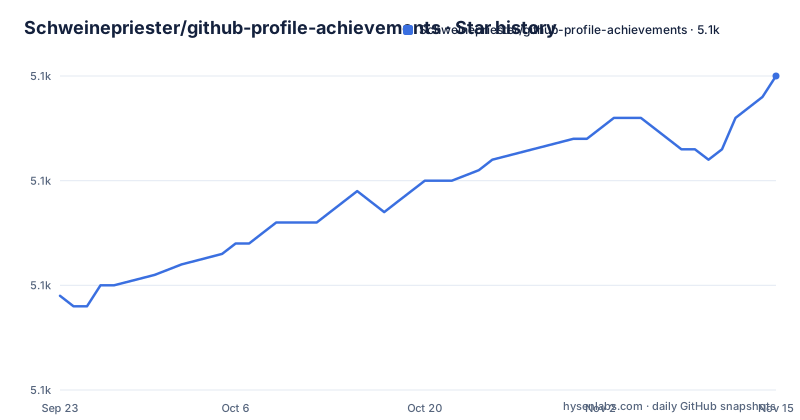
Star history
- Schweinepriester/github-profile-achievements5,090 ★ · +21
| Repository | 2026-09-23 | 2026-11-15 |
|---|---|---|
| Schweinepriester/github-profile-achievements | 5.1k | 5.1k |
21 Stars in the last 53 days, measured from the daily GitHub snapshot. Compare with other projects
Editorial analysis
A repository with no code, only tables that replace a deleted official list
The top level of the repository holds four entries: .gitattributes, LICENSE, README.md and an images/ folder. There is nothing to install and nothing to run. The whole project is the README, a set of Markdown tables, plus the badge images they point at. It is MIT licensed, the default branch is main, and the last push was on 2026-10-15.
The reason it exists is stated in the README itself. GitHub introduced an Achievements section on the profile in April 2021, alongside the Mars Ingenuity helicopter launch, with three badges: Mars 2020 Helicopter Mission, Arctic Code Vault, and a badge for sponsoring open source work through GitHub Sponsors. The official GitHub Docs once carried a list of badges, and the README links to an archived copy from 2022-05-31. That list is gone from the live docs, so the README declares that unless an official list returns, this repository is the list.
How the Earnable column splits badges into live, internal and disabled
The main table has four columns: Title, Badge, Earnable and Earned by. Ten Achievements sit in it. Pair Extraordinaire, Quickdraw, Starstruck, Galaxy Brain, Pull Shark, YOLO, Finishing Touch and Public Sponsor carry a tick. Arctic Code Vault Contributor and Mars 2020 Contributor carry a cross, because they were tied to the 2020 GitHub Archive Program and the Mars 2020 Helicopter Mission and cannot be earned now.
Two further tables carry the badges that cannot be reached by normal activity. The Internal section lists three Proxima badges, Proxima Pioneer, Proxima Staffshipper and Proxima Staffuser, awarded to GitHub staff for contributing to GitHub's own development. The Disabled section lists Heart On Your Sleeve and Open Sourcerer, which were live for at least some users but are neither earnable nor shown on any profile any more. Both disabled rows are marked as being tested, so a cross in that table means paused, not retired.
The practical consequence is that a badge you see on someone else's profile may be impossible for you to get. Check the column before assuming a badge is a goal.
Tier thresholds climb steeply, and the Gold step is rarely a small one
A separate Tiers table gives the counts for Bronze, Silver and Gold, shown on the profile as x2, x3 and x4. The base badge is the entry level, then the numbers jump. Pull Shark starts at 2 merged pull requests, then needs 16, 128 and 1024. Starstruck starts at a repository with 16 stars, then 128, 512 and 4096. Galaxy Brain starts at 2 accepted answers, then 8, 16 and 32. Pair Extraordinaire starts at one merged pull request with a coauthor, then 10, 24 and 48. Finishing Touch needs 4, 16 and 32 merged pull requests that improve UI quality.
Two details are easy to misread. Starstruck counts stars on a single repository you created, not stars summed across your account. Finishing Touch is about pull requests that improved GitHub's own UI quality, which is a narrower pool than ordinary open source work, and the base badge is for one such merged pull request.
Quickdraw, YOLO and Public Sponsor have no tier rows. Quickdraw is closing an issue or pull request within 5 minutes of opening, YOLO is merging your own pull request without code review, and Public Sponsor is sponsoring open source work through GitHub Sponsors.
The 2022 additions have no published criteria, so some rows are best knowledge only
A dated note in the README records that on 2022-06-09 GitHub announced more Achievements without specific criteria. The numbers in the table for those badges therefore come from contributors working things out, not from a GitHub statement. The README says as much with the phrase to the best of our knowledge, and asks readers to open an issue if something is missing or incorrect.
The Details section sends you to the repository's Discussions for specifics on how to earn individual badges and links two threads, one for Galaxy Brain and one for YOLO. Anything not covered there has no further source in the repository.
What this means for you is that a threshold in the table is a good guide, not a guarantee. If you are counting merged pull requests toward a Silver tier and your badge does not appear at the listed number, the discrepancy may be an error in the table rather than a fault with your account. The issue tracker is the stated place to report it.
It records badges but cannot award, unlock or restore any of them
One of the searches people run is for an achievements unlocker. This repository is not one. It contains no scripts, no API calls and no automation, and every Earned by cell describes an activity that has to happen on GitHub itself, such as getting a pull request merged or having an answer accepted.
It also cannot tell you why a badge is missing from your profile. Another common search is GitHub achievements not showing, and the repository gives two partial leads. Some badges are disabled platform wide, so they will not appear for anyone. Others, Arctic Code Vault Contributor and Mars 2020 Contributor, are tied to events that are over. For anything else, the table only tells you the rule, and you have to compare it with your own activity.
The repository does not track your personal progress either. It is a static reference, so counting your merged pull requests, accepted answers or repository stars is up to you.
Achievements left GitHub Community Discussions in February 2024, which narrows where Galaxy Brain comes from
A dated note records that on 2024-02-06 Achievements stopped being available in GitHub's Community Discussions, a change made to counter spam, with a link to GitHub's announcement. Galaxy Brain is the badge for accepted answers, and the README links its how-to-earn thread from the Details section.
The consequence for readers is that the Galaxy Brain row describes a rule that was written before that change. The table lists 2, 8, 16 and 32 accepted answers, but the repository does not explain where accepted answers can now be earned, and a reader aiming for that badge should not assume the Community Discussions route still counts. The note is also a reminder that rows in this table can go stale when GitHub changes how a badge is granted, which is exactly the situation the Disabled sections exist to record.
The README also tells you how to hide Achievements if you dislike them, with a link to the GitHub Docs page on changing the visibility of Achievements and a direct link to the profile settings.
Release names track the size of the table, not a software version
The repository publishes releases even though it ships no software. The recent ones are v2.0.0, named Double trouble, it's six now, on 2022-07-13; v3.0.0, named Nice nine, on 2022-11-09; and v4.0.0, named The unachievable five, on 2026-05-22. The names read as counts of badges at the time of each release, and the gap between v3.0.0 and v4.0.0 is more than three years.
That gap is the thing to know before relying on it. The repository has had pushes since the last release, with the most recent on 2026-10-15, but a tagged release is a snapshot you can cite and the README on main is where updates land. If you want to link to a stable version of the table, use a tag. If you want the most current thresholds, read main.
The GitHub Docs personalizing-your-profile page still has a section on how some badges were awarded, such as the qualifying repositories for the Mars 2020 Helicopter Contributor Achievement, but the full official list is gone.
Editorial conclusion
Use it as a lookup table when you want to know what a badge on a GitHub profile means or how many merged pull requests, stars or accepted answers a tier needs. Do not treat it as an authority on the 2022 additions, since GitHub gave no specific criteria for them, and do not expect it to earn or unlock anything for you. Check the Earnable column and the Disabled tables before chasing a badge.
Frequently asked questions
How do you get achievements on GitHub?
Each badge in the github-profile-achievements table has an Earned by rule, such as 2 pull requests merged for Pull Shark or closing an issue or pull request within 5 minutes of opening for Quickdraw. Badges marked with a cross in the Earnable column cannot be earned now.
What is a GitHub profile used for?
The github-profile-achievements repository covers one part of it, the Achievements section that GitHub added to the profile in April 2021. Profile owners can hide Achievements through the visibility setting in their profile settings.
Is github-profile-achievements an official GitHub list?
No. GitHub's own docs once had a list of badges, which is now gone, and this repository says that unless an official list returns, it is the list. It is maintained by Schweinepriester under the MIT license.
Does github-profile-achievements cover Bronze, Silver and Gold tiers?
Yes. A Tiers table gives the counts for Pair Extraordinaire, Starstruck, Galaxy Brain, Pull Shark and Finishing Touch, and also for the disabled Heart On Your Sleeve and Open Sourcerer. For example, Pull Shark Gold needs 1024 merged pull requests.
Official sources
Add this badge to your README
If you maintain this project, the badge below links readers to this analysis and shows its maintenance status from the daily GitHub snapshot. Paste the markdown into your README; add ?metric=license or ?metric=stars to the image URL for a different field.

[](https://hysenlabs.com/projects/schweinepriester-github-profile-achievements)Star history chart for your README
[](https://hysenlabs.com/projects/schweinepriester-github-profile-achievements)Was this useful?