scm_breeze: a shell tool that wants Ruby, whose add alias also deletes, and whose Node manifest points at files nothing builds
Adds numbered shortcuts to the output git status, and much more
At a glance
- What is it?
- A set of bash and zsh scripts that store each changed path in a numbered environment variable so any git command can take numbers or ranges instead of paths. Its installer appends one line to your shell rc file, its keyboard bindings commit without further ceremony, its homepage is still the blog post that announced it in 2011, and the repository lints shell, Ruby, Markdown and JSON at once.
- Who is it for?
- scm_breeze fits someone who lives in a shell, has more repositories than directories they can remember, and wants to type numbers instead of paths. Four things to check before you install it.
- Can I use it commercially?
- Yes. MIT is a permissive licence: you can use, modify and sell software built on it, as long as you keep its copyright and licence notices.
- Is it still maintained?
- Yes. The repository last received commits 115 days ago.
- What is it written in?
- Mainly Shell, according to GitHub's language statistics.
Answers come from the project's GitHub data, last synced on November 15, 2026, and from our analysis. They are not legal advice.
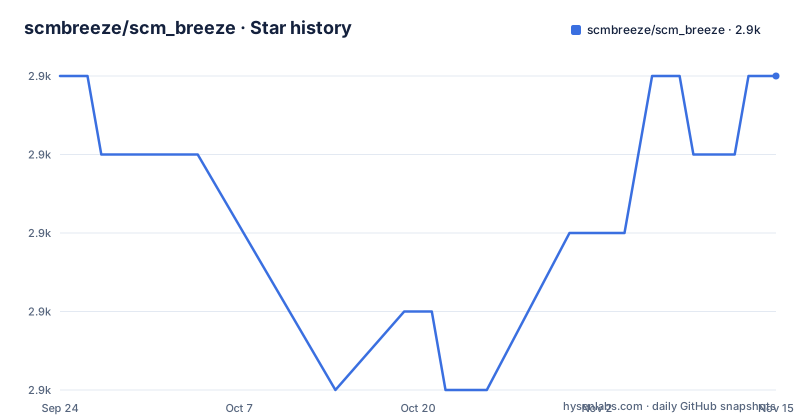
Star history
- scmbreeze/scm_breeze2,913 ★ · +0
| Repository | 2026-09-24 | 2026-11-15 |
|---|---|---|
| scmbreeze/scm_breeze | 2.9k | 2.9k |
0 Stars in the last 52 days, measured from the daily GitHub snapshot. Compare with other projects
Editorial analysis
The homepage is a blog post from 2011 that announced the project
The repository's homepage field points at an article on a personal blog, published in October 2011, titled as git shortcuts you have never seen before. So the canonical link for the project is the post that introduced it rather than a documentation site or the repository itself, which is a reasonable choice for a project whose documentation is its shell session and a reasonable liability for anything else. The README is the real documentation and it is organised as a table of contents with nine top-level entries, covering installation, a Docker sandbox, the file shortcuts with their three sub-sections, keyboard bindings, the repository index, linking external project design directories, four configuration topics, custom emojis, tab completion notes split by shell, updating, uninstalling and a list of alternative projects. The last of those is worth noticing: the README points at other tools rather than arguing it is the only option.
The installer appends exactly one guarded line to your shell rc file
Installation is three commands: clone the repository into a dot directory in your home directory, run the installer, and source your shell rc file. What the installer does is create the required default config files and add one line to your bashrc or zshrc, and that line is worth reading before you run it:
[ -s "$HOME/.scm_breeze/scm_breeze.sh" ] && source "$HOME/.scm_breeze/scm_breeze.sh"The test before the source is a file test that checks the script exists and is not empty, so the line is harmless if the clone is missing. That is the defensive part. The part to be aware of is that a shell rc file is read by every new shell you open, and this project inserts itself into all of them. The repository also ships an uninstall script and an example rc file, so the change is reversible and the configuration is meant to be copied rather than written from scratch.
The add alias also removes deleted files
The mechanism is simple and effective. Whenever you look at your SCM status, each modified path is stored in a numbered environment variable, with a configurable prefix that is the letter e by default. Those numbers, or ranges of them, can be handed to any command. The project aliases the usual add alias to its own function, which expands integers and ranges, so typing a few numbers is equivalent to typing a list of paths, and a range covers everything in between. There is one behaviour difference that the README states in a parenthesis rather than in the main flow: the add shortcut also removes deleted files, unlike the standard add command, and that behaviour can be turned off. For a working tree with deletions in it, that is the difference between staging a deletion and silently discarding one, so the setting is worth finding before you use the alias on a repository where you have deleted things.
A shell project that wants Ruby, and lints five languages
The install section carries one dependency note that surprises people: you need Ruby installed for some of the commands to work, and it also improves performance. That is the only runtime requirement stated beyond the two shells, and it is a real one, because the documentation points at the Ruby language site for installation instructions. The repository's tooling spreads wider still. There is a shellcheck configuration for the shell scripts, a RuboCop configuration for whatever Ruby the project contains, a spell checker configuration with its own dictionary directory, and a Prettier setup. Then there is a Node manifest and a yarn lock file, so a project whose product is a shell function also carries five toolchains. The spell checker deserves a note of its own, since its dictionary is generated from lock files by a command line tool, which is how the project keeps third party package names from tripping its own lint.
Two keyboard bindings commit, and one of them commits everything
The bindings exist because the author's most frequent commands are add and commit. Two defaults are defined, both behind the same prefix chord: the prefix followed by the c key runs a function that adds the given files if any were given and then commits what is staged, and the prefix followed by the space bar commits everything. Both go through a shared commit prompt function, which the README shows as a screenshot and describes as giving access to your bash history with the arrow keys when running under bash. That last detail is the interesting one, because it means the tool rewires how you reach history inside its own prompt. The sequence for adding and committing in one step is to type the file numbers, press the home key, then press the prefix chord with c, so the numbers you already typed are the arguments.
A Docker sandbox pre-seeded with staged, unstaged and untracked changes
There is a small Docker setup under a docker directory for trying the tool without touching your host shell configuration, which is the polite way to ship something that edits an rc file. Two commands from the repository root build and run it:
docker build -t scm_breeze-sandbox docker/
docker run --rm -it -v "$PWD:/workspace" scm_breeze-sandbox
The container is arranged so the shortcuts have something to act on. The workspace is the repository bind-mounted from the host, so edits are live, and the home directory contains a throwaway git repository already populated with staged, unstaged and untracked changes, which is exactly the state the numbered shortcuts are built to summarise. The test suite can be run from the mounted workspace with a script at its root, and starting the z shell inside the container lets you exercise the other supported shell. That combination makes the sandbox a usable development loop rather than a demo, which is more than most projects of this size offer.
The Node manifest points at build output that no script produces
The repository has a package manifest with a name, a version of 1.1.0, an empty author field, empty keywords and an empty engines object. Its entry points are all build output: a main field pointing into a dist directory, a types field next to it, and a binary mapped to another file in that same directory, with the files list including only the dist tree, the readme and the licence. The scripts are shell checking, two formatting commands, two spell checker commands and one that generates a dictionary. There is no build script, and the dist directory is not in the repository listing. So the published shape of this Node side describes a package that nothing in the repository compiles, and the actual dependency is a third party command line tool the manifest installs for the dictionary generation step. Meanwhile the shell project itself publishes no GitHub releases at all, so the manifest version is the only version number anywhere.
Editorial conclusion
scm_breeze fits someone who lives in a shell, has more repositories than directories they can remember, and wants to type numbers instead of paths. Four things to check before you install it. It edits your shell rc file, appending a guarded source line, which is a change to a file every new shell reads. Its add shortcut is not git add, because it also removes deleted files unless you turn that off. It expects Ruby for some commands and for speed, which is not an obvious dependency for a shell project. And its keyboard binding for commit everything sits two keys away from a normal keystroke, so decide whether you want a global chord that commits your working tree before you get used to it.
Frequently asked questions
What does SCM Breeze add to git?
Numbered file shortcuts. Whenever you view your SCM status, each modified path is stored in a numbered environment variable with a configurable prefix, and those numbers or ranges can be passed to any command: the add alias expands numbers like 2 3 11 into the matching paths, and a range such as 1-10 covers every unstaged change.
Does the SCM Breeze add alias behave exactly like git add?
No. The README notes that the add shortcut also removes deleted files, unlike the standard add command, and that this behaviour can be turned off if you do not want it. Everything else, including diffing, resetting and checking out a single numbered file, follows the git commands you would type by hand.
How do I install SCM Breeze?
Clone the repository into a dot directory under your home directory, run the included install script, and source your shell rc file. The installer creates default config files and appends one line to your bashrc or zshrc that sources the main script only if that file exists and is not empty.
What does SCM Breeze need besides a POSIX shell?
Ruby, according to the install note, for some commands to work and for better performance. The repository also carries linting configuration for shell scripts, Ruby, Markdown and JSON, plus a Node manifest and a yarn lock file, so the toolchain around a shell project spans several languages.
What do the SCM Breeze keyboard shortcuts do?
Two default bindings behind the same prefix chord: the chord followed by c adds the given files if any were typed and then commits what is staged, and the chord followed by the space bar commits everything. Both use a shared commit prompt, which under bash also gives access to your history with the arrow keys.
What is the SCM Breeze repository index?
An index of your projects and their submodules for fast switching with tab completion, compared in the README to autojump but without needing to learn anything. You point it at a repository directory with a setting in your config file and build the index with a rebuild flag, and the documented example reports scanning a code directory and the number of repos indexed.
Official sources
Add this badge to your README
If you maintain this project, the badge below links readers to this analysis and shows its maintenance status from the daily GitHub snapshot. Paste the markdown into your README; add ?metric=license or ?metric=stars to the image URL for a different field.

[](https://hysenlabs.com/projects/scmbreeze-scm-breeze)Star history chart for your README
[](https://hysenlabs.com/projects/scmbreeze-scm-breeze)Was this useful?