cyberdream.nvim: High-Contrast Neovim Colorscheme with Plugin Extensions
🤖💤 High-contrast, Futuristic & Vibrant Neovim Colorscheme
At a glance
- What is it?
- cyberdream.nvim is a Lua colorscheme for Neovim focused on high contrast, transparency, and configurable plugin-specific styling. It includes terminal themes and extension files for many editor plugins, while the README does not document installation commands.
- Who is it for?
- Adopt cyberdream.nvim if you want a high-contrast Neovim theme with explicit extension support and included terminal color schemes. Do not choose it as a self-contained setup solution without first checking the README and repository files for installation and configuration details, because the README does not document them.
- Can I use it commercially?
- Yes. MIT is a permissive licence: you can use, modify and sell software built on it, as long as you keep its copyright and licence notices.
- Is it still maintained?
- Yes. The repository last received commits 7 days ago.
- What is it written in?
- Mainly Lua, according to GitHub's language statistics.
Answers come from the project's GitHub data, last synced on November 7, 2026, and from our analysis. They are not legal advice.
Star history
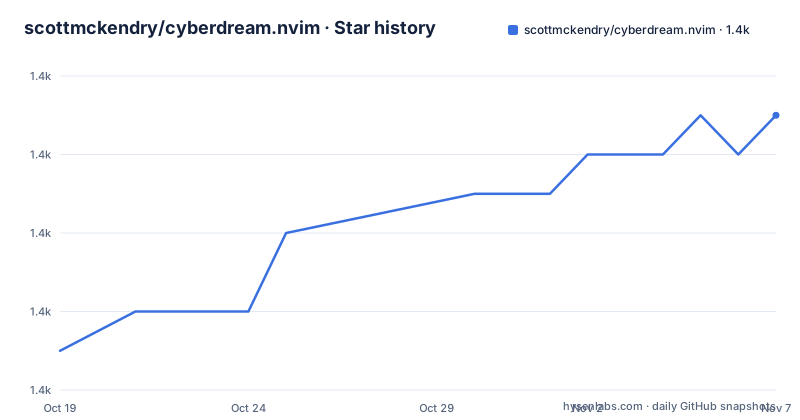
- scottmckendry/cyberdream.nvim1,425 ★ · +6
| Repository | 2026-10-19 | 2026-11-07 |
|---|---|---|
| scottmckendry/cyberdream.nvim | 1.4k | 1.4k |
6 Stars in the last 19 days, measured from the daily GitHub snapshot. Compare with other projects
Editorial analysis
What cyberdream.nvim Changes in Neovim
cyberdream.nvim is a Neovim colorscheme rather than a general-purpose editor plugin. It changes the colors used by the editor interface and syntax highlighting, with its stated design priorities being high contrast, transparency, and a futuristic appearance. The intended audience is Neovim users who want a theme that does more than assign a small set of colors to basic editor groups. The README presents screenshots for several interface views and lists plugin-specific extensions for components such as `alpha-nvim`, `blink.cmp`, `dashboard-nvim`, `nvim-dap-ui`, `fzf-lua`, `gitsigns.nvim`, `grug-far.nvim`, `lazy.nvim`, `lualine.nvim`, `noice.nvim`, `nvim-cmp`, `nvim-notify`, and `nvim-treesitter`.
That plugin coverage is the practical distinction. A colorscheme has to define highlight groups for syntax, status lines, diagnostics, completion menus, Git indicators, debugger interfaces, and other UI surfaces. Those surfaces often use names that differ between plugins. cyberdream.nvim keeps separate Lua files under `lua/cyberdream/extensions/` for many integrations, so the project is designed around editor composition rather than only the base Neovim theme.
The repository has a `colors/` directory, a `lua/` directory, `doc/`, `extras/`, tests, and a `flake.nix` file. Based on that layout, the central theme and its extensions are implemented in Lua, while additional color formats or assets are organized separately. The README does not explain whether every extension is enabled by default or how a user selects one, so those details should not be assumed from file names alone.
Lua Theme Layout and Plugin Extension Boundaries
The repository layout makes the design boundary fairly clear. The `lua/cyberdream/extensions/` directory contains separate files for individual integrations. The README maps `alpha-nvim` to `lua/cyberdream/extensions/alpha.lua`, `blink.cmp` to `blinkcmp.lua`, `lualine.nvim` to `lualine.lua`, and `nvim-treesitter` to `treesitter.lua`. This structure is preferable to placing every plugin highlight definition in one large file because a user can reason about the compatibility of each integration separately.
The extensions are described as optional and configurable. The README says that support for popular plugins is available out of the box and that extensions can be toggled on or off to maximize performance. That wording matters. A colorscheme should not assume that every plugin exists in a user's configuration, because loading highlight definitions for absent plugins can produce unnecessary work or warnings. A theme that separates extensions can avoid applying irrelevant groups, although the exact toggle mechanism is not present in the README.
The project is not limited to Neovim. The feature list calls out several included terminal themes under an extras section. Repository topics also identify `alacritty-theme`, `helix-theme`, `kitty`, `textmate`, `tmtheme`, `vim-colorscheme`, `wezterm-colorscheme`, `windows-terminal-theme`, and `yazi`. The `extras/` directory is consistent with that cross-editor scope. The README does not enumerate every terminal export or describe compatibility versions, so adopters should inspect that directory rather than assume that each named terminal receives the same file format or color mapping.
Installation and First Use Without Documented Setup Steps
The README does not provide installation instructions. It does not show a package-manager command, a plugin declaration, a `setup` function, a `colorscheme` command, or a configuration snippet. The repository contains `.lazy.lua`, but the README does not explain whether that file is an example, a development file, or a supported configuration path. It would be inaccurate to invent a command from it.
The project is identified as a Neovim plugin in its topics, and the primary language is Lua. Those facts indicate the expected environment and implementation language, but they do not establish a complete installation procedure. The repository has a `README.md`, so a new user should start there for current setup guidance. The `doc/` directory is another place to check for project-specific usage documentation.
The first real use should be treated as a verification step rather than a documented tutorial. A user would need to install the repository according to the project's current instructions, configure the theme through the mechanism the repository specifies, and then inspect Neovim's interface and any plugin UI they use. The README does not state which Neovim versions are supported, whether a background transparency setting is required, or which extension keys are used. Those omissions limit the usefulness of a reproducible setup example, so no unverified command or Lua snippet is included here.
Terminal Extras and Cross-Application Color Consistency
The extras are a meaningful part of cyberdream.nvim's scope. The README identifies terminal theme support and links to an extras section. Repository topics additionally name terminal and editor targets such as Alacritty, Helix, kitty, WezTerm, Windows Terminal, TextMate, and Yazi. This suggests the project is intended to carry its visual language beyond Neovim rather than treating the terminal as an unrelated afterthought.
That approach differs from a theme that only changes Neovim highlight groups. A terminal palette must account for ANSI colors, shell output, prompt tools, and editor integrations that may use colors differently from Neovim. A Neovim colorscheme can define a consistent background and foreground palette, but it does not automatically control every terminal or external editor. The `extras/` directory and the documented extras section are therefore relevant when evaluating whether the same color system can cover a development workstation.
There is a trade-off. More exported formats and integrations increase the surface that maintainers must keep aligned with their respective tools. The README does not document update frequency for each extra, supported application versions, or whether all targets receive identical palettes. It is also silent on how terminal transparency is configured. For users who want a single Neovim theme only, that breadth adds little. For users who want matching terminal and editor colors, it removes a separate conversion task, provided the relevant export exists in the repository.
Performance, Compatibility, and Failure Cases
The README explicitly says that plugin extensions can be toggled on or off to maximize performance. This is the clearest stated limitation and design constraint. A theme that loads definitions for many integrations may do more work during startup or may reference plugins that are not installed. cyberdream.nvim addresses that concern by organizing integrations separately and offering a toggle, but the README does not specify the default set, the cost of enabling all extensions, or how failures are reported.
Compatibility is another unresolved point. The listed integrations cover particular plugin ecosystems, including completion systems such as `blink.cmp` and `nvim-cmp`, but a colorscheme file can still become outdated when a plugin changes its highlight group names. The repository has tests, which indicates that the project includes automated project-level checks, but the README does not list what those tests cover. It does not claim compatibility with every plugin version or every Neovim release.
cyberdream.nvim would also be a poor choice for a user who wants a minimal theme with no plugin-specific code or a conventional low-saturation palette. Its stated emphasis on high contrast and transparency is a preference, not a universal usability improvement. Users sensitive to color contrast, terminal background settings, or visual density may find that the aesthetic requires adjustment. The README does not document a contrast mode, alternate palette, or configuration file for changing the design, so those preferences should be checked before adoption.
cyberdream.nvim Versus a Minimal Base16 Theme
A real alternative is a minimal Base16 theme distributed for Neovim. The repository topics include `base16-theme`, but the README does not explicitly state that cyberdream.nvim is generated from Base16. The comparison is therefore between two approaches: cyberdream.nvim provides a named theme with many plugin-specific extensions and terminal extras, while a minimal Base16 theme generally centers on a base palette and may leave most plugin styling to separate tooling.
The practical difference is scope. cyberdream.nvim includes extension files for plugins such as `gitsigns.nvim`, `lualine.nvim`, `noice.nvim`, `nvim-notify`, and `nvim-treesitter`. A minimal Base16 setup can provide consistent syntax colors with fewer theme-specific integration decisions, but it may require separate colorschemes or configuration for plugin interfaces. The exact behavior of any particular Base16 implementation is outside the repository documentation, so the comparison should remain at the level of documented project scope.
Users who value a single coordinated visual system across Neovim and terminal applications may prefer cyberdream.nvim's extras. Users who want fewer moving parts and already maintain a Base16 workflow may find that a simpler Base16 theme is easier to integrate. Neither approach can be judged from aesthetics alone. The relevant checks are the plugin list, the files in `extras/`, the default extension behavior, and the setup instructions in the current README.
Maintenance Signals and MIT License Implications
The repository is not archived. Its last push was on 2026-10-05, and the release history lists `v5.5.0` on 2026-06-28, `v5.4.0` on 2026-04-10, and `v5.3.0` on 2025-09-28. These dates show repository activity and several versioned releases, but the README does not describe a release policy, support window, or migration procedure for breaking changes.
The project uses the MIT license. That permits use, modification, distribution, and private use under the license conditions, including preservation of the copyright and license notice and the disclaimer of warranty. This is a licensing summary, not legal advice. Teams that copy theme files into an internal distribution should preserve the applicable license notice and review the exact `LICENSE` file for their circumstances.
Upgrade cost is likely to depend on configuration rather than compilation. The Lua theme and extension files can change between releases, and the README does not say whether extension names, highlight groups, or setup keys are stable. A user adopting the theme should compare the current `CHANGELOG.md`, release tag, and local Lua configuration before replacing an existing theme. The release history provides concrete version points for that review.
Editorial conclusion
Adopt cyberdream.nvim if you want a high-contrast Neovim theme with explicit extension support and included terminal color schemes. Do not choose it as a self-contained setup solution without first checking the README and repository files for installation and configuration details, because the README does not document them. Verify first that the theme and the required extension match your Neovim plugins and workflow.
Frequently asked questions
How do I install cyberdream.nvim in Neovim?
The README does not document an installation command or plugin-manager setup. It points users to the repository documentation, which should be checked for the current instructions.
Which Neovim plugins does cyberdream.nvim support?
The README lists extensions for plugins including `alpha-nvim`, `blink.cmp`, `dashboard-nvim`, `nvim-dap-ui`, `fzf-lua`, `gitsigns.nvim`, `lualine.nvim`, `noice.nvim`, `nvim-cmp`, `nvim-notify`, and `nvim-treesitter`. It says these extensions can be toggled on or off.
Does cyberdream.nvim include themes for terminals and other editors?
Yes. The README states that several terminal themes are included, and repository topics also identify targets such as Alacritty, Helix, kitty, WezTerm, Windows Terminal, TextMate, and Yazi. The README does not describe configuration steps or supported versions for each target.
Can cyberdream.nvim plugin extensions be disabled?
The README says that support for popular plugins can be toggled on or off to maximize performance. It does not provide the toggle syntax in the README.
Official sources
Add this badge to your README
If you maintain this project, the badge below links readers to this analysis and shows its maintenance status from the daily GitHub snapshot. Paste the markdown into your README; add ?metric=license or ?metric=stars to the image URL for a different field.

[](https://hysenlabs.com/projects/scottmckendry-cyberdream-nvim)Star history chart for your README
[](https://hysenlabs.com/projects/scottmckendry-cyberdream-nvim)Was this useful?