dlssg_for_sm86: a prebuilt DLL in the root, and nothing to build
Here is a dlssg for RTX30 Series GPU
At a glance
- What is it?
- A proxy library that reports an RTX 30 or 20 card as an RTX 50 to a game so that frame generation turns on, shipped as a proxy DLL with a dlssg_sm86 runtime directory and a sectioned configuration file, an offline kernel benchmark whose own numbers run from about 32 percent down to 19 percent, and a declaration that the kernel work is finished and Vulkan is abandoned.
- Who is it for?
- Read the licence terms of your driver and of the game before installing anything, because the mechanism is a deliberate change to what the game believes about your hardware, and that is a different kind of act from a settings change.
- Can I use it commercially?
- Not without permission. GitHub finds no licence file in the repository, and without a licence all rights are reserved by default: you may read the code but not reuse it. Check the README, or ask the authors, before using it.
- Is it still maintained?
- Yes. The repository last received commits 1 day ago.
- What is it written in?
- GitHub does not report a main language for this repository.
Answers come from the project's GitHub data, last synced on November 15, 2026, and from our analysis. They are not legal advice.
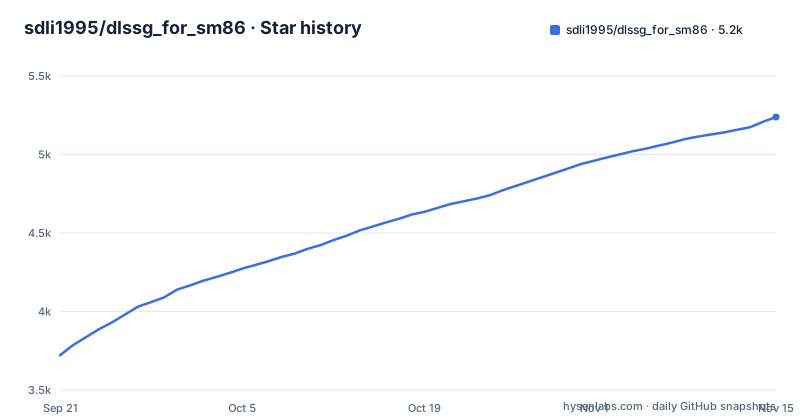
Star history
- sdli1995/dlssg_for_sm865,239 ★ · +1,518
| Repository | 2026-09-21 | 2026-11-15 |
|---|---|---|
| sdli1995/dlssg_for_sm86 | 3.7k | 5.2k |
1,518 Stars in the last 55 days, measured from the daily GitHub snapshot. Compare with other projects
Editorial analysis
The repository root is the release
There is no source tree here. The top level holds the proxy DLL, a configuration file, the dlssg_sm86 runtime directory, installation manuals, a directory of alternative proxy names, an archive directory, a documentation directory, a third-party notices file and two versions of the readme. A compiled Windows library sits directly in the root, and the runtime requirements say explicitly that neither the CUDA Toolkit nor Python is needed.
So this repository is a release channel rather than a project you build. The metadata records no primary language and no licence, and the third-party notices file is there because the embedded runtime is not the author's code. The readme also says this release has a single build (bundled runtime 310.9.16, up to 6X), with the two 0.3.5 builds (310.9 / 310.1) kept in archive\0.3.5\.
The release cadence is fast and the timestamps are unusually tight. The recent releases are 0.3.5 on 2026-09-19, 0.4.0 on 2026-10-14 and 0.4.1 on 2026-10-27, with the last push to the default branch logged at the same moment as the 0.4.1 tag.
The rewrite is aimed at the game, not at the driver
The mechanism is a proxy library that loads ahead of the game's own, and it uses the unmodified factory runtime, which since 0.4.0 sits in the dlssg_sm86 directory rather than inside the proxy, so the game's calls into the vendor's interface are unchanged. That design is itself a revision: version 0.3.0 reverted from a native mode, in which the project hosted its own interface implementation, back to the proxy, because the native approach had compatibility problems on some games that were hard to fix.
The trick that turns the feature on is reporting a different card. The library rewrites the reported graphics architecture, and from 0.3.3 it does so at game start rather than later, and it reports an RTX 50. The reason given is specific: games using a particular version of the integration library had already decided at startup that the card did not support frame generation and removed the plugin, so the rewrite has to land before that check runs. The in-game multiplier options are unlocked as they would be on the newer card.
The sharpest lesson in the file is 0.3.4. An NVIDIA App DLSS override or an NGX online update could cause the vendor's own upscaling component to receive the rewrite as well, take a path that does not belong to that card, and hang the GPU, which showed up as a crash at launch or a driver reset on enabling the feature. The fix was to give the vendor's own components the true architecture and confine the rewrite to the integration library and the game. A rewrite that leaks outside its target is what turned a feature into a crash.
Two switches decide everything
Two settings carry most of the frame generation behaviour, though since 0.4.x the configuration file also has [DLSSG], [XeSSFG] and [SuperResolution] sections. The first is the optimization level, with four values. Zero selects the factory kernels and no speedup. One selects fully accelerated kernels whose output is bit-identical to the official result. Two additionally enables lossy image kernels, which are faster, with a stated peak signal-to-noise ratio above about 50 dB against the official image, and since 0.4.0 that is the factory default. Three is everything lossy and fastest.
The second switch is the generated frame cap, where the factory value corresponds to 4X and changing it corresponds to 6X on the newer runtime. The actual number of generated frames is requested by the game and then clamped to the runtime's cap, so the setting raises the ceiling rather than forcing a multiplier.
Everything else takes a safe default and is deliberately absent from the shipped file, with the complete list in the installation document. There is also a third option mentioned in the 0.3.3 notes that is off at every level by default: a flag to stop skipping repeated real-frame copies within one group. It has never been verified in a real game and produced a flicker report in the previous release, which is the kind of note that saves a reader an evening.
The VRAM increment follows output pixels, not the multiplier
The memory table is the most immediately useful number in the file, and it is measured rather than estimated. The method is stated: the extra local video memory used by frame generation itself, taken after warm-up minus before the feature is created, rounded up to 10 MiB, on the newer runtime with the best kernels.
The invariance is the finding. The increment varies only with output resolution and not with the multiplier, so 2X and 6X cost the same. In 16:9 it is about 230 MiB at 720p, about 350 at 1080p, about 540 at 1440p and about 810 at 3840 by 2160. The ultrawide and other ratios scale by output pixel count: about 440 MiB at 2560 by 1080, about 700 at 3440 by 1440, about 1050 at 5120 by 2160, about 610 at 3840 by 1080, about 990 at 5120 by 1440, and about 430 at 1920 by 1440.
Two exclusions are stated. The figure is frame generation's own increment and does not include the game itself, and it does not include the compositing input textures, which matters because those scale with resolution too. Frames at the same height and different widths land close together, which is the check that the number is tracking pixels rather than aspect ratio.
The benchmark measures kernel time, and admits its own limits
The performance table is methodologically careful, and the readme spends a paragraph saying what it is not. The measurement is the 3080 Ti on a specific driver, taken on a dated day, in units of GPU milliseconds per real frame for a whole generated group including shared preprocessing. Four rounds of 256 groups, the median of the medians, with configurations interleaved inside a round so they share thermal drift, and the reduction computed from unrounded data.
The results decline in a way the readme explains. At 720p and 2X the accelerated kernels cut the time by about 31 percent; at 1080p and 2X by about 32 percent; by 4K at 6X the gain is about 19 percent. The stated reason is that lower resolutions and lower multipliers sit closer to being bound by start-up and latency rather than by the kernel.
Two caveats are worth more than the table. The measurement is of the GPU compute cost, not of frames per second in a game, and the file says so in those terms. And at 3X and above the per-group time can be bimodal, with the median landing between the two peaks, so the raw minimum and mean are kept in the data file. The readme also notes the numbers are conservative for the current release, because the kernel set did not change after the measurement and the later release only replaced the images of 26 kernels for a further few percent on the same card.
The estimator, and the rule you must not break
Because the table is not frames per second, the file supplies the arithmetic for converting it. Measure your own frame rate with frame generation off at the same scene, output resolution, upscaling setting and quality, then pick the group cost from the table and add it to the base frame time:
基础帧时间   T_base (ms) = 1000 / F_off
帧组时间     T_group (ms) ≈ T_base + T_FG
真实帧/帧组速率 G (组/s)  ≈ 1000 / T_group
插帧后总帧率 F_out (FPS)  ≈ G × M = 1000 × M / (1000 / F_off + T_FG)
The one rule that breaks the estimate is multiplying the group cost by the number of generated frames. The table's group figure already includes the whole group and its shared preprocessing, so the multiplier applies to the result and never to the cost. The worked example in the file takes 50 frames per second with generation off, a base frame time of 20 milliseconds, and the 4K 4X row: the factory kernels give a group time of 25.577 milliseconds, about 39.1 groups per second and an estimated 156.4 frames per second, while the accelerated kernels give 24.442, about 40.9 and an estimated 163.7.
The closing paragraph is the honest part. It is a rough estimate, and resource contention, synchronisation, processor overhead, frame caps and refresh rate all move the real number, which is not guaranteed to match a counter or the displayed rate.
Signed with a self-signed certificate, and Vulkan is gone
The security section exists because a proxy library dropped next to a game executable invites the obvious question. The answer is that the released libraries, including the named alternatives, are code signed, that the certificate used for this release is self-signed with a stated subject, and that the readme prints its SHA-1 fingerprint so you can check it in the file properties or with the standard signing tool. It is also explicit about what a self-signed certificate does not do: it verifies who signed the file and that the file is intact, and it does not confer the default trust Windows expects, so the first run may still show an unknown publisher warning. That warning is described as a reputation prompt rather than a malware detection, which is a distinction worth keeping in mind when an antivirus and a SmartScreen dialog disagree.
The declared boundaries are equally concrete. Kernel-level work on frame generation is described as having reached the current optimum, with later versions limited to compatibility and bug fixes, and INT8 upscaling for presets L and M on the two supported card families is now provided in this release. Vulkan is abandoned rather than deferred, for three stated reasons: the wrapper layer's own game compatibility is not good enough, coverage testing is limited, and adding Vulkan would only produce more compatibility problems. Users who need it are pointed at a community patch.
Diagnosis is log based: since 0.4.1 there is a single text log, dlssg_sm86\logs\dlssg_sm86.log, and [Logging] FrameTiming=1 additionally writes frame_timing.txt.
Editorial conclusion
Read the licence terms of your driver and of the game before installing anything, because the mechanism is a deliberate change to what the game believes about your hardware, and that is a different kind of act from a settings change. Then read the failure list rather than the benchmark: 0.3.4 and 0.3.5 were crash fixes, 0.3.4 for driver resets and GPU hangs caused by the rewrite leaking into components it should never have touched, and the project's own advice for visual artefacts is to raise the base frame rate rather than to change a setting. What you get is a kernel-level tool with an optimization level, a generated frame cap and optional upscaling and XeSS-FG settings, a measured and methodologically careful speedup that shrinks as resolution and multiplier rise, no Vulkan, and a maintenance promise limited to compatibility fixes.
Frequently asked questions
What does dlssg_for_sm86 do?
It is a proxy library for Windows x64 and D3D12 that enables the vendor's frame generation on RTX 30 series (SM86) and RTX 20 series (SM75) cards. It uses the unmodified factory runtime, shipped since 0.4.0 in the dlssg_sm86 directory, so the game's calls are unchanged, rewrites the reported graphics architecture to an RTX 50 for the game and the integration library, and leaves the vendor's own components on the true architecture, which is what fixed the crashes in 0.3.4.
What do the two settings in dlssg_sm86.ini control?
The optimization level, with four values: factory kernels with no speedup, fully accelerated kernels that are bit-identical to the official output, the same plus lossy image kernels at roughly 50 dB peak signal-to-noise ratio (the factory default since 0.4.0), and everything lossy. The other is the generated frame cap, where the factory value gives 4X and the higher value gives 6X on the newer runtime. All other options take safe defaults and are documented in the installation guide instead.
How much extra video memory does frame generation use with dlssg_for_sm86?
The project's own measurements, on the newer runtime with the accelerated kernels, give about 230 MiB at 720p, about 350 at 1080p, about 540 at 1440p and about 810 at 3840 by 2160 in 16:9, with ultrawide and 4:3 figures between about 430 and about 1050 MiB. The increment depends only on output resolution and not on the multiplier, so 2X and 6X cost the same. The figure excludes the game itself and the compositing input textures.
Does dlssg_for_sm86 support Vulkan?
No, and the project says so directly rather than leaving it for a release note. Vulkan support is described as not feasible in the project's current state because the wrapper layer's own game compatibility is not good enough, coverage testing is limited, and adding Vulkan would only bring more compatibility problems. Users who need Vulkan are pointed at a community patch build.
Will antivirus flag the dlssg_for_sm86 proxy library?
The readme addresses this in advance. All the released proxy libraries are code signed, and the certificate is self-signed with a stated subject and a published SHA-1 fingerprint that you can check in the file properties or with the standard signing tool. A self-signed certificate verifies the signer's identity and the file's integrity but not Windows default trust, so the first run may still report an unknown publisher, which the readme distinguishes from antivirus detection.
Official sources
Where developers are discussing it
Posts on Hacker News, dev.to and Lobsters that link to this repository, found by our scan of those communities. 0 in the last 30 days; newest first.
- Enables Nvidia DLSS Frame Generation (DLSS-G) on RTX 30-series and RTX 20-seriesHacker News · Sep 23, 2026 · 2 points · 0 comments
Add this badge to your README
If you maintain this project, the badge below links readers to this analysis and shows its maintenance status from the daily GitHub snapshot. Paste the markdown into your README; add ?metric=license or ?metric=stars to the image URL for a different field.

[](https://hysenlabs.com/projects/sdli1995-dlssg-for-sm86)Star history chart for your README
[](https://hysenlabs.com/projects/sdli1995-dlssg-for-sm86)Was this useful?