Roam Control: a prebuilt IPA, a private source tree, one restore step
Choose, test and move an iPhone’s reported location.
At a glance
- What is it?
- Roam Control is a proprietary iPhone app for choosing, testing and moving the location the phone reports, shipped as a prebuilt IPA outside the App Store. Its own warning about blast radius is the first thing any adopter should read.
- Who is it for?
- Roam Control is a reasonable tool for a developer or QA engineer who needs a fixed or walked location on an iPhone they own, and an unreasonable one for anything else, including anyone whose testing touches navigation, emergency, safety, transport or location sharing, since the app states that a simulated position reaches every app on the device and the first feature is restoring the real one. Before installing, settle three things.
- Can I use it commercially?
- Check first. The repository uses a licence we do not classify automatically, so read its LICENSE file before any commercial use.
- Is it still maintained?
- Yes. The repository last received commits 25 days ago.
- What is it written in?
- Mainly Swift, according to GitHub's language statistics.
Answers come from the project's GitHub data, last synced on November 13, 2026, and from our analysis. They are not legal advice.
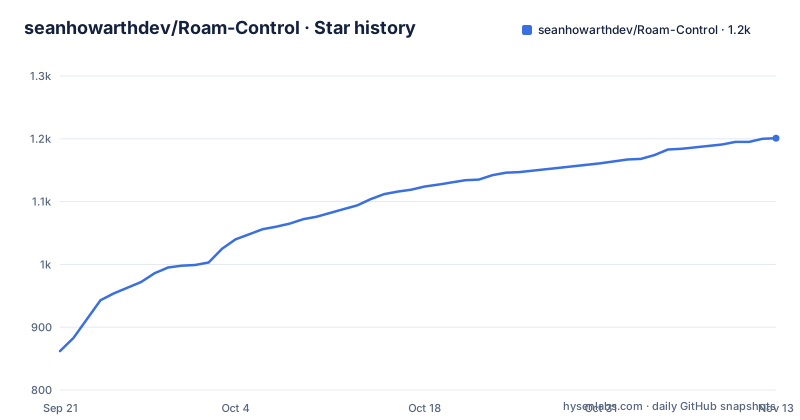
Star history
- seanhowarthdev/Roam-Control1,201 ★ · +339
| Repository | 2026-09-21 | 2026-11-13 |
|---|---|---|
| seanhowarthdev/Roam-Control | 862 | 1.2k |
339 Stars in the last 53 days, measured from the daily GitHub snapshot. Compare with other projects
Editorial analysis
A reported location reaches every app on the phone
The most important paragraph in this project is the one about responsible use, and it should be the first thing anyone reads. Location simulation can affect every app that uses the iPhone's reported position. The instruction that follows is unconditional: restore the real location before using navigation, emergency, safety, transport or location-sharing features.
That is a wider scope than the feature list suggests. The list offers a fixed reported location, walking routes with pause, resume, reverse and redirect, favourites, history, and recovery from interrupted sessions. What it does not offer is any way to scope the change to one app, because there is no mechanism in the description for doing so.
The project states its own scope limit twice, in the About section and again under responsible use, describing itself as intended for development and testing on an iPhone you own and control. Pairing and LocalDevVPN sessions are part of the feature set rather than an escape hatch from this limit.
Anyone evaluating this for a work device should treat the restore step as a precondition of installation rather than a cleanup task.
The build number is in two tag names and missing from the third
The three most recent releases carry their build numbers unevenly. v0.9.3 is named Roam Control 0.9.3 with Build 63. v0.9.2 is named Roam Control 0.9.2 with Build 61. v0.9.4 is named only Roam Control 0.9.4, with no build number in its title at all.
The README header fills the gap by naming the current release as 0.9.4 Build 74. So the build counter for the newest release is recoverable from the README and not from the release list, which means anyone scripting a download has to read two places to know which artefact they are getting.
The dates are close together. v0.9.2 shipped on 2026-09-14, v0.9.3 on 2026-09-22 and v0.9.4 on 2026-09-26, with the default branch pushed on 2026-09-27. That is three releases in twelve days, which means the version in the README header and the version on your device can diverge within a week.
The requirement line is also fixed rather than ranged: iOS 27 or newer, with no statement anywhere about which older versions are supported.
The repository ships a LICENSE while the metadata reports no licence
Three surfaces describe the terms and they do not agree. The repository metadata carries no recognised licence identifier. A `LICENSE` file sits at the root. And the README states plainly that Roam Control is proprietary software, copyright 2026 Sean Howarth, all rights reserved.
What the LICENSE file permits is narrow: the public IPA may be downloaded and used personally, subject to the terms in that file. Redistribution, modification, repackaging, mirroring and unofficial releases are all ruled out without prior written permission. So the grant is personal use of a binary, not a source or build grant.
There is also a provenance wrinkle worth reading. The project states that historical source code previously published under other licences remains governed by the licence applicable to the specific version when it was published, and that those historical grants are not revoked by the current distribution model. Combined with the `CHANGELOG.md` and the release history document at the root, that points to an earlier era when source was public.
Anyone auditing this needs to read the LICENSE file itself rather than either of the other two signals, and neither the README nor the metadata tells them which one is authoritative.
No source directory exists, only documentation and policy files
The top level of the repository holds `.github/`, `.gitignore`, `CHANGELOG.md`, `CONTRIBUTING.md`, `Documentation/`, `LICENSE`, `README.md` and `SECURITY.md`. There is no source tree, no project file, no package manifest and no build script.
The README says this directly: the application source code is not publicly distributed, and what ships is a prebuilt IPA. The language recorded for the repository is Swift, which is a leftover of the earlier public-source era rather than a description of what you can read today.
The documentation set is substantial and mostly about operating the app rather than building it. It covers installation, a user guide, using a personal VPN, VPN compatibility, an advanced self-hosted IKEv2 setup on Linux, the current release, release history, privacy, and responsible use, with a security policy at the root.
That shape has a practical consequence. You can read every instruction the project gives you and still not be able to check what the app does with the VPN tunnel it asks you to set up, because the code that would tell you is not there.
Two install routes and one prerequisite that has to come first
Roam Control is not distributed through the App Store or through TestFlight. The stated route is to download the IPA attached to the current GitHub Release and install it with SideStore, or to import it into LiveContainer.
The LiveContainer route carries a prerequisite that is easy to miss because it is about the host app rather than about Roam Control: Fix Local Notifications must be enabled before Roam Control's first run, so that the pairing notification can be delivered correctly. Enable it afterwards and the first pairing attempt is the thing that fails.
An installation guide is linked as required reading before installing, and the project is explicit about sourcing: download only from the official repository, since unofficial mirrors, modified builds and redistributed copies are not authorised.
The pairing step is also where the VPN comes in. Guided LocalDevVPN setup is offered for both Wi-Fi and mobile-data use, and the documentation includes a page on VPN compatibility plus an advanced guide to running IKEv2 yourself on Linux.
Older releases stay visible after their downloads are taken away
The release policy has two halves, and the second one surprises people. Roam Control normally keeps downloadable IPA assets for the current stable release and, where appropriate, the immediately previous stable release. Older GitHub Releases may remain visible as historical records after their downloadable assets have been retired.
A visible release is therefore not a downloadable one. If you arrive at an older tag from a search result or a forum post, the page will look complete and the asset will not be there. Since three releases landed within twelve days, there is a short window where the previous release is still installable and then stops being installable without any change to its page.
The documentation set includes both a current release page and a release history page, which is the sensible way to check what is actually available before planning an install around a specific build.
For teams, the practical approach is to download the IPA once, verify it, and keep it in internal artifact storage rather than pointing an install script at a release URL that may be retired later.
No pull requests, and two separate channels for problems
Contributions are closed by policy, not by neglect. Roam Control is described as maintainer-developed and is not accepting pull requests or unsolicited code contributions, despite the presence of a `CONTRIBUTING.md` at the root. What is welcome is feedback through GitHub Issues, covering bug reports, feature requests, testing results and technical findings.
Two further channels exist for different classes of problem. Casual help, beta discussion and feature ideas go to the project's Discord. Security-sensitive reports go through GitHub Security Advisories rather than a public issue, which is the correct route for an app that installs a VPN profile.
On data, the privacy position is stated in one line that covers all of it: locations, searches, favourites, history, walking routes and pairing records remain on the iPhone. Anonymous usage statistics are optional and off by default, and the privacy policy is pointed to for the exact set of fields that may be reported once sharing is switched on.
The one thing that is not optional is the location restore, and it belongs in the same category: a safety step rather than a preference.
Editorial conclusion
Roam Control is a reasonable tool for a developer or QA engineer who needs a fixed or walked location on an iPhone they own, and an unreasonable one for anything else, including anyone whose testing touches navigation, emergency, safety, transport or location sharing, since the app states that a simulated position reaches every app on the device and the first feature is restoring the real one. Before installing, settle three things. Accept that the source is not public and the licence is proprietary with redistribution barred, which means you cannot audit the pairing or the notification handling. Confirm your OS is iOS 27 or newer. And for LiveContainer, enable Fix Local Notifications before the first run, or pairing notifications will not arrive. The last push to main was on 2026-09-27 and the current release is 0.9.4.
Frequently asked questions
Is Roam Control related to the Sonos Roam or a Made To Roam collar?
No. Roam Control is an iPhone app for choosing, testing and moving the location the phone reports, for development and quality assurance on a device you own and control. The other results share only the name and have nothing to do with reported GPS positions.
How do I install Roam Control?
It is not distributed through the App Store or TestFlight. Download the IPA attached to the current GitHub Release and install it with SideStore, or import it into LiveContainer. For LiveContainer, Fix Local Notifications must be enabled before the app's first run so that the pairing notification can be delivered.
Does Roam Control send my location to a server?
Locations, searches, favourites, history, walking routes and pairing records remain on the iPhone. Anonymous usage statistics are optional and off by default, and the privacy policy names the exact information that may be reported once sharing is enabled.
Can I contribute code to Roam Control?
No. It is described as maintainer-developed and is not accepting pull requests or unsolicited code contributions. Bug reports, feature requests, testing results and technical findings go through GitHub Issues, casual help goes to the project's Discord, and security-sensitive reports go through GitHub Security Advisories.
Why does Roam Control need a VPN?
It supports on-device pairing and guided LocalDevVPN-compatible sessions for both Wi-Fi and mobile-data use. Its documentation includes a VPN compatibility page and an advanced guide to running IKEv2 yourself on Linux, so the tunnel can be self-hosted rather than relying on a third-party service.
Official sources
Add this badge to your README
If you maintain this project, the badge below links readers to this analysis and shows its maintenance status from the daily GitHub snapshot. Paste the markdown into your README; add ?metric=license or ?metric=stars to the image URL for a different field.

[](https://hysenlabs.com/projects/seanhowarthdev-roam-control)Star history chart for your README
[](https://hysenlabs.com/projects/seanhowarthdev-roam-control)Was this useful?