OpenArc: a manifest at 2.0.5, a 3.0 release, and a compose file with a default API key
Inference engine for Intel devices. Serve LLMs, VLMs, Whisper, Kokoro-TTS, Embedding and Rerank models over OpenAI endpoints.
At a glance
- What is it?
- OpenArc is an OpenVINO-backed inference server that exposes LLMs, speech and embedding models over OpenAI-compatible endpoints on Intel hardware. Its version metadata, install note and reference deployment disagree with each other in ways that matter before you run it.
- Who is it for?
- OpenArc suits people who want speech and text models behind one OpenAI-compatible server on Intel hardware and who are willing to run a nightly OpenVINO build. Do not adopt it expecting a stable dependency floor, because the documented install pulls pre-release wheels from a nightly index while the manifest allows a stable minimum, and do not expose the compose deployment as written: it publishes port 8000 with a fallback API key and leaves an Intel debug flag on.
- Can I use it commercially?
- Yes. Apache-2.0 is a permissive licence: you can use, modify and sell software built on it, as long as you keep its copyright and licence notices.
- Is it still maintained?
- Yes. The repository received new commits within the last day.
- What is it written in?
- Mainly Python, according to GitHub's language statistics.
Answers come from the project's GitHub data, last synced on November 25, 2026, and from our analysis. They are not legal advice.
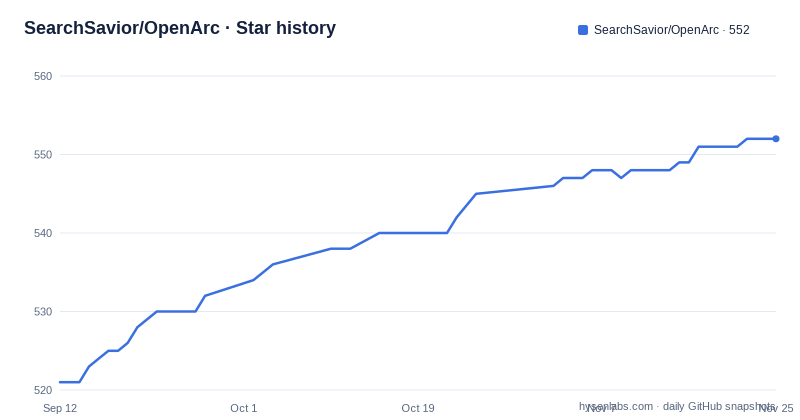
Star history
- SearchSavior/OpenArc552 ★ · +31
| Repository | 2026-09-12 | 2026-11-25 |
|---|---|---|
| SearchSavior/OpenArc | 521 | 552 |
31 Stars in the last 74 days, measured from the daily GitHub snapshot. Compare with other projects
Editorial analysis
The manifest still reads 2.0.5 while the newest release is 3.0.0
The packaging metadata and the release history disagree by a full major version. `pyproject.toml` declares `version = "2.0.5"`, and the most recent published release is `v3.0.0`, whose release name is simply `3.0`.
The release timeline explains how the drift happened and shows it is not ancient history. `v2.0.4` shipped on 2026-04-05, `v2.0.5` on 2026-09-05, and `v3.0.0` on 2026-09-25. The last push to the repository is 2026-09-26, one day after the 3.0 tag. So the manifest was not merely forgotten across a year; it was left behind immediately before a major release.
Two consequences follow. A source build reports 2.0.5 no matter which branch you are on, so any version string you read from an installed copy cannot tell you whether the 3.0 work is present. And a container started from the compose file tracks a floating tag, so two machines can run different code while both report the same manifest version.
The one-line summary drifts too. The project description calls it an inference engine for Intel devices, while the manifest description calls it an inference server for OpenVINO AI models. Server and engine are different claims about what the process does.
The install note hands you a nightly dependency and never names OpenArc
The README opens with a note saying the project currently requires nightly wheels to run the latest models, and the command under it installs one package.
uv pip install --pre -U openvino-genai --extra-index-url https://storage.openvinotoolkit.org/simple/wheels/nightlyRead carefully, that line does three things and omits a fourth. It enables pre-release resolution with `--pre`, it upgrades `openvino-genai`, and it adds an extra index pointing at the OpenVINO nightly wheel directory. What it does not do is install OpenArc. The package the note is warning you about is a dependency, and the note is the only installation command in the visible text.
Meanwhile the manifest declares `openvino-genai>=2026.3.1` as an ordinary floor. A resolver that trusts the manifest will happily take a stable build, which is precisely what the note says will not run the latest models. The two instructions can both be followed and still not agree.
For the actual OpenArc install the README defers entirely: the Quickstart is three links, one each for Linux, Windows and Docker, all pointing into the documentation site. The repository does ship `setup.sh` and `setup.bat` at the root, plus a `uv.lock`, so the pieces are present. They are simply not named in the page a reader lands on.
The compose file publishes port 8000 with a fallback API key
The reference deployment sets `OPENARC_API_KEY` from the environment with a literal fallback.
That line expands to whatever the operator has set, and to the string `openarc-default-key` when they have not. The service behind it speaks OpenAI-compatible endpoints, which is to say it accepts chat completions, transcriptions, embeddings and reranks, and the compose file publishes it on port 8000 with no interface restriction in the mapping.
So the shipped configuration is a server that will start without any credential setup and listen on all host interfaces with a key that is written down in the repository. Setting `OPENARC_API_KEY` is the fix and it costs one line, but nothing in the compose file stops the container from coming up in the weaker state, and there is no healthcheck that would fail on it.
Two other defaults are worth reading before first run. `OPENARC_AUTOLOAD_MODEL` falls back to empty, so nothing loads until you ask for it, and `restart: unless-stopped` means the container comes back on its own after a host reboot, carrying the same key forward. Logging is capped at three files of ten megabytes, which is a reasonable choice and the only resource limit in the file.
NEOReadDebugKeys=1 ships enabled in the reference deployment
Three Intel graphics environment variables sit in the compose file as plain defaults, not as an optional block.
`NEOReadDebugKeys=1` is the one to notice. It is a diagnostic switch for the Intel compute runtime, and the reference deployment turns it on. It is not labelled experimental and it is not commented out, so anyone who copies the compose file inherits it.
The other two are tuning rather than diagnostics. `OverrideGpuAddressSpace=48` sets an address space override to 48, and `EnableImplicitScaling=1` turns on implicit scaling. Both are reasonable for a machine whose integrated graphics memory reservation is too small, and both are hardware-dependent in a way the file does not explain. Copying them to a different Intel generation is a guess.
The file also grants the container the render device node directly with a `/dev/dri` bind mount, which is what makes NPU and GPU execution reachable from inside the container at all. That access is required for the advertised device support, and it is also the reason the debug flag matters more here than it would in a plain process: the container holds the device, not just the socket.
The port mapping and the volume pair complete the shape of the deployment. Models mount from a host path defaulting to `./models`, while configuration lives in a named volume mounted at `/persist`, so container restarts keep settings and lose nothing on the host.
/v1/audio/speech is restricted to one model while Qwen3-TTS is implemented
The endpoint table is the most useful part of the feature list, because each route names the models allowed on it.
`/v1/completions` is marked `llm` only. `/v1/audio/transcriptions` accepts `whisper` and `qwen3_asr`. `/v1/audio/speech` is marked `kokoro` only. `/v1/embeddings` takes `qwen3-embedding` and `/v1/rerank` takes `qwen3-reranker`, both contributed by the same handle. `/v1/models` and `/v1/chat/completions` carry no restriction.
The speech line is the contradiction. The same page claims an OpenVINO implementation of Qwen3-TTS in the feature list, alongside the Kokoro implementation credited to the Kokoro-82M model, and the project description advertises Kokoro-TTS and Qwen-TTS side by side. Yet the only route that can carry text to speech is restricted to Kokoro.
So implementing a model and exposing it are separate acts here, and the visible documentation does not say which other TTS models are reachable. If your client code assumes an OpenAI-compatible speech endpoint will accept whatever you have loaded, that assumption fails against this server.
The route restrictions also mean the OpenAI compatibility is partial by design rather than accidental. Anything a client sends to a route outside its allowance has to be rejected by the server, not ignored.
Two other feature lines describe behaviour you would otherwise have to infer. Automatic unload on inference failure means a model that errors is dropped rather than left resident, and every request carries metrics: ttft, prefill_throughput, decode_throughput, decode_duration, tpot, load time, and stream mode.
CPU-only torch is chosen by the installer, not by the manifest
The dependency list names `torch>=2.11.0` and `torchvision>=0.26.0`, which reads like an ordinary GPU-capable install. The build configuration underneath says otherwise.
A uv index named `pytorch-cpu` points at the PyTorch CPU wheel location and is marked explicit, and a source mapping sends both `torch` and `torchvision` to that index. So a uv-driven install, which is the install the project is built around given `uv.lock` and the `[tool.uv]` package setting, gets CPU-only wheels.
That is coherent for the project's purpose. This is an OpenVINO server for Intel devices with NPU support and CPU offload as a hybrid device mode, so the torch it needs is the one that will not fight OpenVINO for the same accelerator. It also means the default configuration cannot use a CUDA device at all.
The gap is that the source mapping is a uv feature. Install the same manifest with plain pip and you get whatever the public index serves, which is not the same torch build. Nothing in the manifest text says which of the two you are meant to have.
Python is pinned at two levels as well. `requires-python = ">=3.12"` is the floor in the manifest, and a `.python-version` file sits at the repository root for tools that read it.
Two agent frameworks, a docs generator and a keyboard hook ship as runtime dependencies
The runtime list runs to twenty-five entries and mixes the server with tooling a server does not obviously need.
Two agent frameworks are unconditional: `openai-agents>=0.4.2` and `smolagents>=1.22.0`. The project describes itself as an inference server, and both of those are client-side agent libraries, so anything importing this package installs them whether or not a single agent is ever constructed.
`zensical>=0.0.31` is a documentation site generator, and `zensical.toml` sits at the repository root next to a `docs/` directory. That is the tool that builds the site the Quickstart links point at, listed as a runtime dependency of the package that site tells you to install.
`pynput>=1.8.1` is the one with a security surface. It is a library for observing and controlling keyboard and mouse input at the operating system level, pulled in as a hard requirement by a server whose documented job is speech to text, text to speech and chat completions. On a shared or multi-tenant host, a process holding a global input hook is a different kind of dependency than one holding a model in memory.
The audio and build-adjacent entries are more defensible: `kokoro`, `misaki[en]`, `librosa`, `sounddevice`, and `soundfile` for the Kokoro path, plus `pip>=25.2`, `pybind11>=3.0.4`, and `ddgs>=9.6.1`. The test group is separate and small, pytest with pytest-asyncio and httpx, and the pytest configuration restricts the default test path to `tests/unit` with strict markers and strict config.
Two Discord invite links, two image names, and one floating tag
The README carries two different Discord invite URLs. The badge at the top points at one, and the paragraph inviting readers to discuss Intel devices points at another. One of them is stale, and nothing marks which.
The compose file has a parallel ambiguity. The active service image is `ghcr.io/searchsavior/openarc:latest`, and directly beneath it sits a commented alternative, `ghcr.io/searchsavior/openarc-battlemage:latest`, with a note that this is the image to use for the battlemage version. Nothing else in the visible text explains what battlemage is: it is not a release, not a branch name in the visible material, and not mentioned in the feature list.
Both images are referenced by a floating tag. Combined with the manifest version drift described earlier, that is the practical limit on reproducibility here: the compose file resolves to whatever was last pushed to the registry, the manifest reports 2.0.5 regardless, and there is no digest to pin.
The rest of the root is conventional and worth noting for orientation. `src/` holds the package with an `openarc` console script pointing at `src.cli:cli`, `examples/` is split into five directories for nncf, openvino, openvino_genai, optimum and utilities, and there are separate `demos/`, `tests/`, `models/` and `.devops/` directories alongside `convert_config.py`, `AGENTS.md`, and `CONTRIBUTING.md`.
The acknowledgements name nine projects it builds on, from Optimum-Intel and the OpenVINO family through llama.cpp, vLLM, Transformers, FastAPI, click and rich-click, and close with a BibTeX entry citing a 2024 survey of efficient inference for large language models. Reading that list tells you where the acceleration work comes from, and that most of it is borrowed rather than original here.
Editorial conclusion
OpenArc suits people who want speech and text models behind one OpenAI-compatible server on Intel hardware and who are willing to run a nightly OpenVINO build. Do not adopt it expecting a stable dependency floor, because the documented install pulls pre-release wheels from a nightly index while the manifest allows a stable minimum, and do not expose the compose deployment as written: it publishes port 8000 with a fallback API key and leaves an Intel debug flag on. Before you rely on a number, confirm whether you have 2.0.5 from a source build or 3.0.0 from the release, check which endpoints your chosen models are allowed on, and pin an image tag rather than latest.
Frequently asked questions
What model types can OpenArc serve?
LLMs, VLMs, Whisper, Kokoro-TTS, Qwen-TTS, Qwen-ASR, embedding and reranker models, over OpenAI-compatible endpoints backed by OpenVINO. Speech to text, text to speech and an LLM can be hosted on the same server at the same time.
Why does OpenArc need nightly OpenVINO wheels?
The README states the project currently requires nightly wheels to run the latest models, and the command it gives installs openvino-genai with --pre from the OpenVINO nightly wheel index. The manifest itself only requires openvino-genai>=2026.3.1, so the documented install and the declared floor do not match.
Which OpenAI endpoints does OpenArc expose?
The endpoint list covers /v1/models, /v1/completions for llm only, /v1/chat/completions, /v1/audio/transcriptions for whisper and qwen3_asr, /v1/audio/speech for kokoro only, /v1/embeddings for qwen3-embedding, and /v1/rerank for qwen3-reranker.
What API key does the OpenArc docker compose file use by default?
It sets OPENARC_API_KEY from the environment and falls back to the literal string openarc-default-key when the variable is unset. The compose file also publishes port 8000 without restricting the interface and sets restart to unless-stopped.
Which OpenArc version am I running?
The manifest declares version 2.0.5, while the most recent published release is v3.0.0 from 2026-09-25. A source build reports 2.0.5 regardless of the branch, and the compose file pulls a floating latest tag, so the reported version does not identify the running code.
Does OpenArc install GPU-enabled PyTorch?
The manifest names torch>=2.11.0 and torchvision>=0.26.0, but the uv configuration maps both to an explicit pytorch-cpu index, so a uv install gets CPU-only wheels. That mapping is a uv feature, so a plain pip install of the same manifest can resolve different torch builds.
Official sources
Add this badge to your README
If you maintain this project, the badge below links readers to this analysis and shows its maintenance status from the daily GitHub snapshot. Paste the markdown into your README; add ?metric=license or ?metric=stars to the image URL for a different field.

[](https://hysenlabs.com/projects/searchsavior-openarc)Star history chart for your README
[](https://hysenlabs.com/projects/searchsavior-openarc)Was this useful?