php-code-coverage: collection, processing and rendering as one package
Library that provides collection, processing, and rendering functionality for PHP code coverage information.
At a glance
- What is it?
- A PHP library split into the three jobs a coverage pipeline actually has, where the collection driver comes from a driver Selector and serialized data is a first-class input so a report can be rendered somewhere else.
- Who is it for?
- php-code-coverage suits a PHP project that wants to own its coverage pipeline from collection through to a written report, rather than accept whatever the test runner emits for you. It does not suit you if all you need is the built-in report from a test runner, since that problem is already solved.
- Can I use it commercially?
- Yes. BSD-3-Clause is a permissive licence: you can use, modify and sell software built on it, as long as you keep its copyright and licence notices.
- Is it still maintained?
- Yes. The repository last received commits 1 day ago.
- What is it written in?
- Mainly PHP, according to GitHub's language statistics.
Answers come from the project's GitHub data, last synced on November 15, 2026, and from our analysis. They are not legal advice.
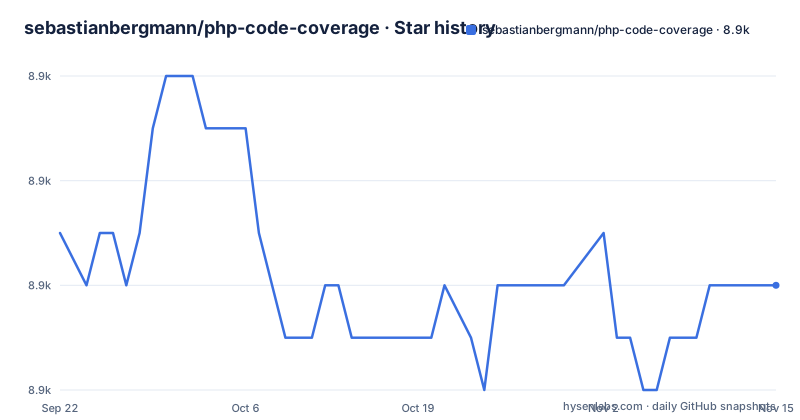
Star history
- sebastianbergmann/php-code-coverage8,924 ★ · -1
| Repository | 2026-09-22 | 2026-11-15 |
|---|---|---|
| sebastianbergmann/php-code-coverage | 8.9k | 8.9k |
-1 Stars in the last 54 days, measured from the daily GitHub snapshot. Compare with other projects
Editorial analysis
Collection, processing and rendering are three separate jobs
The description is short and it is a specification rather than a slogan: the library provides collection, processing, and rendering functionality for PHP code coverage information. Those are three distinct stages, and a package that covers all three is not the same thing as a report generator. Collection is the part that instruments execution and records which lines ran. Processing is turning that raw record into something structured. Rendering is writing it out in a format a tool can consume. The consequence is scope. If you only wanted the last of the three you would take whatever your test runner already emits, so the reason to adopt this is that you want the earlier stages too, or want to control which report format comes out. Worth noting that the Composer package is named phpunit/php-code-coverage while the namespace is SebastianBergmann\CodeCoverage, so nothing in the API ties you to PHPUnit as the caller.
Regular dependency or dev dependency, and the docs pick for you
Installation offers two forms and explains when each applies. You can add the library as a local, per-project dependency using Composer:
composer require phpunit/php-code-coverageIf you only need it during development, the documentation says, for instance to run your project's test suite, then you should add it as a development-time dependency:
composer require --dev phpunit/php-code-coverageAlmost every reader is in the second case, and the example the package gives for its own use is a test suite, which means the first form is the exception. Choosing the second form is the single decision that keeps coverage tooling out of your deployable set, and it costs nothing if you were going to run tests anyway.
The coverage driver is selected, not detected
The collecting example makes its first real decision early. You build a Filter, call includeFiles with an explicit list of paths, and then construct the CodeCoverage object with two arguments: a driver obtained by calling forLineCoverage on a driver Selector, and the same filter instance. The driver is an argument you pass to the CodeCoverage constructor. That is the design decision worth internalising, because it is what allows the same code to run under different coverage backends. The filter is passed to both the driver and the coverage object, which is consistent with the driver needing the same file scope the coverage report will be measured against.
Measurement is bracketed by a named test
Coverage collection in the example is explicitly scoped. You call start with a placeholder name for the test, and later call stop. Between those two calls goes the code under test, marked in the example only by a comment. The consequence is that the unit of measurement is a span you open and close, not a whole process lifetime, and the span carries a name you supply. That matters for two reasons. Data becomes attributable to a specific named test rather than to an undifferentiated run, which is what makes per-test reporting possible at all. And a test runner can interleave the calls across a suite, collecting many separate scopes in one process, instead of needing one execution per measurement. If you are integrating this by hand, the start and stop pair is the contract you have to honour.
Serialized coverage is an input, so rendering can happen elsewhere
The second example is the one that shows how this is meant to fit into a pipeline rather than a single command. It deserializes coverage data from a file path using a Serialization Unserializer, and then renders it:
<?php declare(strict_types=1);
use SebastianBergmann\CodeCoverage\Report\Facade as ReportFacade;
use SebastianBergmann\CodeCoverage\Serialization\Unserializer;

$data = (new Unserializer)->unserialize('/path/to/coverage.php');

ReportFacade::fromSerializedData($data)->renderOpenClover('/tmp/openclover.xml');
Note the shape of that call. The report is produced from serialized data rather than from a live coverage object, which means collection and rendering are genuinely separable in time and place. A test run can collect and write the serialized file on a build machine, and a later job can turn it into XML without re-executing the suite. That is the arrangement most CI setups want, and it also means the serialization format is a compatibility surface you depend on across jobs.
The first example stops before its render call
One practical limitation of the documentation is that the collecting example is cut off mid-statement. It builds the coverage object, starts and stops collection, and then reaches a report facade call whose method name is incomplete, ending partway through. That matters more than it sounds for anyone evaluating the library, because the collecting example is the one you would copy. The only complete render call visible anywhere is the OpenClover one in the serialization example, so if what you need is an HTML report, or a Clover file from a live coverage object rather than from serialized data, you have to go to the API documentation or the interface for the facade. It is a small gap, but it is the gap you hit first.
Two version lines shipped on the same day
The release history shows a package that ships often: the recent releases are 14.5.1 from 2 November 2026, 14.5.0 from 30 October 2026 and 14.4.1 from 3 October 2026. The repository keeps a per-minor changelog file, ChangeLog-14.5.md, at the root rather than one single changelog covering everything.
The build is Ant and a phar tool, not Composer scripts
The root of the repository describes an older and more manual toolchain than the Composer installation suggests. There is a build.xml file, which is an Ant build definition, a .phive directory for managing phar archives, a phpstan.neon for static analysis, a .php-cs-fixer.dist.php for code style, a phpunit.xml describing the library's own tests, and a renovate.json for automated dependency updates. The source, tests, tools and a build output directory sit as separate roots. None of that affects you as a consumer, since you install a tagged release from Packagist, but it does tell you something about the project. The maintainer tooling predates the Composer-native conventions that newer PHP packages adopt.
Editorial conclusion
php-code-coverage suits a PHP project that wants to own its coverage pipeline from collection through to a written report, rather than accept whatever the test runner emits for you. It does not suit you if all you need is the built-in report from a test runner, since that problem is already solved. Before adopting, choose between the regular and the dev Composer requirement, confirm which version line matches your PHPUnit generation, and read the API documentation for the render call, because the first example on the front page stops before its method name.
Frequently asked questions
How do you determine code coverage in PHP?
With this library you collect, process and render in three stages. You build a Filter listing the files in scope, select a driver through a driver Selector's forLineCoverage method, construct CodeCoverage with the driver and the filter, then call start with a test name and stop around the code under test, and finally produce a report.
How can I see the code coverage in Pytest?
Pytest is the Python test runner, and this library is for PHP, installed with Composer. If you are working in PHP, the equivalent steps are the same ones described here: select a coverage driver, bracket the test with start and stop, and render the result, or unserialize previously collected data and render that.
Where can I run a PHP code coverage tool?
Anywhere PHP and Composer are available. The library is a package rather than a standalone binary, so it is installed into your project with composer require, normally as a development-time dependency with the dev flag, and then driven from your test suite through its API.
Official sources
Add this badge to your README
If you maintain this project, the badge below links readers to this analysis and shows its maintenance status from the daily GitHub snapshot. Paste the markdown into your README; add ?metric=license or ?metric=stars to the image URL for a different field.

[](https://hysenlabs.com/projects/sebastianbergmann-php-code-coverage)Star history chart for your README
[](https://hysenlabs.com/projects/sebastianbergmann-php-code-coverage)Was this useful?