sebastian/version puts git describe behind two constructor arguments
Library that helps with managing the version number of Git-hosted PHP projects
At a glance
- What is it?
- One class, one public method, and a release number you type in yourself. The library runs git describe on the path you hand it and, for an X.Y.Z release, returns the output as-is, which keeps the surface tiny and the failure modes narrow.
- Who is it for?
- sebastian/version fits projects whose application code has to print its own version string and whose tags carry a clean series prefix; six lines of PHP cover that and nothing more. Skip it when the version is assembled once during packaging, where calling git describe from a shell script is easier to control, and skip it if your tags are not named after the series you pass in, because the series filter then stops matching and nothing reports it.
- Can I use it commercially?
- Yes. BSD-3-Clause is a permissive licence: you can use, modify and sell software built on it, as long as you keep its copyright and licence notices.
- Is it still maintained?
- Yes. The repository last received commits 3 days ago.
- What is it written in?
- Mainly PHP, according to GitHub's language statistics.
Answers come from the project's GitHub data, last synced on November 14, 2026, and from our analysis. They are not legal advice.
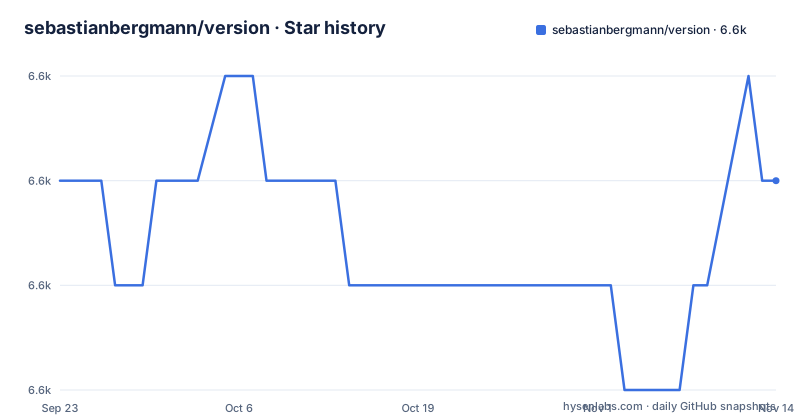
Star history
- sebastianbergmann/version6,569 ★ · +0
| Repository | 2026-09-23 | 2026-11-14 |
|---|---|---|
| sebastianbergmann/version | 6.6k | 6.6k |
0 Stars in the last 52 days, measured from the daily GitHub snapshot. Compare with other projects
Editorial analysis
One class with one method and two constructor arguments
sebastian/version is a PHP library whose entire public API is the class SebastianBergmann\Version. The constructor expects two values. $release is the version number of your latest release in X.Y.Z form, or the name of the release series in X.Y form when that branch has produced nothing yet. $path is the directory where your source code lives, and passing __DIR__ usually suffices. Apart from the constructor the class exposes exactly one public method, asString(). There is nothing to configure, no service to register, no cache to warm. The library does not read composer.json for a number, does not ask a version file for one either, and does not compare tags against branches. It runs git describe and formats what comes back, so everything it does follows from those two arguments. The interesting questions are what asString() does with them, and what it declines to do.
Four branches inside asString(), and the command each one runs
The behaviour is decided by two questions: is $path part of a Git repository, and is $release in X.Y.Z or X.Y form. That gives four cases. With X.Y.Z outside a repository, the release string comes back untouched. With X.Y outside a repository, it comes back with -dev appended. With X.Y.Z inside a repository, the output of the filtered command is returned as-is:
git describe --tags --match 'X.Y.*'If no tag of that series is reachable, the filter is dropped and the output of plain git describe --tags is returned instead. The X.Y case inside a repository produces a string that begins with X.Y and ends with information from git describe --tags. Read the asymmetry carefully: the series filter exists in one branch only, so a tag from an unrelated series can still reach your version string through the fallback.
composer require, then bumping the release string by hand
Add it as a local, per-project dependency of your own package:
composer require sebastian/versionIf it only serves your test suite, the dev form keeps it out of the runtime requirements:
composer require --dev sebastian/versionThe first call is the whole tutorial:
<?php declare(strict_types=1);
use SebastianBergmann\Version;

$version = new Version('1.0.0', __DIR__);

var_dump($version->asString());
The README shows what comes back:
string(18) "1.0.0-17-g00f3408"That string has three parts: the tag you last released, the number of commits since then, and the abbreviated hash of the current commit. What remains is manual work. When you prepare a new release you update the first constructor argument yourself, because nothing in the library compares your tags to your branches or fails when the two disagree.
The fallback tag can sit outside the series you ship
The series filter is what separates a useful version string from a confusing one, and it applies to a single branch. Pass 2.0.0 as the release and the class asks git for tags matching 2.0.*. If your repository holds no reachable 2.0 tag, that call returns nothing and the class retries without the filter, accepting whatever tag git can reach. The commit count and hash in the result then measure distance from an unrelated release, and the returned string carries nothing that tells you which tag was the baseline. For a project with older tags still reachable in the same repository, that is the wrong reference point. If your release process keeps several series alive at once, look at the string once after a fresh tag before you publish it.
Without a Git repository the string carries no commit detail
The two no-repository branches are the quiet failure mode. Distribute a release tarball that your users extract, or run the application from a copy where .git is missing, and $path stops being part of a work tree. The class does not throw. With an X.Y.Z release string you get that string back, so a build that should have reported 1.0.0-412-gc0ffee reports 1.0.0 and the output never hints that the commit count was skipped. With an X.Y series string you get it with -dev appended, which reads like a nightly build whether one happened or not. The README does not document how a missing git executable or a path outside the repository behaves.
The X.Y branch stops at the first two components
The X.Y form exists for a branch that has not shipped a release yet, and that is where the documentation thins out. Outside a repository the rule is exact: return X.Y with -dev appended. Inside a repository the README says only that the result begins with X.Y and ends with information from git describe --tags, without giving a format, a flag, or a test that settles whether the suffix is a commit count, a hash or a tag name. How the two halves are joined is not written down either. If you intend to print the series name together with the distance from the last tag, read the returned value rather than relying on a layout, and pin it with a test in your own suite, since a change in that shape would arrive as a string difference rather than an error.
Calling git describe yourself instead
The library adds no algorithm. The whole of it is one shell command with a series filter, and a release script can call the same command:
git describe --tags --match 'X.Y.*'The difference is where the release number lives. In a shell script you already hold the release value, so you can pass it as an argument, combine it with other git plumbing, or stop the build when git describe exits non-zero. The PHP class takes the release number as a string you type in and never checks it against the tags, so a typo between 2.0.0 and 2.1.0 does not fail loudly: it changes the filter and quietly changes the answer. Take the class when your application code, rather than your build script, has to print the version. Take the command when the string is assembled once at release time.
Two release lines under one package name
The repository is not archived and was pushed to on 2026-11-02. Two patch releases, 7.0.1 and 6.0.1, were published on 2026-10-04, and 7.0.0 arrived on 2026-02-06, so the 6.x line is still taking fixes while 7.x moves on. That is the pattern to expect from a library whose users sit on both sides of a major bump. The tree matches that kind of project: composer.json, phpstan.neon, .php-cs-fixer.dist.php and renovate.json sit beside src/, build.xml, tools/, .phive/, ChangeLog.md and SECURITY.md. Those file names point at static analysis, style checks and dependency updates running in the repository. The licence is BSD-3-Clause, which permits vendoring the code into a closed product as long as the licence text travels with any copy you distribute.
Editorial conclusion
sebastian/version fits projects whose application code has to print its own version string and whose tags carry a clean series prefix; six lines of PHP cover that and nothing more. Skip it when the version is assembled once during packaging, where calling git describe from a shell script is easier to control, and skip it if your tags are not named after the series you pass in, because the series filter then stops matching and nothing reports it. Before adopting it, tag one release in a scratch clone, call asString() with the real path, and confirm the returned string names the tag you expected.
Frequently asked questions
What does sebastian/version return when the path is not part of a Git repository?
With a release in X.Y.Z form the release string is returned unchanged. With a release in X.Y form it is returned with -dev appended. No exception is raised either way.
How many public methods does the sebastian/version class expose?
One: asString(). The constructor takes the release number and the path to your source directory, and everything else the class does happens inside that single method.
What happens in sebastian/version when the release series has no reachable tag?
The call that filters tags by the X.Y series comes back empty, so the class retries with plain git describe --tags and returns that output as-is, without a series filter.
Does sebastian/version keep the release number in sync with my tags?
No. The release number is the first constructor argument and you update it by hand when a new release is prepared. Nothing compares it against the tags that exist.
Can sebastian/version produce a version string in a format other than the git describe output?
No option changes the layout. With an X.Y.Z release inside a repository the output of git describe is returned as-is; with an X.Y release the class appends -dev outside a repository and, inside one, returns a string that begins with X.Y and ends with information from git describe --tags.
Official sources
Add this badge to your README
If you maintain this project, the badge below links readers to this analysis and shows its maintenance status from the daily GitHub snapshot. Paste the markdown into your README; add ?metric=license or ?metric=stars to the image URL for a different field.

[](https://hysenlabs.com/projects/sebastianbergmann-version)Star history chart for your README
[](https://hysenlabs.com/projects/sebastianbergmann-version)Was this useful?