php-timer: one stop() method, four units, and an honest unreliable clock
Utility class for timing
At a glance
- What is it?
- php-timer is a utility class for timing things, factored out of PHPUnit into a stand-alone component. Its whole API is a Timer you start and stop, a Duration you query in four units, and a formatter that reports time and memory together. It also offers a since-start-of-request figure and tells you in its own heading that the clock behind it is unreliable.
- Who is it for?
- php-timer suits a PHP project that wants to measure a block of code without adopting all of PHPUnit, and it is a natural fit for test output and diagnostics. Be careful with the since-start-of-request entry point, because the README labels it unreliable.
- Can I use it commercially?
- Yes. BSD-3-Clause is a permissive licence: you can use, modify and sell software built on it, as long as you keep its copyright and licence notices.
- Is it still maintained?
- Yes. The repository received new commits within the last day.
- What is it written in?
- Mainly PHP, according to GitHub's language statistics.
Answers come from the project's GitHub data, last synced on November 14, 2026, and from our analysis. They are not legal advice.
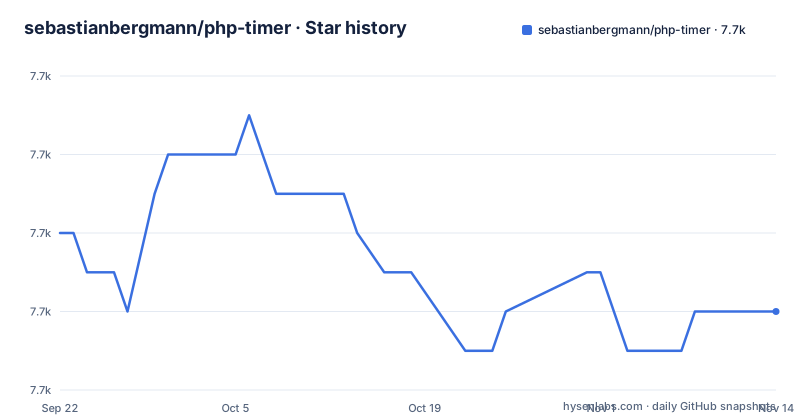
Star history
- sebastianbergmann/php-timer7,734 ★ · -2
| Repository | 2026-09-22 | 2026-11-14 |
|---|---|---|
| sebastianbergmann/php-timer | 7.7k | 7.7k |
-2 Stars in the last 53 days, measured from the daily GitHub snapshot. Compare with other projects
Editorial analysis
Start, stop, and read the duration in four units
The usage example is one loop and one object.
require __DIR__ . '/vendor/autoload.php';

use SebastianBergmann\Timer\Timer;

$timer = new Timer;

$timer->start();

foreach (\range(0, 100000) as $i) {
    // ...
}

$duration = $timer->stop();
`stop()` returns a Duration, and the accessors the README shows on it are: `asString()` for a formatted value, then `asSeconds()`, `asMilliseconds()`, `asMicroseconds()` and `asNanoseconds()` as numbers.
The documented output shows the shape of each. A string of length 9 reading `00:00.002`, a float of 0.002851062 seconds, 2.851062 milliseconds, 2851.062 microseconds, and an integer of 2851062 nanoseconds.
That is worth pausing on, because the same interval is reported as a float, a float, a float and an int. Seconds and milliseconds keep a fractional part; nanoseconds are returned as an integer.
The duration's class name is a string of length 32
The README shows the class of the returned object before any of the values, and it is not decoration.
string(32) "SebastianBergmann\Timer\Duration"The reason to note it is that `Timer` and `Duration` are separate classes, both in the `SebastianBergmann\Timer` namespace. The timer measures; the duration holds. If you are passing a measurement across a boundary, the thing you pass is the Duration, and the Duration is what carries the unit conversions.
That separation is the reason this could be extracted from PHPUnit at all. PHPUnit needs to time a test; your project may need to time a block of code; neither needs the other, so the timing part lives in its own package under a `phpunit/` vendor namespace.
The formatter reports time and memory in one line
The second feature is ResourceUsageFormatter, and it exists because a duration alone rarely answers the question you had.
use SebastianBergmann\Timer\ResourceUsageFormatter;
use SebastianBergmann\Timer\Timer;

$timer = new Timer;
$timer->start();

foreach (\range(0, 100000) as $i) {
    // ...
}

print (new ResourceUsageFormatter)->resourceUsage($timer->stop());
and the output is one line:
Time: 00:00.002, Memory: 6.00 MBSo the formatted duration string from the first example and a memory figure appear together, which is what makes the pair useful for a test failure message. A test that takes two milliseconds and allocates six megabytes is describing a different problem from one that takes two milliseconds and allocates six hundred.
Note the instantiation style, `(new ResourceUsageFormatter)->resourceUsage(...)`, with the parentheses around the object rather than an assignment. The formatter carries no state between calls in this example, so constructing it inline at the point of use is enough.
The second entry point is labelled unreliable in the heading
There is a second way to get the same formatted line, and the README does not pretend otherwise.
The heading is `Duration since PHP Startup (using unreliable $_SERVER['REQUEST_TIME_FLOAT'])`.
That parenthetical is the most useful sentence in the documentation, because it names both the mechanism and its weakness. `$_SERVER['REQUEST_TIME_FLOAT']` is the request start time PHP records for the web request.
The method is `resourceUsageSinceStartOfRequest()`, and the documented output matches the explicit-duration example: `Time: 00:00.002, Memory: 6.00 MB`.
The difference is what you do not need to write. With `resourceUsage()` you wrap the code in a timer. With `resourceUsageSinceStartOfRequest()` you run the code and ask how long it has been since PHP started, which is convenient in a script or a shutdown function and inaccurate wherever the request time is not a reliable reference.
Composer, with a development-time variant for test suites
Installation is Composer, and the README gives two commands for two situations.
composer require phpunit/php-timerto add it as a local per-project dependency, and:
composer require --dev phpunit/php-timerif you only need it during development, for instance to run your project's test suite.
That second case is the common one, and it explains the extraction. The package exists as a stand-alone component because a project should not have to install all of PHPUnit to time something, but the common use is still inside a test run.
The wording is deliberate about locality. You add this library as a local, per-project dependency, which means the version is resolved by your project's composer.lock rather than by a global install, and two projects on the same machine can use different versions.
The autoloader path in every example is `__DIR__ . '/vendor/autoload.php'`, which is the Composer autoloader in the conventional location.
The repository carries three linters and a ChangeLog
The root of the repository is where the tooling tells you what kind of project this is.
There is a `.php-cs-fixer.dist.php` for code style, a `phpstan.neon` for static analysis, and `phpunit.xml` for the tests themselves. A `build.xml` sits alongside them, and `renovate.json` handles dependency updates.
A code-style fixer, a static analyser and a test configuration for a package this small is a signal about the standards its maintainer holds rather than about complexity.
Then there is `ChangeLog.md`, plus `LICENSE` and `SECURITY.md`, with `tools/` and `.phive/` also present, and the source lives under `src/` with tests under `tests/`.
The `.phive/` directory is the interesting one, because Phive is a tool manager for PHP development tools. Its presence suggests development tools are managed through it rather than being whatever happens to be installed on a contributor's machine.
The releases are major-versioned and recent: 9.0.0 on 2026-02-06, 8.0.0 on 2025-02-07 and 7.0.1 on 2024-07-03, with the last push to main on 2026-10-29. That cadence is one major a year.
Editorial conclusion
php-timer suits a PHP project that wants to measure a block of code without adopting all of PHPUnit, and it is a natural fit for test output and diagnostics. Be careful with the since-start-of-request entry point, because the README labels it unreliable. Verify three things before you rely on it: which PHP versions your project runs, since releases are major-versioned and the newest is 9.0.0, whether you need the resource usage formatter as well as the duration, and whether nanosecond resolution on your platform is meaningful, since the API exposes it without stating where the precision comes from.
Frequently asked questions
what is php-timer
A utility class for timing things, factored out of PHPUnit into a stand-alone component. You create a `SebastianBergmann\Timer\Timer`, call `start()`, run your code, call `stop()`, and receive a `SebastianBergmann\Timer\Duration` you can read as a formatted string or as seconds, milliseconds, microseconds or nanoseconds. A `ResourceUsageFormatter` reports time and memory on one line, either for an explicit duration or since the start of the PHP request.
how to install php-timer
With Composer, using `composer require phpunit/php-timer` to add it as a local per-project dependency, or `composer require --dev phpunit/php-timer` if you only need it during development, for instance to run your project's test suite. The examples then load the Composer autoloader with `require __DIR__ . '/vendor/autoload.php'` and import from the `SebastianBergmann\Timer` namespace. The releases are 9.0.0 from 2026-02-06, 8.0.0 from 2025-02-07 and 7.0.1 from 2024-07-03.
how do I measure memory as well as time in php-timer
Use `ResourceUsageFormatter`. After stopping a timer, `print (new ResourceUsageFormatter)->resourceUsage($timer->stop())` returns a line such as `Time: 00:00.002, Memory: 6.00 MB`. There is also `resourceUsageSinceStartOfRequest()`, which needs no timer and reports the same fields, but the README labels it as using the unreliable `$_SERVER['REQUEST_TIME_FLOAT']`.
Official sources
Add this badge to your README
If you maintain this project, the badge below links readers to this analysis and shows its maintenance status from the daily GitHub snapshot. Paste the markdown into your README; add ?metric=license or ?metric=stars to the image URL for a different field.

[](https://hysenlabs.com/projects/sebastianbergmann-php-timer)Star history chart for your README
[](https://hysenlabs.com/projects/sebastianbergmann-php-timer)Was this useful?