PHPBU is a backup tool you drive with a configuration file and a command line
PHP Backup Utility - Creates and encrypts database and file backups, syncs your backups to other servers or cloud services and assists you monitor your backup process
At a glance
- What is it?
- PHPBU is a PHP utility that creates and encrypts backups, syncs them to other servers or cloud services and helps you monitor the backup process, with sources for a dozen databases and file systems, compression, validation, encryption, a dozen sync targets and several reporting back ends. It runs as a PHAR, from PHIVE or from Composer, and it has a simulate mode.
- Who is it for?
- Adopt PHPBU when you want a single tool that dumps several databases, encrypts the result, ships it off site and tells you whether it worked, without writing a script per database. Do not adopt it if your backups already run in a container platform with its own backup tooling, because PHPBU is a script you run on a host with a PHP runtime and the POSIX tools.
- Can I use it commercially?
- Check first. The repository uses a licence we do not classify automatically, so read its LICENSE file before any commercial use.
- Is it still maintained?
- Yes. The repository last received commits 127 days ago.
- What is it written in?
- Mainly PHP, according to GitHub's language statistics.
Answers come from the project's GitHub data, last synced on November 7, 2026, and from our analysis. They are not legal advice.
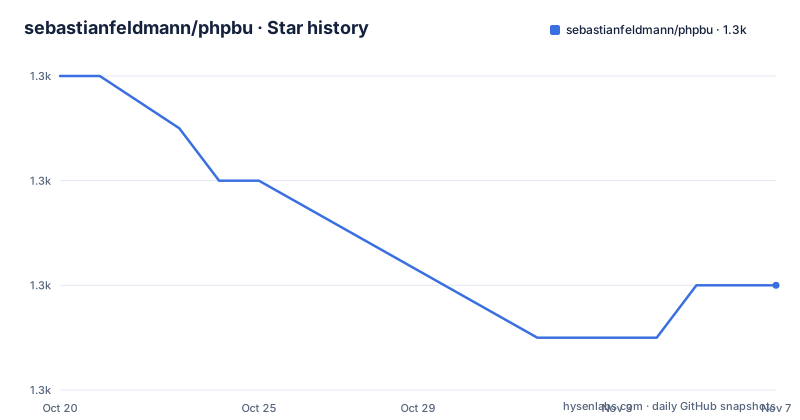
Star history
- sebastianfeldmann/phpbu1,304 ★ · -4
| Repository | 2026-10-20 | 2026-11-07 |
|---|---|---|
| sebastianfeldmann/phpbu | 1.3k | 1.3k |
-4 Stars in the last 18 days, measured from the daily GitHub snapshot. Compare with other projects
Editorial analysis
One tool for the whole backup path
PHPBU is the PHP Backup Utility, a PHP tool that creates and encrypts backups, syncs your backups to other servers or cloud services and assists you in monitoring your backup process.
The scope is the whole path rather than a single step, and that is the design decision. A dump tool gives you a file. What a backup programme needs is a file that is compressed, validated, encrypted, copied somewhere else, cleaned up according to a retention policy, and reported on, and PHPBU is each of those as a stage in one configuration.
The feature list in the readme is organised exactly that way. Creating backups covers ArangoDB, Directories, Elasticsearch, InfluxDB, Ldap, MongoDB, MySQL, Percona XtraBackup, PostgreSQL and Redis. Compressing covers bzip2, gzip, xz and zip. Validating covers a minimum size check and comparing with previous backups. Encrypting covers mcrypt and openssl. Syncing to other locations covers Amazon S3, Azure Blob, Dropbox, FTP, Google Drive, Google Cloud Storage, OpenStack, rsync, SFTP and Softlayer. Cleaning up your local backup covers deleting backups older than x, storing only x MB of backups, keeping only the last x backups, and keeping fewer backups for a more distant past. And writing backup reports covers a text file, a JSON file, mail, Prometheus, Telegram and a webhook.
The implementation language is PHP, the homepage is phpbu.de, and the last push was on 2026-07-03. The recent releases are 6.0.33 and 6.0.32, both from 2026-06-20, and 6.0.31 from 2026-02-04, so the patch line is being maintained actively.
Three ways to install, one of them a single file
The installation section starts with the most convenient option for a utility like this, which is a PHP Archive that bundles everything you need in one file.
wget https://phar.phpbu.de/phpbu.phar
chmod +x phpbu.phar
php phpbu.phar --version
And then the readme suggests moving the PHAR to a directory on your PATH, which turns it into a normal command.
mv phpbu.phar /usr/local/bin/phpbu
phpbu --version
There is also a PHIVE route, which installs the tool using the phar.io tooling, with a single command.
phive install phpbuAnd Composer is supported too.
  "require": {
    "phpbu/phpbu": "^6.0"
  }
The PHAR matters more than it might seem for a backup tool. A backup utility is often the one thing you install on a machine and then forget about for two years, and a single file that runs anywhere with a PHP interpreter is much easier to keep than a Composer project with a vendor directory that will drift out of date.
The requirements are short: PHP 7.2 or newer with the curl, dom, json and spl extensions, and a POSIX shell with tar and either bzip2 or gzip.
The command line, and the simulate mode
The usage output is a single page and it tells you how the tool is meant to be used.
phpbu [option]

  --bootstrap=<file>       A "bootstrap" PHP file that is included before the backup.
  --configuration=<file>   A phpbu xml config file.
  --colors                 Use colors in output.
  --debug                  Display debugging information during backup generation.
  --generate-configuration Create a new configuration skeleton.
  --limit=<subset>         Limit backup execution to a subset.
  --simulate               Perform a trial run with no changes made.
  --restore                Print a restore guide.
  -h, --help               Print this usage information.
  -v, --verbose            Output more verbose information.
  -V, --version            Output version information and exit.
Four of those options are worth reading twice. The --simulate option performs a trial run with no changes made, which is the option that turns a backup tool from a risk into a tool, because you can find out what a configuration would do before it deletes anything or copies a hundred gigabytes.
The --restore option prints a restore guide. That is a small design decision with a large effect on whether people trust a backup, because the question that decides whether a backup is real is not whether it was created but whether anybody can get it back.
The --limit option runs only a subset of the configured backups, so a single database can be dumped while you work on its configuration. The --bootstrap option includes a PHP file before the backup runs, which is the hook for anything the configuration cannot express.
The examples section makes the workflow concrete, starting with a bare phpbu run that requires a valid XML configuration file, phpbu.xml or phpbu.xml.dist, in the current working directory.
XML or JSON, and a schema to validate it against
The configuration can be written in XML or in JSON, and the two forms are equivalent. The XML example is the more interesting one because it is the format the tool defaults to.
  <phpbu xmlns:xsi="http://www.w3.org/2001/XMLSchema-instance"
         xsi:noNamespaceSchemaLocation="https://www.phpbu.de/schema/6.0/phpbu.xsd"
         verbose="true">
    <backups>
      <backup name="myAppDB">
        <source type="mysqldump">
          <option name="databases" value="mydbname"/>
          <option name="user" value="user.name"/>
          <option name="password" value="topsecret"/>
        </source>
        <target dirname="backup/mysql"
                filename="mysqldump-%Y%m%d-%H%i.sql"
                compress="bzip2"/>
      </backup>
    </backups>
  </phpbu>
The structure is a source and a target, and the source type selects the dumper, here mysqldump, with the options as name and value pairs. The target is a directory, a filename with strftime style placeholders, and a compression method. The filename template is what makes the retention rules work, because a backup named for its timestamp can be sorted and aged.
The schema reference in the root element is not decoration. The project ships phpbu.xsd, a JSON schema in phpbu.schema.json, and a sample configuration in phpbu.xml.sample, and the readme points at the --generate-configuration option to create a new configuration skeleton. So the tool can validate the file you wrote, and can start you off with one.
One rule from the usage section is easy to miss. All paths inside the configuration should be absolute or relative to the configuration file itself, which is what makes a configuration portable between hosts.
Old PHP versions have their own pinned releases
Near the top of the readme there is a short list of version mappings, and it is a maintenance policy rather than a footnote.
If you are not using PHP 8.1 or greater already you can still use phpbu version 6.0.30. If you are not using PHP 8.0 or greater you can still use version 6.0.20. If you are not using PHP 7.2 or greater, version 5.2.10. And if you are behind PHP 7.0, version 4.0.10.
So there is a maintained release for every PHP generation in use, and the versions are named. That is a generous thing for a utility to do, and it reflects how backup software is deployed, which is rarely on the platform the team would choose today.
There is a small inconsistency worth noting. The badge advertises a minimum PHP version of 8.0, while the requirements section says PHP 7.2 or newer, and the version list maps 7.2 to release 5.2.10 rather than to a 6.x release. So the 6.0 line, which is the current line, is the one that assumes a modern PHP, and the older PHP generations are served by older branches.
For a tool that runs unattended, the version pinning is the point, and it is worth deciding which release you will run before you configure anything, because the schema URL in the configuration is versioned too, with the example pointing at the 6.0 schema.
Static analysis, a schema and a hook configuration
The top level listing shows a project with the tooling of a serious PHP library, and the files are the interesting part.
There is phpstan.neon, which is the configuration for PHPStan, the static analyser, and phpunit.xml for the test suite. There is captainhook.json, which is the configuration for a commit hook runner, so the checks run at commit time rather than only in CI. There is a .scrutinizer.yml, and the readme carries badges for the Scrutinizer code quality score and the code coverage, alongside a GitHub Actions integration badge and a Packagist badge for the stable version, the minimum PHP version, the downloads and the licence.
The build system is Ant, with build.xml and a build/ directory, alongside a composer.json for the dependencies and a phive.xml for the PHIVE tooling, so the project can be built and released through more than one route. The phpbu/ directory is the application entry point, and there is a phpbu.xml.sample to start from.
The src/ directory holds the code and tests/ the test suite, and doc/ holds the documentation.
One naming detail is worth noting for anyone automating this. The tool is PHPBU and the configuration file is phpbu.xml, while the package name on Packagist is phpbu/phpbu, so a cron entry, a systemd unit and a Composer requirement will all use slightly different spellings of the same thing.
Editorial conclusion
Adopt PHPBU when you want a single tool that dumps several databases, encrypts the result, ships it off site and tells you whether it worked, without writing a script per database. Do not adopt it if your backups already run in a container platform with its own backup tooling, because PHPBU is a script you run on a host with a PHP runtime and the POSIX tools. Verify first that your PHP version is supported, that the extensions you need are present, and that your configuration passes the schema, since the project ships an XSD and a JSON schema that the configuration is validated against.
Frequently asked questions
What does PHPBU do?
It is a PHP tool that creates and encrypts backups, syncs them to other servers or cloud services, and assists with monitoring the backup process. It supports sources for ArangoDB, directories, Elasticsearch, InfluxDB, LDAP, MongoDB, MySQL, Percona XtraBackup, PostgreSQL and Redis.
How do I install PHPBU?
Download the PHAR with wget, make it executable and move it to a directory on your PATH, or install it with phive install phpbu, or require phpbu/phpbu at version ^6.0 in your Composer project.
What can PHPBU sync a backup to?
Amazon S3, Azure Blob, Dropbox, FTP, Google Drive, Google Cloud Storage, OpenStack, rsync, SFTP and Softlayer. It can also compress with bzip2, gzip, xz or zip, and encrypt with mcrypt or openssl.
How do I report a problem with a PHPBU backup?
The reports can be written as a text file or a JSON file, sent by mail, exposed to Prometheus, sent to Telegram, or posted to a webhook. The validation stages can check a minimum size and compare against previous backups.
What does the simulate option do in PHPBU?
The --simulate option performs a trial run with no changes made, which lets you see what a configuration would do before it deletes old backups or copies data. There is also --limit to run only a subset of the configured backups and --restore to print a restore guide.
Which PHP versions does PHPBU support?
The current 6.0 line expects a modern PHP, and the readme maps older interpreters to older releases: version 6.0.30 for PHP 8.1 or older, 6.0.20 for PHP 8.0 or older, 5.2.10 for PHP 7.2 or older and 4.0.10 for anything behind PHP 7.0.
Official sources
Add this badge to your README
If you maintain this project, the badge below links readers to this analysis and shows its maintenance status from the daily GitHub snapshot. Paste the markdown into your README; add ?metric=license or ?metric=stars to the image URL for a different field.

[](https://hysenlabs.com/projects/sebastianfeldmann-phpbu)Star history chart for your README
[](https://hysenlabs.com/projects/sebastianfeldmann-phpbu)Was this useful?