Adminer: database administration as one PHP file you can delete later
Database management in a single PHP file
At a glance
- What is it?
- Adminer is a database management tool that ships as a single PHP file deployable to the target server, plus a companion Editor build for end-user data manipulation. Seven engines are built in and nine more come from plugins, the Git download needs its submodules initialised, and the PHP floor is 5.4 for the compiled file but 7.4 for the source.
- Who is it for?
- Use Adminer when you need database administration on a server you control and would rather drop in one file than stand up a stack, because the single-file model is the reason it exists and also the reason it is trivial to remove. Do not expect the support list to be uniform, since seven engines are built in while nine more depend on plugins, and those plugins cover things that are not relational databases at all.
- Can I use it commercially?
- Check first. The repository uses a licence we do not classify automatically, so read its LICENSE file before any commercial use.
- Is it still maintained?
- Yes. The repository last received commits 2 days ago.
- What is it written in?
- Mainly PHP, according to GitHub's language statistics.
Answers come from the project's GitHub data, last synced on November 14, 2026, and from our analysis. They are not legal advice.
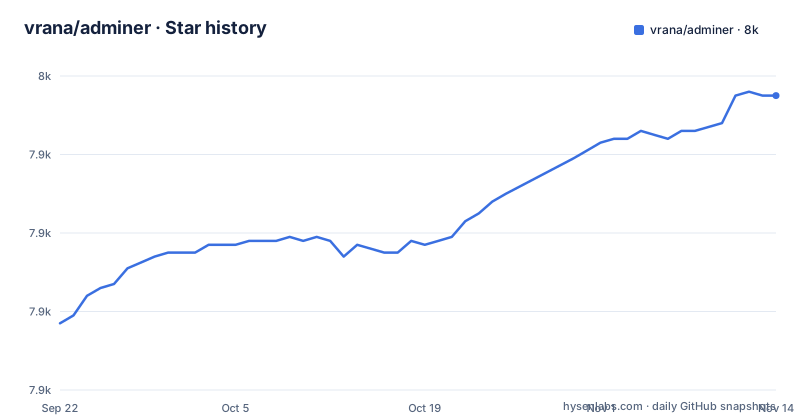
Star history
- vrana/adminer7,955 ★ · +58
| Repository | 2026-09-22 | 2026-11-14 |
|---|---|---|
| vrana/adminer | 7.9k | 8k |
58 Stars in the last 53 days, measured from the daily GitHub snapshot. Compare with other projects
Editorial analysis
Two products, one repository
Adminer is described as a full-featured database management tool written in PHP, consisting of a single file ready to deploy to the target server.
The single file is the design, not a packaging convenience. There is nothing to install on the target beyond dropping a file next to a document root and pointing a browser at it, and nothing to uninstall afterwards beyond deleting the file.
There is a second product in the same repository. Adminer Editor offers data manipulation for end-users, which is a different job from administration: one is for whoever owns the database, the other is for the people who need to correct records without being handed credentials.
The repository layout keeps them as separate directories, `adminer/` and `editor/`, and the Installation section lists them as two separate development entry points rather than one.
The consequence is that they are coupled in a way worth knowing before you install either. The Editor development version needs an `adminer/` directory next to it, so the two are not independent artefacts even though they serve different users.
The single file is compiled from a tree, not authored as one
The artefact everyone deploys is not the source anyone edits, and the repository is explicit about how it is produced.
Among the listed entry points there is `compile.php`, described as creating a single file version, alongside `adminer/index.php` for running the development version of Adminer and `editor/index.php` for the Editor.
So the shipped file is a build output. The working tree contains the application as separate pieces, and one PHP script inlines them into the deployable form.
Two consequences follow. The first is that the Requirements line is about two different things, which is covered separately below. The second is that a fork needs the compile step, not just the source directory, and that step is the only place the deployable format is defined.
The other entry points describe the rest of the maintenance surface. `editor/example.php` is an example customisation, `lang.php` updates translations, and `tests/*.spec.js` holds the end-to-end tests. Those file extensions are the tell: a PHP application whose end-to-end tests are JavaScript files driven by a browser runner.
PHP 5.3 for the compiled file, 7.4 for the source
The Requirements line is short and it is the most consequential line in the README for anyone choosing a runtime.
PHP 5.4 or later for the compiled file, and PHP 7.4 or later for the source codes.
Those are two floors several years apart, applied to two artefacts of the same project. The compiled single file is the portable one, and it stays compatible with old interpreters because that is what lets you drop it onto any server with PHP on it.
The source tree, which uses modern PHP, needs a substantially newer interpreter. So the version you can run depends on which form you have, not on which version of Adminer you have.
The consequence is that the Requirements line is not a statement about the project's minimum PHP. It is two statements, and the one that matters is the one matching your deployment artefact. If you are pinning a base image, a PHP 5.4-capable runtime lets you ship the compiled file while blocking source development, and pinning 7.4 or later lets you build from the tree.
The submodule is not optional in a Git download
The Installation section opens with a conditional that has a consequence worth spelling out.
If downloaded from Git then run: `git submodule update --init` (or `composer install`).
A `.gitmodules` file sits at the repository root, so there is at least one submodule, and both `git submodule update --init` and `composer install` are offered as ways to bring it in.
That means a plain `git clone` produces a tree that looks complete and is not.
There are two mechanisms offered for the same job, which is itself a small friction point: one for people who have submodules enabled and one for people who would rather let Composer resolve it.
The consequence is that if you are scripting a build from source, the submodule initialisation has to be part of the script rather than something a human remembers. The .gitmodules file at the root is the only signal in the layout.
Seven engines built in, nine plugin targets that are not all databases
The feature list splits support into two lines, and the split matters.
Supported directly are MySQL, MariaDB, PostgreSQL, CockroachDB, SQLite, MS SQL and Oracle. Seven relational engines, including one distributed SQL system and one that is a single file.
Plugins are listed separately, for Elasticsearch, OpenSearch, SimpleDB, MongoDB, Redis, Firebird, ClickHouse, IGDB and IMAP. Nine targets.
Read across, the plugin list is broader than the word plugins suggests. Elasticsearch and OpenSearch are search engines, Redis is a key-value store, SimpleDB is an Amazon hosted store, MongoDB is a document database, and IMAP is a mail protocol rather than a datastore anyone administers with SQL. IGDB is a games database.
So the plugin count is not nine more relational databases, and treating the two lists as one would overstate the built-in coverage.
The consequence is that if your data lives in a search engine or a cache, reaching it through Adminer is an extension rather than a capability, and you should check the plugin page rather than assume it is present. The README points at the Adminer Plugins page for the user-contributed list, and there is a plugins directory in the repository for the ones distributed with it.
Playwright drives the end-to-end tests of a PHP application
One entry point in the Installation list is worth reading twice: `tests/*.spec.js`, described as Playwright end-to-end tests.
A browser-driven test suite in a project whose runtime is a single PHP file, with no JavaScript build step and no front-end framework in the requirements. That combination tells you something about how the project is verified.
It means the tests do not exercise the PHP functions directly. They drive a browser, which means they exercise the deployed artefact: the file served over HTTP, the login, the query, the result. That is a harder thing to set up than unit tests and a much better fit for this particular project, because the thing being tested is fundamentally an HTML interface.
It also means a change that breaks the compile step or the single-file packaging shows up as a browser failure rather than as a PHP error.
Alongside the tests there is a `tests/` directory, a `conf/` directory for configuration and a `designs/` directory for presentation assets, which is consistent with a project whose visible surface is largely styling.
The consequence is that a fork has a real integration suite available, but running it means having the browser runner installed and serving the application, which is a heavier loop than a PHP test suite would give you.
Localised, themeable, and built from more than the PHP file
The top level tells you what sits behind the single file, and it is a broader tree than one would expect.
There is `lang.php` for translations and the README lists updating translations as a maintenance task, which means the interface is localised rather than English-only.
There is a `designs/` directory, so the appearance is a separable concern, and a `conf/` directory for configuration alongside it.
There is a `plugins/` directory for the distributed plugins, and a `docs/` directory, a changelog, and a composer manifest sitting next to the submodule route.
There is also a file named `CLAUDE.md` at the top level, which is an instruction file for coding agents working in the repository.
So the deployable artefact is one PHP file, and the work behind it spans translation catalogues, design assets, configuration, plugin code, tests and documentation. That gap is the whole point of the single-file model: the distribution is compressed and the repository is not.
The consequence is that removing Adminer from a server is genuinely a single deletion, while maintaining a fork is not a small job, and the two facts should not be confused when you are deciding how much of it to take on.
What Adminer cannot do, and what it leaves you owning
Five limits, and the first is the one the deployment model creates rather than the feature list.
It cannot protect itself. It is a database client served over HTTP, so whatever authenticates requests in front of it is your responsibility. The README does not describe an authentication layer, and a database client reachable at an unprotected URL is the failure mode everyone deploying this kind of tool should plan around.
It cannot be built from a bare clone. A Git download needs its submodules initialised, which only the .gitmodules file and the README hint at.
It cannot claim one PHP version. The compiled file and the source have floors several years apart, so the answer to what PHP you need depends on which artefact you hold.
It cannot give you the same coverage across engines. Seven databases are supported directly and everything else is a plugin, and the plugin list includes mail and search rather than databases.
And it cannot be verified end to end without leaving PHP. The end-to-end tests are browser-driven JavaScript specs, so anything the project needs to verify end to end is verified through a browser rather than in process.
Editorial conclusion
Use Adminer when you need database administration on a server you control and would rather drop in one file than stand up a stack, because the single-file model is the reason it exists and also the reason it is trivial to remove. Do not expect the support list to be uniform, since seven engines are built in while nine more depend on plugins, and those plugins cover things that are not relational databases at all. Before you deploy it, check three things. It is a database client served over HTTP, so plan what protects it in front. A Git download is incomplete until its submodules are initialised. And the declared PHP floor is 5.4 for the compiled file but 7.4 for the source, so decide which of the two you are shipping before choosing a runtime.
Frequently asked questions
What is Adminer used for?
It is a full-featured database management tool written in PHP, delivered as a single file ready to deploy to the target server. A companion product, Adminer Editor, offers data manipulation for end-users rather than administrators, and its development version needs an adminer directory next to it.
Is Adminer better than phpMyAdmin?
The README does not compare the two. What it states is scope: Adminer supports MySQL, MariaDB, PostgreSQL, CockroachDB, SQLite, MS SQL and Oracle directly, with plugins for nine further targets including Elasticsearch, MongoDB, Redis and ClickHouse.
How do I install Adminer?
If you downloaded it from Git rather than as a release, run git submodule update --init, or composer install. The compiled single file is produced by running compile.php, which is why the requirements differ: PHP 5.4 or later for the compiled file and PHP 7.4 or later for the source codes.
how to access adminer
Deploy the single file to the target server and point a browser at it. In a Git checkout the development version is served through adminer/index.php, and the Editor variant through editor/index.php, which needs an adminer directory alongside it.
how to use adminer plugin
Several plugins ship with Adminer and many user-contributed ones are listed on the Adminer Plugins page. The README names plugin targets for Elasticsearch, OpenSearch, SimpleDB, MongoDB, Redis, Firebird, ClickHouse, IGDB and IMAP, and the repository has a plugins directory for the distributed ones.
Official sources
Add this badge to your README
If you maintain this project, the badge below links readers to this analysis and shows its maintenance status from the daily GitHub snapshot. Paste the markdown into your README; add ?metric=license or ?metric=stars to the image URL for a different field.

[](https://hysenlabs.com/projects/vrana-adminer)Star history chart for your README
[](https://hysenlabs.com/projects/vrana-adminer)Was this useful?