libseccomp: a C interface to the kernel syscall filter
The main libseccomp repository
At a glance
- What is it?
- libseccomp wraps the Linux kernel's BPF based syscall filtering mechanism in a conventional function call API, so applications can restrict what a process may ask the kernel for without writing filters by hand. It supports two dozen architectures and ships with its own test suite, developer tools and a signed release process.
- Who is it for?
- Adopt libseccomp when you are writing a C or C++ service on Linux that needs to limit which syscalls it may issue, since the library handles the BPF filter generation, architecture handling and the kernel interface details for you. Do not reach for it as a sandbox on its own, because seccomp filtering restricts syscalls rather than containing a process, and the library is Linux specific by definition.
- Can I use it commercially?
- Yes, with conditions. LGPL-2.1 is a weak copyleft licence: you can use it inside commercial and closed-source software, but if you distribute changes to its own files, you must publish those changes under the same licence.
- Is it still maintained?
- Yes. The repository last received commits 32 days ago.
- What is it written in?
- Mainly C, according to GitHub's language statistics.
Answers come from the project's GitHub data, last synced on November 7, 2026, and from our analysis. They are not legal advice.
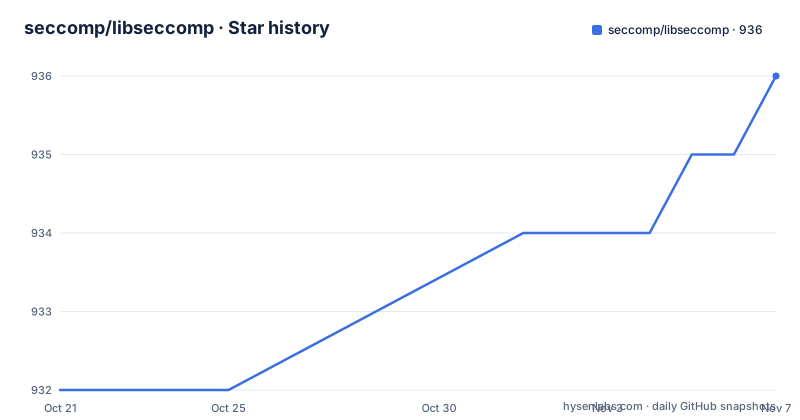
Star history
- seccomp/libseccomp936 ★ · +4
| Repository | 2026-10-21 | 2026-11-07 |
|---|---|---|
| seccomp/libseccomp | 932 | 936 |
4 Stars in the last 17 days, measured from the daily GitHub snapshot. Compare with other projects
Editorial analysis
A function call API over a BPF filter language
The kernel gives you seccomp-bpf, which is a mechanism for filtering the system calls a process is allowed to make, expressed as a Berkeley Packet Filter program. Writing that by hand is unpleasant and error prone, and it is architecture sensitive. libseccomp exists to put a conventional library interface in front of it.
The project states the intent plainly: it provides an easy to use, platform independent interface to the Linux Kernel's syscall filtering mechanism, and the API is designed to abstract away the underlying BPF based syscall filter language and present a more conventional function-call based filtering interface that should be familiar to, and easily adopted by, application developers.
Two properties follow from that design. The abstraction is platform independent at the API level, so application code does not branch on architecture, while the generated filter underneath is inherently per architecture. And the call style is ordinary C, which means the library can be linked into anything without pulling in a runtime.
The library is C, with headers under include/ and the implementation under src/, and it installs a pkg-config file from libseccomp.pc.in so that dependent builds can find it the usual way. The licence field on the repository says LGPL-2.1.
One API covering two dozen CPU architectures
The architecture list is long, and it is the clearest statement of scope in the project. Supported are 32-bit and 64-bit x86, the x86 x32 ABI, 32-bit ARM EABI, 64-bit ARM, 64-bit LoongArch, 32-bit Motorola 68000, 32-bit and 64-bit MIPS in several endian and ABI variants including mips64n32 and mipsel64n32, 32-bit and 64-bit PA-RISC, 32-bit and 64-bit PowerPC including ppc64le, 32-bit and 64-bit s390, 64-bit RISC-V, and 32-bit SuperH in both big endian and native flavours.
That list is a maintenance commitment as much as a feature. Every architecture needs its own syscall tables and its own handling of the calling convention, and the filter that gets generated has to match the ABI in use. A library that only covered x86_64 would be a different project with a much smaller obligation.
Two details worth noting for anyone building a multi-arch binary. The x32 ABI is supported alongside regular x86_64, which matters for distributions that ship a 64-bit kernel with 32-bit userspace calls. And the MIPS family appears four times with different endianness and ABI, which is the sort of coverage that usually comes from distributions needing the library packaged.
Go bindings live in a separate repository, the libseccomp-golang project, rather than in this one. The same split applies to the source repository itself, which is stated to live on GitHub.
Building from a release tarball or from the repository
There are two build paths, and the difference matters if you are reproducing a vendor build.
From an official release tarball, the familiar autotools three step process applies.
# ./configure
# make [V=0|1]
# make install
From sources retrieved from the source repository, you may need to run the autogen.sh script before running configure. The repository contains configure.ac, Makefile.am, m4/ and autogen.sh, which is the standard layout for a project that ships both a generated tarball and a git checkout.
In both cases running ./configure -h displays the list of build-time configuration options.
The top level directory also holds the documentation set, mostly manpages, under doc/, alongside README, LICENSE, CREDITS, CONTRIBUTING and CHANGELOG files. The CHANGELOG at the root is where you look for behaviour changes between versions, since the project publishes releases as tarballs with GitHub releases attached, and the most recent tags are v2.6.1 from 2026-07-01, v2.6.0 from 2025-01-24 and v2.5.6 from 2025-01-24.
The repository is not archived and the last push was on 2026-10-07, so development continues between releases rather than only at them.
Regression tests, live filter tests and the tools directory
The library has a test suite in the tests/ directory with make targets to drive it, and the difference between the two kinds of test is worth understanding before you trust a green run.
The standard regression tests can be run after building the library.
# make checkThese are safe to run on any Linux system, even one whose kernel does not support seccomp-bpf, that is seccomp mode 2. The warning attached to them is about time and noise rather than safety: the run can take a while and produces a lot of output.
The generated filters can then be exercised against a live system with the live tests.
# make check-build
# (cd tests; ./regression -T live)
These will fail if the running kernel does not provide the necessary support, which is exactly why they are separate. A regression run tells you the library builds filters correctly; a live run tells you the kernel accepts and enforces them.
There is also a tools/ directory with programs that may be useful when developing the library or applications that use it, and the project notes that not all of these tools are installed by default. Expect to build them from the tree if you want them.
Verifying release tarballs before you deploy them
For a component that sits between your application and the kernel, verifying the source you build from is not optional, and the project lays out the procedure. Before use you should verify the downloaded release tarballs and checksums using the detached signatures supplied as part of the release, and the detached signature files are the ones ending in .asc.
# gpg --verify file.asc fileThe list of authorised signers is short and explicit. At present only two keys are authorised to sign official libseccomp releases: Paul Moore, [email protected], fingerprint 7100 AADF AE6E 6E94 0D2E 0AD6 55E4 5A5A E8CA 7C8A, and Tom Hromatka, [email protected], fingerprint 47A6 8FCE 37C7 D702 4FD6 5E11 356C E62C 2B52 4099.
Any other signature on a tarball is not an official release, and for a library that ends up in container images and distribution packages, that check belongs in your own release pipeline rather than in a one-off manual step.
Vulnerability reporting has a separate path. Problems can be reported using the GitHub issue tracking system, while those who wish to privately report potential vulnerabilities should follow the directions in SECURITY.md at the repository root.
When the library is the wrong layer for the job
There is a straightforward case where libseccomp is unnecessary. If your process already has a small, fixed syscall policy and you can afford to write the filter yourself, the kernel interface is available directly and the library is overhead. What you give up is portability across the two dozen architectures, because a hand written BPF program has to be right for one calling convention.
The library is also the wrong layer if you are looking for containment rather than restriction. A seccomp filter limits which system calls a process may make. It does not confine memory, it does not separate namespaces, and it does not stop a process from doing damage with the calls it keeps. If the goal is running untrusted code safely, you need an isolation mechanism, and libseccomp belongs inside that arrangement as one layer, not instead of it.
There is a third practical mismatch worth naming. The library is a C library with a C API, so using it from a managed runtime means a cgo binding or a FFI layer rather than a native package. The Go bindings exist for that case, and they live in their own repository rather than in this one, which is the pattern to expect for a project that wants to keep its core free of language specific dependencies. Anything else you reach for, from a language with no maintained binding, turns a small native library into a build and packaging project of its own.
Releases are driven by issue counts, not by a calendar
The release process is unusual enough to call out, because it changes what you should expect between versions. GitHub milestones are used to track development and manage new releases, and the project does not follow a regular, calendar based release schedule. Instead, releases are determined by the number of outstanding issues and pull requests assigned to the related milestone, and a new release is created when all of the outstanding items in that milestone have been closed.
In practice this means release timing depends on how much work has piled up, not on a date. The gaps in the tag history are consistent with that: v2.6.1 was released on 2026-07-01, while both v2.6.0 and v2.5.6 carry dates in January 2025. A security fix that arrives between milestones waits for the milestone to drain, so if you track upstream security fixes rather than release boundaries, you need to watch the issue tracker as well as the tags.
The project also has a stated position on issue etiquette. If you believe a particular issue or pull request should be part of a release milestone, or excluded from one, you are asked to leave a comment on that issue or pull request. Creating new issues solely for the purpose of asking when the next release will happen is discouraged, and such issues are likely to be closed with a reference to that section of the README.
Editorial conclusion
Adopt libseccomp when you are writing a C or C++ service on Linux that needs to limit which syscalls it may issue, since the library handles the BPF filter generation, architecture handling and the kernel interface details for you. Do not reach for it as a sandbox on its own, because seccomp filtering restricts syscalls rather than containing a process, and the library is Linux specific by definition. Verify first that your kernel offers seccomp mode 2 support, that your target architecture is in the supported list, and that you check the detached signature on any release tarball you download, because only the two listed maintainer keys are authorised to sign official releases.
Frequently asked questions
How do I build and install libseccomp from a release tarball?
Follow the standard autotools sequence: run ./configure, then make, then make install. Running ./configure -h lists the build-time configuration options. Building from the source repository instead may require running autogen.sh before configure.
How do I verify a libseccomp release tarball?
Use the detached signature files ending in .asc and run gpg --verify file.asc file. Only two keys are authorised to sign official releases: Paul Moore with fingerprint 7100 AADF AE6E 6E94 0D2E 0AD6 55E4 5A5A E8CA 7C8A, and Tom Hromatka with fingerprint 47A6 8FCE 37C7 D702 4FD6 5E11 356C E62C 2B52 4099.
Which architectures does libseccomp support?
The listed set includes 32-bit and 64-bit x86, the x32 ABI, ARM EABI and aarch64, LoongArch, m68k, several MIPS variants including mips64n32, PA-RISC, PowerPC including ppc64le, s390 and s390x, riscv64, and SuperH in big endian and native builds.
How do I run the libseccomp tests?
After building, run make check for the standard regression tests, which are safe on any Linux system even without seccomp mode 2 support. To exercise the generated filters on a live system, run make check-build and then the live regression from the tests directory, which fails if the running kernel lacks the needed support.
Official sources
Add this badge to your README
If you maintain this project, the badge below links readers to this analysis and shows its maintenance status from the daily GitHub snapshot. Paste the markdown into your README; add ?metric=license or ?metric=stars to the image URL for a different field.

[](https://hysenlabs.com/projects/seccomp-libseccomp)Star history chart for your README
[](https://hysenlabs.com/projects/seccomp-libseccomp)Was this useful?