dircolors-solarized cannot work on macOS, and its 256dark palette is deliberately approximate
This is a repository of themes for GNU ls (configured via GNU dircolors) that support Ethan Schoonover’s Solarized color scheme.
At a glance
- What is it?
- Five dircolors configuration files for GNU ls, where one theme reproduces the Solarized palette exactly at the cost of reconfiguring the terminal and the other approximates it in 256 colours, tested against a tarball of permission edge cases.
- Who is it for?
- Use this repository if you want GNU ls to stop looking like every other ls and you are on Linux or a Unix with GNU coreutils. The decision is which trade you want: 256dark for a terminal that already supports 256 colours and needs no reconfiguration, or ansi-universal for the exact Solarized colours, which requires you to reconfigure the terminal's ANSI settings and caps you at the scheme's sixteen colours.
- Can I use it commercially?
- Yes. MIT is a permissive licence: you can use, modify and sell software built on it, as long as you keep its copyright and licence notices.
- Is it still maintained?
- Activity is slowing. The repository last received commits 6 months ago.
- What is it written in?
- Mainly Makefile, according to GitHub's language statistics.
Answers come from the project's GitHub data, last synced on November 24, 2026, and from our analysis. They are not legal advice.
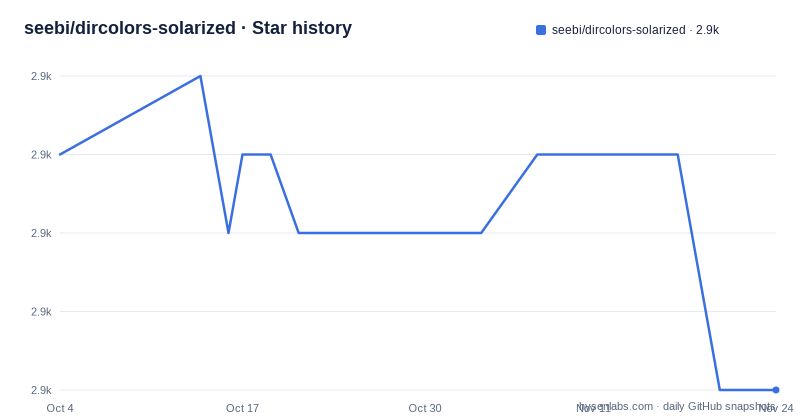
Star history
- seebi/dircolors-solarized2,859 ★ · -3
| Repository | 2026-10-04 | 2026-11-24 |
|---|---|---|
| seebi/dircolors-solarized | 2.9k | 2.9k |
-3 Stars in the last 51 days, measured from the daily GitHub snapshot. Compare with other projects
Editorial analysis
macOS users are told up front it cannot work
The README does not bury the platform limit. A quick note for macOS users says their operating system does not use GNU ls, so they cannot use these themes, and then offers two ways out.
The first is a solution contributed by a commenter in issue 10, linked directly. The second, proposed by another commenter in the same issue, is to install GNU ls from homebrew, from the coreutils formula.
That framing tells you what this repository is. It is a set of configuration files for GNU dircolors, which configures GNU ls, so anything without GNU ls has nothing to configure. The workarounds exist because they supply the missing piece rather than because the themes need special handling.
The same relationship is why the themes live in their own repository: the README points at the main Solarized repository and at this one as the place the ls themes were split out to.
256dark is approximate on purpose, and the fix has not started
The first theme is called 256dark and describes itself as a degraded Solarized Dark theme for terminal emulators and newer dircolors that both support 256 colours. It shows the approximate Solarized palette, and the README says that makes it very easy to set up while allowing many more colours beyond the sixteen in Solarized.
The improvement is documented and unfinished. The note says that in the future it may be possible to change the approximate colours to the exact Solarized palette, at which point the theme would improve automatically, and that work on an appropriate Xresources file has not yet started. It links a 256-colour remapping discussion in the main Solarized repository for the detail.
So the trade is explicit. With 256dark you configure nothing in your terminal and get a close but not exact rendering. With the ansi themes you get the exact sixteen colours and have to reconfigure the terminal to match.
ansi-universal buys exactness with a terminal reconfiguration
The second theme, by a different contributor, is a universal theme for 16-colour or 256-colour terminal emulators and any version of dircolors. It allows the exact Solarized palette to be displayed, and it pays for that in two ways stated in the same sentence: the terminal emulator's ANSI colour settings have to be reconfigured, and you are limited to the sixteen Solarized colours.
What it buys with that is portability. The README describes the theme as designed with a fallback scenario, so that if you are on a terminal where the Solarized palette has not been set up, elements do not become invisible or incredibly hard to read, and the output does not turn a boring gray.
Four situations are designed for: Solarized Dark, Solarized Light, the terminal's default ANSI colours on a dark background, and the same on a light background. Two variants, ansi-dark and ansi-light, are slightly optimised versions of the universal theme for their respective palettes, each sacrificing a little universality, and each described as a slight detriment to the other palette.
Five theme files and four documented themes
The repository root holds five configuration files: dircolors.256dark, dircolors.256dark.no-bold, dircolors.ansi-dark, dircolors.ansi-light and dircolors.ansi-universal.
The README describes four themes by name: 256dark, ansi-universal, and the two variants ansi-dark and ansi-light. The fifth file, the no-bold variant of 256dark, appears in the tree with no section explaining it.
That is a small gap, and the likely answer is obvious from the name, since a bold hierarchy is one of the things the 256dark section describes and a terminal without bold support would need the same palette without it. But nothing in the file says so, so anyone deciding between the two 256dark files has to work it out from the name.
The root also holds the LICENSE file, an img directory of screenshots, and a Makefile whose only target exists to build the test fixture, which is the subject of the next section.
The test fixture is a directory tree of permission cases
The repository ships a bzip2 tarball called test-directory.tar.bz2 and one Makefile target that unpacks it and then sets permissions by hand:
prepare-directory:
	rm -rf test-directory
	tar xvjf test-directory.tar.bz2
	cd test-directory && chmod a+t directory+t directory+t-o+w && chmod 777 directory777 && chmod o+w directory+t-o+w && rm file3.hardlink; ln file3 file3.hardlink && chmod g+s setgid-g+s && chmod u+s setuid-u+s
The fixture is a catalogue of the cases GNU ls renders differently. There is a directory with the sticky bit, one that is world writable, one that is group writable only, one with the setgid bit and one with the setuid bit. A file is deleted and recreated as a hard link, so the listing has a name that shares an inode with another.
That the recipe chmods each case explicitly rather than trusting the archive to carry the modes is the point worth noticing. The screenshots in the README are captured from this fixture, so the permissions on your screen are the ones this Makefile sets.
More colours is not automatically better
The themes section opens with a warning before describing either theme: note that 256 colours does not necessarily mean better than ANSI.
The 256dark theme's design choices are listed and they are about legibility rather than fidelity. Backup, log and cache files get a comment style. Files of special interest such as .tex files, Makefiles and .ini files are highlighted. A bold hierarchy separates file kinds: archives are violet, compressed archives violet plus bold, audio orange, video orange plus bold. Special files, including block devices and pipes, are inverted using the Solarized light palette for the background, and symbolic links are bold so they can be told from directories.
The listed tested use-cases are latex directories and source code directories, which tells you what the author checked rather than what is guaranteed.
The ansi themes use a different rule. Visibility generally follows importance, with an attempt to let unimportant items fade into the background, which the README notes is not always possible when supporting dark and light backgrounds at once. Loud colours are reserved for noteworthy items.
Two repositories, no releases, and a Makefile as the main language
The project is one file of documentation and a handful of configuration files, and its metadata says so. The primary language is recorded as Makefile, the license as MIT with a LICENSE file at the root, and there are no GitHub releases at all.
The last push to master is dated 2026-05-27. There is no tag history to read and no version number, so tracking a change means watching the branch.
The README's own table of contents lists five sections, and the two that come after the theme descriptions are the ones a reader is most likely to need: one on understanding Solarized colours in terminals, and one on an angry flashing tab complete fix. Both of those are troubleshooting topics rather than theme features, which is a fair summary of what this repository is for.
Screenshots are linked from the img directory, captured in iTerm2 with a patched Inconsolata font for the 256dark theme, and in a mix of iTerm2 and PuTTY on Windows for the ansi themes, including default dark and default light palettes.
Editorial conclusion
Use this repository if you want GNU ls to stop looking like every other ls and you are on Linux or a Unix with GNU coreutils. The decision is which trade you want: 256dark for a terminal that already supports 256 colours and needs no reconfiguration, or ansi-universal for the exact Solarized colours, which requires you to reconfigure the terminal's ANSI settings and caps you at the scheme's sixteen colours. Before you commit, check two things. Check that your platform actually ships GNU ls, because the README states plainly that macOS does not and gives two workarounds. And check that you will not be waiting on the exact 256-colour version: the README says the improvement to 256dark depends on Xresources work that has not started, and points at an open discussion for it.
Frequently asked questions
What are Solarized colors?
The README does not define the scheme; it links to the Solarized homepage for details, screenshots and implementations for other applications. What it states about scope is that Solarized has sixteen colors, and that these ls themes either approximate them in a 256-colour terminal or reproduce them exactly by reconfiguring the terminal.
What are the hex codes for the Solarized colors?
This repository does not print any hex codes. It ships five dircolors configuration files and describes the palette in terms of role rather than value, so the codes themselves are on the Solarized homepage the README links to.
Which dircolors-solarized theme should I use?
ansi-universal if you can reconfigure your terminal's ANSI colour settings, since it reproduces the exact sixteen Solarized colours and stays legible on unconfigured terminals. 256dark if you cannot, since it needs only a terminal and a newer dircolors that support 256 colours, at the cost of an approximate palette.
Does dircolors-solarized work on macOS?
Not directly. The README states that macOS does not use GNU ls and that these themes therefore cannot be used there. It offers two workarounds: a solution posted in issue 10, and installing GNU ls through the homebrew coreutils formula.
How can I test the dircolors-solarized themes?
The repository ships test-directory.tar.bz2 and a Makefile target named prepare-directory, which removes any old copy, unpacks the archive and sets the permission cases the themes care about: a sticky directory, a world-writable one, a group-writable one, setgid and setuid directories, and a file recreated as a hard link.
Official sources
Add this badge to your README
If you maintain this project, the badge below links readers to this analysis and shows its maintenance status from the daily GitHub snapshot. Paste the markdown into your README; add ?metric=license or ?metric=stars to the image URL for a different field.

[](https://hysenlabs.com/projects/seebi-dircolors-solarized)Star history chart for your README
[](https://hysenlabs.com/projects/seebi-dircolors-solarized)Was this useful?