Semgrep is semantic grep, and its free edition stops at one function
Lightweight static analysis for many languages. Find bug variants with patterns that look like source code.
At a glance
- What is it?
- Semgrep searches code with patterns written the way you write code, supports more than thirty languages and runs locally without uploading anything. The README is unusually direct about the limit: the Community Edition can only analyse within the boundaries of a single function or file, and the cross-file analysis that fixes that lives in the paid platform.
- Who is it for?
- Semgrep Community Edition fits a team that wants a fast, readable rule for one specific bug pattern and runs it as a pre-commit hook or a pull request check, with no code leaving the build environment. It does not fit a security programme that needs cross-file data-flow reachability, because the README states that limitation and points to the paid platform for it.
- Can I use it commercially?
- Yes, with conditions. LGPL-2.1 is a weak copyleft licence: you can use it inside commercial and closed-source software, but if you distribute changes to its own files, you must publish those changes under the same licence.
- Is it still maintained?
- Yes. The repository last received commits 1 day ago.
- What is it written in?
- Mainly C, according to GitHub's language statistics.
Answers come from the project's GitHub data, last synced on November 14, 2026, and from our analysis. They are not legal advice.
Star history
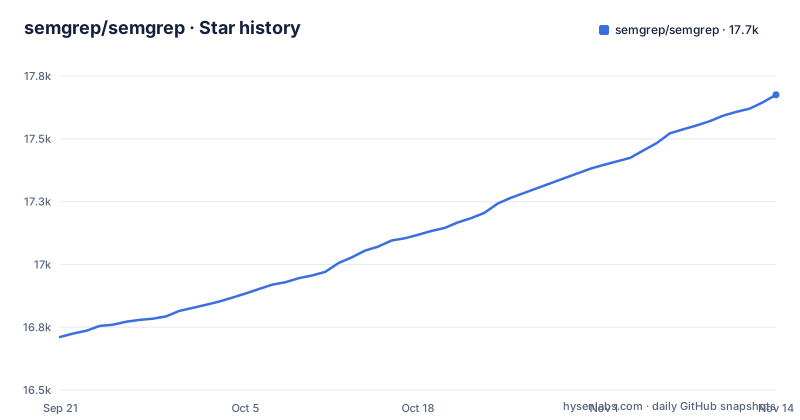
- semgrep/semgrep17,675 ★ · +964
| Repository | 2026-09-21 | 2026-11-14 |
|---|---|---|
| semgrep/semgrep | 16.7k | 17.7k |
964 Stars in the last 54 days, measured from the daily GitHub snapshot. Compare with other projects
Editorial analysis
The free edition analyses one function, and the README says so early
The most important paragraph for an evaluator is the one about security contexts. It states plainly that Semgrep Community Edition will miss many true positives, because it can only analyse code within the boundaries of a single function or file. That single sentence decides which projects the tool suits. If your rule is about the shape of a call, the free engine is the right tool and it is fast. If your rule is about whether a tainted value reaches a sink in another file, the free engine has no way to know, and the features that fix it are listed as paid: cross-file and cross-function data-flow reachability, claimed to cut false positives by a quarter and raise detected true positives by two and a half times, plus contextual post-processing that further reduces noise by around a fifth. The paid path also ships thousands of proprietary rules across SAST, SCA and secrets scanning.
Patterns are written as code, which is the whole difference from grep
The comparison the README draws is with a literal text search. Running grep for the string 2 matches only that string, whereas Semgrep searching for 2 matches the assignment where a variable is set to one and a second variable adds one to it. That is what makes the rules readable: they look like the code you already write. The claim that rules need no abstract syntax trees, no regex and no separate DSL is the pitch. The repository itself complicates that picture slightly, because the matching engine is written in OCaml and configured with tree-sitter, but the interface you write against is still the code-shaped one.
Three install routes, and the login step is what changes your rule set
The CLI section lists several ways in. On macOS the preferred routes are `pipx install semgrep` and `uv tool install semgrep`, while Homebrew is maintained on a best-effort basis and often lags behind the latest release. The other routes, and the platforms the comments name:
# For macOS
$ brew install semgrep

# For Ubuntu/WSL/Linux/macOS
$ python3 -m pip install semgrep

# To try Semgrep without installation run via Docker
$ docker run -it -v "${PWD}:/src" semgrep/semgrep semgrep login
Note the asymmetry: pip is offered for Linux and macOS as well, so a Windows user on WSL is covered, and the container route exists for people who do not want to install anything. Running semgrep login is optional, and this is the sentence that decides your bill. Logging in is what gives access to the dependency scanner, to more than six hundred high confidence pro rules written by the security research team, and to the pro analysis engine. The free tier is the scanner, not the rule library.
An OCaml engine, a Python wrapper and a two-stage Alpine image
The repository is a hybrid and the packaging says so out loud. The core engine is built with dune and opam, with a Makefile whose prelude asks for OCaml 4.14.0 toolchain components, a C toolchain with pkg-config plus PCRE and gmp libraries, and a Python 3 environment with pip and pipenv. The Dockerfile explains the two-stage approach: the core binary is built fully static on Alpine, because Alpine uses Musl and can be statically linked, and then that binary alone is copied into a second Alpine container whose only job is to run the Python wrapper. The stated reason is image size, since building the core needs a large set of tools that are useless at run time. A Windows developer is expected to work under WSL or Cygwin, and there is a dedicated environment file for the latter. Build on your own only if you intend to change the engine.
The root setup.py is a pre-commit shim that pins the CLI to one version
There is a setup.py at the repository root, which is unusual, and the comment above it explains why. It says the file is used for pre-commit because that tool expects a setup.py in the repository root, and that the real one lives at cli/setup.py. What it installs is not a library at all: the distribution is named semgrep_pre_commit_package, the package list is empty, and the only requirement is an exact pin of semgrep to one specific version. In the file as committed that pin is 1.183.0, matching the newest tag, v1.183.0. So the hook installs a wrapper that pulls a fixed CLI, which is a deliberate choice for reproducible hook behaviour and a trap if you read the version in that file as the version of your local install.
Thirty plus languages for code, twelve for supply chain
The two products have different reach and the README lists both. Semgrep Code is stated to support more than thirty languages, and the enumeration runs from Apex, Bash, C, C++, C#, Clojure, Dart, Dockerfile and Elixir through Go, Java, JavaScript, JSX, JSON, Julia, Kotlin, Lisp, Lua, OCaml, PHP, Python, R, Ruby, Rust, Scala, Scheme, Solidity, Swift, Terraform, TypeScript, TSX, YAML and XML, closing with a generic entry covering template languages such as ERB and Jinja. Semgrep Supply Chain is narrower and stated as twelve languages across fifteen package managers, from NuGet and Pub to Go modules, Gradle, Maven, npm with several Yarn generations and pnpm, Composer, pip with pipenv and Poetry, RubyGems, Cargo and SwiftPM. If your dependency manifests are unusual, check that second list rather than assuming the first one covers them.
Local by default, in an IDE, at a commit hook, or on every pull request
The privacy claim is specific: analysis happens on your computer or in your build environment, and by default code is never uploaded. That is what makes a pre-commit hook a reasonable first deployment. The platform route is described as a separate onboarding path where you register, explore demo findings, then add your project through Projects, Scan New Project and Run scan in CI, choosing your version control system, after which Semgrep scans after every pull request. The README also says the platform is the recommended starting point for new users even though the scans stay local. The tool is named as running in three places: an IDE, a pre-commit check, and a CI or CD workflow. For the version you get, the default branch is develop, so a clone lands on development code rather than on the v1.183.0 tag.
Editorial conclusion
Semgrep Community Edition fits a team that wants a fast, readable rule for one specific bug pattern and runs it as a pre-commit hook or a pull request check, with no code leaving the build environment. It does not fit a security programme that needs cross-file data-flow reachability, because the README states that limitation and points to the paid platform for it. Before you commit, decide whether your rules are patterns or proofs: Community Edition can track tainted data within a function, but cross-function and cross-file analysis have different engine requirements. And check which branch you cloned, because the default branch is develop rather than a release branch, while the newest tagged release is v1.183.0 from 2026-10-29.
Frequently asked questions
what is semgrep
It is lightweight static analysis for many languages, described as semantic grep for code, where rules look like the code you already write. It searches code, finds bugs, and enforces secure guardrails and coding standards, and it can run in an IDE, as a pre-commit check, and inside CI or CD workflows.
what is semgrep used for
Finding bug variants with patterns that look like source code, and enforcing coding standards. The README contrasts it with a plain text search: grep for the string 2 matches only that string, while Semgrep can match an assignment where one variable is set to one and another adds one to it.
how to install semgrep
On macOS the README prefers pipx install semgrep or uv tool install semgrep (Homebrew is best-effort and often lags), use python3 -m pip install semgrep on Ubuntu, WSL, Linux or macOS, or run the published container without installing anything. After installing, semgrep login is optional but it is what grants access to the dependency scanner, the pro rules and the pro engine, and running semgrep ci in your app's root directory scans the project.
Can I use Semgrep for free?
The Community Edition is the open-source scanner and it analyses code locally, with no upload by default, but the README states it will miss many true positives in security contexts because it only analyses within one function or file. For SAST, SCA or secrets scanning it recommends the AppSec Platform, which adds cross-file analysis, more than 20000 proprietary rules and post-processing of findings.
Official sources
Add this badge to your README
If you maintain this project, the badge below links readers to this analysis and shows its maintenance status from the daily GitHub snapshot. Paste the markdown into your README; add ?metric=license or ?metric=stars to the image URL for a different field.

[](https://hysenlabs.com/projects/semgrep-semgrep)Star history chart for your README
[](https://hysenlabs.com/projects/semgrep-semgrep)Was this useful?