BrowserGym's AssistantBench snippet imports workarena and the licence badge points at Apache
🌎💪 BrowserGym, a Gym environment for web task automation
At a glance
- What is it?
- A research framework that wraps nine web agent benchmarks in Gymnasium environments. The usage blocks in its own documentation carry copy and paste errors, and the licence badge links to a different licence than the one it names.
- Who is it for?
- Treat BrowserGym as a research dependency, which is exactly what its own warning asks. It is not framed as a consumer product, and the code supports that framing: the root distribution carries no code at all, the version is declared dynamically, and the useful entry point is a single abstract task class to inherit from.
- Can I use it commercially?
- Check first. The repository uses a licence we do not classify automatically, so read its LICENSE file before any commercial use.
- Is it still maintained?
- Yes. The repository last received commits 5 days ago.
- What is it written in?
- Mainly Python, according to GitHub's language statistics.
Answers come from the project's GitHub data, last synced on November 22, 2026, and from our analysis. They are not legal advice.
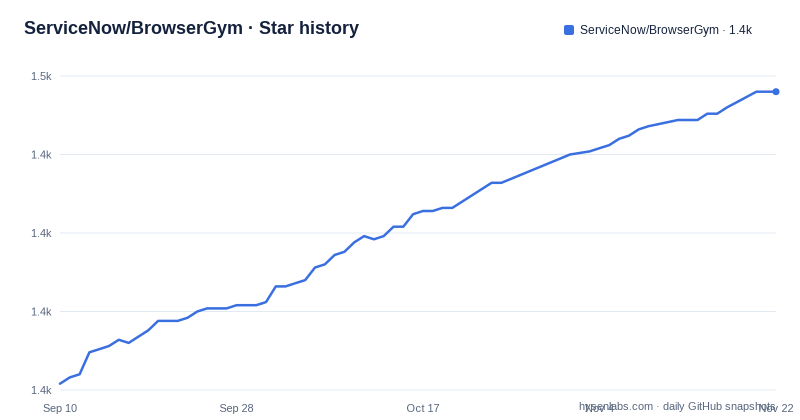
Star history
- ServiceNow/BrowserGym1,445 ★ · +93
| Repository | 2026-09-10 | 2026-11-22 |
|---|---|---|
| ServiceNow/BrowserGym | 1.4k | 1.4k |
93 Stars in the last 73 days, measured from the daily GitHub snapshot. Compare with other projects
Editorial analysis
The licence badge names MIT and links to Apache 2.0
The badge row at the top of the README carries a malformed link whose visible text is the MIT licence address while the target underneath is the Apache 2.0 address, wrapped inside an empty link:
[]([https://opensource.org/licenses/MIT](http://www.apache.org/licenses/LICENSE-2.0))Four sources now disagree. The badge text says MIT, the badge target is the Apache 2.0 page, the platform record for this repository reports NOASSERTION, and a LICENSE file sits at the repository root. This is not a technical problem, but it is the kind that surfaces during a compliance review rather than during an import, and one click on the badge settles it wrongly.
The root distribution is not where the licence question ends anyway. pyproject.toml declares name browsergym-meta with an empty package list and a comment saying the meta distribution exists because the real packages ship as its dependencies.
The AssistantBench example registers workarena
Each benchmark gets its own usage block, and the AssistantBench one has been copied from WorkArena without updating it:
import browsergym.workarena  # register assistantbench tasks as gym environments

# start an assistantbench task
env = gym.make("browsergym/assistantbench.validation.3")
The import brings in workarena, and the comment claims it registers assistantbench tasks. The listing snippet underneath is wrong in the same way: it filters the registry for identifiers starting with `browsergym/workarena`, so it enumerates WorkArena tasks rather than the AssistantBench one just created.
Anyone following this block gets an environment id that the registration may not define, since only workarena was imported, and a task list that has nothing to do with AssistantBench. This is the block most likely to be pasted, because AssistantBench is the least familiar name in the list.
The VisualWebArena example imports the webarena package
The VisualWebArena block repeats the same copy and paste in a different place. Its import line and its comment both refer to WebArena:
import browsergym.webarena  # register webarena tasks as gym environments

# start a visualwebarena task
env = gym.make("browsergym/visualwebarena.721")
Here the tail of the block is correct, since the listing filters on `browsergym/visualwebarena`, so the reader gets a VisualWebArena task id from a list of VisualWebArena ids. But nothing in that block imports the VisualWebArena package, which exists separately as browsergym-visualwebarena in the install ladder.
So two of the seven usage blocks carry an import that does not match their own task id. The MiniWoB, WorkArena, WebArena and TimeWarp blocks name the package they use, which is what makes these two read as oversights rather than a convention.
The openended boilerplate never leaves its own loop
The open-ended task is the entry point everything else builds on, and its boilerplate ends like this:
    obs, reward, terminated, truncated, info = env.step(action)
    if terminated or truncated:
The condition is there and its body is empty, inside a `while True` loop with no other exit. As printed, the loop spins forever after termination. Anyone using this as a starting point has to notice that and add the break themselves.
The rest of the block is careful. The environment is created with `task_kwargs` carrying the starting URL, and `wait_for_user_message=True` is spelled out with a comment explaining that the environment waits for a human between agent messages, which is what makes the interactive example above it work.
make install covers eight paths and skips two benchmarks
Development installs go through the Makefile rather than pip, and the target lists eight editable paths:
uv pip install -e ./browsergym/core -e ./browsergym/miniwob -e ./browsergym/webarena -e ./browsergym/webarenalite -e ./browsergym/visualwebarena/ -e ./browsergym/experiments -e ./browsergym/assistantbench -e ./browsergym/Two gaps sit in that list. TimeWarp has its own package in the published ladder and a usage block in the documentation, but no path here. WebLINX, listed among the included benchmarks and marked as static, appears in neither.
The fourth path also names a directory the install ladder does not publish. The README offers browsergym-webarena-verified, while the Makefile edits ./browsergym/webarenalite. Two names for what looks like one thing, and no line in the file says whether the lite directory is the source of the verified package or an older name for it.
setup-miniwob pins a commit and appends to .env every time
The MiniWoB target is the most careful thing in the Makefile. It clones Farama-Foundation/miniwob-plusplus only when the directory is missing, resets it to a fixed commit hash, and writes a MINIWOB_URL file path into a .env file so the benchmark can be served from disk.
The clone is guarded and the .env write is not. The line is appended with >>, so a second run of the target adds a second identical MINIWOB_URL entry to the same file while the clone step correctly does nothing. Nothing clears the file and nothing de-duplicates it, so a repeated setup leaves duplicate environment definitions that a shell will load in order.
The commit pin is the part worth copying into your own setup. MiniWoB++ is a moving target, and resetting to a named hash is what makes a benchmark result reproducible months later.
Nine benchmarks, and the newest tag is eight months behind the last push
Nine benchmarks are included by default: MiniWoB, WebArena, WebArenaVerified, VisualWebArena, WorkArena, AssistantBench, WebLINX as a static benchmark, OpenApps and TimeWarp. Two details about how they are offered are easy to miss. OpenApps does not use the Gymnasium pattern at all, it builds an OpenAppsLauncher from a config and calls launch on it. WebLINX is marked static, so it is not an interactive environment.
The release history is thinner than that list. The newest tag is v0.14.3 from 2026-01-20, preceded by a dev prerelease on 2026-01-08 and v0.14.2 from 2025-08-05, while the last push to main was on 2026-09-27. The root manifest does not carry a version at all, it declares the version dynamic, so the only way to know which code you have is the installed package metadata.
Editorial conclusion
Treat BrowserGym as a research dependency, which is exactly what its own warning asks. It is not framed as a consumer product, and the code supports that framing: the root distribution carries no code at all, the version is declared dynamically, and the useful entry point is a single abstract task class to inherit from. Before you rely on it, check three things in your own checkout. The per-benchmark usage snippets in the documentation contain at least two wrong imports, so copy from the benchmark's own directory instead. The licence badge names one licence and links to another, and the platform record says nothing, so read the LICENSE file. And the newest tag is v0.14.3 from January 2026 while main has moved since, so decide whether you want the tag or the branch.
Frequently asked questions
What is BrowserGym used for?
It exposes web agent benchmarks as Gymnasium environments so a research agent can be written once and run against MiniWoB, WebArena, WebArenaVerified, VisualWebArena, WorkArena, AssistantBench, WebLINX, OpenApps and TimeWarp. The project describes itself as a framework for web agent research and states it is not meant to be a consumer product.
How do I install BrowserGym?
Pick one of the packages from the ladder, where browsergym pulls in everything and browsergym-core gives only the open-ended task, then run playwright install chromium. Each benchmark needs its own extra setup afterwards, and development installs go through make install instead of pip.
Which pip package installs the TimeWarp benchmark?
The install ladder does not list one. TimeWarp has its own usage block and its own browsergym.timewarp import, and the Makefile install target edits eight paths without including it, so a development checkout does not have TimeWarp available either.
Is BrowserGym licensed under MIT?
The README badge is ambiguous. Its text points at the MIT licence address while the link underneath points at the Apache 2.0 address, the platform record reports NOASSERTION, and a LICENSE file sits at the repository root. Read the file rather than the badge.
Can I add my own web benchmark to BrowserGym?
That is the stated extension point. A new benchmark requires inheriting the AbstractBrowserTask class, and it is described as easy to do. The root distribution carries no code of its own, since its packages ship as dependencies of the meta package.
Official sources
Add this badge to your README
If you maintain this project, the badge below links readers to this analysis and shows its maintenance status from the daily GitHub snapshot. Paste the markdown into your README; add ?metric=license or ?metric=stars to the image URL for a different field.

[](https://hysenlabs.com/projects/servicenow-browsergym)Star history chart for your README
[](https://hysenlabs.com/projects/servicenow-browsergym)Was this useful?