PasteGuard proxies three upstreams, and one of them is a ChatGPT backend
AI gets the context. Not your private data. Local-first privacy proxy for browser chat, AI APIs, and coding agents.
At a glance
- What is it?
- PasteGuard is a local-first privacy proxy that masks personal data and secrets before a request leaves your machine, aimed at teams that cannot send raw client data to a model provider. Its design is sound and small, and the interesting parts are the seams: a Codex route that points at ChatGPT's own backend, a routing decision that is the detection result, and a detector whose only semantic backend is one model.
- Who is it for?
- PasteGuard fits a team that has already decided not to send raw client records to a provider and wants one interception point instead of redaction code in every application. It does not fit as a compliance answer on its own, because the README says so in one sentence, and it does not fit as a guarantee, since names and places ride on a single semantic backend and everything else rides on shape matching.
- Can I use it commercially?
- Yes. Apache-2.0 is a permissive licence: you can use, modify and sell software built on it, as long as you keep its copyright and licence notices.
- Is it still maintained?
- Yes. The repository last received commits 2 days ago.
- What is it written in?
- Mainly TypeScript, according to GitHub's language statistics.
Answers come from the project's GitHub data, last synced on November 25, 2026, and from our analysis. They are not legal advice.
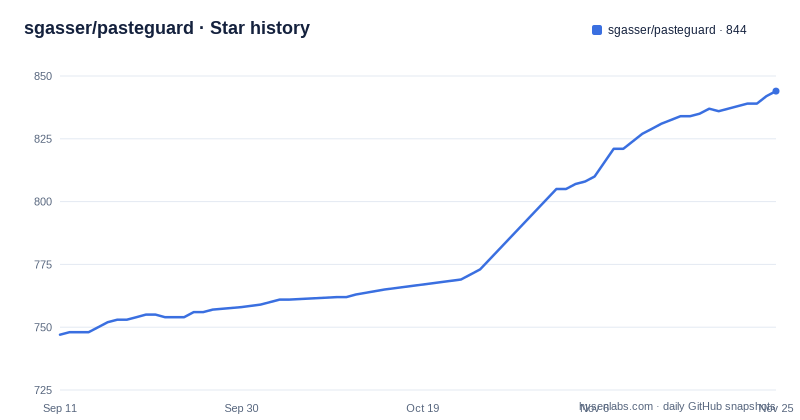
Star history
- sgasser/pasteguard844 ★ · +97
| Repository | 2026-09-11 | 2026-11-25 |
|---|---|---|
| sgasser/pasteguard | 747 | 844 |
97 Stars in the last 75 days, measured from the daily GitHub snapshot. Compare with other projects
Editorial analysis
One base URL, three upstreams, and one of them is not an API host
The integration story is one base URL and a table. For an application, `client.chat.completions.create(...)` and `client.responses.create(...)` both pass through the privacy pipeline:
from openai import OpenAI

client = OpenAI(base_url="http://localhost:3000/openai/v1")
The three routes PasteGuard exposes are worth reading closely, because they are not symmetrical. OpenAI traffic goes to `http://localhost:3000/openai/v1` in place of `https://api.openai.com/v1`, and Anthropic traffic to `http://localhost:3000/anthropic` in place of `https://api.anthropic.com`. The third is `/codex`, standing in for `https://chatgpt.com/backend-api/codex`.
That last replacement is the one to notice. It is a consumer chat backend path, not a documented API host, so the coding agent route depends on an endpoint that exists to serve a signed-in browser session. Everything else in this repository is plumbing you control; that one is a URL someone else can move.
The one-line docker run has no volume and no config file
The quick start is one command and a browser tab:
docker run --rm -p 3000:3000 ghcr.io/sgasser/pasteguard:latestThat is genuinely the fastest way to see it work, and it is also the thinnest possible deployment. There is no volume, so nothing survives the container, and `--rm` means the state goes with it. There is no configuration file either, which is the detail the compose file makes obvious.
The compose path mounts two things: `./config.yaml` into the container read only, and `./data` into `/pasteguard/data` for persistence. The repository ships `config.example.yaml`, not `config.yaml`, so the compose path needs a copy of the example before it will start. Both services also declare a build context against `docker/Dockerfile` even though the proxy service already names a published image, which is how the same file serves `docker compose up -d` for production and `docker compose up detector -d` for development.
So the two install paths cost different things: one container with nothing to keep, or a mounted config and data directory you have to create first.
Mask Mode and Route Mode ask the same detector the same question
There are two privacy modes, and they differ in where the request goes rather than in what is sent. Mask Mode replaces personal data and secrets with placeholders, sends the request upstream, and restores supported placeholders before the response reaches you. Route Mode sends requests containing sensitive data to a local LLM such as Ollama, vLLM or llama.cpp, while requests without sensitive data can still go to the configured cloud provider.
Read together, they share one decision point: did the detector find anything. That is a clean design, and it is also the single point of failure. The same call decides whether a request is masked and where it is routed, so a value the detector misses is not merely unmasked, it is routed to the cloud provider, which is the opposite of what Route Mode was configured for.
The restore side carries its own qualifier. Supported placeholders are restored before the response comes back, and nothing on the page describes what happens to an unsupported one, or whether the unmasked value reaches the caller in clear text. Both modes are worth testing against your own payloads before either goes near production data.
Checksums cover IBANs, and names depend on one model
The detector is two systems, not one. Structured values get checksums and format checks: credit cards, IBANs, and EU VAT numbers are exactly the kind of value that has a check digit, and the stack line credits GLiNER together with python-stdnum in the `detector/` directory, which is the library that knows how to validate those formats.
Names, locations and organisations have no checksum. Those go to a semantic backend, and there is exactly one: GLiNER is currently the only backend, with a separate page for semantic backends and a separate page for custom GLiNER models. Read that as a single dependency in the path of every masked request rather than as a plugin system, because nothing else is wired up yet.
Personal data coverage is enumerated rather than sampled: names, locations, emails, phone numbers, credit cards, IBANs, IP addresses and EU VAT numbers, with detection described as multilingual. Secrets are enumerated the same way: API keys for providers such as OpenAI, Anthropic, Stripe, AWS and GitHub, SSH and PEM private keys, JWT tokens, bearer tokens, passwords and connection strings. Both sets are handled in real time, streaming responses included, which is the part that matters for a chat window that renders tokens as they arrive.
The detector has its own benchmark, its own tsconfig and its own lint scope
Most redaction tools ship a test suite. This one ships an accuracy benchmark with its own TypeScript project. The package scripts include `benchmark:accuracy`, which runs `benchmarks/pii-accuracy/run.ts`, a separate `typecheck:benchmarks` that points at `tsconfig.benchmarks.json`, and lint, format and check commands that all cover `src` together with `benchmarks/pii-accuracy/*.ts` rather than the source alone.
That tells you something about how the project treats detection quality, which is the part of a privacy proxy that actually decides whether it works. What it does not tell you is the number, because no accuracy figure is published on the page and no threshold appears in the scripts.
The rest of the manifest is ordinary and worth a glance. Bun runs it, Hono serves it, `kysely` and `pg` sit behind SQLite or Postgres, `zod` and `@hono/zod-validator` handle request validation, and `tailwindcss` is a runtime dependency. The version in the manifest, 0.9.3, matches the current release tag.
Agent instructions and one pinned dependency override sit in the root
The root of the repository reads like a working project rather than a release. Alongside `src/`, `docs/`, `detector/` and `docker/` there are `AGENTS.md`, `CLAUDE.md` and a `.conductor/` directory, all tracked, plus `biome.json`, `bun.lock`, `config.example.yaml` and a separate `tsconfig.benchmarks.json`. Three agent instruction files in the root is a choice, and for a privacy proxy it is also a small supply chain question worth asking about, since anything an agent reads from the tree can steer what it writes back.
Two manifest details are easy to miss. The build bundles for the Bun target and marks `lightningcss` as external, yet `lightningcss` appears in neither dependencies nor devDependencies, while `tailwindcss` is a runtime dependency, so the built output expects a package that nothing in the manifest declares. And the overrides block pins `postcss` to one exact version, 8.5.18, which is a deliberate way of keeping a transitive dependency still.
Cadence is brisk rather than continuous: v0.9.1 and v0.9.2 landed a day apart at the end of July 2026, v0.9.3 and the last push both fall on 2026-08-25.
The dashboard logs what was detected, what was masked and what left
Every request is logged with its masking detail, and the dashboard shows three things per request: what was detected, what was masked, and what reached the provider. That last column is the one that makes this useful rather than decorative, because it is the only place you can see what your provider actually received.
It is also the thing to think about before turning it on. The same page that proves the redaction worked keeps a record of every prompt that passed through, and PasteGuard is positioned as a control point for teams handling client records, contracts, support tickets and candidate details. A local-first proxy with a query log is still a database of your sensitive data, one that sits between you and the provider instead of at the provider.
The project is explicit about the limit of its own claim, and it is worth quoting rather than paraphrasing: PasteGuard can support regulated workflows, but it does not replace your legal, security or compliance program.
Editorial conclusion
PasteGuard fits a team that has already decided not to send raw client records to a provider and wants one interception point instead of redaction code in every application. It does not fit as a compliance answer on its own, because the README says so in one sentence, and it does not fit as a guarantee, since names and places ride on a single semantic backend and everything else rides on shape matching. Before you route production traffic through it, read the restore path, because only supported placeholders come back and the page does not say what happens to the rest. Check which upstream you point at, since the Codex path is a ChatGPT backend rather than an API host, and remember that every request with masking detail is logged by the dashboard you are about to enable.
Frequently asked questions
What is PasteGuard and what does it do?
A local-first privacy proxy for model providers. It masks personal data and secrets before the request leaves your machine, forwards it to the provider you configured, and restores supported placeholders in the response before it reaches you.
How do I run PasteGuard for the first time?
Run `docker run --rm -p 3000:3000 ghcr.io/sgasser/pasteguard:latest` and open localhost:3000 for the dashboard. Custom config, persistent logs and Docker Compose are separate documented paths, and the compose file mounts a config.yaml that the repository only provides as config.example.yaml.
Which upstream endpoints does PasteGuard stand in for?
OpenAI at `http://localhost:3000/openai/v1` in place of `https://api.openai.com/v1`, Anthropic at `http://localhost:3000/anthropic` in place of `https://api.anthropic.com`, and the Codex CLI at `http://localhost:3000/codex` in place of `https://chatgpt.com/backend-api/codex`.
What does Route Mode do in PasteGuard?
Requests containing sensitive data are sent to a local LLM such as Ollama, vLLM or llama.cpp, while requests without sensitive data can still go to the configured cloud provider. The decision is made by the same detector that Mask Mode uses.
Does PasteGuard detect names as well as secrets?
Yes, but by a different mechanism. Structured values such as credit cards, IBANs and EU VAT numbers get checksums and format checks with python-stdnum, while names and places go through a semantic backend, and GLiNER is currently the only one. Personal data also covers locations, emails, phone numbers and IP addresses, with multilingual detection.
Does PasteGuard replace a compliance programme?
No. The README states that PasteGuard can support regulated workflows but does not replace your legal, security or compliance programme.
Official sources
Add this badge to your README
If you maintain this project, the badge below links readers to this analysis and shows its maintenance status from the daily GitHub snapshot. Paste the markdown into your README; add ?metric=license or ?metric=stars to the image URL for a different field.

[](https://hysenlabs.com/projects/sgasser-pasteguard)Star history chart for your README
[](https://hysenlabs.com/projects/sgasser-pasteguard)Was this useful?