trust_remote_code defaults to true, and package.json still says 2.1.0
Control panel for VLLM, Sglang, llama.cpp, exllamav3
At a glance
- What is it?
- Local Studio is a local-first workstation for self-hosted LLM backends: a Bun controller that owns model lifecycle and an OpenAI-compatible proxy, and a Next.js frontend that can sit on your laptop while the controller runs on a GPU host. The security-relevant defaults are all in one environment template, and two of them are permissive.
- Who is it for?
- Use it if you want one control plane over several local inference backends, and put it on loopback unless you have a reason not to, because the non-loopback path is the one that forces an API key.
- Can I use it commercially?
- Yes. MIT is a permissive licence: you can use, modify and sell software built on it, as long as you keep its copyright and licence notices.
- Is it still maintained?
- Yes. The repository last received commits 20 days ago.
- What is it written in?
- Mainly TypeScript, according to GitHub's language statistics.
Answers come from the project's GitHub data, last synced on November 15, 2026, and from our analysis. They are not legal advice.
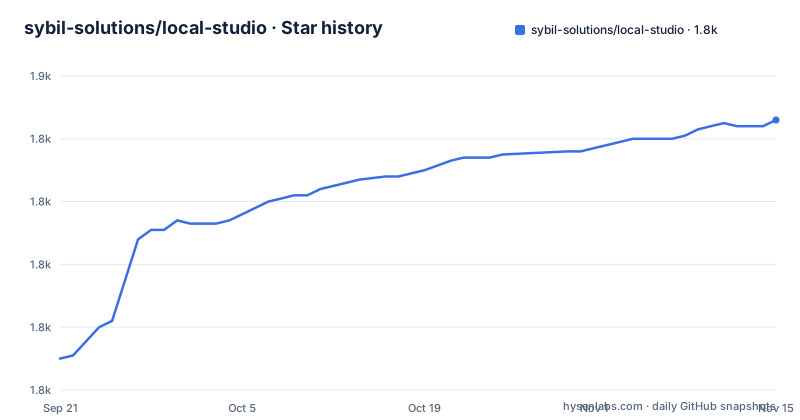
Star history
- sybil-solutions/local-studio1,846 ★ · +76
| Repository | 2026-09-21 | 2026-11-15 |
|---|---|---|
| sybil-solutions/local-studio | 1.8k | 1.8k |
76 Stars in the last 55 days, measured from the daily GitHub snapshot. Compare with other projects
Editorial analysis
The description names exllamav3 and the backend list names MLX
The repository summary describes a control panel for vLLM, Sglang, llama.cpp and exllamav3. The wired backend families in the documentation are a different set of four: vLLM server recipes through configured, discovered, system, Docker or bundled targets; SGLang `launch-server` recipes through configured or discovered Python targets; llama.cpp `llama-server` recipes for GGUF models; and MLX `mlx_lm.server` recipes for Apple Silicon. So exllamav3 appears in the summary and not in the recipe list, while MLX appears in the recipes and not in the summary. The recipes are how a model gets launched, and target discovery for them, along with models, integrations and server controls, is what the Configure surface is for, with selections persisted in the controller data directory. Apple Silicon is served by MLX and everything else by the three server processes, which is also why the packaged download is a single Apple Silicon DMG even though serving vLLM or SGLang needs Linux with an NVIDIA driver and CUDA.
package.json declares 2.1.0 and the newest release is 3.0
Three version numbers sit in three places and they do not agree. The root `package.json` declares version 2.1.0, the newest published release is v3.0.0 titled Local Studio 3.0 on October 3, 2026, and the default branch's most recent commit is dated October 2, 2026. The release titles are inconsistent as well, since v3.0.0 carries a product name while v2.16.0 and v2.15.2 carry their bare version numbers. The narrative in the documentation also stops short of the release it describes. It explains that version 2.0 unified day-to-day operation around Status, Workbench, Configure and Usage in place of separate model, integration and server surfaces, and then describes a 2.x world throughout: a 2.9.0 floor for mobile pairing, engine paths under a data directory, and version 2 surfaces. A reader checking the page against the tag list is looking at documentation for a generation behind the newest release. The root manifest is marked private, so that number is a workspace coordinate rather than a published package version, which makes the mismatch harmless for installs and confusing for anyone writing automation against it.
The frontend can point at a controller on a GPU host
The split that makes the product work is a controller, defined simply as the backend process the user interface talks to, which is the Bun and Hono server in `controller/`. It owns model lifecycle, the OpenAI-compatible proxy for chat, models, tokenization and audio, system state including GPU metrics, logs, usage, settings and SSE, plus controller integrations. The `frontend/` module is Next.js 16 with React 19 and the macOS Electron shell, hosting the Workbench at `/agent`, the consolidated Configure surface, settings, usage, logs and the browser-facing API routes. The consequence is that the controller can run locally or on a remote GPU host while the interface stays wherever you are, which is why a phone companion is possible at all. The architecture diagram draws that path as user to Electron shell or web UI, to the frontend server and its API routes, to the controller API, and from there to the inference runtime process and the backend recipes. The second diagram is less finished: its last line is an arrow, `ProxyRoutes --> H`, pointing at a node named H that is never defined anywhere in it.
The environment template trusts model remote code by default
The privileged switches are grouped in one commented block, and the framing is that safe defaults are off. Two of them are not. `LOCAL_STUDIO_DEFAULT_TRUST_REMOTE_CODE` is documented as defaulting to true so that models needing custom modelling code work out of the box, with the instruction to set it to false to harden the default, noting that recipes can still opt in per recipe. That is the load-bearing one: with it on, downloading a model that ships modelling code means running that code on the host. The other, `LOCAL_STUDIO_ALLOW_CUSTOM_LAUNCH_COMMAND`, is off and gates whether a recipe may specify a raw launch command or custom command, which the comment names as arbitrary binary execution. Two more settings are about who can reach the controller at all. When the host is not loopback the controller refuses to start without `LOCAL_STUDIO_API_KEY` unless `LOCAL_STUDIO_ALLOW_UNAUTHENTICATED` is set, and a keyless wildcard bind also has to enumerate every accepted hostname or address in `LOCAL_STUDIO_ALLOWED_HOSTS`. The inference backend port is a separate 8000.
Read only is an allowlist, and Pi runs as the host user
The agent surface is `/agent`, and it runs `@earendil-works/pi-coding-agent` through the frontend runtime rather than shelling out to a separate agent process for normal turns. Pi stays the source of truth for authentication, settings, resources, tools and native JSONL sessions, and the runtime honours `PI_CODING_AGENT_DIR`, `PI_CODING_AGENT_SESSION_DIR` and Pi's own `sessionDir` setting in the same precedence order as the command line, with existing Local Studio session storage kept as a read-compatible legacy source while new sessions land in Pi's resolved directory. The tool model has three tiers, and the documentation is careful about what they mean. New chats start with Pi's `read`, `grep`, `find` and `ls`. Full access enables every tool registered in that Pi session, including extension tools. Read only is described in the page's own terms as a model-tool allowlist, not an operating-system sandbox, with loaded extensions still free to have their own behaviour, and Pi running with the full permissions of the host user. Tailscale is named as the thing that limits who can reach the dashboard, and the same sentence says it does not sandbox Pi.
Plain next start breaks SSE, and the frontend needs a token
Production runs the same three commands as a build step and two servers:
npm run build
bun --cwd controller run start
npm run start
`npm run start` launches the standalone server through `scripts/project.mjs`, and the page carries one flat prohibition: never use plain `next start`, because it breaks SSE streaming. That single line explains why the standalone wrapper exists, since the status and runtime event streams the interface depends on are server-sent events. The controller does not change shape between environments, running as `bun src/main.ts` in production exactly as in development. The frontend has its own gate: production web startup fails unless `LOCAL_STUDIO_FRONTEND_TOKEN` is set, or the unauthenticated opt-in beside it is. In development there is no such requirement, which is the sort of difference that gets discovered on a deploy. The top level also carries `vercel.json` and `.vercelignore` next to a `services/` directory, so a hosted deployment path is at least scaffolded, though the page says nothing about it.
Setup creates the data directory, the database and the engine venvs
Two commands do the work, and the first is a preflight:
npm run doctor
npm run setup
The prerequisites are Bun 1.3.14 or newer, Node.js 22.19 or newer, npm 10 or newer, Python 3.10 or newer and Git, with `uv` strongly recommended and engine installs falling back to pip. `npm run setup` installs the controller, shared contracts, agent runtime and frontend from their lockfiles, after which the setup wizard walks through choosing a models directory, installing an engine, downloading a model, launching it and benchmarking. Nothing asks you to create anything first. The controller listens on `127.0.0.1:8080`, and its data directory and SQLite database are created automatically, with model weights read from `LOCAL_STUDIO_MODELS_DIR`, defaulting to `/models`. Engine installs land below the data directory at `runtime/venvs/<backend>-latest`, one virtual environment per backend under a name that always ends in the same word, which is where a rolling upgrade has to be reconciled with the old environment still on disk.
Editorial conclusion
Use it if you want one control plane over several local inference backends, and put it on loopback unless you have a reason not to, because the non-loopback path is the one that forces an API key. Three defaults deserve a decision before first run. `LOCAL_STUDIO_DEFAULT_TRUST_REMOTE_CODE` ships true, so a model that ships custom modelling code runs it; set it false and opt in per recipe. `LOCAL_STUDIO_ALLOW_CUSTOM_LAUNCH_COMMAND` is off, which is the guard on arbitrary binary execution, so leave it off unless a recipe genuinely needs it. And the Workbench read-only mode is a tool allowlist, not a sandbox, with Pi running as the host user, so treat Tailscale as reach control rather than containment. The version numbers disagree with each other: `package.json` declares 2.1.0 while v3.0.0 shipped on October 3, 2026.
Frequently asked questions
What is local studio?
It is a local-first workstation for self-hosted LLM backends, built from a Bun and Hono controller in `controller/` that owns model lifecycle and an OpenAI-compatible proxy, and a Next.js 16 and React 19 frontend in `frontend/` that also serves as the macOS Electron shell. The controller can run locally or on a remote GPU host.
Which inference backends does Local Studio support?
Four wired families: vLLM server recipes, SGLang `launch-server` recipes, llama.cpp `llama-server` recipes for GGUF models, and MLX `mlx_lm.server` for Apple Silicon. The repository summary names exllamav3 instead of MLX, and the backend port for vLLM and SGLang is 8000.
Does Local Studio execute code that a downloaded model ships?
It can, by default. `LOCAL_STUDIO_DEFAULT_TRUST_REMOTE_CODE` is documented as defaulting to true so models needing custom modelling code work out of the box, and the environment file tells you to set it to false to harden the default, with recipes able to opt in individually. Separately, `LOCAL_STUDIO_ALLOW_CUSTOM_LAUNCH_COMMAND` is off by default and gates arbitrary binary execution from a recipe.
What does read-only mode in the Local Studio Workbench actually restrict?
It is a model-tool allowlist, not an operating-system sandbox. New chats start with Pi's `read`, `grep`, `find` and `ls`, full access enables every tool registered in the session including extension tools, and loaded extensions may still have their own behaviour while Pi runs with the full permissions of the host user.
Why does Local Studio tell you not to use plain next start?
Because it breaks SSE streaming, which is how status and runtime events reach the interface. `npm run start` launches the standalone server through `scripts/project.mjs` instead, and the controller runs the same way in production as in development with `bun src/main.ts`.
Official sources
Add this badge to your README
If you maintain this project, the badge below links readers to this analysis and shows its maintenance status from the daily GitHub snapshot. Paste the markdown into your README; add ?metric=license or ?metric=stars to the image URL for a different field.

[](https://hysenlabs.com/projects/sybil-solutions-local-studio)Star history chart for your README
[](https://hysenlabs.com/projects/sybil-solutions-local-studio)Was this useful?