The install instruction for @shadcn/lint is a prompt, and its error messages name your own component files
An agent-first linter for Tailwind design systems. Write design system rules that agents can verify.
At a glance
- What is it?
- A linter for Tailwind design systems built for coding agents rather than for people. You declare which utility classes each component may change, and the error tells the agent what to use instead and which file to edit.
- Who is it for?
- Fit this if you own a component library and agents are writing code against it, because the alternative is a type error that says a property is not allowed and leaves the model to guess. The distinction the project draws is the right one: a rule that only reports a violation is a rule an agent can satisfy by deleting something, while a rule that names the available sizes and the file to change is a rule it can satisfy correctly.
- Can I use it commercially?
- Yes. MIT is a permissive licence: you can use, modify and sell software built on it, as long as you keep its copyright and licence notices.
- Is it still maintained?
- Yes. The repository last received commits 11 days ago.
- What is it written in?
- Mainly TypeScript, according to GitHub's language statistics.
Answers come from the project's GitHub data, last synced on November 13, 2026, and from our analysis. They are not legal advice.
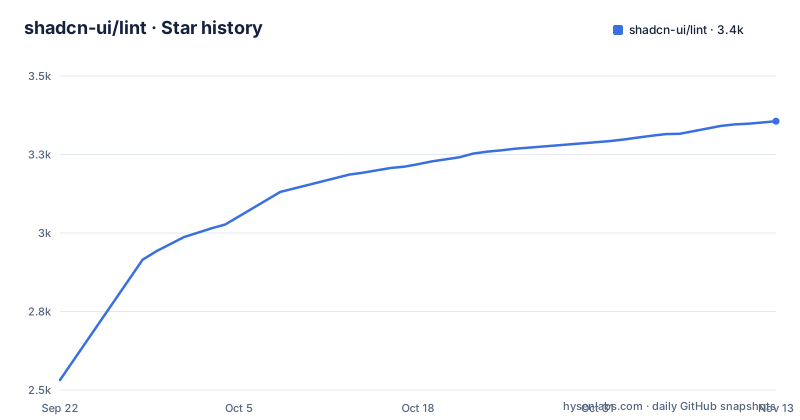
Star history
- shadcn-ui/lint3,356 ★ · +824
| Repository | 2026-09-22 | 2026-11-13 |
|---|---|---|
| shadcn-ui/lint | 2.5k | 3.4k |
824 Stars in the last 52 days, measured from the daily GitHub snapshot. Compare with other projects
Editorial analysis
The quickstart is a prompt, not a command
The installation section does not contain an install command. It contains two lines of text to hand to a coding agent:
Read https://github.com/shadcn-ui/lint/blob/main/SETUP.md
and set up @shadcn/lint in this project.
So the setup path is a document on the network that an agent fetches and follows, and the setup document itself is committed at the root of this repository under that name. A manual route is linked for people who would rather configure it themselves.
This is consistent with the rest of the project. The tool is described as an agent-first linter, its description line asks you to write design system rules that agents can verify, and the section explaining why a linter at all opens by saying a linter is programmable, so you can write rules for your design system without changing your components.
The three stated reasons follow from the same premise. You can ship the same components with different rules, because each project defines its own contracts without touching the component code. You can apply rules to components you do not own, from third-party packages, with no forks and no wrappers. And you can keep one shared configuration for a design system and let each project add to it.
The scope claims are narrow and worth noting: Tailwind v4 projects, the component library itself explicitly not required, two supported linters, and three supported frameworks.
A type error says no and this error says how
The document's central comparison is two error messages about the same mistake, and it is the clearest statement of what the tool is for.
The mistake is a button that accepts margin and width but owns its padding. Enforced with types, by narrowing its style prop to a picked subset of the style properties, the violation produces a compiler message: an object literal may only specify known properties, and padding does not exist in that type.
The document's objection to that is precise. The rule works. But it only tells the agent that padding is not allowed, and it does not tell it how to size the button.
The same rule under this linter produces three lines instead. The first says the class is not allowed on the component and that the component owns its spacing. The second says to use a size, or margin there, or a gap on the parent for space around it. The third says to add a size in a named file under the component directory only if the design explicitly calls for one.
Read those three lines as an interface. The first is the violation. The second is the immediate fix, with two alternatives for space that is not the component's own. The third is the escape hatch, and it is the interesting one, because it names the file an agent should edit if it believes the design requires something new, and it attaches the condition that the design has to actually call for it.
So the error text carries three things a compiler error cannot: what to use, what else would work, and where a change belongs if the change is legitimate.
Contracts are name patterns with their own allow and deny lists
The configuration format is one rule with a list of allowed categories and a list of contracts, and each contract is a regular expression on a component name carrying its own lists.
The first example allows the layout category globally and then narrows a single component:
"shadcn/no-restyle": ["error", {
  allow: ["layout"],
  contracts: [
    { pattern: "^Button$", allow: ["w-full", "mt-*", "mb-*"] },
  ],
}]
The pattern is anchored, so it matches one component exactly, and the allow list holds class patterns including wildcards. In that example a button may take a size, a vertical margin and full width, while padding, shape, a custom height and a fixed width are all reported.
The second example is the interesting one, because it gives two parts of the same component different rules. A card title may change layout and typography but has font classes denied outright. Card content may change layout and spacing. So a title can grow its text size while its content can change padding, and the two are prevented from borrowing each other's properties: font weight on the title is an error, text size on the content is an error.
That is a level of granularity a type signature cannot express without inventing new component props, and the document says as much, noting that expressing the policies in TypeScript can take complex types while these are configured without changing the component API.
A second rule keeps the allowed values on the theme's scale
Opening up a category does not have to mean opening up its values, and the document shows the two rules composing.
The first rule is the contract one, with card content allowed layout and spacing. The second rule is a separate rule name set to error with no options at all, one that flags arbitrary values.
Together they say: you may change this component's padding, but you may only use the spacing scale your theme defines. So a padding drawn from the scale passes at one breakpoint and another, while a padding written as a literal pixel value at a breakpoint is reported.
The division of labour is the point. The first rule answers which properties a component's consumers may touch, per component and per part. The second answers which values those properties may take, globally. Neither alone gives you both halves, and the document presents them as complementary rather than as alternatives.
That composability is also what makes the approach viable for a shared design system. A project can adopt the value rule without writing contracts, or adopt the contract rule and leave values open, and a centrally maintained configuration can supply the categories while each project supplies its own contracts for the components it owns.
Custom messages are keyed by category and filled with your own values
The part that makes this a linter rather than a rule engine is that the error text is configurable and interpolatable.
Messages are a nested object on the same rule, keyed by the category of violation. A single spacing entry gives the text the agent will see, and in the example it is a sentence telling the agent to use the size property instead of padding. An agent that writes a padding utility on a button is shown exactly that sentence and nothing else from the rule.
Placeholders are what make the text specific. The guidance is to use your component's own sizes, variants and file paths in error messages, and for spacing errors one placeholder lists the available sizes. So the same sentence that says use the size prop can be filled with the sizes that particular component actually declares, rather than with a generic instruction to consult documentation.
The example showing this stops partway through a message string, mid placeholder, so the full set of placeholders the tool understands is not visible in this document.
This is the mechanism that produces the three line error in the earlier section. Without placeholders a custom message is a fixed string, and a fixed string is what a type error already is. With them, the message is assembled from your components at lint time, which is why the documentation describes the suggestions as coming from your components, variants and theme rather than from a rule table.
The results table covers forty tasks while the claim is a hundred and fifty
The evidence section makes two claims and shows one table, and the table does not cover what the prose claims.
The first claim is that the rules were exercised with coding agents across more than 150 task runs, and that almost every task reached zero violations in one correction round.
The table has five models, each with a completed task count out of eight. That is forty tasks in total. One model completed six of eight and the other four completed eight of eight. Errors before lint feedback are recorded per model at 69, 66, 42, 117 and 98, and the errors after column is zero in every row.
So the table is forty of the hundred and fifty runs, and the prose summary of that table, that almost every task reached zero violations, is describing a set in which one model in five failed two tasks.
The second claim is a cost comparison, and it is scoped: in the control runs on one model family, fixing violations with lint feedback cost between ten and forty eight percent less than fixing them with rules alone. No baseline is given for the cost of rules alone, and no sample size is attached to the range.
Both claims link onward to an evaluation document in the repository that is said to contain the results and the methodology, so the remainder of the runs are presumably there. Nothing in the file says so.
The release chain runs a corpus check and leaves the evaluations out
The workspace root is where the publishing rules are visible, and the scripts read as a checklist.
Almost every script filters to the single published package and then runs a task in it. The build runs that package's build. The test script builds it and then tests it. Type checking runs the compiler in no-emit mode through the same filter. Formatting is prettier with a cache flag, and linting is the flat-config eslint run over the whole tree.
Three scripts reach a second workspace package instead, and each of them builds the lint package first: a corpus task, a corpus check, and the evaluations.
Then the release script, which is a chain of four steps: type check, then test, then the corpus check, then publish the accumulated changesets. So a corpus check gates a release, and the evaluation suite does not. The suite that produced the numbers in the README is a task you run deliberately; the corpus check is a task that runs on every publish.
Whether that is the right division is a judgement rather than a defect, since a corpus is usually deterministic and cheap while model evaluations are neither. It does mean the claims in the README are not protected by the release pipeline, so nothing fails if the numbers stop matching what the tool does.
Editorial conclusion
Fit this if you own a component library and agents are writing code against it, because the alternative is a type error that says a property is not allowed and leaves the model to guess. The distinction the project draws is the right one: a rule that only reports a violation is a rule an agent can satisfy by deleting something, while a rule that names the available sizes and the file to change is a rule it can satisfy correctly. Three things to check first. Whether the linter you already use can host it, since the project covers two of them and a design system with a third would need a wrapper. Whether your rules are worth writing down, because the mechanism is only as good as the contracts and a wrong contract teaches the wrong thing with great confidence. And what evidence you accept, because the headline numbers cover a fraction of the runs the document claims and the cost figure is scoped to one model family with no baseline given. The rules themselves are ordinary configuration; the unusual part is that the error text is treated as an interface.
Frequently asked questions
What is @shadcn/lint?
An agent-first linter for Tailwind design systems. You declare which utility classes each component may change, and when an agent breaks a rule the error names what broke, what to use instead, and where in your own components to find the alternative.
Do I need shadcn/ui to use @shadcn/lint?
No. It works with Tailwind v4 projects and says explicitly that the component library is not required. It is available for both ESLint and Oxlint, and it supports React, Svelte and Vue.
How do I install @shadcn/lint?
The quickstart tells you to hand your coding agent a two line prompt asking it to read a setup document in the repository and set the tool up in your project. That setup document is committed at the root of the repository, and a manual route is linked for people who prefer to configure it themselves.
How do I let a component change its size but not its padding?
Configure the no-restyle rule with a list of allowed categories and a contract keyed by a regular expression on the component name, giving that contract its own allow list. A pattern anchored on the button's name with its own allowed class list lets a size and vertical margins through while padding and shape are reported, and the error text names the sizes available.
What evidence does @shadcn/lint give that it works with agents?
The document reports the rules being exercised with coding agents across more than 150 task runs, with a table of per-model results recording errors before and after, and says that in its control runs on one model family, fixing violations with lint feedback cost 10 to 48 percent less than with rules alone. A link points to the evaluation write-up and methodology.
Which Tailwind classes can @shadcn/lint restrict?
Rules are expressed as categories such as layout, spacing and typography, plus per-component allow and deny lists of class patterns that can include wildcards. A second rule flags arbitrary values, so a component may be allowed to change padding while staying on the theme's spacing scale.
Official sources
Add this badge to your README
If you maintain this project, the badge below links readers to this analysis and shows its maintenance status from the daily GitHub snapshot. Paste the markdown into your README; add ?metric=license or ?metric=stars to the image URL for a different field.

[](https://hysenlabs.com/projects/shadcn-ui-lint)Star history chart for your README
[](https://hysenlabs.com/projects/shadcn-ui-lint)Was this useful?