The readme opens with a diff block containing a warning, and the three scripts have scopes their names do not suggest
Uninstall Microsoft Edge with a batch script.
At a glance
- What is it?
- Remove-MS-Edge is a batch script that uninstalls a browser people did not choose to install. Its whole design turns on one question, which is whether the thing you are removing is the browser or the embedded web view, and the readme answers that by listing the fifteen programs that need the second one. It also tells you, in a code block marked as a diff, that doing this can break your updates.
- Who is it for?
- Use this if you have decided you want the browser gone and you have read the dependency list, because the three scripts differ in exactly one way that matters: whether the embedded web view goes with it. That decision has a long tail, because fifteen listed programs depend on the web view, including a firewall admin tool, an email client, a game platform and the Xbox app.
- Can I use it commercially?
- Yes. CC0-1.0 is a permissive licence: you can use, modify and sell software built on it, as long as you keep its copyright and licence notices.
- Is it still maintained?
- Yes. The repository last received commits 16 days ago.
- What is it written in?
- Mainly Batchfile, according to GitHub's language statistics.
Answers come from the project's GitHub data, last synced on November 15, 2026, and from our analysis. They are not legal advice.
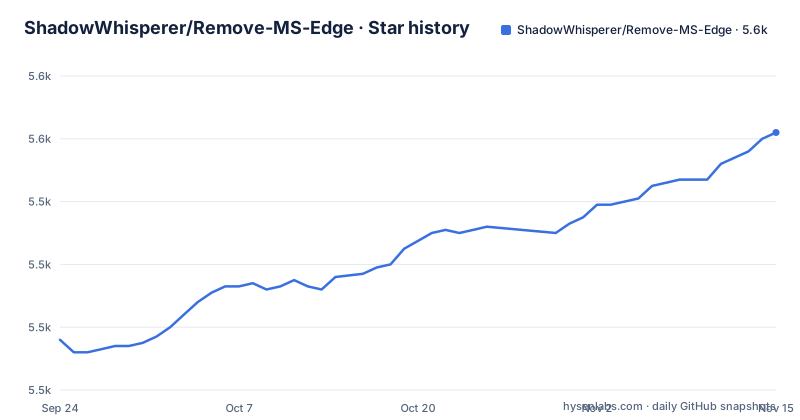
Star history
- ShadowWhisperer/Remove-MS-Edge5,562 ★ · +66
| Repository | 2026-09-24 | 2026-11-15 |
|---|---|---|
| ShadowWhisperer/Remove-MS-Edge | 5.5k | 5.6k |
66 Stars in the last 52 days, measured from the daily GitHub snapshot. Compare with other projects
Editorial analysis
The readme opens with a code block marked as a diff
The first thing on the page is not a title or an installation line. It is a fenced block tagged as a diff, and its first line begins with a minus sign, so it renders as a removed line in a patch. The sentences are a warning: removing the browser may cause an update failure loop, and the remedy is to install the browser, install all the Windows updates, and only then remove it. That is an unusual piece of documentation design, and an effective one, because a reader scanning the page cannot miss a warning formatted as something being deleted. It also sets the tone for everything after it. This is a script that does something the operating system considers protected, and the author's own position is that it should be done in a particular order and only once the machine is otherwise up to date.
Three scripts, and the names describe scopes you would not guess
The batch section offers three files and the distinction between them is one word long. The first removes both the browser and the web view. The second removes the browser and its packaged version only, which is the version installed from the store rather than the one installed by the traditional installer. The third removes the packaged version only and explicitly leaves the web view and the Chrome-based version alone. So the naming is the trap: the file called for Edge removes more than the file with the longer name, which removes less. Anyone reading the file list rather than the descriptions will get this backwards. The section also credits most of the work to another person, which is worth noting in a project whose entire mechanism is three text files, because it tells you where to look if one of them misbehaves on a particular Windows build.
Fifteen programs need the web view, and one is pinned to a version
The dependency list is the real content of the repository, and it is headed by a warning that the web view is required. It runs to fifteen entries: a firewall's administration tool, the Eclipse development environment, the publishing tool for one game engine, an image viewer, a laptop recovery tool, a system photos application, an add-ons utility for a Windows shell extension, a personal finance package, a flight simulator add-on, a game platform, a network firewall tool, ShowMyPC, the system mail client, the console gaming app, and any application built on a particular desktop framework. Two entries carry extra information. The image viewer is listed with a specific major version and a note that earlier and later versions do not need it, which is the kind of precision that suggests the list was checked rather than copied. The shell extension utility lists an alternative implementation that can be used instead, so the list offers a way out as well as a warning.
The compiled executable is marked as no longer recommended
The page still documents how to build a single-file executable from the source, and marks it as depreciated, which is a misspelling of the word it means and is the only editorial slip visible on the page. The build line is a single long command from a Python packer:
```pyinstaller --onefile --noconsole -i icon.ico -n Remove-Edge.exe edge.py --add-data "setup.x64.exe;." --add-data "setup.x86.exe;." ```
The icon and the output name are given, and two helper executables are bundled in as data files, one for 64-bit and one for 32-bit. The repository has an underscore-prefixed _Source/ directory, and the repository's recorded primary language is a batch file, which is consistent: the batch scripts are the product and the Python was a convenience path.
The repair for the update loop lives in another repository
The warning at the top of the page and the fix for it are in different places, which is the only real gap in the documentation. Under a heading for additional files, the page offers two installation links for the things you might have just removed: the browser from the vendor's business download page, and the web view from the developer page. Then it offers a batch script for fixing update problems, and that script is not in this repository. It is a raw file fetched from a separate project by the same author, on a branch, with the filename encoded in the link. So the failure mode described at the very top of the page is fixed by something you have to go and find, and the link is a raw fetch rather than a release, which means it can change under you without a version number.
A registry command goes in the opposite direction, restoring a compatibility setting
The last item on the page is the only one that adds something back. It is a single registry command that sets a numeric value under the Internet Explorer integration key inside the software branch, naming the supported flag and writing it with a force flag so it applies without prompting. Its stated purpose is to restore the compatibility feature inside the browser's own settings. That is the opposite of everything else on the page, and it suggests the repository has accumulated the small fixes people asked for rather than a coherent position on what a Windows machine should look like. It is also the one item that touches the registry under the machine-wide key, which means it needs administrative rights and, unlike the batch scripts, leaves a persistent setting rather than removing a package.
Four top-level entries, a public-domain licence, and version tags without a prefix
The repository is small in a way that is worth stating plainly. Four entries sit at the top: the readme, a licence, a directory holding the batch scripts, and the underscore-prefixed source directory, alongside the configuration directory for the hosting platform. The licence is a public-domain dedication. The releases are numbered plainly, with tags reading 2.1, 2.2 and 2.3, no prefix and no patch component, published across the second half of 2025, while the last commit to the default branch is dated 2026-10-30. So the release line is quiet relative to the commits, and a script you pin by tag is pinning one of three points across a year.
Editorial conclusion
Use this if you have decided you want the browser gone and you have read the dependency list, because the three scripts differ in exactly one way that matters: whether the embedded web view goes with it. That decision has a long tail, because fifteen listed programs depend on the web view, including a firewall admin tool, an email client, a game platform and the Xbox app. Two further cautions come from the page itself. It says up front that removing the browser can put the machine into an update failure loop, and the repair script for that lives in a separate repository, so read the warning before you run anything. And the compiled executable build is marked as no longer recommended, with the heading misspelled, so use the batch scripts rather than hunting for a binary.
Frequently asked questions
Can you actually remove Microsoft Edge?
The repository ships batch scripts for it in three scopes: one that removes the browser and the embedded web view, one that removes the browser and its store version, and one that removes only the store version. The page also warns at the top that removing the browser may cause a Windows update failure loop, and points at a repair script hosted in a separate repository.
how to remove ms edge from windows 11
Among its three batch files, the page offers one that removes the browser and its packaged version, and one that removes only the packaged version while leaving the web view and the Chrome-based install alone. It also lists fifteen programs that require the web view, so the choice between the two files is a decision about what else on the machine you still need.
What breaks if I remove the Edge web view as well?
The page lists what it calls required: a firewall administration tool, the Eclipse IDE, the publishing tool for one game engine, an image viewer at one major version, a laptop recovery tool, the system photos app, a shell add-ons utility, a finance package, a flight simulator add-on, a game platform, a network firewall tool, ShowMyPC, the system mail client, the console gaming app, and applications built on a particular desktop framework.
Does the repository help stop Edge taking over as my default browser?
Not directly. The page does not cover default browser settings. What it does include is a registry command that restores a legacy compatibility feature inside the browser's own settings, which is a different change and runs in the opposite direction from the removals the rest of the page describes.
Is there an .exe version of Remove-MS-Edge?
The page documents how to build one with a Python packer and marks that route as depreciated, misspelled on the page. The repository's own primary language is a batch file, and the scripts themselves are plain text files, so the batch versions are the ones to use.
Official sources
Add this badge to your README
If you maintain this project, the badge below links readers to this analysis and shows its maintenance status from the daily GitHub snapshot. Paste the markdown into your README; add ?metric=license or ?metric=stars to the image URL for a different field.

[](https://hysenlabs.com/projects/shadowwhisperer-remove-ms-edge)Star history chart for your README
[](https://hysenlabs.com/projects/shadowwhisperer-remove-ms-edge)Was this useful?