vscode-background: painting the editor without leaving it
Bring background images to your vscode. vscode background 背景扩展插件。
At a glance
- What is it?
- vscode-background is a small Visual Studio Code extension that puts background images behind the editor, the sidebar, the panel, the auxiliary bar or the whole window, with a carousel, per-image styles and local or remote sources. It does it by editing the editor's own HTML file, which is the reason it works and the reason it can break.
- Who is it for?
- Adopt vscode-background if you want a wallpaper inside VS Code and you are willing to let an extension modify the editor's own HTML, and if your installation is one you can restore when an update overwrites it. Do not adopt it on a managed or shared workstation where the install directory is not yours to change, and do not expect it to survive a VS Code update without reinstalling.
- Can I use it commercially?
- Yes. MIT is a permissive licence: you can use, modify and sell software built on it, as long as you keep its copyright and licence notices.
- Is it still maintained?
- Yes. The repository last received commits 58 days ago.
- What is it written in?
- Mainly TypeScript, according to GitHub's language statistics.
Answers come from the project's GitHub data, last synced on November 7, 2026, and from our analysis. They are not legal advice.
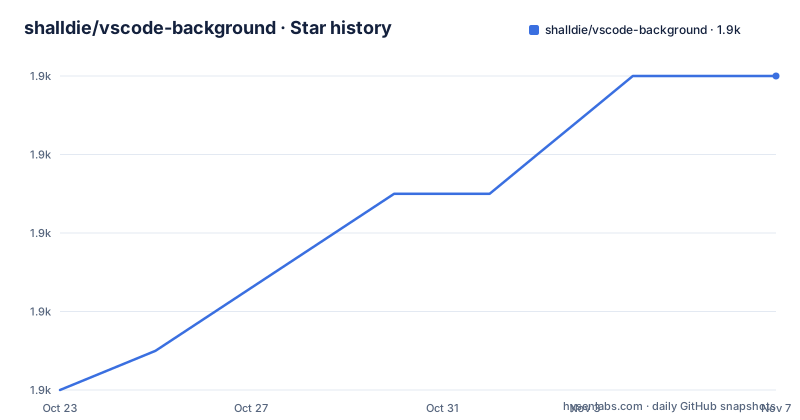
Star history
- shalldie/vscode-background1,918 ★ · +8
| Repository | 2026-10-23 | 2026-11-07 |
|---|---|---|
| shalldie/vscode-background | 1.9k | 1.9k |
8 Stars in the last 15 days, measured from the daily GitHub snapshot. Compare with other projects
Editorial analysis
Six surfaces, one extension
The extension does one small thing and does it in several places. Its stated job is to bring background images to Visual Studio Code, and the list of supported targets is fullscreen, editor, sidebar, auxiliarybar, panel, carousel, and custom images and styles. In practice that means you can put a picture behind the code area, behind the file tree, behind the panel, behind the secondary side bar, or behind the entire window, and the pictures can rotate. The images can also be your own, with the config accepting local files, folders, remote https URLs and data URLs. It is published on the Visual Studio Marketplace as shalldie.background, with the repository under shalldie/vscode-background, MIT licensed, and the README is available in English, in Chinese as README.zh-CN.md and in Japanese as README.ja-JP.md, which tells you the extension has a user base that is not only English speaking. The interface is minimal by design: a single Background button in the bottom right of the status bar opens all the commands of the extension.
Installing takes two clicks, and then it edits your editor
There are two ways to install the extension, and both are ordinary VS Code mechanics. You install it from the Visual Studio Marketplace, or you search for shalldie.background from inside VS Code. The second route matters for corporate environments where the marketplace is proxied or blocked, since the extension identifier is what you search for. What happens after installation is the part worth reading. The common issues section states plainly that this extension works by editing the vscode's html file, and the documentation points to docs/common-issues.md for what to do when something goes wrong. The manifest backs that up. The dependency list includes @vscode/sudo-prompt, which is how an extension asks for administrator rights on Windows, and the scripts include a vscode:uninstall entry that runs node ./dist/uninstall, which is a restore path for the file the extension changed. So the mechanism is a modification of the installed application, with elevation on some systems and a cleanup command for the reverse operation. That is also the honest answer to the question of when this extension is the wrong tool.
The editor section and what useFront means
Configuration happens in your settings.json, and the settings are grouped by the section they affect. There is a single global switch, background.enabled, a boolean defaulting to true that decides whether the extension does anything at all. The editor section, background.editor, carries the settings specific to the code area. useFront is a boolean defaulting to true and it decides whether the image is placed above or below the code, which is the one setting in the group that changes legibility rather than appearance. style is an object, empty by default, holding custom CSS for the image. styles is an array of objects for styling each image individually, which is what makes a carousel with different treatments per picture possible. images is the list of sources, and interval is a number in seconds for the carousel, where 0 disables it. random is a boolean defaulting to false that picks a picture at random instead of cycling in order. The documented example puts those keys together:
{
  "background.editor": {
    "useFront": true,
    "style": {
      "background-position": "100% 100%",
      "background-size": "auto",
      "opacity": 0.6
    },
    "styles": [],
    "images": [
      "https://hostname/online.jpg",
      "file:///local/path/img.jpeg",
      "/home/xie/downloads/img.gif",
      "~/Pictures/img.png",
      "${HOME}/Pictures/img.png",
      "/home/xie/images",
      "data:image/*;base64,<base64-data>"
    ],
    "interval": 0,
    "random": false
  }
}
The style object is plain CSS passed through to the image, with the MDN reference linked for the properties, so anything the browser understands works here too.
Where images come from, and what the paths allow
The images setting is more capable than it first looks, and the source list in the documentation is worth reading in full. Remote images are restricted to https, which is a sensible constraint for a setting that fetches from the network in a code editor. Local images can be written as file URLs with the file:/// scheme, as plain absolute paths in the platform's own form, with Windows drive letters and backslashes as in the example, and with the tilde for a home directory. Environment variables are supported in local paths, with the example using ${HOME}. A local folder can be given instead of a file, which is the simplest way to point at a directory of wallpapers, and a data URL is accepted for an image you want to inline rather than load from disk. Because a folder is a valid entry, the extension does the scanning, and because the paths are resolved by the extension rather than by the browser, a path that is valid on your machine may be meaningless on another. The fullscreen, sidebar, auxiliarybar and panel sections accept the same images list with the same rules, so the only differences are the styling keys.
The other four sections differ in three keys
The fullscreen, sidebar, auxiliarybar and panel sections are configured through background.fullscreen, background.sidebar, background.auxiliarybar and background.panel, and the documentation says the sidebar and panel have the same config as fullscreen. The keys they add are opacity, size and position. Opacity is a number defaulting to 0.1, with a recommended range of 0.1 to 0.3, which is the setting that matters most in practice, because a picture behind code at full strength makes text unreadable. Size is an alias for the CSS background-size property, defaulting to cover, which is described as self-adaptation and recommended. Position is an alias for background-position, defaulting to center. On top of those come the same styles, images, interval and random keys as the editor section, so the carousel and the per-image styling work identically wherever you place a picture. The example for the fullscreen section is the same shape with the values spelled out, and the other two sections are left as empty objects to inherit the defaults.
Editing the editor's HTML is a feature and a liability
The mechanism is the thing to evaluate, because it decides both the user experience and the failure modes. The extension works by editing the vscode's html file, which is the workbench document the editor loads its interface from. That buys something no CSS-level extension can: the background sits behind the editor's own chrome, behind the tree, behind the panel, at the level of the shell rather than inside a webview. It also means the extension is writing into the installation directory of the editor, which is why the manifest carries an elevation prompt and an uninstall script, and why a docs/common-issues.md exists at all. The predictable consequence is that an update to VS Code replaces the modified file and the backgrounds disappear, and the predictable second consequence is that on a managed or shared workstation, or anywhere the install directory is not writable, the extension either asks for rights it should not have or does nothing. A user with a corporate image and a strict extension allowlist will hit that wall before any configuration problem.
How the project is built and released
The build is a small TypeScript project with modern tooling. The build script runs the linter, then a type check with tsc --noEmit, then esbuild through a local esbuild.mjs, which is the bundling step. The lint step is oxlint over src, with a separate oxfmt for formatting, and the watch mode runs the esbuild and tsc watchers in parallel through npm-run-all. Packaging uses vsce package with a vscode:prepublish hook that runs the build first. The manifest also carries the extension's contribution points, including commands such as extension.background.info and extension.background.install grouped under the Background category. Localisation is set up through the l10n directory, with package.nls.json alongside Japanese and Chinese variants, matching the three README languages. The releases have been frequent this year, with v3.0.0 on 2026-07-31, v3.0.1 on 2026-08-05 and v3.1.0 on 2026-09-11, and the last push to the repository was on the day of that last release.
Editorial conclusion
Adopt vscode-background if you want a wallpaper inside VS Code and you are willing to let an extension modify the editor's own HTML, and if your installation is one you can restore when an update overwrites it. Do not adopt it on a managed or shared workstation where the install directory is not yours to change, and do not expect it to survive a VS Code update without reinstalling. Before you install, read docs/common-issues.md, check whether the extension prompts for elevated rights on your setup, and keep the version in mind, with the current release at v3.1.0 from 2026-09-11.
Frequently asked questions
What does vscode-background do?
It is a Visual Studio Code extension that brings background images to the editor, supporting the fullscreen, editor, sidebar, auxiliarybar and panel sections, plus a carousel mode and custom images and styles. It works by editing VS Code's own html file.
How do I install the extension?
Either install it from the Visual Studio Marketplace, or search for shalldie.background from inside VS Code. The extension identifier is the same in both routes, which is what you need for a proxied or restricted marketplace.
What image sources does the configuration accept?
Remote images over https only, local files as file URLs or absolute paths, paths using a tilde for the home directory, paths containing environment variables such as ${HOME}, local folders, and data URLs. The same images list is used for the editor, fullscreen, sidebar, auxiliarybar and panel sections.
How do I configure the carousel and the opacity?
The interval key is the number of seconds between images, with 0 disabling the carousel, and random decides whether images are picked at random rather than cycled in order. In the fullscreen, sidebar, auxiliarybar and panel sections there is also an opacity number, defaulting to 0.1 with a recommended range of 0.1 to 0.3, and size and position aliases for the CSS background-size and background-position properties.
Will the background survive a VS Code update?
The extension works by editing the editor's html file inside the installation, so an update that replaces that file removes the backgrounds. The extension asks for administrator rights through the sudo-prompt dependency and ships an uninstall script, and the repository points at docs/common-issues.md for problems. The current release is v3.1.0 from 2026-09-11 under the MIT licence.
Official sources
Add this badge to your README
If you maintain this project, the badge below links readers to this analysis and shows its maintenance status from the daily GitHub snapshot. Paste the markdown into your README; add ?metric=license or ?metric=stars to the image URL for a different field.

[](https://hysenlabs.com/projects/shalldie-vscode-background)Star history chart for your README
[](https://hysenlabs.com/projects/shalldie-vscode-background)Was this useful?