claude-code-hooks gives Claude Code a voice on 30 events, and its changelog numbering is not a count
claude code hooks - adding voice on each hook
At a glance
- What is it?
- A collection of hook configurations that play a sound at each Claude Code lifecycle event, tracked row by row against the Claude Code version that introduced each hook. The useful part is the tracking table, which doubles as a record of how the hook surface grew. The confusing part is that the number in its second column is a set version rather than a hook count, and it skips values.
- Who is it for?
- Use it if you want audible or otherwise visible feedback on what Claude Code is doing, since that is the whole product and it is cheap to adopt per event rather than all at once. Install from the guide for your platform rather than the top-level page, and read the common error section first, because the failure mode is a single line at startup.
- Can I use it commercially?
- Yes. MIT is a permissive licence: you can use, modify and sell software built on it, as long as you keep its copyright and licence notices.
- Is it still maintained?
- Yes. The repository last received commits 164 days ago.
- What is it written in?
- Mainly HTML, according to GitHub's language statistics.
Answers come from the project's GitHub data, last synced on November 15, 2026, and from our analysis. They are not legal advice.
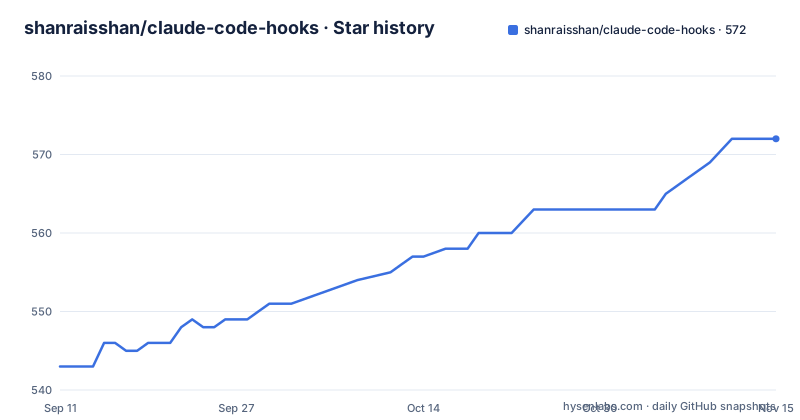
Star history
- shanraisshan/claude-code-hooks572 ★ · +29
| Repository | 2026-09-11 | 2026-11-15 |
|---|---|---|
| shanraisshan/claude-code-hooks | 543 | 572 |
29 Stars in the last 65 days, measured from the daily GitHub snapshot. Compare with other projects
Editorial analysis
The install is one command and one prompt, if the prerequisites are met
There is no package to install. The application is a set of hook configurations, so installation means copying them into place, and the README splits that into three documents, one for macOS, one for Linux, and one for Windows, linked from the page as three bare anchors with no text between the brackets. Once the files are in place the usage is two steps. Start the client:
claudeThen send a prompt, and a sound plays on session start, on tool use, on an agent response, and on other events. The reason the page cannot show this inline is that the whole surface is an audio notification rather than a visible one, which is why a demo video and a local HTML presentation sit at the top of the README instead of screenshots.
The failure mode is one line at startup, and it means prerequisites
There is a single documented error, and its presence tells you most of what you need to know about the failure surface:
SessionStart:startup hook errorIt appears when the prerequisites from the platform guide were not followed, and it arrives at startup rather than when the offending event fires. That ordering is the useful part, because it means a misconfigured install announces itself before you type anything, and you do not have to diagnose a missing sound by wondering whether the event fired. The hook named in the message is the startup session hook, so the configuration being read at that moment is the earliest thing the client loads. Anything after that point, including the audio playback itself, is outside what this repository can report to you.
The second column is a version of the hook set, not a hook count
The changelog table has a column headed Hooks, and reading it as a count does not work. One row sits at 12 and adds the Setup hook, and the next row is also 12 while adding three subagent hooks at once. Other rows move the number by one while adding two hooks, as with CwdChanged and FileChanged moving 24 to 25, or by three while adding one, as with PostCompact, Elicitation, and ElicitationResult taking the number from 19 to 22. The sequence also has gaps, with no rows at 1, 2, 3, 14, 17, 20, 21, or 24. So the column is a version stamp for the configuration set, incremented once per change to the set rather than once per hook, and it should be read as an ordering key. The header saying 30 hooks is the accurate count; the column is not.
Every hook is pinned to the Claude Code version that introduced it
The most valuable column is the fourth. Each row ties a hook to the Claude Code release that shipped it, from the initial release carrying PreToolUse, PostToolUse, Stop, and SessionEnd at v1.0.38 in June 2025, through UserPromptSubmit at v1.0.54 and SessionStart at v1.0.62, to PermissionRequest at v2.0.45 and the 2026 cluster ending at MessageDisplay at v2.1.152. That mapping is what turns a table of sounds into a maintenance tool: when a client upgrade changes behaviour, the row tells you which of your own hooks were introduced in the same release and are therefore the ones to re-check. Two rows break the pattern by citing only the hook documentation instead of a version, and one row carries an em dash in both the date and the version columns, so a small part of the table cannot be traced to anything.
Keeping 30 hooks consistent is delegated to two slash commands
Thirty hooks do not live in one file. The repository tracks a changelog directory, a presentation, install guides, a demo, plans, and both a .claude directory and a .codex directory at the root, which suggests the same hook set is maintained for more than one agent client. Two commands exist to keep that straight. One scans for new hooks and for drift across all files, which is an admission that drift is the expected failure mode. The other adds any recommended hook across all files in a single command. Both are invoked as slash commands under a workflows namespace rather than as scripts you run. If you take nothing else from this repository, take the discipline of a single command that adds a hook everywhere it belongs, since the alternative is a set that silently diverges between clients.
Hooks Claude Code does not document get their own section
There is a section headed Not in Official Docs, linked to a hooks document inside the .claude directory with an anchor of the same name. That is a significant claim to make about a client feature, and it is the part of this repository most worth verifying for yourself, because the section exists to record hooks that the vendor's own documentation does not cover. The same applies to the newest rows in the changelog: the last three entries cite the hook documentation rather than a client version, which is consistent with hooks that are newer than the release notes. The repository also links a hooks reference in the Claude Code documentation, which is where the boundary between official and not official would be drawn.
The repository root has a directory literally named with an exclamation mark
The top level contains .claude, .codex, .github, a .mcp configuration file, a CLAUDE.md, changelog, demo, install, plans, presentation, and tests for an agents hook. It also contains a directory whose entire name is an exclamation mark. That is not a typo in the listing; it is a directory called !, and its purpose is not explained anywhere in the documentation. Two other details sit alongside it. The demo is a local HTML page with a Python server and a start script, which is why the repository's primary language is reported as HTML rather than anything script-like. And the tests directory is named for one specific hook, the agents hook, which implies the test coverage is per hook rather than for the set as a whole. None of it is described in the README, so the tree is the only guide to what is actually here.
Every image, badge, and video link on the page has an empty anchor
The rendering of the README is in poor shape, which matters more than usual here because the images it lost were the demo. The badge row opens with an empty link pointing at the hooks document, followed by a second badge whose label is a fragment of a badge service URL rather than an image, and a third pointing at the repository itself. Below that sit two empty centred paragraphs, then the demo video and the local presentation, both as anchors with nothing inside them. The installation section is three empty anchors for the three platform guides. The links block at the bottom is five more empty anchors pointing at a video, a social post, a thread, a microblog, and an article. So the fastest route to understanding the project, which is watching it make a noise, is a set of links that render as blank space.
Editorial conclusion
Use it if you want audible or otherwise visible feedback on what Claude Code is doing, since that is the whole product and it is cheap to adopt per event rather than all at once. Install from the guide for your platform rather than the top-level page, and read the common error section first, because the failure mode is a single line at startup. If you maintain hooks yourself, borrow the changelog discipline: each hook pinned to the version that introduced it, which is the only way to know which of your hooks a Claude Code upgrade just broke.
Frequently asked questions
what is claude code hooks
This repository is a collection of Claude Code hook configurations that add audible feedback to the agent lifecycle. A sound plays on session start, tool use, agent response, and other events, with coverage across 30 hook events tracked in a changelog table.
install claude code hooks
There is no package to install. Installation means copying the hook files into place using the guide for your platform, with separate documents for macOS, Linux, and Windows. Then start the client with claude and send a prompt, and you should hear a sound on session start, tool use, and agent response.
how to debug claude code hooks
If the prerequisites from your platform guide were not followed, the client prints one line at startup: SessionStart:startup hook error. It appears before you type anything, which means a misconfigured install announces itself rather than failing silently on the first event.
how to create claude code hooks
A hook is a configuration file, not code you compile, so you write one into the hooks directory for your client and register it. Two slash commands here help with the bookkeeping: one scans for new hooks and for drift across all files, and one adds any recommended hook across all files in a single command.
where are claude code hooks stored
In the .claude directory at the repository root, where the hook event overview lives in a hooks document with a Not in Official Docs section. A .codex directory sits alongside it for the other agent client, and a .mcp configuration file is at the root as well.
Official sources
Add this badge to your README
If you maintain this project, the badge below links readers to this analysis and shows its maintenance status from the daily GitHub snapshot. Paste the markdown into your README; add ?metric=license or ?metric=stars to the image URL for a different field.

[](https://hysenlabs.com/projects/shanraisshan-claude-code-hooks)Star history chart for your README
[](https://hysenlabs.com/projects/shanraisshan-claude-code-hooks)Was this useful?