DSH Pocket puts a code-executing agent behind an eight digit password
Put DeepSeek Harness in your pocket: run dsh web on your computer and access it in sync by scanning a QR code on your phone (LAN and public network, real-time screen mirroring).
At a glance
- What is it?
- DSH Pocket is a plugin that puts the DeepSeek Harness running on your computer on your phone, over the local network or a Cloudflare tunnel, with the same interface mirrored in real time. Its documentation spends more words on the security model than on the feature list, which is the right balance for what it does: the harness executes code on the machine, and this project decides who gets to type into it.
- Who is it for?
- DSH Pocket fits one person with one unattended machine who wants to check on a long agent run from a phone, and who reads a security section before enabling anything. Start on the local network with the password left on, keep the mandatory disclaimer in mind if you ever expose it publicly, and if you move to a named tunnel with a fixed address, set a custom password yourself, because that is the one mode where the password stops rotating.
- Can I use it commercially?
- Yes, with conditions. GPL-2.0 is a copyleft licence: if you distribute software that includes it, you must release that software's source code under the same licence. Running it internally without distributing it does not trigger that obligation.
- Is it still maintained?
- Yes. The repository received new commits within the last day.
- What is it written in?
- Mainly JavaScript, according to GitHub's language statistics.
Answers come from the project's GitHub data, last synced on November 14, 2026, and from our analysis. They are not legal advice.
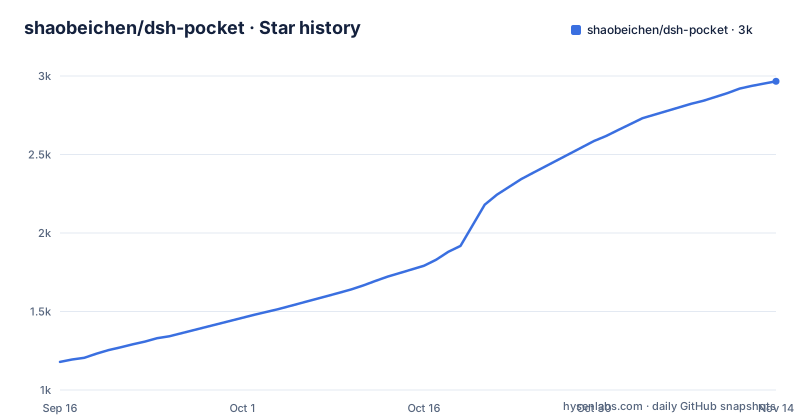
Star history
- shaobeichen/dsh-pocket2,966 ★ · +1,787
| Repository | 2026-09-16 | 2026-11-14 |
|---|---|---|
| shaobeichen/dsh-pocket | 1.2k | 3k |
1,787 Stars in the last 59 days, measured from the daily GitHub snapshot. Compare with other projects
Editorial analysis
The whole point is an unattended machine you can still reach
The pitch is stated in one line and then illustrated three times. You run the harness on your computer, you scan a code with your phone, and you get the same interface in real time, streaming as it streams and controllable in both directions. The three situations given are a commuting agent task you want to check on, being away and needing your machine's agent to look something up or write some code when you have neither remote desktop nor SSH, and simply wanting to send it work and approve what it does from a phone. All three assume the machine is unattended and possibly unattended by anyone you trust. Everything else in this project, the passwords, the lockout, the disclaimer and the public-detection rule, exists to make that arrangement survivable, which is why the readme's security section is longer than its feature table.
Five wrong passwords locks one address for a minute
The login limiter is where concrete numbers appear. Five consecutive wrong attempts from the same address lock it for sixty seconds, and when failures across addresses pass a global threshold there is a brief lock for everyone, added specifically to slow down distributed scanning that rotates source addresses. Entering the right password resets the counter. Layered on top is the rule that matters more: any destination that is not loopback or a private network range is treated as public, and that includes a fixed domain of your own tunnel or reverse proxy aimed at the machine's port. So there is no swapping in your own hostname to get past the public password. The readme records that decision as an issue number, and it is the correct default, because the alternative is a check that trusts a name.
Two passwords, three files, and rotation you are allowed to turn off
The public link gets a randomly assigned address and, by default, a fresh eight digit password every time you enable it, with previous links invalidated on the spot, so a leaked link stops working without you doing anything. The local network link has its own separate eight digit password, on by default, which the readme justifies as security first, and which can be switched off so that scanning connects with nothing typed, reachable only from the same network. Either password can be replaced with a fixed one of eight to sixty-four letters or digits, and the moment you do that the public one stops rotating. State lives in three files under the tool's own directory: one holding the public password, one holding the local password with a manual refresh button, and a settings file for the switches.
The named tunnel is the one mode where the password holds still
The default public route is a quick tunnel, which means a randomly assigned address that changes on every restart, so old links die by themselves and you never have to think about them. The alternative is a named tunnel, and it is a four step setup: create a tunnel in Cloudflare's dashboard, copy its token, point your own domain's service at a local port in that tunnel's public hostname configuration, then paste the token and the domain into the settings page. The address is then fixed across restarts. The trade-off is stated in the same breath: because the address no longer changes, the public password does not rotate either, so the readme tells you to set a custom password and manage it yourself. The token is stored only on that machine, in the settings file, and the page does not echo it back to you.
Two runtime dependencies, and both of them draw QR codes
The manifest's entire runtime dependency set is a QR code generator and its terminal counterpart. There is no tunnel client in it, because the tunnel is cloudflared, downloaded the first time you enable public access and, on macOS and Linux, fetched through a mirror for speed. What tells you this is a plugin rather than an application is the peer dependency, which is the host's own plugin framework, along with the five client packages the manifest asks to be injected: the connection, the interface slots, the layout, the locale, and a session log export. A patch file is declared too, applied to the host's bundle. The declared engine is Node 22 or newer, and releases are cut by an automated pipeline with a generated changelog, which is also why three patch versions landed on the same morning. Installation is correspondingly short, because the host has to exist first:
npm install -g @deepseek-ai/dsh     # 全局安装;验证:dsh --version
# 不想全局装?每次命令前加 npx:npx @deepseek-ai/dsh <命令>
Then the plugin is added through the harness's own plugin command with a profile flag, the web server is restarted, and a phone access entry appears in the settings sidebar. Updating is one command with a flag that matters: across a major version the latest flag is required, because the plugin's version range will not cross from a zero series to a one series on its own.
The mobile client is a port, and one entry hides itself
Narrow screens get a drawer layout, full width sessions, safe area handling around the status bar and touch tuning, and the readme says plainly that this layout was ported from another mobile effort under a permissive licence, rather than designed from scratch. A native right sidebar entry appears on phones and can be switched off on ordinary handsets to keep the layout compact, while a foldable opened flat can use the sidebar and the terminal bar at the same time. One entry is deliberately conditional. The mobile file browser only appears if the host provides an explorer panel, and when it does not, the entry hides itself, on the stated reasoning that a button which does nothing when tapped is worse than no button. That is a small decision with a large effect on how a tool feels when something is missing.
Compression and heartbeats are what make it usable on a phone
Large responses are compressed automatically with two encodings, and the readme quantifies the effect: a seventeen megabyte long session becomes roughly one megabyte, using a middle quality setting chosen to be fast and to save data rather than to squeeze hardest. Streaming output passes through a websocket with no buffering on the way, so a long answer scrolls on the phone while it is still being produced on the computer. There is also a heartbeat whose stated purpose is defeating silent disconnections caused by router address translation timeouts and power saving modes, with automatic reconnection when one happens. The tunnel is re-established by itself after the harness restarts, without anyone reopening it. For a tool whose entire purpose is watching a long agent run from a mobile network, those details are the product rather than the plumbing.
The desktop section stops mid-sentence
The documentation is Chinese first with an English version linked at the top of the file, and the repository description carries both languages in one string. The last section, about the desktop version of the harness, begins to say that the scan and mirror behaviour works there as well and then stops inside an unclosed emphasis marker, so whatever else it says about the desktop client is not in the file. Two smaller things sit next to it. The badge row links the package page twice, which renders as two identical badges. And the release history shows three patch versions published within a few hours of each other, which is what an automated pipeline does when commits land close together. None of that is a problem, but together they show which parts of this project get attention and which get machinery.
Editorial conclusion
DSH Pocket fits one person with one unattended machine who wants to check on a long agent run from a phone, and who reads a security section before enabling anything. Start on the local network with the password left on, keep the mandatory disclaimer in mind if you ever expose it publicly, and if you move to a named tunnel with a fixed address, set a custom password yourself, because that is the one mode where the password stops rotating. Anyone exposing a code-executing harness to the internet for a team should build the authentication and auditing themselves instead.
Frequently asked questions
What does DSH Pocket actually do?
It puts the DeepSeek Harness running on your computer onto your phone. You run the harness web server on the machine, scan a QR code with the phone, and get the same interface mirrored in real time over the local network or through a public tunnel, with control working in both directions.
How do I install DSH Pocket?
The DeepSeek Harness must already be installed and verified with its version command. Then you add the plugin from the command line with a profile flag and restart the harness web server, after which a phone access entry appears in the settings sidebar.
What protects the DSH Pocket login?
An eight digit random password by default on both the local and public links, five consecutive wrong attempts from one address locking it for sixty seconds, a brief global lock when failures across addresses exceed a threshold, and a fail-closed rule under which any destination that is not local or private is treated as public, so a custom domain cannot be used to bypass the password.
Can I keep the same public password across restarts?
Yes, but then it stops rotating automatically. Either password can be set to a fixed value of eight to sixty-four letters or digits from the settings page, and the readme recommends doing exactly that if you use a named tunnel with a fixed address.
Is there a way to run DSH Pocket with no password at all?
The command line mode has a no-auth switch, and the readme calls it not recommended because it exposes a harness that can execute code to anyone able to reach the port. Before that was fixed, the command line path had no authentication at all.
Official sources
Add this badge to your README
If you maintain this project, the badge below links readers to this analysis and shows its maintenance status from the daily GitHub snapshot. Paste the markdown into your README; add ?metric=license or ?metric=stars to the image URL for a different field.

[](https://hysenlabs.com/projects/shaobeichen-dsh-pocket)Star history chart for your README
[](https://hysenlabs.com/projects/shaobeichen-dsh-pocket)Was this useful?